
Your needs, this model
Does it fit your priorities?
Does the F4-424 count as a four-bay NAS if I also use its M.2 sockets?
Yes, at four native SATA positions: the exact specification separately lists two M.2 2280 NVMe sockets for caching. Those sockets do not add trays or change the four-bay count. If you need five native drive bays, compare the separately reviewed five-or-more-bay results rather than counting cache connectors.
Explore this need in the finder →Can a two-drive mirrored arrangement fit this model's bay and one-port network limits?
The product table lists RAID 1, four SATA positions and two separate 2.5GbE ports. A buyer could choose two exact-model-compatible SATA drives, create a RAID 1 volume and use one individual 2.5GbE port, leaving two of the four SATA bays open. No data drives or initialized pool are listed in the manufacturer package reference, and a mirror does not replace an independent backup.
Explore this need in the finder →Does link aggregation give the F4-424 a single 5GbE port?
No. Its two built-in jacks are individually rated 2.5GbE, and the manufacturer's up-to-5Gbps aggregation description refers to combining ports rather than one faster port. A 3Gbps one-port minimum is above either connector's rating; compatible networking equipment and workload still determine actual transfers.
Explore this need in the finder →The TerraMaster F4-424 is the standard four-bay model, not the separately specified F4-424 Pro or F4-424 Max. Its official product handle exposes one Default Title configuration; it does not establish a retail drive bundle or a particular seller package. This review is a source-based assessment of the documented hardware and setup choices, not a hands-on test or a claim about a seller's current stock.
Four SATA trays are the count that matters
The F4-424's clearest reason to consider it is a straightforward four-position desktop chassis. TerraMaster lists four internal SATA positions for 3.5-inch HDDs, 2.5-inch HDDs, or 2.5-inch SSDs, with hot-swap support. The same specification lists two M.2 2280 NVMe sockets, but identifies them as cache positions; they are not two extra SATA trays. The finder therefore counts four internal drive bays, not six. If the project needs five native drive positions, an external shelf or cache socket is not a substitute for a larger chassis.
TerraMaster publishes 88 TB as four 22 TB drives of raw capacity. That is a manufacturer reference, not usable space after RAID, filesystem overhead or reserved space. The specification also says capacity can change with supported drives and may vary by RAID type; it separately warns that the maximum single-volume size is not the same as raw capacity. The current drive list contains model-specific entries such as the 20 TB Seagate IronWolf ST20000NE000, marked Recommended for F4-424. A per-drive row is not proof that every listed drive can be combined in every four-bay array, so check the exact drive model, firmware and intended layout before building a pool.
Two NVMe sockets, with a compatibility check
The two M.2 2280 positions are listed as PCIe 3.0 x1 and the product copy describes them as SSD cache. They add an option for cache, not a reason to count the F4-424 as an all-flash six-bay NAS. I would not assume that a particular NVMe module, pair of modules, storage-pool role or cache benefit is guaranteed simply because it fits the connector. TerraMaster's live compatibility table lists exact module models and can change; verify the precise module and firmware for this NAS. Buyers who want native M.2 data positions rather than SATA trays should compare a purpose-built all-flash model such as the F4 SSD, whose layout is materially different.
Dual 2.5GbE is not one 5GbE port
The F4-424 lists two individual RJ45 2.5GbE ports and link aggregation. A single connection is still rated at up to 2.5 Gbps at the port. The manufacturer's aggregate link figure does not turn those jacks into one built-in 5GbE connector or promise a particular file-copy rate. To make use of higher network rates, clients, switches or a direct-link peer, cables, storage, protocol and workload all have to support the intended path.
This is a meaningful boundary for the shortlist: it can meet a one-port 2.5Gbps requirement, but not a 3Gbps minimum for one port. If a four-bay brief needs a higher single-port tier, see the separately assessed F4-425 Pro N305; it has a different storage and network specification, so compare its exact package and operating plan rather than treating it as an F4-424 option.
Memory and software need realistic expectations
The specification lists an Intel N95 processor, 8 GB of DDR5 non-ECC SODIMM memory in one slot, and a 32 GB supported maximum. The single-slot detail matters: 32 GB is the listed system total, not an extra module to stack on top of the preinstalled one. The N95's listed maximum burst clock is 3.4 GHz, but that paper specification does not tell a buyer how a chosen virtual machine, media workload or application will perform. TerraMaster also lists two 10Gbps USB 3.2 host ports and HDMI 2.0b; neither changes the number of internal storage bays or the speed of its Ethernet ports.
The product table names Btrfs and EXT4 for internal storage, and lists RAID 1 alongside TRAID, RAID 5, RAID 6 and other modes. A possible two-drive RAID 1 arrangement would use two compatible SATA drives in two of the four trays, leaving two bays open. It is an owner-created arrangement: the hardware does not arrive with that drive pair, an initialized array or a ready volume established by the manufacturer's package reference. TerraMaster's TOS 7 help separates storage pools from volumes and says at least one volume must be created before data can be stored. Follow the current prompts for the exact installed version and preserve data before making layout changes. A mirror can help with a drive failure; it is not another copy against deletion, theft, malware or a wider device failure.
What the package and source limits mean
The listed manufacturer package contains the host, power cord, a 90 W adapter, an RJ45 cable, a quick installation guide, a warranty note and a few screws. It does not list data drives. That helps set a reasonable shopping plan, but a seller can offer a bundle or service terms not established by this model-page list. Match the exact F4-424 name and confirm the shipped drive count, whether memory or other parts differ, return terms and warranty channel on the actual offer.
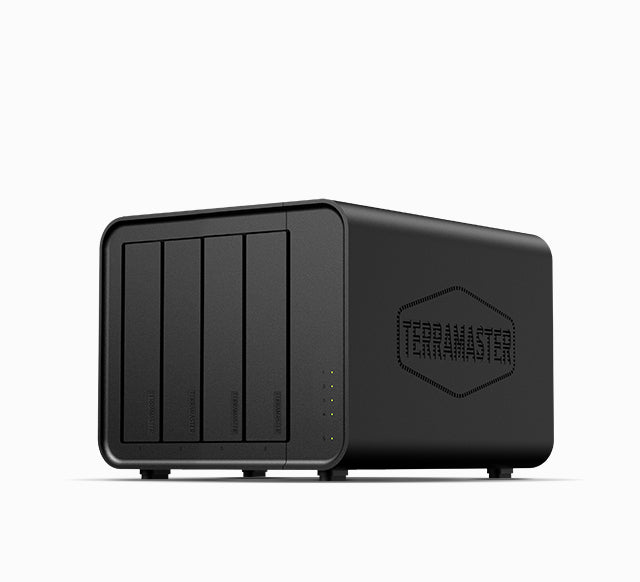
The manufacturer lists chassis dimensions of 222 × 179 × 154 mm in height × width × depth order, and a 3.4 kg weight. It also publishes a 21 dB(A) figure under a specific two-drive standby condition and stated test environment; that is not an independent or full-load noise test. The official exterior image shows a black four-tray desktop enclosure, not its installed drives or rear connectors. The exact English documentation index I could inspect listed a product photo rather than a readable installation manual, and its linked download did not return usable contents in this check. This review therefore does not invent an installation procedure; consult the current manual for the exact purchased hardware and TOS version.
Where it fits—and where to compare
On paper, the F4-424 suits someone who wants four ordinary SATA positions, a pair of separate 2.5GbE ports, an N95 platform and optional M.2 cache sockets, and is comfortable selecting drives and setting up storage. It can satisfy a four-bay, 2.5Gbps one-port and RAID 1 requirement when the buyer checks and supplies the drives. Its practical limits are equally clear: four native trays, no documented 5GbE single port, one memory slot, and setup work before there is a storage volume. It is not a fit for a five-bay minimum, a single-port requirement above 2.5Gbps, or a brief that counts M.2 cache as extra SATA storage. Compare the distinct F4-424 Pro 16 GB and F4-424 Pro 32 GB assessments separately if their CPU or memory configurations are relevant; do not transfer their options to this standard F4-424.
This assessment uses the manufacturer model page, specification and compatibility sources. Published throughput, capacity, power and noise figures are not independent test results, and no particular Amazon listing or seller package has been verified here.
Key specifications
Key details at a glance
| Internal drive bays | 4 bays |
|---|---|
| Documented internal drive media | 3.5-inch SATA HDD / 2.5-inch SATA HDD / 2.5-inch SATA SSD |
| Built-in Ethernet ports | 2 x built-in individual RJ45 2.5GbE ports |
| Fastest individual Ethernet port | 2.5 Gbps |
| Installed system memory | 8 GB |
| Maximum listed memory | 32 GB |
| Listed storage arrangements | TRAID / Single / JBOD / RAID 0 / RAID 1 / RAID 5 / RAID 6 / RAID 10 |
| Internal file systems | Btrfs / EXT4 |
| Dimensions (H × W × D) | 222 x 179 x 154 |
| Weight | 3.4 kg |
| Hardware warranty | 2 years |
| Data drives included in listed package | No |
| M.2 NVMe slots | 2 |
| Processor | Intel N95 |
| CPU cores | 4 |
| CPU threads | 4 |
| Installed memory type | DDR5 non-ECC SODIMM |
Use the exact model’s instructions for operating limits, supplied equipment and version differences.
Sources for this review
Sources for this assessment
- TerraMaster U.S.-facing F4-424 product page
- TerraMaster F4-424 specification page
- TerraMaster official F4-424 product-handle JSON
- TerraMaster Home/SOHO NAS directory, current recheck of the saved F4-424 observation
- TerraMaster current official NAS hard-drive compatibility list
- TerraMaster current official NVMe M.2 compatibility list
- TerraMaster TOS 7 Storage Pool help page
- TerraMaster TOS 7 Volumes help page
- TerraMaster F4-424 product documentation index
- Official F4-424 exterior JPEG associated with its exact product handle

Check your setup before choosing a NAS
Use the finder to check bay count, the network link you need, and whether a documented two-drive redundant arrangement is essential.