
Your needs, this model
Does it fit your priorities?
Does the F4 SSD meet a four-position minimum and one 5-Gbps Ethernet-port floor?
The exact model page lists four M.2 2280 NVMe positions and one individual 5GbE port, so the four-position and 5-Gbps floors are met. Those positions are not SATA trays; a five-position floor or a 5.5-Gbps single-port floor is above the documented boundary. The link rating is not a measured file-copy speed.
Explore this need in the finder →Can two of the F4 SSD's NVMe positions form a redundant arrangement?
The exact product specification lists RAID 1, so two buyer-selected compatible M.2 2280 NVMe SSDs could form a possible owner-created mirror while two of the four positions remain open. The manufacturer package list does not include data SSDs or an initialized volume. Check the live compatibility entry for each exact SSD and firmware, back up before volume creation, and keep a separate backup because a mirror is not one.
Explore this need in the finder →Does the published 32-TB figure prove four 8-TB SSDs will give 32 TB of usable space?
No. TerraMaster states 32 TB raw as four 8-TB modules, while its current compatibility table marks an 8-TB WD Black SN8100 as Recommended for this model. That does not prove four identical modules form one supported array, and RAID and formatting reduce usable capacity. Recheck the exact module and firmware, and treat the figure as the manufacturer's raw-capacity reference rather than a usable-space promise.
Explore this need in the finder →Will the F4 SSD deliver 5 Gbps through an existing 2.5GbE switch?
The NAS has one individual port rated at 5GbE, but the client, switch or router and cable must negotiate a compatible link for the faster path. A 2.5GbE network component can constrain the end-to-end connection; the port label is not a transfer-rate test. Check both endpoints and cabling before paying for a 5GbE-capable NAS.
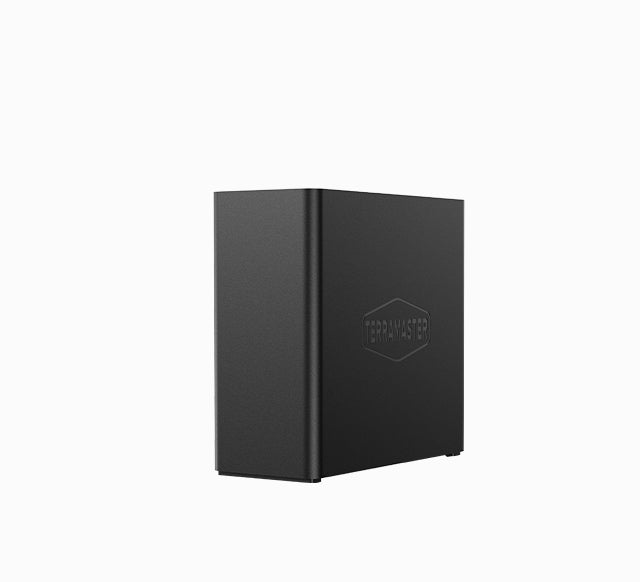
Explore this need in the finder →The TerraMaster F4 SSD is a four-position all-flash NAS, but “four bay” here means four M.2 2280 NVMe sockets—not four conventional SATA trays. That distinction is the main buying decision. The U.S.-facing page specifies one built-in 5GbE port, an Intel N95 processor and 8 GB of DDR5 memory. It is not a substitute for a four-tray HDD NAS when you already own SATA drives.
Four M.2 positions, not four SATA trays
TerraMaster lists four M.2 2280 NVMe positions and no SATA storage interface. Its specification accepts PCIe 3.0, 4.0 and 5.0 NVMe modules, but rates the four host slots as two PCIe 3.0 x2 positions and two PCIe 3.0 x1 positions. A newer SSD may fit the stated type while still operating within the host’s listed PCIe 3.0 lane rating. The page does not identify slot order or give a workload test for a particular four-drive set, so it would be misleading to describe all four positions as equivalent high-speed lanes.
The advertised 32 TB is a raw arithmetic example—four 8-TB SSDs—not usable array capacity. The live TerraMaster compatibility table includes an 8-TB WD Black SN8100 row marked Recommended for F4 SSD, but that row is not proof that four identical modules work together in one supported array. RAID layout, formatting, system use and the exact drive revisions affect usable space. The table can change, so verify each specific module and firmware before ordering. If your plan depends on drives you already own, check the exact model number rather than assuming that an M.2 connector alone guarantees compatibility.
What its network and processor specifications do—and do not—promise
The single RJ45 port is rated at 5GbE, which is useful only if the computer, switch and cable can negotiate a compatible faster-than-gigabit path. It is not a promised 5-Gbps file copy. The page lists one physical Ethernet port; its generic link-aggregation feature does not create another connector.
The Intel N95 is listed as four-core with burst up to 3.4 GHz. TerraMaster specifies one installed 8-GB DDR5 non-ECC SODIMM in one slot, with 32 GB as the supported maximum; reaching that ceiling means replacement, not adding a second module. These are specifications, not evidence of a particular VM, container or media-server result. The product page mentions 4K decoding and Plex/Jellyfin support, but this assessment tests neither streams nor transcoding.
Three USB 3.2 host ports are listed at 10 Gbps: two Type-A and one Type-C. The specification also lists one HDMI socket, but its version field literally says “HDMI 2.b.” That text is ambiguous, so I record the connector only rather than guessing a standard. Likewise, the product page’s feature table names some TOS 7.0 capabilities but does not prove which operating-system version a particular shipment arrives with.
A mirror is a setup choice, not an included configuration
The exact model page lists RAID 1 among supported storage modes. One plausible plan is to select two compatible NVMe modules, create a RAID 1 volume yourself and leave two of the four positions open. The generic TOS storage-pool guide describes pool creation as an administrator workflow; neither it nor the product package list says that a usable mirror is already initialized. The manufacturer’s package reference names the host, power accessories, one RJ-45 cable, quick-installation guide, warranty note and screws, but not data SSDs. Treat the offered shipment separately and verify the chosen seller’s package.
A mirror can keep a volume available after one drive fails, but it does not protect against deletion, malware, theft or loss of the chassis. Pool creation can erase data on installed drives, so start with clean, compatible modules and preserve another copy before initialization. If your requirement is simply four storage positions without redundancy, a single-disk or other supported layout is another possible setup; the buyer must select the actual drives and layout rather than assume the NAS arrives configured.
Small exterior, conditioned noise and power figures
The manufacturer lists dimensions of 138 × 60 × 140 mm (H × W × D), 0.6 kg net and two 50-mm fans. Its 19 dB(A) entry is conditioned on SSD standby, a 17.3-dB(A) background and a 1-m distance—not an independent room measurement or loaded-noise guarantee. The 32-W read/write and 8-W hibernation figures likewise apply to a stated fully loaded 2-TB Seagate M.2 SSD condition, not every drive set.
The F4 SSD is therefore easiest to justify when a buyer wants four internal NVMe positions, values the compact footprint and can actually use the 5GbE port on the rest of the network. The F8 SSD Plus is a distinct eight-position all-NVMe model with a listed individual 10GbE port; the F6-424 takes a different route with six SATA trays and two M.2 cache sockets. Those structural comparisons do not settle performance or price. If standard SATA drives, a known four-tray package or a particular transfer result is essential, choose and verify a model whose exact evidence supports that requirement instead of reading those features into this small all-flash chassis.
Evidence and offer checks
The English-facing documentation index lists a photo, not a readable F4 SSD manual. The exact handle has one Default Title configuration but blank manufacturer SKU and barcode fields. Amazon’s U.S. detail page identifies the selected F4 SSD and calls the listing diskless in its title; that does not guarantee every seller shipment. Before ordering, distinguish it from F8 SSD and F8 SSD Plus, check each SSD model and the package contents, and verify the 5GbE path. This assessment uses no price, stock, review score or hands-on test.
TerraMaster F4 SSD specifications · Current TerraMaster NVMe compatibility list · TOS 7 storage-pool guide
Key specifications
Key details at a glance
| Internal drive bays | 4 bays |
|---|---|
| Documented internal drive media | M.2 2280 NVMe SSD |
| Built-in Ethernet ports | 1 x built-in individual RJ45 5GbE port |
| Fastest individual Ethernet port | 5 Gbps |
| Installed system memory | 8 GB |
| Maximum listed memory | 32 GB |
| Listed storage arrangements | TRAID / TRAID+ / Single / JBOD / RAID 0 / RAID 1 / RAID 5 / RAID 6 / RAID 10 |
| Internal file systems | Btrfs / EXT4 |
| Dimensions (H × W × D) | [138, 60, 140] |
| Weight | 0.6 kg |
| Hardware warranty | 2 years |
| Data drives included in listed package | No |
| M.2 NVMe slots | 4 |
| M.2 SSD storage-pool support | Yes |
| Processor | Intel N95 |
| CPU cores | 4 |
| CPU threads | 4 |
| Installed memory type | 8 GB DDR5 non-ECC SODIMM; the manufacturer lists one pre-installed 8-GB module |
Use the exact model’s instructions for operating limits, supplied equipment and version differences.
Sources for this review
Sources for this assessment
- TerraMaster U.S.-facing F4 SSD product page and specification table
- TerraMaster official F4 SSD product-handle JSON
- TerraMaster current official M.2 NVMe SSD compatibility table
- TerraMaster Home/SOHO NAS collection, existing observation recheck
- TerraMaster F4 SSD product documentation index
- TerraMaster TOS 7 storage-pool guide
- TerraMaster F4 SSD launch announcement
Check your setup before choosing a NAS
Use the finder to check bay count, the network link you need, and whether a documented two-drive redundant arrangement is essential.