
Your needs, this model
Does it fit your priorities?
Can the 32-GB F4-424 Pro meet a four-bay and 2.5-Gbps one-port requirement?
Yes, on the documented hardware: the exact specification lists four SATA positions and two individual 2.5GbE ports. The finder tests one port's rating rather than the pair's advertised aggregate; the two M.2 cache sockets are separate from the native SATA-bay count.
Explore this need in the finder →Can the 32-GB configuration use a two-drive mirror while meeting the one-port rating?
The model specification lists RAID 1, so a buyer can plan to select two exact-model-compatible SATA drives and create a volume using two trays while one individual 2.5GbE port remains the network fact. The package reference lists no drives or preconfigured array; check drive/firmware support and keep an independent backup.
Explore this need in the finder →Can I later expand this profile beyond 32 GB of system memory?
No larger memory ceiling is documented here. The exact configuration has one 32-GB DDR5 module in one slot and the specification lists 32 GB as the maximum; the 16-GB F4-424 Pro profile is the alternative if a replacement-to-32-GB path is more useful than starting at the maximum.
Explore this need in the finder →The larger memory option is already at the stated ceiling
TerraMaster's exact F4-424 Pro page offers 16-GB and 32-GB memory choices. The 32-GB specification describes one DDR5 non-ECC SODIMM in one slot and sets 32 GB as the maximum supported memory. This profile therefore starts at the published ceiling, rather than leaving a second slot open or documenting a path above 32 GB. If your deployment has a reason to allocate more memory at setup, that is the clear distinction from the 16-GB version; if not, the bigger figure alone does not show that file transfers, media work or any application will be faster. No workload testing was performed for this assessment.
The selector is evidence of two memory configurations, not a complete seller bundle definition. TerraMaster's product-handle JSON contains 16GB and 32GB variants but no SKU or barcode for either. The 32-GB specification comes from the exact product page, while a particular store or marketplace listing can still differ in condition or supplied contents. Confirm that the chosen unit is the 32-GB option and ask about return terms if system memory is an essential requirement. For the alternative with a documented replacement path to 32 GB, compare the 16-GB F4-424 Pro review.
Check your storage plan against four, not six, drive bays
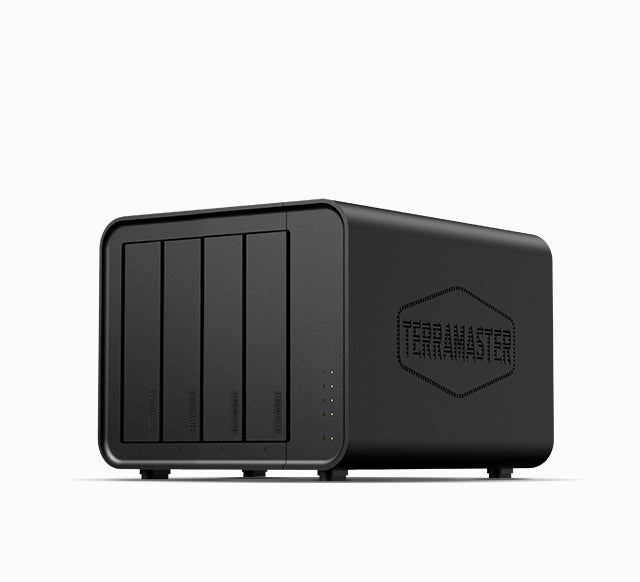
The chassis has four SATA drive positions for 3.5-inch HDDs or 2.5-inch HDDs and SSDs. TerraMaster also lists two M.2 2280 NVMe sockets, PCIe 3.0 x1, for SSD caching. Their separate function is the key planning detail: they do not count as SATA trays, and a cache installation is not the same as a larger native HDD array. TerraMaster's live SSD list identifies particular F4-424 Pro-compatible modules, but the changing table is not a blanket certificate for any two SSDs or a given firmware revision. Check each exact model and the intended role before buying.
The manual capacity headline is not a safe shortcut. The model table states 88 TB raw based on four 22-TB drives; the current HDD compatibility list marks selected F4-424 Pro drives at 30 TB and 32 TB as Recommended. The sources do not reconcile that difference into a settled maximum, or say that every four-drive arrangement at those capacities is validated. No universal maximum or usable-space figure is claimed here. A supported drive can have a model-specific compatibility status without establishing a total-array limit. Estimate usable capacity separately for the intended RAID or TRAID layout and keep the exact firmware and model codes with your purchase notes. The drive-compatibility guide explains what to check in a changing model table.
Network rating and aggregate claims are different questions
The F4-424 Pro has two built-in 2.5GbE ports. That makes 2.5 Gbps the maximum documented rating of one connector; it does not provide a built-in 5GbE port. TerraMaster's copy discusses link aggregation up to 5 Gbps, but any aggregate throughput needs compatible network peers and configuration and should not be promised to a single client from the port count alone. A switch, NIC, cable, storage subsystem, file protocol and workload can each limit the actual path. If one 5-Gbps link is a hard requirement, the numeric finder should not treat this model's two ports as satisfying it. The network-path article shows why port ratings and transfer results cannot be substituted for one another.
RAID 1 is possible only after a buyer supplies and configures drives
The exact specification lists RAID 1, so a buyer can plan around a two-drive mirror using compatible SATA drives. In the example operating plan, two of the four native bays are used and the other two remain unoccupied; a single built-in 2.5GbE port is treated separately from any aggregation. The manufacturer's published package list names the NAS, power cord, adapter, RJ45 cable, Quick Installation Guide, warranty note and screws. It does not list data drives or a prepared volume, and it cannot prove what a particular seller will ship. Verify the exact drive model and firmware in TerraMaster's current list, confirm package contents, and preserve existing files before creating a storage pool. A mirrored array is not an independent backup. Keep a separate copy somewhere that would survive loss of the NAS itself; the RAID and backup guide covers that distinction.
Size, noise and operating claims have test conditions
The manufacturer lists a 3.4-kg chassis measuring 222 × 179 × 154 mm, one 120-mm fan, a 90-W power supply and no redundant supply. Its 21.0-dB(A) statement uses two SATA drives or SSDs in standby and a 17.3-dB(A) background reading at one metre. Treat that as a stated test setup, not an independently verified room-noise level. Likewise, the listed 33-W read/write and 13-W hibernation examples use four named 4-TB Seagate drives in specified states. They are not a general running-cost forecast. If you are placing the NAS in a quiet room or estimating electricity, the conditions and your drive set matter more than a single advertised number.
When does the 32-GB configuration make sense?
This profile is the clearer choice if you need the documented 32 GB installed at initial setup and accept that the listed ceiling is also 32 GB. It shares the F4-424 Pro's four SATA bays, two separate M.2 cache positions and two 2.5GbE connectors with the 16-GB configuration; memory is the material selector difference established by these sources. Neither is a five- or six-bay unit, neither supplies a single 5-Gbps Ethernet port, and neither comes with a confirmed seller-added drive bundle in this research. Compare the 16-GB version if replacing a module later is more useful than starting at the maximum, or look at a distinct model if the port or bay boundary is wrong for your plan. This assessment describes the manufacturer's documentation, not a tested workload or guaranteed listing.
Key specifications
Key details at a glance
| Internal drive bays | 4 bays |
|---|---|
| Documented internal drive media | 3.5-inch SATA HDD / 2.5-inch SATA HDD / 2.5-inch SATA SSD |
| Built-in Ethernet ports | 2 x individual built-in RJ45 2.5GbE ports |
| Fastest individual Ethernet port | 2.5 Gbps |
| Installed system memory | 32 GB |
| Maximum listed memory | 32 GB |
| Listed storage arrangements | TRAID / Single / JBOD / RAID 0 / RAID 1 / RAID 5 / RAID 6 / RAID 10 |
| Internal file systems | Btrfs / EXT4 |
| Dimensions (H × W × D) | 222 x 179 x 154 mm (H x W x D) |
| Weight | 3.4 kg |
| Data drives included in listed package | No |
| M.2 NVMe slots | 2 |
| Processor | Intel Core i3-N305 |
| CPU cores | 8 |
| Installed memory type | 32 GB DDR5 non-ECC SODIMM (one preinstalled 32-GB module) |
Use the exact model’s instructions for operating limits, supplied equipment and version differences.
Sources for this review
Sources for this assessment
- TerraMaster U.S.-facing F4-424 Pro model page and specifications
- TerraMaster F4-424 Pro official product-handle JSON
- TerraMaster official NAS hard-drive compatibility table
- TerraMaster official SSD compatibility table
- TerraMaster TOS 7 Storage Pool guide
- TerraMaster Home/SOHO NAS catalogue page
- Official F4-424 Pro product image linked from its exact model page

Check your setup before choosing a NAS
Use the finder to narrow documented desk/shelf or rack formats, internal-bay minimums, a single Ethernet-port rating and optional redundancy requirements.