
Your needs, this model
Does it fit your priorities?
How many native bays does the TS-453E provide, and do its two M.2 slots count toward that number?
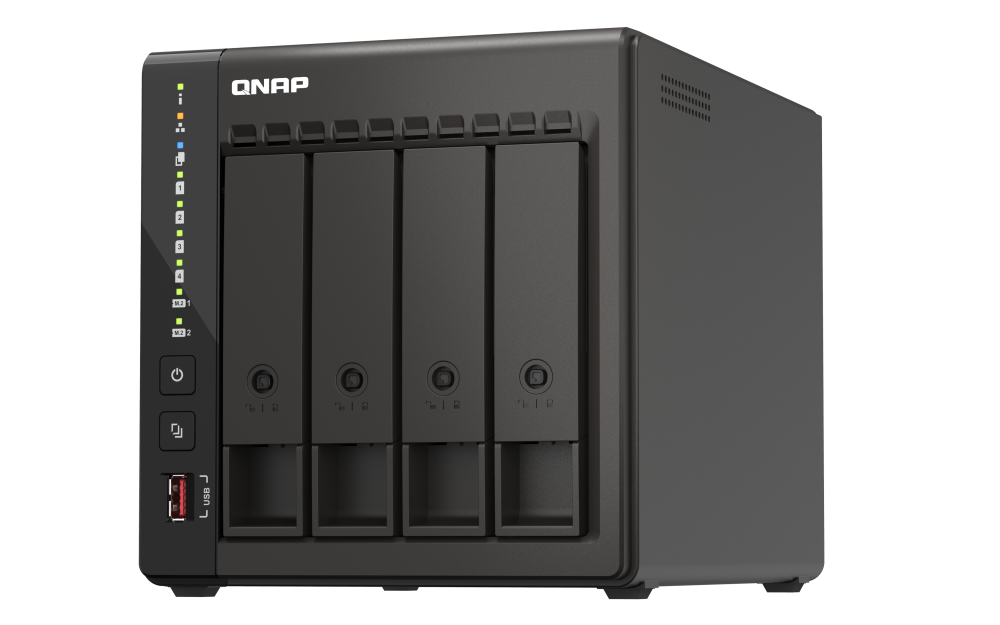
QNAP identifies four 3.5-inch SATA trays. Its two M.2 2280 NVMe positions are separate from the SATA bays and are not hot-swappable trays, so the screening count remains four. The base model ships without HDDs; confirm each full drive model and capacity in QNAP's compatibility list before ordering. The older guide lists 2.5-inch SATA HDDs, while the current hardware table names 3.5-inch HDDs and 2.5-inch SSDs; treat that difference as an exact-drive check rather than assuming compatibility.
Explore this need in the finder →Does the TS-453E meet a built-in 2.5GbE minimum, and do its two ports guarantee 5Gbps to one client?
Yes, QNAP lists two built-in 2.5GbE RJ45 ports, so one individual port meets a 2.5GbE link-rating screen. QNAP also describes port trunking up to 5Gbps, but that is not the rating of one interface and does not establish one-client file-copy throughput. The switch, client adapter, cabling, storage and workload all affect the path.
Explore this need in the finder →Can the TS-453E be screened for four bays, 2.5GbE and a two-drive mirror together?
Yes. The exact model has four native SATA bays and two built-in 2.5GbE ports, and QNAP documents QTS RAID 1 using two drives. This is an operating-plan match, not a preconfigured mirror or drive-included package; select compatible disks, budget mirror capacity and keep a separate backup.
Explore this need in the finder →Is the TS-453E's 8 GB memory upgradeable for a future QuTS hero workload?
Do not assume an upgrade. QNAP's current hardware page lists two SODIMM slots and 16 GB maximum for the 8 GB TS-453E-8G, but the English TS-x53E User Guide v4 calls that configuration non-expandable at 8 GB. The installed 8 GB is consistent; upgradeability is not. Confirm the exact hardware revision with QNAP before making a memory-dependent operating-system or application plan.
Explore this need in the finder →Assessment basis: this review is a source-based evaluation of QNAP's U.S. TS-453E-8G-US package and model documentation, not a hands-on setup or performance test. The TS-453E combines four native SATA trays with two M.2 positions, two 2.5GbE ports and dual HDMI outputs. Its appeal is a fairly broad desktop feature set; its important caveats are a diskless base package, a documented memory-upgrade conflict and a network ceiling below 10GbE on any one built-in port.
Four SATA positions, with M.2 kept separate
QNAP identifies four 3.5-inch SATA bays and two M.2 2280 PCIe Gen 3 x2 positions. The M.2 slots may be useful for compatible NVMe SSDs, but they are not two additional SATA trays and the guide says M.2 SSDs are not hot-swappable. The four-bay count therefore stays four for a buyer who needs ordinary drive positions. QNAP's package information does not include hard drives, so the enclosure and storage media are separate purchasing decisions.
There is a small support-list difference that matters when selecting less common drive formats. The English TS-x53E User Guide v4 lists 3.5-inch SATA hard drives, 2.5-inch SATA hard drives and 2.5-inch SATA SSDs. The current U.S. hardware table names 3.5-inch SATA hard drives and 2.5-inch SATA SSDs, but not 2.5-inch hard drives. Use the current model-specific compatibility lookup for every complete drive identifier and capacity rather than treating a connector size as a compatibility guarantee. QNAP's generic compatibility page is a place to check, not evidence that a particular disk is approved.
One built-in 2.5GbE port is the right comparison unit
The TS-453E has two built-in 2.5GbE RJ45 ports. That is useful when the switch and clients are also multigigabit, but it is not a built-in 10GbE system: the model's fastest single interface is rated 2.5GbE. QNAP says port trunking can deliver up to 5Gbps, but the two port labels do not become one 5-Gbps link to every client. The source does not make that aggregate a single-client file-copy promise. Check the complete connection—NAS, switch, client adapter and cabling—and remember that drive layout and workload also affect transfers.
This distinction is especially important when comparing it with QNAP's TS-435XeU-4G-US. That rackmount model has built-in 10GbE SFP+ links but requires a suitable peer, transceiver or DAC and rack planning. The TS-453E is the simpler desktop-shaped path when 2.5GbE is sufficient; its ports do not satisfy a requirement for one 10-Gbps built-in port.
QTS is default; QuTS hero is an alternative, not a second simultaneous setup
QNAP names QTS as the default operating system and supports switching to QuTS hero on the TS-453E from QTS 5.2.1. The former uses EXT4 in this assessment; the latter uses ZFS. Think of these as alternative system plans and verify the supported firmware, memory requirements and migration instructions before choosing between them. Switching operating systems on a populated NAS is not just a menu preference: protect the data and verify QNAP's current migration procedure before changing systems.
For a straightforward two-drive arrangement, QTS documents RAID 1 as a two-member mirror that tolerates one member-drive failure while healthy. QuTS hero's RAID 1 documentation also specifies two members and one-drive tolerance. Both plans use only two of this four-bay enclosure's trays, so do not mistake four bays for a four-disk mirror. Mirroring consumes capacity and is not a separate backup against deletion, malware, theft, power damage or losing the entire NAS. Select two compatible drives, plan the usable space, and maintain a second copy that can be restored.
Eight gigabytes is clear; the upgrade limit is not
QNAP's current hardware page lists the TS-453E-8G with 8 GB DDR4 memory, two SODIMM slots and a 16 GB maximum. The English TS-x53E User Guide v4 describes the TS-453E-8G memory as non-expandable, with an 8 GB maximum. The shared fact is the installed 8 GB; the sources do not agree on an upgrade path. Do not budget for more RAM, or select a memory-dependent application plan, until QNAP confirms which hardware revision applies to the specific unit. The fact record therefore leaves maximum memory unknown instead of choosing one source and silently dismissing the other.
Where it differs from nearby four-bay choices
The TS-464-8G-US is the closer general-purpose comparison: it also has four native SATA positions, dual 2.5GbE and two M.2 positions, while its reviewed configuration adds a PCIe expansion slot and HDMI 2.1 output. Both models have a memory-source disagreement about the 8 GB configuration, so neither deserves an assumed upgrade advantage. Choose between their documented expansion and display layouts only after checking your software and storage plans.
The fanless TS-410E-8G-US also has four positions and dual 2.5GbE, but QNAP documents a 2.5-inch-only drive layout. The TS-453E's larger 3.5-inch trays and 120mm fan make it a different physical choice; account for the fan and drive noise where it will sit. Neither model arrives with data drives. For a rack cabinet rather than a desk or shelf, the TS-435XeU comparison is more relevant because it uses a short-depth 1U chassis and different high-speed networking.
Checks before committing to a configuration
- Confirm the offer is the U.S. TS-453E-8G-US base package and separate any optional drive or installation selection from its base contents.
- Check each SATA HDD or SSD by full model and capacity in the current TS-453E compatibility list; resolve the 2.5-inch HDD documentation difference before choosing that media.
- Keep the memory upgrade question open until QNAP confirms the shipped revision against the current specification and User Guide v4.
- Choose QTS or QuTS hero deliberately, then verify current firmware, migration steps and data safeguards before installing or switching systems.
- For 2.5GbE, verify the switch, client network adapters and cable path; do not interpret trunking as one guaranteed 5-Gbps client connection.
- Budget for the chosen drive layout and an independent backup, and allow room for the tower, its fan airflow and front tray access.
Key specifications
Key details at a glance
| Internal drive bays | 4 bays |
|---|---|
| Documented internal drive media | 3.5-inch SATA HDD / 2.5-inch SATA SSD |
| Built-in Ethernet ports | 2 x built-in 2.5GbE RJ45 |
| Fastest individual Ethernet port | 2.5 Gbps |
| Installed system memory | 8 GB |
| Listed storage arrangements | QTS: RAID 1 / QuTS hero: RAID 1 |
| Internal file systems | EXT4 (QTS, default) / ZFS (QuTS hero, optional alternative OS) |
| Hardware warranty | 3 years |
| Data drives included in listed package | No |
| M.2 NVMe slots | 2 |
| Processor | Intel Celeron J6412 |
| CPU cores | 4 |
| CPU threads | 4 |
Use the exact model’s instructions for operating limits, supplied equipment and version differences.
Sources for this review
Sources for this assessment
- QNAP U.S. Creators & Home Users catalogue observation
- QNAP U.S. Tower / SMB product grid
- QNAP U.S. Official Store SMB Desktop category, four-page result
- QNAP U.S. TS-453E model page
- QNAP U.S. Official Store TS-453E-8G-US configurable product page
- QNAP U.S. TS-453E hardware specification page
- QNAP TS-x53E English User Guide, version 4, 2024-04-22
- QNAP U.S. TS-453E / TS-464 comparison page
- QNAP U.S. notice adding QuTS hero support for TS-253E and TS-453E
- QNAP QTS 5.2 RAID types
- QNAP QuTS hero h5.2 RAID types
- QNAP Compatibility List
- QNAP U.S. TS-453E software specifications
Check your setup before choosing a NAS
Use the finder to check bay count, the network link you need, and whether a documented two-drive redundant arrangement is essential.