
Your needs, this model
Does it fit your priorities?
Are the four TS-435XeU bays ordinary NAS drive trays, or do the M.2 slots count too?
QNAP documents four native 3.5-inch SATA bays and lists 3.5-inch SATA HDDs, 2.5-inch SATA HDDs and 2.5-inch SATA SSDs as compatible media. The two M.2 2280 NVMe positions are a separate storage/cache layer, not two more hot-swappable SATA trays. The model ships without data drives; check each exact disk and capacity in QNAP's TS-435XeU compatibility list before ordering.
Explore this need in the finder →Can this NAS meet a 10GbE requirement without installing a network card?
Yes, QNAP lists two built-in 10GbE SFP+ ports alongside two 2.5GbE RJ45 ports. The SFP+ sockets do not by themselves establish an end-to-end 10-Gbps path: check the switch or peer, the matching transceiver or DAC, cable reach and the client NIC. The 10-Gbps port rating is not a promise of file-copy speed, and these accessories are not assumed included in the base package.
Explore this need in the finder →Does a documented TS-435XeU mirror protect against every kind of data loss?
No. QNAP's exact-model guide documents a two-disk RAID 1 arrangement that can continue after one member-drive failure while the mirror is healthy. That consumes capacity for redundancy, requires two separately selected compatible drives, and does not protect against deletion, malware, theft, controller failure or loss of the entire NAS. Keep a separate backup and test restoring it.
Explore this need in the finder →Does the base TS-435XeU package include the sliding rails for my rack?
QNAP's version-2 package list includes the NAS, power cord, Ethernet cable, drive screws, M.2 heatsinks and a handle/angle-bracket kit; it explicitly says rail kits are not included. The guide lists RAIL-B02 compatibility, while the current product page also lists optional rail accessories. Match a current kit to your cabinet's post depth and reserve room for the power-supply projection, network connectors, cable bend and rear ventilation before committing to the short-depth figure.
Explore this need in the finder →Can I expand the included 4 GB of memory without replacing it?
QNAP identifies one DDR4 SODIMM slot, with one 4 GB module installed and one 32 GB module as the listed maximum. That is a replacement path, not an additional empty-slot upgrade. QNAP recommends its memory modules; verify the exact supported part for this model and firmware rather than assuming that any physically compatible SODIMM will work.
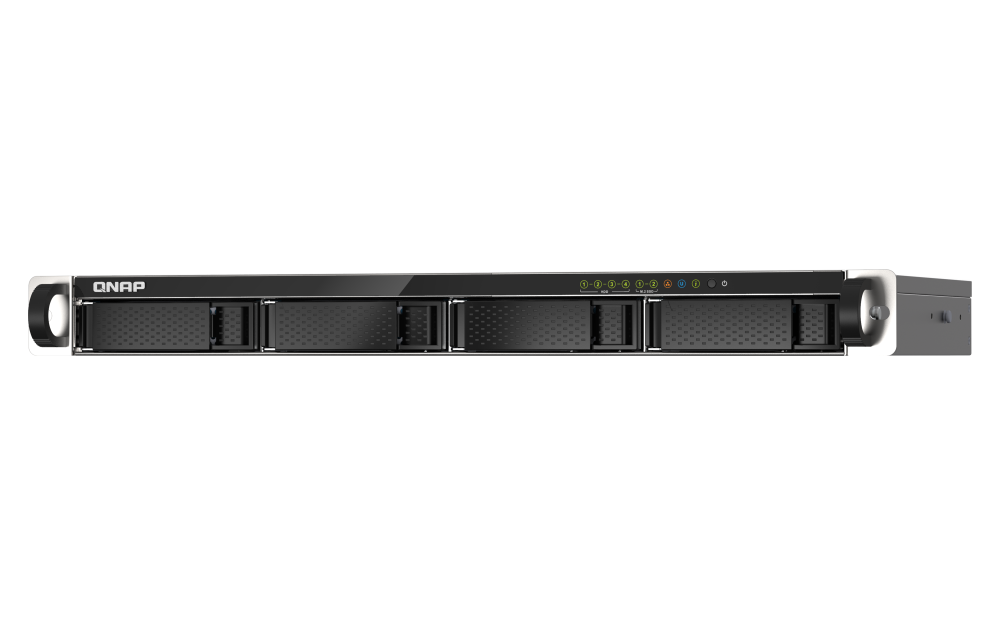
Explore this need in the finder →The QNAP TS-435XeU-4G-US is a compact 1U rack NAS built around an unusually capable set of onboard network ports: two 10GbE SFP+ interfaces and two 2.5GbE RJ45 interfaces, alongside four native SATA trays. That mix can make sense in a shallow rack where the network already has compatible SFP+ equipment and the storage job does not demand a large bay count. It is not a simple “10-gigabit NAS” promise: the port rating describes a link, not the speed a given client will see. This is a documentation-based assessment of QNAP’s model pages and guide, not a hands-on test or performance measurement.
Four SATA bays, with M.2 kept in its own lane
QNAP documents four 3.5-inch SATA 6 Gb/s bays, with backward compatibility for SATA 3 Gb/s drives. The exact-model guide lists 3.5-inch SATA hard drives, 2.5-inch SATA hard drives and 2.5-inch SATA solid-state drives as supported media. That breadth does not certify every retail drive: QNAP directs buyers to its compatibility list, where the exact drive model and capacity should be checked. The product is diskless by default in the reviewed configuration; the four positions are not four included drives.
Two M.2 2280 NVMe positions add another storage option, but they do not turn the appliance into a six-bay SATA NAS. QNAP describes their use for cache acceleration or SSD storage pools, while the guide notes that M.2 drives are not hot-swappable. Account for the M.2 modules, heatsinks and installation separately, and verify exact compatibility. In other words, the TS-435XeU can mix native SATA storage with an NVMe layer, but shoppers should not count those M.2 slots when comparing how many standard SATA trays they need.
What its built-in 10GbE does—and does not—mean
Unlike rack NAS models that need an add-in card to reach 10GbE, the TS-435XeU lists two onboard 10GbE SFP+ ports. It also has two built-in 2.5GbE RJ45 ports, so it offers copper multi-gigabit links as well as SFP+. That is the product’s clearest differentiator for a buyer who already has an appropriate fast network path and wants the NAS side of the link without using an expansion slot. The sockets alone are not a complete 10GbE setup: check the exact switch or peer, compatible SFP+ transceiver or DAC, cable type and length, client NIC, and any optic requirements. Those accessories are not assumed to be in the base package.
QNAP’s product material describes port trunking and publishes test figures under named lab conditions, but those should not be read as a single-client transfer guarantee. A faster individual link can still be bottlenecked by the client, switch, cabling, installed drives, storage layout, file sizes or workload. Two ports do not automatically combine into one faster transfer for one computer. Start by tracing the whole path, then treat the manufacturer’s benchmark as a test result under its stated setup—not as a forecast for a different one.
A useful mirror plan, not a complete backup plan
QNAP’s TS-435XeU guide and software specification document RAID 1 as a supported two-drive arrangement. A practical assessment can therefore describe a QTS plan using two separately selected compatible SATA drives in a mirror, with a built-in 10GbE port for the network path. The guide says a two-member RAID 1 set can tolerate one failed member while it is healthy. It does not mean the NAS arrives with a prebuilt pool, and the mirror uses the second drive’s capacity for redundancy rather than doubling usable space.
RAID is not a second copy. It does not undo accidental deletion, ransomware, damage to the NAS, theft, fire or a failed recovery process. Keep an independent backup on separate equipment or a suitable off-site destination and test that you can restore the files that matter. Before installing drives, check compatibility and identify the storage layout you intend to create; choosing RAID after the disks are populated can have consequences for existing data.
Rack depth and memory are real planning details
QNAP positions this as a 1U short-depth chassis. The current hardware page lists 43.3 × 430 × 292.12 mm and notes that the width/depth reference excludes ear hooks and the protruding power-supply section. There is an important source caveat: the older version-2 user guide prints a conflicting 230 mm chassis width. The sensible purchase check is the current model drawing plus a tape measure for the rack—not a guess based on the smaller number. Leave room for power and network connectors, cable bends, airflow and service access.
The manual lists a handle and angle-bracket kit, but says rail kits are not included; it names RAIL-B02 compatibility. The current product page presents optional rack accessories, including a rail option marked end-of-life. Check the exact current kit against cabinet-post depth and mounting method before relying on “short depth” as proof that a rail will fit. Its three 40 mm fans and single 100 W supply are also relevant to an installation plan; this assessment makes no noise or power measurement of its own.
The U.S. 4G package starts with one 4 GB DDR4 SODIMM in a single slot, and QNAP lists a 32 GB maximum. That is a replacement path, not a free second slot. QNAP recommends its memory modules, so verify the exact compatible part before upgrading. The model specification lists a Marvell OCTEON TX2 ARM Cortex-A72 quad-core processor, while QNAP’s exact page names CN9130/CN9131 rather than identifying which sub-variant is inside an individual unit. The platform has useful storage and networking features, but the specification is not evidence that every CPU-heavy application or virtual-machine workload will suit it.
Who should shortlist it
Put the TS-435XeU-4G-US on a shortlist when four native SATA positions are sufficient, a 1U short-depth rack layout matters, and built-in 10GbE SFP+ is more valuable than an optional future card. It is also a plausible choice for a mixed network where some devices use 2.5GbE RJ45 and others use an SFP+ link. Compare it with the QNAP TS-h765eU if QuTS hero/ZFS, its 8 GB starting memory or its different expansion layout is more important; that model’s optional 10GbE module competes for its E1.S/M.2 positions, unlike the TS-435XeU’s onboard SFP+ ports. Compare it with a four-bay model such as Synology’s RS422+ if a simpler 1GbE built-in network is enough and you prefer that platform.
The trade is clear: four bays only, a 4 GB base memory configuration, rack accessory and SFP+ planning, and no included drives. If the network is gigabit-only, the built-in 10GbE may be unnecessary complexity. If you need more than four native positions, M.2 slots are not a substitute. Check the exact U.S. package, each drive, every network accessory and the rail before choosing. The official QNAP model page and English TS-435XeU guide are the starting documents; neither establishes that a particular retail seller has stock or that a different bundle contains the same parts.
Key specifications
Key details at a glance
| Internal drive bays | 4 bays |
|---|---|
| Documented internal drive media | 3.5-inch SATA HDD / 2.5-inch SATA HDD / 2.5-inch SATA SSD |
| Built-in Ethernet ports | 2 x built-in 10GbE SFP+ / 2 x built-in 2.5GbE RJ45 |
| Fastest individual Ethernet port | 10 Gbps |
| Installed system memory | 4 GB |
| Maximum listed memory | 32 GB |
| Listed storage arrangements | JBOD / Single / RAID 0 / RAID 1 / RAID 5 / RAID 6 / RAID 10 |
| Internal file systems | EXT4 (QTS) |
| USB 3.2 Gen 1 ports | 2 |
| Hardware warranty | 3 years |
| Data drives included in listed package | No |
| M.2 NVMe slots | 2 |
| M.2 SSD storage-pool support | Yes |
| Processor | Marvell OCTEON TX2 CN9130 or CN9131 ARMv8 Cortex-A72; QNAP lists either model variant |
| CPU cores | 4 |
| Installed memory type | The TS-435XeU-4G starts with one 4 GB DDR4 SODIMM in its single memory slot; QNAP lists a maximum of one 32 GB module. QNAP advises using its memory modules. Exact supported module compatibility must be checked before upgrade; the installed module would not remain in the single slot when replacing it. |
Use the exact model’s instructions for operating limits, supplied equipment and version differences.
Sources for this review
Sources for this assessment
- QNAP U.S. Creators & Home Users result observed in the site catalogue
- QNAP U.S. Tower / SMB product listing
- QNAP U.S. TS-435XeU product page
- QNAP U.S. Official Store TS-435XeU-4G-US configurable product page
- QNAP TS-435XeU English User Guide, version 2, 2021-03-09
- QNAP TS-435XeU current hardware specifications
- QNAP TS-435XeU hardware specifications, global product route
- QNAP U.S. TS-435XeU software specifications
- QNAP Compatibility List
Check your setup before choosing a NAS
Use the finder to check bay count, the network link you need, and whether a documented two-drive redundant arrangement is essential.