
Your needs, this model
Does it fit your priorities?
Do four bays mean I can use four ordinary 3.5-inch hard drives?
No. QNAP documents four 2.5-inch SATA positions and lists 2.5-inch SATA solid-state drives as compatible. The model guide also contains a cooling note about low-temperature hard drives, so check the TS-410E compatibility list for each exact disk rather than assuming 3.5-inch HDD support. The bay count is four, but its media fit is more specialized than a standard 3.5-inch NAS.
Explore this need in the finder →Can two compatible drives be arranged for one-drive-failure tolerance?
Yes. QNAP's TS-410E guide lists RAID 1 as a supported two-drive mode with one-member failure tolerance. The reviewed plan uses two compatible 2.5-inch SATA SSDs. A mirror uses the second drive for redundancy, reduces usable capacity, and does not replace a separate backup against deletion, malware, theft or loss of the whole NAS.
Explore this need in the finder →Will its dual 2.5GbE ports guarantee 5Gbps for a single file copy?
No. Each built-in port is rated up to 2.5GbE; QNAP describes up to 5Gbps when using port trunking across both ports. That is not a single-client transfer guarantee. A switch, client adapter, cable, storage layout, file sizes and workload all affect the result, so make the full network path compatible before paying for multigig equipment.
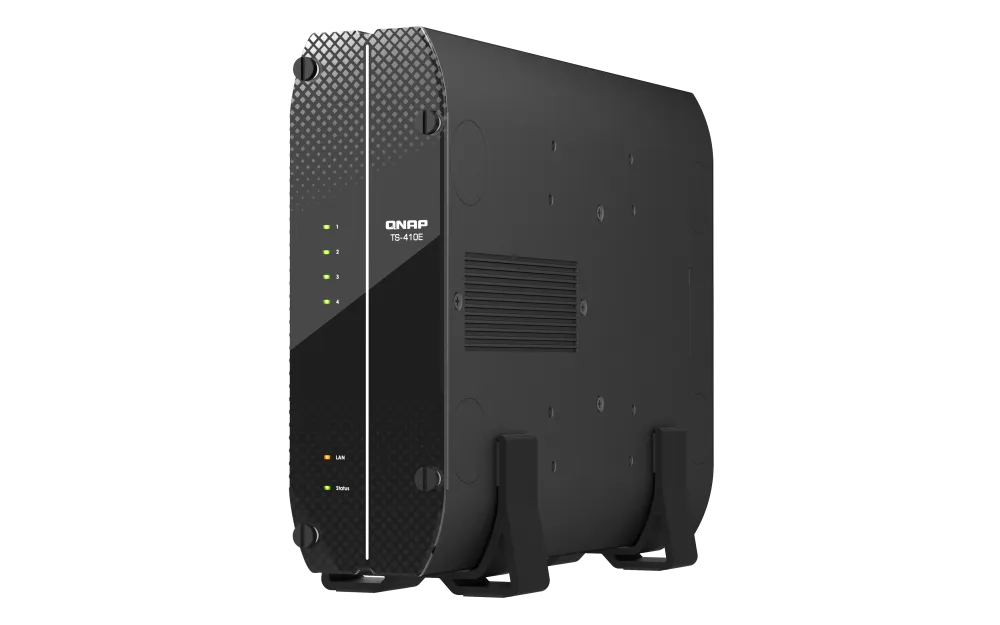
Explore this need in the finder →The TS-410E's headline is not simply four bays. It is a fanless desktop NAS whose four native positions are 2.5-inch SATA slots, paired with two built-in 2.5GbE ports and fixed 8 GB memory. That combination suits a fairly specific storage plan: a small, quiet-place appliance built around compact SATA media and a wired multigig network. It is not the obvious choice if you want to fill inexpensive 3.5-inch hard drives.
Four bays, with a narrower drive decision
QNAP's U.S. product and store pages describe four 2.5-inch SATA SSD positions, and the model guide lists 2.5-inch SATA solid-state drives in its compatibility row. The guide also contains a nearby cooling note about low-temperature, low-noise hard drives. Because those statements do not establish blanket approval for every 2.5-inch HDD, check the exact drive model against QNAP's compatibility list before treating it as a candidate. The safe planning distinction is that this is not a standard 3.5-inch SATA bay layout.
That changes the cost and capacity calculation. Four positions do not say how many terabytes are included: the TS-410E ships without data drives. Choose drive models first, check the supported capacity and firmware notes, then calculate raw and usable space for the storage arrangement you intend to create. A bay count or product-page benchmark does not tell you the capacity-per-dollar of a particular drive set.
A quiet-location design, not a no-heat guarantee
QNAP identifies the TS-410E as fanless and positions it for noise-sensitive environments. That removes the NAS chassis fan as a sound source; it is not an independent acoustic measurement, and an installed drive can still make noise. QNAP's advice to select low-temperature, low-noise drives is worth taking seriously in a fanless design. Leave the appliance where its documented operating environment can be maintained rather than assuming any closed cabinet or warm shelf will suit it.
The included package is a desktop-oriented arrangement: the guide lists the NAS, an AC adapter, power cord, Cat5e cable, 2.5-inch drive screws and two stands. It does not list data drives. Before purchase, check which accessories and warranty actually accompany the seller's exact TS-410E-8G-US package; an official model page is not proof of a third-party seller's bundle or terms.
Two 2.5GbE ports help only when the path is ready
Each built-in Ethernet port is rated up to 2.5GbE. QNAP says port trunking across the pair can reach up to 5Gbps, but a two-port aggregate is not a promise that one computer will copy a single file at that rate. The switch or router, the client's adapter, the cable path, storage layout, protocol and workload all matter.
QNAP also advertises lab throughput figures for specified conditions; those are context, not a prediction for mixed small files, Wi-Fi, or a different drive arrangement. Trace the network from the NAS through the switch to the actual computer before paying extra for multigig infrastructure. If one 2.5GbE port is the requirement, the finder treats that port's line rate separately from the possible aggregate of both ports.
QTS is the default; an OS change is a separate project
The TS-410E ships with QTS. QNAP also says it supports switching to QuTS hero beginning with QTS 5.2.2, provided the hardware meets QuTS hero's stated memory requirement. These are alternative software setups, not two filesystems running together. QNAP warns that an operating-system change requires a backup and removal of the installed disks; its own migration guidance says QTS and QuTS hero use different file systems. Decide which system you want before populating the NAS, especially if you are moving an existing volume.
QNAP's TS-410E guide documents RAID 1 with two disks and lists one-member failure tolerance. That provides a defined response to one drive failure, but it reduces usable capacity and does not protect against deletion, malware, theft or loss of the whole appliance. Keep a separate backup and test restoring a file. A four-bay chassis can also be started with other disk counts or storage layouts, but the right trade depends on the data and the drives you choose; the RAID menu is not a backup plan.
Fixed memory and useful local connections
The listed Intel Celeron J6412 has four cores and can burst to 2.6 GHz; the 8 GB onboard memory is not expandable. This is a meaningful constraint if your intention is to run several virtual machines or memory-hungry apps, rather than primarily share folders, back up computers and stream media. A NAS processor feature list cannot establish how well every application will run under your concurrent workload.
The unit has four USB 3.2 Gen 2 Type-A ports and an HDMI 1.4b output specified up to 4K at 30 Hz. Those connections may support a locally attached workflow, but they do not make every display format or application compatible. Check the software and playback route you actually plan to use.
Who should shortlist it?
Consider this model when you need a compact fanless tower, have verified a compatible 2.5-inch SATA drive plan, value its built-in 2.5GbE connection, and can work within fixed 8 GB memory. Skip it if the economics depend on 3.5-inch disks, if you need memory expansion, or if the network path will remain gigabit and the extra port rating solves no real need. For a rack location or a system that accepts 3.5-inch SATA disks, compare the separate QNAP TS-h765eU assessment: its 1U chassis, four SATA bays and optional E1.S/M.2 expansion make a different installation and media decision rather than a larger version of this quiet desktop NAS.
This is a documentation-based assessment of the exact U.S. 8 GB package, not a hands-on test. Confirm the offer's model suffix, drive compatibility, installed software, included parts and seller coverage before choosing a configuration.
Key specifications
Key details at a glance
| Internal drive bays | 4 bays |
|---|---|
| Documented internal drive media | 2.5-inch SATA SSD |
| Built-in Ethernet ports | 2 × 2.5GbE RJ45 |
| Fastest individual Ethernet port | 2.5 Gbps |
| Installed system memory | 8 GB |
| Maximum listed memory | 8 GB |
| Listed storage arrangements | Single / RAID 0 / RAID 1 / RAID 5 / RAID 6 / RAID 10 |
| Internal file systems | EXT4 (QTS) / ZFS (QuTS hero, optional supported OS switch) |
| Hardware warranty | 3 years |
| Data drives included in listed package | No |
| Processor | Intel Celeron J6412 |
| CPU cores | 4 |
| CPU threads | 4 |
| Installed memory type | 8 GB onboard, non-expandable; some memory is reserved for graphics |
Use the exact model’s instructions for operating limits, supplied equipment and version differences.
Sources for this review
Sources for this assessment
Check your setup before choosing a NAS
Use the finder to check bay count, the network link you need, and whether a documented two-drive redundant arrangement is essential.