
Your needs, this model
Does it fit your priorities?
Do the three E1.S/M.2 positions make this a seven-bay NAS?
No. The TS-h765eU has four native hot-swappable SATA bays for 3.5-inch HDDs or 2.5-inch SATA SSDs. Its three E1.S/M.2 PCIe positions accept NVMe devices or selected network modules, but are not additional 3.5-inch SATA bays; count four native drive bays when planning the chassis.
Explore this need in the finder →Can two compatible drives be mirrored in this configuration?
Yes. QNAP documents a two-drive RAID 1 arrangement for QuTS hero. A mirror can tolerate a single member-drive failure under the documented degraded mode, but it reduces usable capacity and does not protect against deletion, malware, theft or loss of the whole NAS; maintain an independent backup and test a restore.
Explore this need in the finder →Are 10GbE and NVMe storage included in the same base setup?
No. The base system has two 2.5GbE ports; QNAP's optional 10GbE module occupies an E1.S/M.2 position. Those same three positions can also host NVMe SSDs for supported storage or cache uses, so decide whether an upgrade slot is for networking or SSDs before ordering. Port ratings also do not predict end-to-end file-transfer speed.
Explore this need in the finder →A short-depth 1U NAS, not a seven-bay box
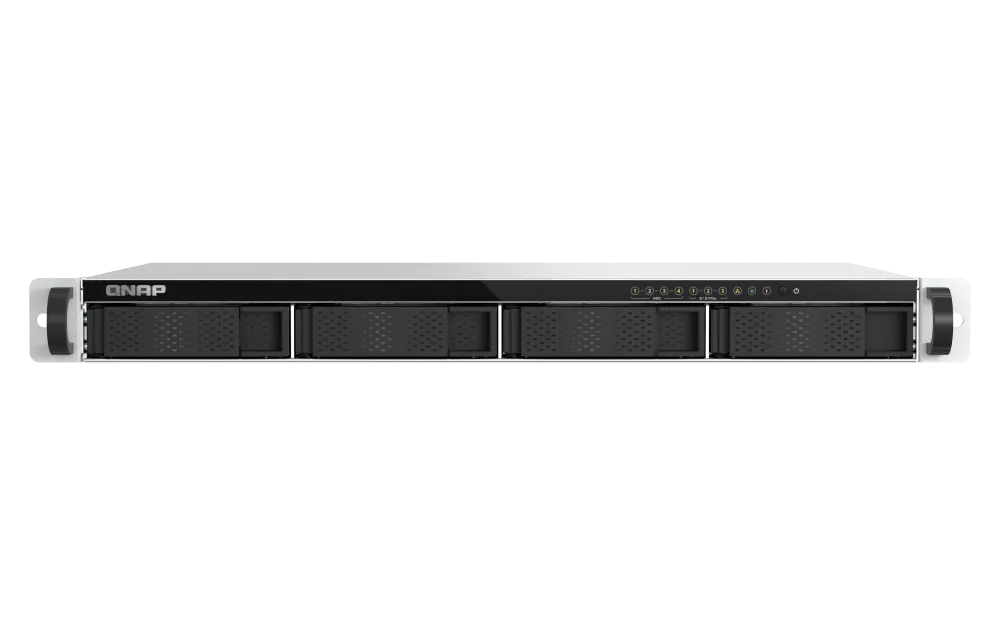
The TS-h765eU is easy to misread from its unusual slot count. The conventional chassis has four hot-swappable SATA bays for 3.5-inch hard drives or 2.5-inch SATA SSDs. Three separate E1.S/M.2 PCIe positions take NVMe devices or compatible network modules; they are not additional 3.5-inch bays. The current U.S. package is TS-h765eU-8G-US; QNAP’s hardware page calls it TS-h765eU-8G.
QNAP positions this as a short-depth 1U system for shallow cabinets and small racks. Its published body dimensions are 43 × 430 × 292.1 mm (H × W × D) and the listed net weight is 4.51 kg before disks. The depth is attractive for a wall cabinet, but a short NAS does not guarantee that the whole installation fits: allow room for the power connector, Ethernet cable bend, air movement, fasteners and service access. The user guide lists RAIL-B02 and short-depth RAIL-S01 compatibility and explicitly says the rail kits are separate. Measure the actual mounting posts and rack depth before choosing either rail set.
Choose the operating system and data layout deliberately
QNAP presents QuTS hero as the intended operating system; it uses ZFS. The hardware page also lists QTS, which uses EXT4. They are alternative software and filesystem arrangements, not features to combine in one pool. The matching example here uses QuTS hero, which the English user guide covers. Before migrating pools or initializing drives, verify the selected OS and recovery steps.
The QuTS hero documentation supports a two-drive RAID 1 arrangement: a pair can hold mirrored data and tolerate one member-drive failure, assuming the remaining disk and system are healthy. That consumes two of the four native bays while giving up the second disk’s capacity to the mirror. It helps with a disk failure; it is not a second backup. A deleted file, ransomware incident, theft, power event or loss of the whole rack can still take out the NAS and its mirrored disks. Maintain a separate backup and test a restore. The unit’s package list includes the chassis, power cord, Cat5e cable, drive screws and quick-start material, not data drives.
Two built-in 2.5GbE ports; 10GbE is an add-on
The base system has two RJ45 2.5GbE ports. That is a meaningful step above the 1GbE ports found on some four-bay rack NAS units, including the Synology RS422+, but it remains a link rating rather than a measured file-copy speed. The switch, client NIC, cable, protocol, disk workload and number of simultaneous transfers all affect the result. QNAP documents port trunking and SMB Multichannel; neither should be treated as a guarantee that one ordinary file transfer will double in speed. Keep the two-port link plan matched to the switch and client behavior you actually need.
For 10GbE, QNAP lists an optional QXG-ES10G1T module that uses one E1.S/M.2 position; up to two are supported. The same positions can host NVMe system drives, pools or cache, so network modules reduce the slots left for SSDs. The manual says M.2 SSDs are not hot-swappable; 9.5 mm or 15 mm E1.S drives need a separate TRAY-E1S-01.
Memory, processor and workload boundaries
QNAP lists an Intel Atom x7405C four-core processor, 8 GB of DDR5 SODIMM memory and a maximum of 16 GB in one slot. QNAP describes the memory as supporting in-band ECC. That is not the same specification as a conventional ECC RDIMM configuration, so organizations with a formal memory requirement should compare the exact terminology rather than treating every “ECC” label as interchangeable. A single memory slot also means expansion is a module replacement, not adding a second matched stick.
The QuTS hero feature set is aimed at data integrity and storage management, but the four SATA bays and this memory ceiling still define the practical system scale. The three PCIe Gen3 x2 E1.S/M.2 positions add flexibility, not unlimited bandwidth. QNAP’s performance material includes manufacturer-run scenarios; these are not independent measurements for this assessment and should not be used as a promise of sustained throughput in a different drive, network or virtualization setup.
Where the design pays off—and where it asks for planning
As a documented-spec choice, the TS-h765eU suits a shallow 1U rack needing four SATA bays, built-in 2.5GbE and optional NVMe/10GbE flexibility. Its four-bay ceiling, single 150 W power supply, separate rail kit and fan-cooled rack chassis demand placement, airflow and growth planning. QNAP’s hardware page and product detail describe the Type-A USB port as Gen2/10Gbps, while the user guide and U.S. store listing say Gen1/5Gbps; confirm the exact revision and package before relying on that port’s speed.
QNAP’s U.S. pages identify the 8 GB model and advertise availability/support through 2031—a lifecycle statement, not a stock promise. The English user-guide table has a text inconsistency: one component heading says “TS-h765eU-4G,” while its memory row lists 8 GB. The current hardware page and U.S. store SKU both identify 8 GB; this assessment does not infer a separate 4 GB retail version.
Assessment
The TS-h765eU-8G-US offers a differentiated four-bay rack platform rather than a high-capacity chassis: a true 1U shallow body, two built-in 2.5GbE ports, QuTS hero/ZFS support and three adaptable E1.S/M.2 positions. Its best feature is the way those positions can be allocated to NVMe storage or optional 10GbE; its central tradeoff is that these upgrades compete for the same three slots. Choose it for the native four-bay and network baseline only if your rack depth, drives, RAID plan, operating system, cooling, single-PSU exposure and separate accessories all suit the installation. This is a documentation-based assessment, not a hands-on test.
Primary references: QNAP’s U.S. TS-h765eU product page, its hardware specifications, the English TS-h765eU User Guide, the QNAP U.S. store listing, and QNAP’s QuTS hero RAID reference.
Key specifications
Key details at a glance
| Internal drive bays | 4 bays |
|---|---|
| Documented internal drive media | 3.5-inch SATA HDD / 2.5-inch SATA SSD |
| Built-in Ethernet ports | 2 × 2.5GbE RJ45 |
| Fastest individual Ethernet port | 2.5 Gbps |
| Installed system memory | 8 GB |
| Maximum listed memory | 16 GB |
| Listed storage arrangements | Single / RAID 0 / RAID 1 / RAID 5 / RAID 6 / RAID 10 / RAID 50 / Triple Mirror / RAID-TP |
| Internal file systems | ZFS (QuTS hero installation) / EXT4 (QTS installation) |
| Dimensions (H × W × D) | 43 × 430 × 292.1 mm (H × W × D); 1U short-depth chassis |
| Weight | 4.51 kg |
| Hardware warranty | 3 years |
| Data drives included in listed package | No |
| M.2 NVMe slots | 3 |
| Listed expansion unit | QNAP TR-004U USB-attached expansion enclosure, sold separately; its bays are external and do not increase native chassis bays. |
| Processor | Intel Atom x7405C |
| CPU cores | 4 |
| Installed memory type | DDR5 SODIMM; QNAP lists in-band ECC support |
Use the exact model’s instructions for operating limits, supplied equipment and version differences.
Sources for this review
Sources for this assessment
- QNAP U.S. Creators & Home Users product result observed in the site catalogue
- QNAP U.S. product catalogue page response and category navigation
- QNAP U.S. TS-h765eU product page
- QNAP TS-h765eU hardware specifications and software options
- QNAP TS-h765eU English User Guide, document version 2
- QNAP U.S. Official Store TS-h765eU-8G-US model listing
- QNAP QuTS hero h5.2 RAID types documentation
- QNAP QTS storage-pool RAID selection reference
Check your setup before choosing a NAS
Use the finder to check bay count, the network link you need, and whether a documented two-drive redundant arrangement is essential.