
Your needs, this model
Does it fit your priorities?
Does the U.S. TS-AI642-8G-US package arrive with a six-drive storage pool?
No. The English model guide lists six drive trays, screws, a power adapter, cord, Ethernet cable and quick-start guide, but no data drives. Choose every HDD or SSD separately, check its exact model and capacity in QNAP's TS-AI642 compatibility list, then plan the QTS storage layout before copying data. The current hardware table's extra 2.5-inch HDD entry is not repeated in the version-3 guide's drive-compatibility row, so verify it rather than assuming it.
Explore this need in the finder →Does QNAP's NPU specification guarantee a 64-camera surveillance installation?
No. QNAP lists a 6 TOPS NPU for supported image-recognition tasks and says QVR Elite supports up to 64 channels, with two included free. QNAP also notes that channel capacity varies with the NAS model, network configuration and camera settings. Check the exact camera list, channel licenses, resolution, frame rate, storage retention and analytics workload before treating a channel count as a workable installation.
Explore this need in the finder →Can the TS-AI642 meet a built-in 2.5GbE requirement without an add-in card?
Yes. QNAP documents one onboard 2.5GbE RJ45 port plus two 1GbE ports. The 10GbE option is a separately chosen adapter in the one PCIe Gen 3 x2 slot; the network filter counts the built-in 2.5GbE link, not a card that is absent from the base package, and the two slower ports do not add up to a guaranteed faster single-client connection.
Explore this need in the finder →Can two drives in the TS-AI642 tolerate one member-drive failure?
QNAP's exact-model guide documents a two-member RAID 1 arrangement with one member-drive failure tolerance while the mirror is healthy, and the current six-bay software specification includes RAID 1. Both disks must be compatible and installed separately. The mirror consumes the second disk's capacity for redundancy and cannot serve as the independent backup against deletion, malware, theft or loss of the complete NAS.
Explore this need in the finder →Can memory be upgraded later if the surveillance or AI workload grows?
QNAP lists 8 GB onboard memory as non-expandable and the English model guide also identifies the memory as fixed. The 8 GB ceiling is part of this model's configuration, not a seller-specific RAM option. If the workload is expected to need more memory, compare another exact model rather than planning a future DIMM upgrade.
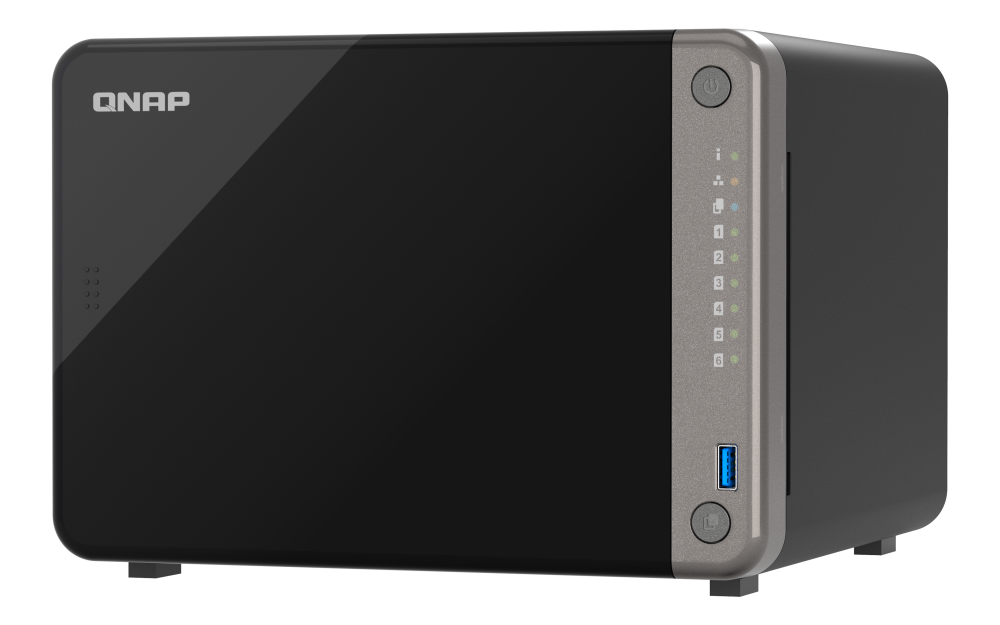
Explore this need in the finder →Assessment basis: this is a research-led review of QNAP's U.S. TS-AI642-8G-US package and model documentation, not a hands-on installation or performance test. The TS-AI642 is unusual among six-bay desktop NAS systems: its pitch combines six SATA trays, a built-in neural processing unit for image-recognition workloads, two HDMI outputs, and a mix of one 2.5GbE and two gigabit Ethernet ports. That mix makes it a more specialized choice than a general-purpose six-bay box.
Six native SATA bays, but no bundled data drives
QNAP's exact-model guide identifies six 3.5-inch SATA bays, support for 2.5-inch SATA SSDs, and hot-swapping for all drives. The U.S. store listing identifies the 8 GB package as TS-AI642-8G-US; the guide's package contents list the NAS, six trays, mounting screws, an external power adapter, a cable, and a quick-start guide, but not hard drives. The enclosure is therefore only the start of the storage plan. Check each complete drive model and capacity against QNAP's live compatibility list before choosing an array; a generic SATA label is not a model-specific approval.
There is a small documentation difference worth preserving: the current QNAP hardware table also names 2.5-inch SATA hard drives, while the version-3 English guide lists 3.5-inch SATA hard drives and 2.5-inch SATA SSDs. Until the exact disk appears on the model's compatibility list, the safer common-denominator plan is not to assume any particular 2.5-inch HDD will work. The two M.2 SSD positions found on some other desktop NAS models are not built into this chassis. QNAP instead lists one PCIe Gen 3 x2 slot that can take compatible optional cards.
A six-bay QTS system with a fixed 8 GB memory ceiling
QNAP lists an eight-core Rockchip RK3588 platform with ARM Cortex-A76/A55 CPU cores, a Mali-G610 graphics processor and a neural processing unit rated up to 6 TOPS. The model guide and current product page agree that the 8 GB of onboard memory is non-expandable. That is a firm planning limit: there is no memory-slot upgrade path if the chosen applications later need more RAM. QNAP's software specification page lists QTS and a six-bay set of storage modes including RAID 1, RAID 5 and RAID 6. This assessment describes the default QTS path; it does not assume a different operating-system edition.
For one drive-failure tolerance in a straightforward two-disk arrangement, the exact guide documents RAID 1 with two members and one member-drive failure. A six-bay chassis does not make that mirror a six-drive layout: the remaining trays need their own storage plan if used. Likewise, redundancy is not backup. A mirror does not create an independent recovery copy against deletion, malware, theft or loss of the whole NAS. Protect important files on another device or location and test a restore.
One built-in multigig port, not three interchangeable fast links
The TS-AI642 provides one built-in 2.5GbE RJ45 connection and two 1GbE RJ45 connections. For a buyer who requires at least one built-in 2.5GbE port, that is a real match; it is not a built-in 10GbE NAS. QNAP lists higher-speed networking as an optional adapter in the single PCIe slot, so a card must be chosen and checked separately. That slot is also the route for some optional M.2, USB or storage-expansion cards, making the upgrade a tradeoff rather than a free extra interface.
A 2.5GbE link is only one segment in a file-transfer path. The switch or router, client adapter, cable, storage layout and workload must also support the intended route. The two gigabit ports do not add to the 2.5GbE port to promise a 4.5Gbps single-client copy. QNAP publishes lab throughput figures under a specific drive set, OS version, client and network setup; those numbers should not be treated as a household result. Trace the complete path before paying for a faster card or switch.
The NPU is for particular image tasks, not a blanket performance guarantee
QNAP positions the NPU for image recognition in its QuMagie and Qsirch applications and related face- or object-recognition workflows. This makes the TS-AI642 worth considering for a photo archive or surveillance workload only when those specific functions matter. An NPU rating does not establish the speed of every NAS application, the number of camera streams a particular installation can sustain, or the quality of a search result. QNAP says QVR Elite can support up to 64 channels, with two channels included free; additional channel capacity, supported cameras, resolution, frame rate, network design and recording retention all need separate checks. Budget for any required licenses and verify the exact cameras rather than treating the headline channel maximum as an included system.
Two HDMI 1.4b outputs give the enclosure a direct-monitoring option, including the kind of local display arrangement QNAP describes for surveillance. The manuals describe a tower with two 90 mm fans, so plan for airflow and an appropriate equipment location rather than assuming a silent desktop appliance. The enclosure is also substantial enough to check shelf depth, ventilation and cable access before committing to a tight cabinet.
How it differs from another QNAP six-bay option
The TS-664-8G is a useful same-brand comparison if the need is general file storage rather than on-device image processing. The TS-664 review documents two built-in 2.5GbE ports and two onboard M.2 positions; the TS-AI642 instead has the NPU and two HDMI outputs but only one built-in 2.5GbE port and no onboard M.2 positions. Both have six native SATA bays, and both require a separate drive decision. If a six-bay all-flash layout is the real need, compare the Synology FS200T separately: that is a SATA-SSD-focused product, not a synonym for six ordinary HDD bays.
The TS-AI642 is most defensible when its specific AI-assisted image or surveillance role, six native bays and 2.5GbE minimum all matter together. For general shared storage, the extra software specialization may not justify choosing it over a less specialized six-bay model. The fixed 8 GB memory, diskless package, optional-card tradeoffs and compatibility work should be part of the buying decision before the NPU headline is.
Checks to make before ordering
- Confirm the seller's exact TS-AI642-8G-US model and inspect the box contents; do not assume data drives are included.
- Look up every proposed HDD or SSD by complete model number and capacity in QNAP's TS-AI642 compatibility list, especially if relying on the hardware-table entry for 2.5-inch SATA HDDs.
- Plan the drive count, QTS RAID layout, usable capacity and independent backup destination before loading data.
- For 2.5GbE, verify the NAS port, switch, client adapter and cabling. If adding 10GbE or M.2 storage, confirm the exact supported card and account for the only PCIe slot.
- For surveillance or AI search, check camera compatibility, required QVR licenses, recording settings, retention and what two included channels cover.
- Check physical clearance and airflow around the tower and its fans, then confirm the seller's warranty and return terms for the exact package.
Key specifications
Key details at a glance
| Internal drive bays | 6 bays |
|---|---|
| Documented internal drive media | 3.5-inch SATA HDD / 2.5-inch SATA SSD |
| Built-in Ethernet ports | 1 x built-in 2.5GbE RJ45 / 2 x built-in 1GbE RJ45 |
| Fastest individual Ethernet port | 2.5 Gbps |
| Installed system memory | 8 GB |
| Maximum listed memory | 8 GB |
| Listed storage arrangements | JBOD / Single / RAID 0 / RAID 1 / RAID 5 / RAID 6 / RAID 10 / RAID 50 |
| Internal file systems | EXT4 (QTS) |
| USB 3.2 Gen 1 ports | 2 |
| Hardware warranty | 3 years |
| Data drives included in listed package | No |
| System drives included (not data-bay drives) | |
| M.2 NVMe slots | 0 |
| Processor | Rockchip RK3588, ARM 64-bit Cortex-A76/A55 octa-core |
| CPU cores | 8 |
| Installed memory type | 8 GB onboard, non-expandable; some memory is reserved for shared graphics use |
Use the exact model’s instructions for operating limits, supplied equipment and version differences.
Sources for this review
Sources for this assessment
- QNAP U.S. Creators & Home Users result observed in the site catalogue
- QNAP U.S. Tower / SMB product listing
- QNAP U.S. TS-AI642 product page
- QNAP U.S. Official Store TS-AI642-8G-US product page
- QNAP TS-AI642 English User Guide, document version 3
- QNAP U.S. TS-AI642 hardware specifications
- QNAP U.S. TS-AI642 software specifications
- QNAP Compatibility List
Check your setup before choosing a NAS
Use the finder to check bay count, the network link you need, and whether a documented two-drive redundant arrangement is essential.