
Your needs, this model
Does it fit your priorities?
Are SSDs included with the six-bay FS200T?
No. The product package lists the desktop system, 65 W power adapter, cord, two LAN cables and tray keys, but not the six storage SSDs. Synology’s 2026 launch announcement supports third-party SSDs; check the precise model list before ordering.
Explore this need in the finder →What networking does this desktop NAS provide?
It has one built-in 2.5GbE and one 1GbE RJ-45 port. The faster link only helps when the switch, cabling and client support 2.5GbE; link aggregation or failover also needs deliberate configuration.
Explore this need in the finder →Does RAID 1 replace a backup on FS200T?
No. DSM lists RAID 1 for a two-drive mirror, which helps with one drive failure. A separate backup copy is still needed for deletion, malware, theft or loss of the NAS.
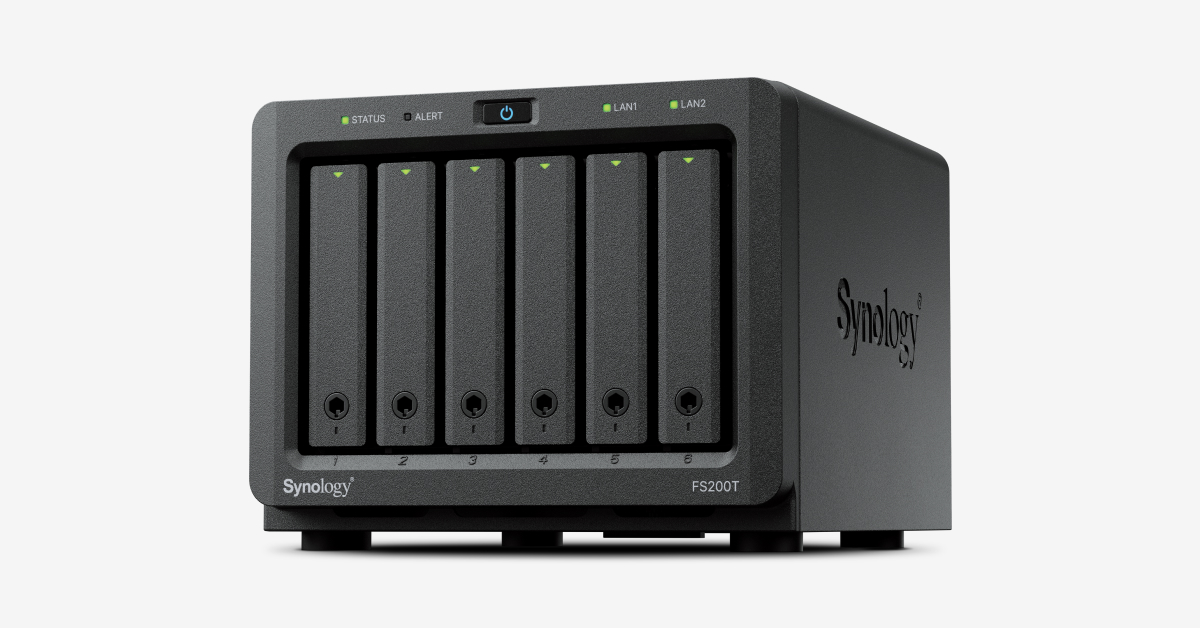
Explore this need in the finder →The FS200T is the outlier in this FlashStation group: a compact six-bay desktop NAS aimed at enthusiasts and home or small-office use rather than a rack installation. Its 121 × 151 × 175 mm chassis has six 2.5-inch SATA SSD positions and a built-in 2.5GbE link. Those features make it easier to place near a small wired network than a 1U or 2U enterprise appliance, but it remains an all-flash system that needs compatible SSDs and careful backup planning.
What six SSD bays do—and do not—include
The product page lists six hot-swappable SATA SSD positions, and the package contents name a main unit, power adapter and cord, two RJ-45 cables and drive-tray keys. SSDs are not included in that standard package. Synology’s 2026 launch announcement says the FS200T supports third-party SSDs without functionality restrictions, while the manufacturer compatibility list remains the validated reference for specific models. Check the exact SSD code before buying rather than assuming every 2.5-inch SATA drive behaves the same.
DSM lists Synology Hybrid RAID and RAID 1 along with other arrangements, so a two-drive mirror is documented. A mirror helps with one drive failure; it does not give you a separate copy against deletion, ransomware, theft or failure of the whole appliance. The single-volume limit is listed as 108 TB, which is a software ceiling, not a guarantee of usable space. With only six SSD bays, the capacity, resilience and cost of the selected drives should be decided together.
A faster local link with a small memory ceiling
Networking consists of one 2.5GbE RJ-45 port and one 1GbE RJ-45 port. Synology describes the second link as usable for redundancy or link aggregation. Neither arrangement means a single client will necessarily see that combined rate: the switch, client interface, cabling, configuration and storage load must all support the path. The 2.5GbE port is an improvement over a single-gigabit-only setup when the rest of the home or office network can use it, but it is not a substitute for a suitable multi-gig switch.
The listed Intel Celeron J4125 has four cores and four threads. Installed memory is 4 GB DDR4 non-ECC, with two slots and a listed 8 GB maximum. This is a more modest hardware ceiling than the rackmount FlashStations and should be considered before planning memory-intensive applications or virtualized workloads. Synology describes the unit as quiet and lists a 21.3 dB(A) noise figure. That is a manufacturer measurement under its stated test conditions, not a guarantee for every SSD, location or room.
Small-office placement and support
The 1.4 kg desktop chassis can fit on a shelf or desk without rack rails. The manufacturer describes it as compact and quiet, while actual sound in a room depends on the SSDs, fan behavior, placement and environment. It has two USB 3.2 Gen 1 ports for peripheral use, but no external NAS drive shelf is listed as a way to expand the six internal positions. If you expect growth, plan for a second NAS or another backup destination rather than counting a desktop external drive as extra internal bays.
Synology lists a three-year limited warranty for FS200T and a separate Warranty Plus option that can extend coverage to five years; verify whether an offer includes that program and whether it is valid in your region. The current US support table shows full DSM updates and technical support for the model. Synology announced availability in May 2026, placing it in a very different context from the older rack FlashStations in this review library.
Who should consider the FS200T?
It is a plausible fit for a home office or small team that wants an SSD-based shared-file and backup appliance, needs up to a 2.5GbE built-in path and can work within 4 GB of memory or a documented 8 GB ceiling. It is a poor match for someone who needs large 3.5-inch HDD capacity, more than six native bays, rackmount deployment, or an enterprise 10GbE fabric. It also does not arrive with six drives just because six bays are shown.
Compared with the FS2500, the FS200T trades twelve 1U bays and dual 10GbE for a tiny desktop enclosure, a six-drive maximum and 2.5GbE. Before ordering, verify the exact SSD models, the standard diskless package, the power adapter and accessories, warranty option, wired network path, usable-capacity layout and independent backup target. A compact form is useful only if the storage and backup plan are complete.
Key specifications
Key details at a glance
| Internal drive bays | 6 bays |
|---|---|
| Documented internal drive media | 2.5-inch SATA SSD |
| Built-in Ethernet ports | 1 × 2.5GbE RJ-45 data port / 1 × 1GbE RJ-45 data port |
| Fastest individual Ethernet port | 2.5 Gbps |
| Installed system memory | 4 GB |
| Maximum listed memory | 8 GB |
| Listed storage arrangements | Synology Hybrid RAID / Basic / JBOD / RAID 0 / RAID 1 / RAID 5 / RAID 6 / RAID 10 |
| Internal file systems | Btrfs / ext4 |
| USB 3.2 Gen 1 ports | 2 |
| Maximum listed single-volume size | 108 TB |
| Dimensions (H × W × D) | 121 × 151 × 175 (H × W × D) |
| Weight | 1.4 kg |
| Manufacturer's idle noise figure | 21.3 dB(A) |
| Hardware warranty | 3 years |
| Data drives included in listed package | No |
| Expansion-unit note | No external drive-shelf expansion path is listed; six internal positions are the documented native bay count. |
| Processor | Intel Celeron J4125 |
| CPU cores | 4 |
| CPU threads | 4 |
| Installed memory type | DDR4 non-ECC SODIMM |
| Single-volume limit condition | Synology lists a 108 TB maximum single volume; usable capacity depends on drives, RAID and metadata. |
Use the exact model’s instructions for operating limits, supplied equipment and version differences.
Sources for this review
Sources for this assessment
- Synology US FlashStation product directory, cycle 10 capture
- Synology FS200T US product page
- Synology FS200T Product Manual / Hardware Installation Guide
- Synology FS200T English datasheet
- Synology FS200T Product Specifications
- Synology announcement of FS200T availability, 2026-05-27
- Synology US Product Support Status, FS and HD rows
Check your setup before choosing a NAS
Use the finder to check bay count, the network link you need, and whether a documented two-drive redundant arrangement is essential.