
Your needs, this model
Does it fit your priorities?
How many native SATA bays does LOCKERSTOR 16R Pro Gen2 (AS7216RDX) have?
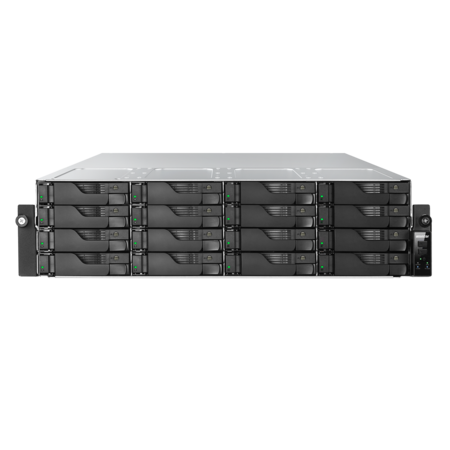
The exact model has 16 native SATA trays. The separate single M.2 NVMe position does not add a SATA bay. A minimum of 16 bays fits; 17 excludes it. Confirm the exact drive/firmware tuple before ordering.
Explore this need in the finder →Does LOCKERSTOR 16R Pro Gen2 (AS7216RDX) have built-in 10-Gigabit Ethernet?
Yes. The exact hardware selector lists two individual built-in 10-GbE ports (plus two Gigabit ports). A rated port does not guarantee 10-Gb/s file copies; the entire client-switch-cable-storage path matters.
Explore this need in the finder →Can LOCKERSTOR 16R Pro Gen2 (AS7216RDX) support a buyer-created two-drive mirror?
A possible owner-created RAID 1 plan uses two buyer-selected compatible SATA drives in two of its 16 native trays and one built-in 10-GbE port, leaving 14 bays open. The reference package lists no data drives or initialized volume. Check drive compatibility, protect existing data before setup and keep another backup; RAID 1 is not backup.
Explore this need in the finder →Research-based assessment: The ASUSTOR LOCKERSTOR 16R Pro Gen2 (AS7216RDX) combines sixteen native SATA trays with dual built-in 10-GbE links in a 3U chassis. It sits between a 12-bay 2U model and a 24-bay four-row rack system, so the decision is not just whether the CPU looks fast: it is whether the rack, drives, network and operating plan justify sixteen positions. This is a source-based analysis, not a report of ownership or performance testing.
Sixteen positions, with a separate M.2 layer
The exact model selector and datasheet identify sixteen 3.5-inch/2.5-inch SATA positions and one separate M.2 2280 NVMe slot using PCIe 5.0 x4. ASUSTOR's M.2 table lists a Single volume option; that M.2 slot does not add a seventeenth SATA tray and does not provide a two-module mirror. The 3U chassis measures 116 x 439 x 576 mm (height x width x depth) and is listed at 15.3 kg. Add room for the rail kit, cable bends, rack doors, service work and the loaded weight of the drives; the chassis depth alone is not an installation-clearance figure. See the official product page, exact hardware selector and model datasheet.
Expansion totals should not be used as a buying promise. The current selector lists a maximum of 44 bays with an expansion unit, while the exact datasheet page lists 32. The documents disagree, so neither figure is used in the match profile or presented as resolved. The known base count is sixteen. If external storage growth matters, get the exact SAS-card and Xpanstor configuration in writing, then reconcile it against the current compatibility and installation documents.
A meaningful Gen2 change from AS7116RDX
This is not the discontinued 16-bay AS7116RDX with a memory suffix. The two models share a sixteen-position, 3U outline, but the newer AS7216RDX uses an AMD Ryzen 7 PRO 7745, 16 GB of ECC DDR5-4800 memory and two individual built-in 10-GbE ports plus two Gigabit ports. The prior LOCKERSTOR 16R Pro AS7116RDX review documents a Xeon E-2224, 8 GB ECC DDR4 and four individual 1-GbE ports; that model also has two M.2 cache sockets rather than this Gen2 single M.2 volume position. The distinction is useful when comparing exact platform capability, but does not establish a workload result or retailer package.
The AS7216RDX's own selector lists four memory slots and a 192-GB maximum. It also lists two PCIe 5.0 slots—one x8 link and one x4 link—for separately chosen expansion hardware. A faster optional NIC or SAS card must be checked for exact card, bracket, driver, switch, cable and system fit; it is not an included built-in Ethernet interface. Each of the two 10-GbE ports can satisfy a 10-Gbps single-port floor, but the surrounding network and storage workload determine actual transfer behavior.
Sixteen bays do not arrive as a sixteen-disk array
The product sources list RAID 1 among supported volume types. One possible setup is an owner-created mirror from two compatible SATA drives selected by the buyer. It uses two of the sixteen trays and leaves fourteen open while one 10-GbE port carries the NAS link. The exact package reference lists no data drives or prepared array; a diskless listing is not an initialized storage pool. Verify the exact drive model, capacity and firmware on ASUSTOR's current compatibility information before reusing disks or ordering new ones. Initialization may erase existing contents. RAID 1 can mitigate one drive failure, but it is not a second backup copy and does not address deletion, malware, theft or failure of the whole NAS.
Physical and operating cost checks
ASUSTOR lists two redundant 550-W 80 PLUS Platinum supplies. Its exact model selector gives 187 W for operation and 128 W for disk hibernation; the manufacturer's table values are not independent measurements or a forecast for your number of disks, workload or power tariff. If resilience matters, two power modules need separately considered cords, PDU/UPS capacity and upstream circuits. The system's two PSU slots do not demonstrate that your site has independent power.
The manufacturer's package reference names one unit, a quick-install guide, two AC cords, two Cat5e LAN cables, two Cat6a 10GbE cables and 48 screws for each listed drive size. It does not list drives, an initialized array or rack rails. The U.S. Store identity page labels the base configuration diskless under NAS SKU 90-AS7216RX1-MF10; it is not a promise about another seller's add-ons or the condition of a particular unit. Check the exact model, SKU, rail kit, trays, cables, both PSUs, returns, support channel and written warranty terms. The current ASUSTOR status table labels this configuration Generally Available, with software and technical support shown as Supported and five years listed; those entries do not establish current stock or coverage on a specific shipment.
When the 16-bay tier makes sense
Consider this profile when sixteen native SATA positions, ECC-capable memory, built-in dual 10GbE and a rack deployment matter together. The 12-bay AS7212RDX uses less rack height for four fewer positions; the 24-bay AS7224RDX adds eight trays but a taller, heavier chassis and higher manufacturer-listed power figures. That comparison is useful only if those extra bays have a real role. An empty tray has no storage value, and no usable capacity can be calculated until exact drives and the chosen RAID layout are known.
Before ordering, confirm the chassis depth and rail clearance, drive/firmware tuple, network peers, expansion-card plan, seller's exact diskless package and an independent backup destination. The package reference and shared AS72XXRDX installation guide document the model family and rack procedure, not the contents or condition of an individual resale unit.
Key specifications
Key details at a glance
| Internal drive bays | 16 bays |
|---|---|
| Documented internal drive media | 3.5-inch SATA HDD / 2.5-inch SATA HDD / 2.5-inch SATA SSD |
| Built-in Ethernet ports | 2 x built-in individual 10-Gigabit Ethernet RJ45 / 2 x built-in individual Gigabit Ethernet RJ45 (1G/100M) |
| Fastest individual Ethernet port | 10 Gbps |
| Installed system memory | 16 GB |
| Maximum listed memory | 192 GB |
| Listed storage arrangements | RAID 1 |
| Dimensions (H × W × D) | 116 x 439 x 576 mm (H x W x D) |
| Weight | 15.3 kg |
| Hardware warranty | 5 years |
| Data drives included in listed package | No |
| M.2 NVMe slots | 1 |
| Expansion-unit note | Official sources conflict: the exact current selector and corresponding datasheet table give different maximum totals for the expansion-unit configuration (44 vs 32). The values depend on additional expansion hardware and are excluded from matching; only 16 native bays are used. |
| Processor | AMD Ryzen 7 PRO 7745 |
| CPU cores | 8 |
| Installed memory type | 16 GB ECC DDR5-4800 UDIMM installed as one module |
Use the exact model’s instructions for operating limits, supplied equipment and version differences.
Sources for this review
Sources for this assessment
- ASUSTOR exact English product page, product ID 93, LOCKERSTOR 16R Pro Gen2 (AS7216RDX)
- ASUSTOR exact hardware and package specification for LOCKERSTOR 16R Pro Gen2 (AS7216RDX)
- ASUSTOR exact package-content reference for LOCKERSTOR 16R Pro Gen2 (AS7216RDX)
- ASUSTOR exact datasheet table for LOCKERSTOR 16R Pro Gen2 (AS7216RDX)
- ASUSTOR exact-model English datasheet PDF for LOCKERSTOR 16R Pro Gen2 (AS7216RDX)
- ASUSTOR U.S. Store exact item 90-AS7216RX1-MF10 for LOCKERSTOR 16R Pro Gen2 (AS7216RDX)
- ASUSTOR manufacturer support status for LOCKERSTOR 16R Pro Gen2 (AS7216RDX)
- ASUSTOR 2025 U.S.-English product comparison
- ASUSTOR LOCKERSTOR Gen2 RDX quick installation guide
- Previously observed ASUSTOR Home/SOHO NAS card listing
- ASUSTOR official front illustration for LOCKERSTOR 16R Pro Gen2 (AS7216RDX)

Check your setup before choosing a NAS
Use the finder to check bay count, the network link you need, and whether a documented two-drive redundant arrangement is essential.