
Your needs, this model
Does it fit your priorities?
How many internal SATA bays does AS7116RDX have, and do the M.2 sockets add to that count?
The exact model has sixteen native SATA drive trays. It also has two separate M.2 SSD sockets, described for cache; those sockets do not make it an 18-bay SATA NAS. A sixteen-bay floor includes this earlier model only when you choose to include earlier models; a seventeen-bay floor is above its native count. Check exact drive and firmware compatibility before ordering disks.
Explore this need in the finder →Does AS7116RDX have built-in 10-Gigabit Ethernet?
No. The base unit lists four individual 1-GbE Ethernet ports. Faster 10/25/40/50-GbE connections are possible only by adding a compatible PCIe network card; the card and complete network path are separate checks and are not assumed included. A port rating is not a file-transfer guarantee.
Explore this need in the finder →Can this 16-bay model support a two-drive mirror while retaining a built-in network link?
A possible owner-created RAID 1 setup uses two buyer-selected compatible SATA drives in two of its sixteen trays, leaves fourteen trays open, and can use one built-in 1-GbE port. ASUSTOR's reference package lists no data drives or initialized array. Confirm the drive/firmware tuple, protect any existing disk data before initialization and maintain a separate backup; RAID 1 does not replace one.
Explore this need in the finder →Research-based assessment: The LOCKERSTOR 16R Pro AS7116RDX is a 3U, 16-tray NAS aimed at a rack deployment that needs native SATA capacity and accepts an older platform. It is not the 2U, 12-tray AS7112RDX, and neither model's optional expansion figures should be treated as built-in bays. This assessment uses manufacturer documents; it does not report hands-on use, testing, measured throughput or an inspected seller unit.
Sixteen native SATA positions are the main distinction
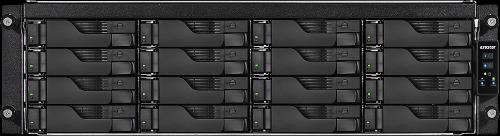
ASUSTOR's exact English product page and hardware selector identify AS7116RDX as the 3U LOCKERSTOR 16R Pro. The base chassis has sixteen SATA positions for 3.5-inch HDDs or 2.5-inch HDDs/SSDs. Two separate M.2 sockets support specified NVMe and SATA SSD form factors for caching; they are not extra SATA trays. This 16-bay profile is the clear reason to compare it with the 12-bay AS7112RDX: the larger model uses an additional rack unit for four more native positions. The exact product page and hardware selector document the base layout.
Do not plan around the manufacturer's quoted expansion ceiling without reconciling the exact equipment. The current specification selector says a total of 28 positions with expansion, while English model/family datasheet text says 40. The difference is unresolved here; only the sixteen internal trays are used in this model assessment. Drive count also is not usable capacity: the choice of disks and RAID layout changes usable space, and the QIG directs buyers to check the exact model's compatibility list.
Two M.2 sockets are a separate layer
ASUSTOR lists two M.2 SSD positions separately from the SATA trays, with model support across NVMe and SATA form factors. Its installation guide warns not to mix PCIe NVMe and SATA AHCI modules in those two sockets and recommends that two installed SSDs be the same model. It directs the owner to the current compatibility list. The manufacturer describes the M.2 positions as cache; this review does not assume they are additional storage-pool capacity or that an SSD is included. The exact supported drive/firmware tuple remains a purchase check.
The documented RAID menu includes RAID 1. A possible setup is a mirror made by the owner from two compatible SATA drives, using two of sixteen trays and leaving fourteen open. The source documents no prepared array or data disks in the reference package. Initialization erases data already on installed disks, so preserve anything important first. RAID can help with a single drive failure, but does not protect against deletion, malware, a chassis failure or a lost site; keep an independent, recoverable backup.
Four Gigabit ports are not a built-in 10GbE connection
The base model lists four separate 1-GbE RJ-45 ports. The manufacturer's advertised 10/25/40/50-GbE options are PCIe add-in cards, not native ports or equipment this review assumes will arrive with a seller unit. The selector lists one PCIe Gen3 x8 slot and two Gen3 x4 slots for optional network or SAS cards. If a faster network is essential, check the exact card and supported slot, driver, transceiver or cable, switch, client and storage path as one system. Aggregating several links does not change the rating of one individual port, and advertised link rate is not a measured file-transfer result.
The exact product material lists a quad-core Intel Xeon E-2224, 8 GB of ECC DDR4-2666 UDIMM installed as one module, four memory slots and a 128-GB listed ceiling. The QIG says third-party memory is not guaranteed. These are specifications rather than a performance verdict; check software requirements and supported memory before buying or upgrading.
Rack, power and life-cycle checks matter
At 132 x 439 x 535 mm, the chassis is 3U high and 535 mm deep before accounting for rails, cable bends and service space. The exact selector reports 15.3 kg / 33.7 lb. An older U.S.-English comparison repeats 15.3 kg but gives 39.6 lb, an inconsistent conversion that should not be silently repeated as a second weight. Confirm the cabinet's usable depth, rail fit, airflow and loaded support before ordering. A physical chassis dimension is not the clearance a rack installation needs.
The selector lists two internal 550-W power supplies and the product materials describe redundancy. That is a component-level option, not proof that two cords use independent circuits or that a UPS/PDU path is resilient. The exact-model reference package lists two power cords, four Cat5e LAN cables, drive screws and a quick-start guide; it does not list data drives or rails. The current package reference is not a promise about the contents, condition or warranty of an individual reseller shipment. Ask for the exact delivered configuration and return/support terms.
Life-cycle evidence needs a date-aware check. The latest ASUSTOR status result returned on 2026-11-02 marks AS7116RDX discontinued, with software and technical support shown as supported and a five-year warranty duration. An indexed result from the prior month said generally available. ASUSTOR defines discontinued as no longer manufactured and says the warranty term begins from the receipt's purchase date, but the conflicting captures do not establish present inventory, remaining support or transferable coverage on any used or old-stock unit. Recheck the current status page and get written terms for the exact unit.
Who should compare it—and what to verify
AS7116RDX is relevant when sixteen native SATA trays, ECC-memory capability and a rack form factor are more important than built-in multigigabit networking. It is a poor fit for a buyer who needs a small desktop NAS, a shallow cabinet without measured clearance, or a native 10GbE port. The main trade-offs are 3U height, 535-mm chassis depth, one-Gigabit built-in ports, an earlier/discontinued status result, unresolved expansion totals and unknown seller configuration.
- Confirm AS7116RDX—not the 12-bay AS7112RDX, a rail bundle or a different family member—and check the seller's exact model and package.
- Check each drive model, capacity and firmware on the current ASUSTOR compatibility list; verify storage mode and usable capacity independently.
- Confirm rack depth, rails, airflow, two power connections and the upstream electrical path.
- Ask for unit condition, all trays and power supplies, included accessories, return terms, support channel and any remaining warranty documentation.
- If you need faster than one 1-GbE link, verify a specific optional PCIe card and every part of the matching network path before treating it as a workable plan.
The manufacturer datasheet, package reference and applicable AS71XXRDX installation guide are useful checks, but none establishes a current seller offer or the actual hardware condition of a particular unit.
Key specifications
Key details at a glance
| Internal drive bays | 16 bays |
|---|---|
| Documented internal drive media | 3.5-inch SATA HDD / 2.5-inch SATA HDD / 2.5-inch SATA SSD |
| Built-in Ethernet ports | 4 x built-in individual Gigabit Ethernet RJ45 (1G/100M) |
| Fastest individual Ethernet port | 1 Gbps |
| Installed system memory | 8 GB |
| Maximum listed memory | 128 GB |
| Listed storage arrangements | Single / JBOD / RAID 0 / RAID 1 / RAID 5 / RAID 6 / RAID 10 / RAID 1/5/6/10 with hot spare |
| Dimensions (H × W × D) | 132 x 439 x 535 mm (H x W x D) |
| Weight | 15.3 kg |
| Hardware warranty | 5 years |
| Data drives included in listed package | No |
| M.2 NVMe slots | 2 |
| Expansion-unit note | Unresolved official-source conflict: the exact specification selector says maximum 28 including expansion while the English model datasheet/family comparison says 40. The matching profile uses only the sixteen native chassis positions. |
| Processor | Intel Xeon E-2224 |
| CPU cores | 4 |
| Installed memory type | 8 GB ECC DDR4-2666 UDIMM installed as one 8-GB module |
Use the exact model’s instructions for operating limits, supplied equipment and version differences.
Sources for this review
Sources for this assessment
- Previously saved ASUSTOR Home/SOHO catalogue observation for LOCKERSTOR 16R Pro
- ASUSTOR exact English product page, product ID 67, LOCKERSTOR 16R Pro
- ASUSTOR exact AS7116RDX hardware and packaging selector, product ID 67
- ASUSTOR LOCKERSTOR 16R Pro AS7116RDX exact-model English datasheet
- ASUSTOR 2022 U.S.-English product comparison, AS7116RDX row
- ASUSTOR current product-support-status result for AS7116RDX
- Earlier official ASUSTOR status-page capture with a conflicting AS7116RDX availability value
- ASUSTOR exact AS7116RDX package-contents page, product ID 67
- ASUSTOR AS71XXRDX English Quick Installation Guide, applicable to AS7116RDX
- ASUSTOR exact-model-applicable QIG package-page image for AS7116RDX
Check your setup before choosing a NAS
Use the finder to check bay count, the network link you need, and whether a documented two-drive redundant arrangement is essential.