
Your needs, this model
Does it fit your priorities?
Can I keep bays open while using a two-drive mirror?
Yes, as an owner-created arrangement. ASUSTOR lists RAID 1 for the exact four-bay AS3304T v2, and its calculator states that a single RAID 1 volume supports at most two drives. Two compatible buyer-supplied disks can occupy two of the four native positions, leaving two chassis bays physically open. Check the complete drive and firmware combination first, back up before initialization because the QIG warns that stored data is erased, and maintain a separate backup; RAID is not backup.
Explore this need in the finder →Does its 2.5GbE port guarantee 2.5-Gbps file transfers?
No. ASUSTOR lists one 2.5G/1G/100M Ethernet interface. The NAS port is only one part of the path: the client, switch or router, cable, storage and workload can all constrain transfers. No transfer result was tested for this assessment.
Explore this need in the finder →What disk sizes fit the four internal SATA bays?
The exact manufacturer specification lists four native SATA positions for 3.5-inch HDDs and 2.5-inch HDDs or SSDs. ASUSTOR's guide directs owners to its compatibility selector; this assessment did not verify a particular drive model and firmware row. A format match alone is not compatibility approval.
Explore this need in the finder →Does the standard package include drives?
The manufacturer package list names the NAS, quick guide, power cord and adapter, Cat 5e network cable, sixteen 2.5-inch drive screws and a cord bracket; it does not list data drives. No exact retailer package was confirmed, so check the seller's item contents rather than assuming a configured disk bundle.
Explore this need in the finder →How is AS3304T v2 different from the older AS3304T?
The exact v2 specification identifies a Realtek RTD1619B quad-core at 1.7 GHz. The original non-v2 AS3304T has a separate manufacturer specification identifying an RTD1296 at 1.4 GHz. That verifies separate model profiles, not a measured performance gain; confirm the literal v2 suffix in any exact offer.
Explore this need in the finder →Is expansion capacity the same thing as native bays?
No. The exact hardware listing counts four positions in the AS3304T v2 chassis and separately advertises a maximum of sixteen with an expansion unit. The add-on is not one of the four built-in positions and is not listed among the standard package contents. Confirm which expansion unit and storage arrangement are supported before sizing a system.
Explore this need in the finder →The ASUSTOR DRIVESTOR 4 Pro Gen2 is the four-bay AS3304T v2. This is a source-based assessment of the exact manufacturer model profile, not a hands-on test or a report of a retailer's current offer. The important distinction from nearby names is literal: AS3304T v2 is not the two-bay AS3302T v2, and the older AS3304T without “v2” has a different processor listing.
Four native SATA positions, not four included drives
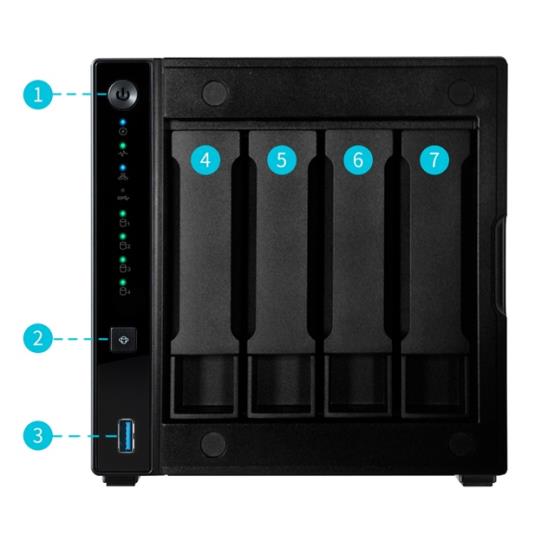
ASUSTOR's exact hardware specification lists four native bays for 3.5-inch SATA hard drives or 2.5-inch SATA hard drives and solid-state drives. Four native positions create room for a larger layout than a two-bay box; bay count alone does not establish usable capacity. The 72 TB raw example uses four 18 TB disks; it is not a usable-capacity or drive-compatibility promise. ASUSTOR separately describes expansion to sixteen total bays with an expansion unit; those are not sixteen positions inside this box, and the add-on is not in the standard package list.
The specification lists 3.5-inch SATA HDDs and 2.5-inch SATA HDDs or SSDs; the English guide directs buyers to its compatibility selector. I did not find a complete disk-model and firmware approval tuple for this review. Check the exact drive model, firmware and any intended mixed-drive arrangement before ordering. A disk that physically fits is not automatically an approved configuration.
A two-drive mirror can leave two positions open
The model's specification lists RAID 1, and ASUSTOR's calculator includes the AS3304T v2 and states that a single RAID 1 volume supports at most two drives. That supports a practical owner-created plan: select two compatible drives, initialize the device and make a two-drive mirror. The mirror uses two of the four native bays, leaving the other two trays physically open for a later plan. The standard configuration is not supplied with a populated array, and this assessment does not claim that a seller will install or initialize anything.
Other RAID levels appear in the manufacturer material, but a buyer should not treat them as interchangeable with a two-disk mirror. Choose a layout for the data, expansion plan and failure tolerance you can actually support. The guide warns that initialization erases data on the disks, so back up first. RAID can keep a volume available through some drive failures; it cannot protect against deletion, theft, malware, chassis loss or a failed backup. Btrfs snapshots are also on-device features, not an independent recovery copy. Keep a separate backup and check that you can restore it.
One 2.5GbE port is one link, not a speed test
The listed network interface is one built-in 2.5G/1G/100M Ethernet port. It is enough to meet a 2.5-Gbps individual-port requirement, but it is not two ports to combine, and it does not prove a 2.5-Gbps file copy. The router or switch, client adapter, cable, disks, file protocol and workload all have to support the desired path. If every client and network component is gigabit, the NAS port rating cannot make that path multi-gigabit. No transfer benchmark was conducted here.
Fixed memory and app choices deserve a check
The v2 specification identifies a Realtek RTD1619B quad-core processor at 1.7 GHz and 2 GB DDR4 memory that is not expandable. These are useful identity and upgradeability facts, not a performance comparison. Evaluate the published file, backup and snapshot services against your intended workload; I did not install ADM or benchmark applications on a unit. If a particular package, filesystem, camera workflow or number of simultaneous services is essential, confirm current support for this exact model before buying. The source excerpts differ on whether the minimum ADM release is 4.1 or 4.2 onward, and the PDF body was not retrievable in this cycle, so I leave that version question unresolved rather than choosing one number.
Package contents and physical setup
The standard manufacturer list names the NAS, quick guide, AC cord and adapter, Cat 5e network cable, sixteen screws for 2.5-inch drives and a power-cord bracket. It does not list data drives. A retailer may create a different bundle, but I did not verify one; read the item-specific contents carefully. ASUSTOR lists a 90 W adapter, a 170 × 174 × 230 mm chassis (height × width × depth), and 2.2 kg weight. Its figures of 25.1 W during operation, 8.4 W with disks hibernating and 19.7 dB with HDDs idle are manufacturer reference values, not measurements in a room with your drives. The guide calls for an ambient range of 0–40 °C and unobstructed ventilation, so leave space around the enclosure rather than planning a sealed shelf.
Which similar ASUSTOR model is the relevant comparison?
The AS3302T v2 shares the v2 family identity and listed 2.5GbE connection, but it has two native bays rather than four. It is the more direct comparison if the real choice is a compact two-disk mirror versus room for more drives. The original AS1104T is also a four-bay 2.5GbE reference, but its reviewed profile has fixed 1 GB memory. The AS1204T is another four-bay candidate, likewise with fixed 1 GB memory in its evidence record. Compare those exact configurations rather than assuming a “4” in a name establishes the same hardware generation or package.
What I would confirm before choosing it
First, check that an offer literally identifies AS3304T v2 and distinguish it from AS3304T without the suffix. The manufacturer marks the v2 model Generally Available and Supported, but this does not prove a live U.S. offer, seller stock, a particular retail SKU or seller warranty. Second, confirm the exact drive models and firmware in ASUSTOR's current compatibility selector, decide which storage layout you will build, and arrange a separate backup before initialization. Third, verify the whole Ethernet path if 2.5GbE is a requirement. The evidence supports a four-bay desktop NAS with a 2.5GbE link and owner-configured RAID choices; it does not support a promise of a particular throughput, usable capacity, included drives or tested application performance.
Key specifications
Key details at a glance
| Internal drive bays | 4 bays |
|---|---|
| Documented internal drive media | 3.5-inch SATA HDD / 2.5-inch SATA HDD / 2.5-inch SATA SSD |
| Built-in Ethernet ports | 1 x built-in 2.5-Gigabit Ethernet (2.5G/1G/100M) |
| Fastest individual Ethernet port | 2.5 Gbps |
| Installed system memory | 2 GB |
| Maximum listed memory | 2 GB |
| Listed storage arrangements | Single / JBOD / RAID 0 / RAID 1 / RAID 5 / RAID 6 / RAID 10 |
| Internal file systems | EXT4 / Btrfs |
| USB 3.2 Gen 1 ports | 3 |
| Dimensions (H × W × D) | 170 x 174 x 230 mm (H x W x D) |
| Weight | 2.2 kg |
| Manufacturer's idle noise figure | 19.7 dB(A) |
| Hardware warranty | 3 years |
| Data drives included in listed package | No |
| Processor | Realtek RTD1619B |
| CPU cores | 4 |
| Installed memory type | 2 GB DDR4; ASUSTOR lists memory as not expandable. |
Use the exact model’s instructions for operating limits, supplied equipment and version differences.
Sources for this review
Sources for this assessment
- ASUSTOR AS3304T v2 hardware and software specification
- ASUSTOR AS3304T v2 English datasheet page
- ASUSTOR AS3304T v2 package contents
- ASUSTOR AS3302T v2 / AS3304T v2 quick installation guide, English Ver. 4.2.3.0816
- ASUSTOR product support status table
- ASUSTOR NAS RAID calculator
- ASUSTOR NAS drive compatibility selector
- ASUSTOR product support timeframe policy and product list
- ASUSTOR Home/SOHO NAS directory observed model label
- ASUSTOR original non-v2 AS3304T specification, distinction only
- ASUSTOR AS3304T v2 English datasheet PDF, direct retrieval attempt
Check your setup before choosing a NAS
Use the finder to check bay count, the network link you need, and whether a documented two-drive redundant arrangement is essential.