
Your needs, this model
Does it fit your priorities?
Can the F6-424 meet a six-bay floor and a 2.5Gbps single-port minimum with a two-drive mirror?
The exact model page lists six native SATA positions, two separate 2.5GbE ports and RAID 1 support. One possible owner-created plan uses two individually compatible SATA drives in RAID 1 and one individual 2.5GbE port; it occupies two bays and leaves four open. The manufacturer package list does not list data drives or an initialized array. Check both exact drive models and the rest of the network path, and keep a separate backup.
Explore this need in the finder →Do the two M.2 sockets make this an eight-bay NAS?
No. The exact specification counts six SATA trays and lists two additional M.2 2280 NVMe sockets for caching. The questionnaire counts six native bays; it does not add the cache sockets or an external shelf. Confirm the exact SSD model in TerraMaster's current compatibility list.
Explore this need in the finder →Does the F6-424 provide a single 5GbE or 10GbE port?
No. It has two individual 2.5GbE ports. The manufacturer's link-aggregation claim is up to 5Gbps across the links, not one 5GbE port and not a guaranteed client transfer rate. A 10Gbps single-port minimum therefore rules it out; consider a different reviewed model with a documented single 10GbE interface and matching network equipment.
Explore this need in the finder →Is 132TB the settled drive-capacity limit?
The product page states 132TB raw as six 22TB drives and says the figure may change as new hard drives are released. TerraMaster's current exact-model compatibility table lists Seagate ST32000NT000 (32TB) and ST30000NT011 (30TB) as Recommended for F6-424. A drive row does not prove that six of the same model form a supported simultaneous array, or establish usable capacity. Because no current maximum follows from the evidence, this assessment leaves raw and usable capacity unset; verify each drive model and firmware.
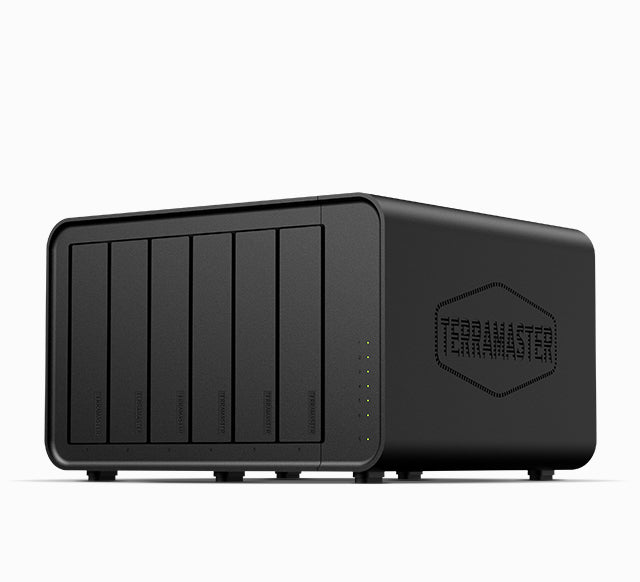
Explore this need in the finder →The F6-424 is a six-tray desktop NAS built around Intel’s N95, 8GB of DDR5 memory and two built-in 2.5GbE ports. Its appeal is the straightforward combination of six native SATA positions and a documented RAID 1 option; the trade-off is that its network ceiling is far below a true 10GbE single-port design. This is a source-based assessment of TerraMaster’s listed configuration, not a hands-on test or a claim about what a particular seller currently ships.
Count the six SATA trays—not every socket
TerraMaster lists six positions for 3.5-inch SATA hard drives, 2.5-inch SATA hard drives or 2.5-inch SATA SSDs. Separately, it specifies two M.2 2280 NVMe sockets on PCIe 3.0 x1 and describes them for SSD caching. They are not two more hot-swap trays, so this is a six-bay NAS for the finder and not an eight-bay system. The maker’s current NVMe compatibility page is useful for checking an exact module, but it does not certify every SSD or an assumed all-slots-at-once combination.
The listed processor is an Intel N95 four-core/four-thread part, with 8GB DDR5 non-ECC memory in one SODIMM slot and a stated 32GB maximum. Upgrading to that ceiling means replacing the installed module; the page does not establish a specific third-party module or guarantee that a retailer’s bundle uses the same memory. For a modest shared-storage machine, this is a clear starting specification, but buyers planning many memory-hungry services should confirm the exact unit and workload before choosing it.
A mirror is possible, but the owner must create it
The exact specification lists RAID 1 as well as RAID 0, 5, 6, 10, JBOD, Single, TRAID and TRAID+. One concrete two-drive plan is to install two compatible SATA drives and create a RAID 1 array, leaving four of the six positions open. That is a documented capability and a possible owner setup—not evidence of an included pair of drives or an initialized volume. TerraMaster’s TOS storage guide describes creating storage pools and volumes as operator actions.
Choose both drive model numbers against the manufacturer’s current compatibility table, and treat changes to firmware and drive support as a reason to recheck. Mirroring can keep a service available after a drive failure, but it does not protect against deletion, malware, theft or damage to the NAS. Keep a separate backup and plan for initialization before moving data. The base package list names the enclosure, power accessories, one network cable, a guide, warranty note and screws; it does not list data drives. A seller’s bundle can differ, so verify the exact listing’s package rather than assuming the manufacturer’s base box matches it.
Dual 2.5GbE is not a 5GbE port
The F6-424 has two separate 2.5GbE RJ45 jacks and no built-in 10GbE jack or SFP+ port in the listed specification. TerraMaster’s page describes link aggregation up to 5Gbps across both links, which is not a 5Gbps individual interface and does not promise that one computer or one file transfer will reach that sum. A faster path depends on the client, switch, cabling, storage arrangement and workload as well as the NAS.
If your requirement is simply one 2.5Gbps-capable port, its two interfaces can meet that documented link-rate screen. If you require a single 10GbE port, the F6-424 does not qualify—even though its name resembles the separate F6-424 Max. Compare the exact reviewed configurations rather than borrowing a sibling’s port rating.
Keep the headline capacity in perspective
The product page states 132TB raw as six 22TB drives and cautions that RAID changes capacity. TerraMaster’s current HDD table now includes 32TB ST32000NT000 and 30TB ST30000NT011 rows marked Recommended for F6-424, as well as smaller examples. That conflicts with treating the 132TB figure as a settled current ceiling. The table does not establish that six of one drive model form a supported simultaneous array or what usable space would result, so this assessment leaves the maximum raw and usable capacity unset. Usable space also depends on the selected drive models, RAID or other array layout and filesystem overhead. Check every exact drive and firmware against the current list; do not interpret a raw arithmetic total as an empty volume size.
The specification also names Btrfs and EXT4 for internal drives, two 10Gbps USB host ports (one Type-A and one Type-C), HDMI 2.0b, hot-swap support, two 92mm fans and a single 150W power supply. Its 154 × 240 × 222mm dimensions are the manufacturer’s chassis figures, not an allowance for cable bends, airflow or the clearance needed to remove trays. Make room for those practical access needs rather than treating the enclosure dimensions as a complete shelf plan.
How much weight to give the noise and speed claims
TerraMaster lists 22dB(A) with M.2 SSDs in standby, a 17.3dB(A) test-environment baseline and a one-metre distance. That is a narrow manufacturer condition, not a general reading for six spinning disks during activity or a guarantee for a room. Likewise, the product page’s throughput copy describes a particular RAID 0 drive setup; it is not a test of this assessment and should not be used as a prediction for a different network and disk set.
Who should shortlist it?
Consider the F6-424 when six native SATA positions matter more than a 10GbE connection, you can supply and verify your own compatible drives, and a 2.5GbE link suits the rest of your wired network. The six trays leave room for a staged build: a two-drive mirror can start the array while four bays stay available, but filling them later means planning a supported expansion path and backup routine, not assuming any RAID conversion is risk-free.
Pass if you need a built-in single 10GbE link, redundant power supplies, or proof that a specific high-capacity drive set is supported without checking the current list. Two M.2 sockets may help a cache-oriented plan, but they do not make this an all-flash six-bay design. Before purchase, confirm the exact model name (not F6-424 Max), base versus seller-added package, chosen drive models, memory version, physical access space, warranty channel and the network equipment that will connect to it. No current offer, price, stock or seller-specific bundle is claimed here.
Key specifications
Key details at a glance
| Internal drive bays | 6 bays |
|---|---|
| Documented internal drive media | 3.5-inch SATA HDD / 2.5-inch SATA HDD / 2.5-inch SATA SSD |
| Built-in Ethernet ports | 2 x built-in individual RJ45 2.5GbE ports |
| Fastest individual Ethernet port | 2.5 Gbps |
| Installed system memory | 8 GB |
| Maximum listed memory | 32 GB |
| Listed storage arrangements | Single / JBOD / RAID 0 / RAID 1 / RAID 5 / RAID 6 / RAID 10 / TRAID / TRAID+ |
| Internal file systems | Btrfs / EXT4 |
| Dimensions (H × W × D) | [154, 240, 222] |
| Weight | 2.7 kg |
| Data drives included in listed package | No |
| M.2 NVMe slots | 2 |
| Processor | Intel N95 |
| CPU cores | 4 |
| CPU threads | 4 |
| Installed memory type | DDR5 4800MHz non-ECC SODIMM |
Use the exact model’s instructions for operating limits, supplied equipment and version differences.
Sources for this review
Sources for this assessment
- TerraMaster U.S.-facing F6-424 product page
- TerraMaster official F6-424 product-handle JSON
- TerraMaster current NAS hard-drive compatibility table
- TerraMaster current M.2 NVMe compatibility table
- TerraMaster TOS 7 Storage Pool help page
- TerraMaster Home/SOHO NAS directory, rechecked saved F6-424 observation
- TerraMaster F6-424 documentation index
- Official F6-424 exterior image associated with exact product handle

Check your setup before choosing a NAS
Use the finder to check bay count, the network link you need, and whether a documented two-drive redundant arrangement is essential.