
Your needs, this model
Does it fit your priorities?
Does the F6-424 Max meet a six-bay floor and a 10-Gbps single-port requirement?
Yes on the documented base hardware: the exact F6-424 Max specification lists six native SATA positions and two separate built-in RJ45 10GbE ports. This finder evaluates one port rating, not a combined 20-Gbps pipe or a guaranteed file-copy rate; a 10GbE switch, client interface, cabling and storage path still need to line up.
Explore this need in the finder →Can a two-drive mirror coexist with the six-bay and 10-GbE setup?
The exact model page lists RAID 1. One possible owner-created plan uses two buyer-selected compatible SATA drives in two of six trays, leaving four open, while one built-in 10GbE port serves the single-port requirement. The manufacturer package reference lists no data drives or prepared volume. Verify the exact drive and firmware list, back up before initializing a volume, and maintain a separate backup because RAID 1 is not one.
Explore this need in the finder →What numeric limits rule out the F6-424 Max?
A seven-native-bay minimum exceeds its six SATA trays; the two M.2 NVMe cache sockets do not count as trays. A 10.5-Gbps minimum for one built-in port exceeds its 10-GbE port rating even though it has two such ports. A six-bay and 10-Gbps request is the exact supported boundary, not a throughput guarantee.
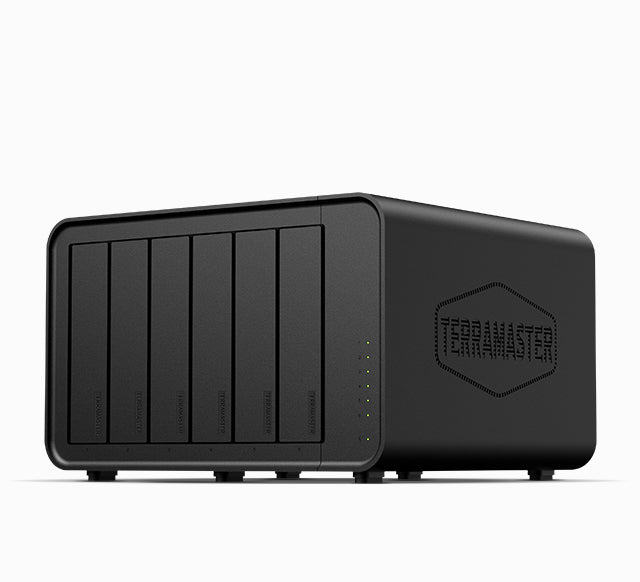
Explore this need in the finder →The TerraMaster F6-424 Max is a six-position hybrid NAS built around six SATA trays, two separate M.2 NVMe cache sockets and two individual 10GbE RJ45 ports. Its strongest case is specific: a buyer who can use a wired 10-Gigabit path and wants six native SATA positions in one desktop enclosure. It is not automatically a better storage plan just because its ports carry a higher nominal rate. This is a documentation-based assessment, not a hands-on test.
Six native SATA positions, plus separate cache sockets
The model specification lists six hot-swappable 3.5-inch SATA HDD, 2.5-inch SATA HDD or 2.5-inch SATA SSD positions. It also lists two M.2 2280 NVMe sockets on PCIe 4.0 x4 and describes SSD caching. Those are separate resources: the M.2 sockets do not turn the NAS into an eight-bay SATA chassis, and their cache use is not a substitute for data-drive compatibility checks. The product page says PCIe expansion slots are absent, so the built-in two-port 10GbE arrangement is the network choice to evaluate rather than an assumption that an add-in card can change it.
TerraMaster's exact specification states 132 TB of raw storage as six 22-TB drives, but its current hard-drive compatibility table lists some 24-TB drive models for F6-424 Max. Those manufacturer references disagree about the highest capacity figure. I therefore treat 132 TB as a dated stated configuration, not a confirmed current ceiling, and do not infer a usable RAID capacity. Check the exact drive model and firmware against the current compatibility table before ordering; RAID layout, filesystems and drive revisions affect what a real volume can use.
When dual 10GbE is useful—and when it is just extra hardware
The chassis has two built-in RJ45 ports, each specified at 10GbE. A finder request for one 10-Gbps port can therefore match on one connector; the pair is not counted as a single 20-Gbps port. TerraMaster describes link aggregation, SMB Multichannel and high transfer figures, but those are not a promise that an individual workstation will copy files at a particular speed. A switch, client NIC, cable, negotiated link, storage layout, protocol and workload all sit between the port label and actual transfers. If the rest of the home network is only Gigabit or 2.5GbE, choose the NAS for other needs rather than assuming the faster port upgrades the whole network on its own.
The manufacturer page also lists an Intel Core i5-1235U, 10 cores and up to 4.4 GHz burst, but component specifications cannot settle whether a particular media, VM, database or backup workload will perform well. The source page's advertised throughput figures are manufacturer claims under specified setups, not results from this assessment.
A possible two-drive mirror is an owner-created setup
RAID 1 appears in the exact model's supported RAID list. One documented possible arrangement is a buyer-created pair of compatible SATA drives in RAID 1, using two of the six trays and leaving four native positions open. One built-in 10GbE port can coexist with that storage plan. The manufacturer's package reference lists the NAS, an adapter, power cord, one RJ45 cable, a quick guide, warranty note and screws; it does not list data drives or a prepared volume. Confirm the actual seller package and inspect the selected drives' exact compatibility before setup.
Creating a storage pool or volume can erase disks, so preserve data and verify migrations first. A mirror may keep a service available after some single-drive failures, but it does not protect against mistaken deletion, malware, theft, fire, a failed NAS or a shared power event. Snapshots and the listed backup utilities can be part of an architecture; maintain a separate recoverable copy and test the restore path.
Resolve the package, memory and space questions before buying
There is a meaningful manufacturer-description conflict: the exact product specification says 8 GB of non-ECC DDR5 in one SODIMM, two memory slots and support up to 64 GB. The Home/SOHO collection card describes the F6-424 Max as having 16 GB. The page exposes one default product variant rather than a separate 16-GB configuration, so I do not silently treat those values as interchangeable. Verify the exact model, SKU and delivered memory with the seller; neither description makes a particular third-party package certain.
The manufacturer lists the chassis at 154 × 240 × 220 mm (height × width × depth), net weight 2.7 kg, two 92-mm fans and a 150-W adapter. Measure the shelf or cabinet with room for air movement, cable bends and drive servicing; stated chassis dimensions do not include the clearance your installation needs. The exact page listed the item as out of stock when checked. That is not a prediction of later availability or a promise about a retailer's offer. Confirm condition, return rights, the adapter and every included component on the actual listing.
Who should shortlist it
Shortlist the F6-424 Max when six native SATA positions and a real 10GbE network path are both deliberate requirements, and you are prepared to select compatible drives and make your own backup plan. Its six-bay count and 10-GbE rating are a hard boundary: a seven-bay minimum or a 10.5-Gbps single-port floor exceeds the published base hardware. The two cache sockets do not change that answer, nor do two Ethernet ports make one faster port.
Skip the extra network capability if no part of your setup can use it, and look for a different bay count if six trays do not meet the growth plan. Before committing, reconcile the memory description, capacity references, current drive list and exact seller package. This review does not establish stock, price, hands-on noise, real-world throughput or the contents of a particular shipment.
Key specifications
Key details at a glance
| Internal drive bays | 6 bays |
|---|---|
| Documented internal drive media | 3.5-inch SATA HDD / 2.5-inch SATA HDD / 2.5-inch SATA SSD |
| Built-in Ethernet ports | 2 x built-in individual RJ45 10GbE ports |
| Fastest individual Ethernet port | 10 Gbps |
| Installed system memory | 8 GB |
| Maximum listed memory | 64 GB |
| Listed storage arrangements | TRAID / TRAID+ / Single / JBOD / RAID 0 / RAID 1 / RAID 5 / RAID 6 / RAID 10 |
| Dimensions (H × W × D) | 154 x 240 x 220 mm (H x W x D) |
| Weight | 2.7 kg |
| Data drives included in listed package | No |
| M.2 NVMe slots | 2 |
| Processor | Intel Core i5-1235U |
| CPU cores | 10 |
| Installed memory type | 8 GB DDR5 non-ECC SODIMM listed on the exact product page as one pre-installed 8-GB module |
Use the exact model’s instructions for operating limits, supplied equipment and version differences.
Sources for this review
Sources for this assessment

Check your setup before choosing a NAS
Use the finder to check bay count, the network link you need, and whether a documented two-drive redundant arrangement is essential.