
Your needs, this model
Does it fit your priorities?
What counts as twelve bays on the TVS-h1277AX-R5-16G-US, and what fits in each group?
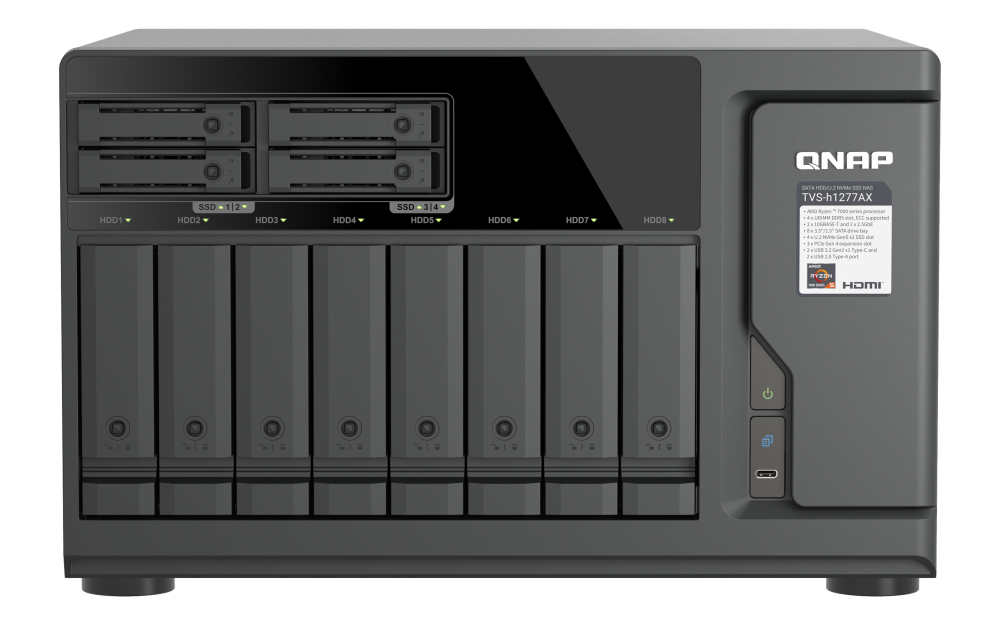
The exact U.S. selector lists eight 3.5-inch SATA positions plus four separate 2.5-inch U.2 NVMe Gen 4 x2 positions. The large bays are listed for SATA HDDs or SATA SSDs; the smaller positions require U.2 NVMe PCIe Gen 4 or Gen 5 drives. QNAP's exact drive/firmware compatibility rows were not verified. U.2 drives must already be installed at power-on for hot swap after startup. A 12-bay threshold counts positions, not interchangeable media, installed drives or usable capacity.
Explore this need in the finder →Does the built-in network meet a 10-Gbps single-port floor?
Yes. The exact profile lists two built-in 10GBASE-T ports, so an individual port meets a 10-Gbps link-rating threshold. The next configured half-step, 10.5 Gbps, is above the fastest built-in port. Optional 25GbE needs a separate compatible adapter. Two ports are not one faster link and line rate is not measured file throughput.
Explore this need in the finder →Can one of its supported software choices be set up with a two-drive mirror?
QNAP's exact QTS and QuTS hero specification tables each list RAID 1 for this 12-position model, and setup guidance leaves disk and RAID selection to the administrator. Choose one OS and two separately selected compatible SATA drives in the eight large bays, then create the mirror. Neither the official package list nor the selector indicates a factory-created array or included data drives. An exact compatible-drive row was not verified; RAID is not an independent backup.
Explore this need in the finder →Does including earlier NAS models change this current-reference assessment?
No. The current QNAP U.S. family page and the exact U.S. Official Store title identify the TVS-h1277AX R5-16G profile as the reviewed reference. The history toggle does not alter its twelve mixed SATA/U.2 positions, 10-Gbps built-in-port rating or owner-created RAID requirement. A model reference does not establish a seller's current stock or package additions.
Explore this need in the finder →The QNAP TVS-h1277AX-R5-16G-US is a desktop tower with eight 3.5-inch SATA bays and four U.2 NVMe positions. The exact U.S. R5-16G profile lists 16 GB DDR5, dual 10GBASE-T and dual 2.5GbE. It may suit a system mixing a SATA pool with an NVMe tier, but twelve positions here are not equivalent trays. Media and installation details matter as much as the count.
Count the positions, then sort drives by interface
The eight large SATA bays accept 3.5-inch SATA HDDs or 2.5-inch SATA SSDs; the four 2.5-inch U.2 NVMe Gen 4 x2 positions are specified for PCIe Gen 4 or Gen 5 drives, not ordinary SATA trays. Inventory drives separately by position type: a matching connector alone does not prove compatibility.
QNAP's TVS-h1277AX compatibility listing includes exact model-and-firmware rows for 3.5-inch SATA HDDs, SATA SSDs and U.2/U.3 SSDs. In the 5 November 2026 list I checked, examples include Seagate ST32000NT000 (EN02), Solidigm SSDSC2KB480GZ (7CV10130) and SanDisk SDS6BA176PSP9X1 (RH11000Y); these are source examples, not a ranking or a guarantee about a seller bundle. Check the live QNAP Compatibility List for the exact intended model and firmware before ordering. QNAP warns that firmware may not appear on retail packaging and advises updating through the drive maker's utility before installation. Its U.2 note says an SSD must be installed before power-on for hot-swap after startup; a drive added later requires shutdown before replacement. This matters if maintenance assumes every position is swappable while running.
The twelve-position tally is a floor, not a capacity estimate: usable space depends on drive sizes, filesystem, RAID, snapshots and spare policy. Expansion does not change the native count. See the bay-count guide for the distinction.
Strong built-in networking, with an optional 25GbE path
The table lists two 10GBASE-T and two 2.5GbE ports, so one built-in port clears 10 Gbps but not 10.5 Gbps. QNAP lists 25GbE only as optional through an adapter. Three PCIe Gen 4 slots have conditional widths and card-size limits; check the exact card, peer, cabling and other expansion before relying on that route.
Link rate is not file-transfer speed: client, switch or direct path, cable, protocol, drives, pool design and workload all matter. QNAP's lab example uses 64 GB RAM and three optional 25GbE adapters, so it is not a base-profile result or an independent test. See the network-path guide for the whole link.
Two OS choices, but only one selected storage plan
The exact selector presents QTS 6.1.0 with EXT4 and QuTS hero h6.1.0 with ZFS as separate alternatives. Each software table lists RAID 1 on an eight-bay-and-larger model such as this one. QNAP's setup instructions describe choosing disks and a RAID type during storage-pool creation, so the practical two-drive mirror is an owner-created plan, not a factory configured array. The example in this assessment uses two compatible SATA drives selected for two of the eight large bays. Check each intended drive's exact model and firmware in QNAP's live list, then configure the mirror yourself.
A two-drive mirror only addresses the failure mode its RAID design covers. It does not replace a second backup with an independent recovery path, and the extra positions do not make a mirror more than a two-member arrangement. Decide between QTS and QuTS hero before designing the final storage configuration; do not combine their file systems or assume the system will arrive with a pool. See why RAID is not backup for the recovery trade-offs.
Hardware fit and installation details
The selector lists a six-core/12-thread Ryzen 5 7000-series processor with a 5.1-GHz burst ceiling and 16 GB DDR5. QNAP's feature copy adds “PRO” to the series name; neither source gives a verified fuller part number. Four memory slots and 192 GB maximum are listed, with optional ECC and identical modules required in dual-DIMM configurations. Check supported upgrades rather than treating the ceiling as a kit recommendation.
The tower measures 8.87 × 14.56 × 12.59 inches (H × W × D), weighs 24.21 lb net and has one 500 W supply. Allow space for cooling, cabling and tray access. It is not a rack NAS despite the similar name of the TS-h1277AFX, whose twelve-position SATA SSD layout differs.
Package limits and who should shortlist it
The package table lists a 10GBASE-T cable, power cord, screws, tray keys and Quick Installation Guide, but not data drives. The U.S. Store title bridges the R5-16G selector to the -US SKU, which also appears in the SMB Desktop catalog. This proves identity, not current offer state or merchant additions. Check order-line contents; QNAP lists a five-year standard warranty whose channel terms should be confirmed.
Shortlist it when eight SATA bays, four separate U.2 positions and built-in 10GbE suit a real tower design. It is less suitable if you expect twelve uniform HDD trays, included disks, a prebuilt mirror, built-in 25GbE or an effortless U.2 swap after boot. Drive choices, OS, network path and seller package remain checks. This is source-based analysis, not a report of hands-on use, independent testing, measured results, included drives or current offer status.
Key specifications
Key details at a glance
| Internal drive bays | 12 bays |
|---|---|
| Documented internal drive media | 3.5-inch SATA hard disk drives in the eight large bays / 2.5-inch SATA solid state drives in the eight large bays / 2.5-inch U.2 NVMe SSDs using PCIe Gen 4 or Gen 5 in the four U.2 positions |
| Built-in Ethernet ports | 2 x built-in 10GBASE-T RJ45 / 2 x built-in 2.5GbE RJ45 |
| Fastest individual Ethernet port | 10 Gbps |
| Installed system memory | 16 GB |
| Maximum listed memory | 192 GB |
| Listed storage arrangements | QTS: RAID 1 using two selected compatible drives / QuTS hero: RAID 1 using two selected compatible drives |
| Internal file systems | EXT4 (QTS alternative) / ZFS (QuTS hero alternative) |
| Hardware warranty | 5 years |
| Data drives included in listed package | No |
| Processor | AMD Ryzen 5 PRO 7000 series (product page); AMD Ryzen 5 7000 series (hardware selector) |
| CPU cores | 6 |
| CPU threads | 12 |
| Installed memory type | 16 GB UDIMM DDR5 |
Use the exact model’s instructions for operating limits, supplied equipment and version differences.
Sources for this review
Sources for this assessment
- TVS-h1277AX — QNAP U.S. product page
- TVS-h1277AX R5-16G hardware specification — QNAP U.S.
- TVS-h1277AX QTS and QuTS hero specification tabs — QNAP U.S.
- TVS-h1277AX package contents — QNAP U.S.
- TVS-h1277AX-R5-16G-US — QNAP U.S. Official Store
- SMB Desktop category page 1 — QNAP U.S. Official Store
- QNAP Compatibility List filtered to TVS-h1277AX
- Getting started with NAS storage — QNAP U.S.
- QNAP U.S. Download Center filtered to TVS-h1277AX
- TVS-h1277AX front image — QNAP U.S. product page
- TVS-h1277AX drive compatibility rows — QNAP official compatibility data
- Compatibility List — QNAP official guidance
- TVS-h1277AX current product, hardware and software selector observations — QNAP

Check your setup before choosing a NAS
Use the finder to narrow documented desk/shelf or rack formats, internal-bay minimums, a single Ethernet-port rating and optional redundancy requirements.