
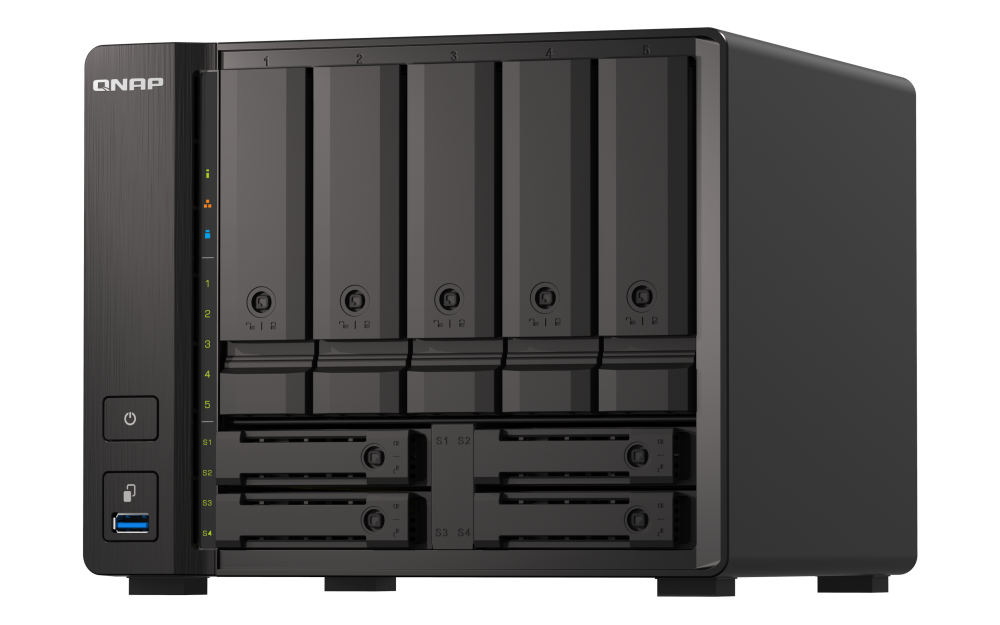
Your needs, this model
Does it fit your priorities?
Does the TS-h973AX-8G-US have nine native drive positions?
QNAP lists five 3.5-inch SATA positions plus four 2.5-inch positions. The 2.5-inch bays 1 and 2 accept U.2 NVMe or SATA SSDs, while U.2 drives must not go in the other positions. M.2 adapters do not create additional native bays. The 8G selector and older guide differ on 2.5-inch SATA HDD support, so check the exact drive against QNAP's current compatibility list.
Explore this need in the finder →Is there one built-in 10GbE port on the 8G package?
Yes. QNAP lists one 10GBASE-T port that can negotiate 10, 5, 2.5, 1 or 0.1Gbps, alongside two separate 2.5GbE ports. The 10GbE figure is one port's link rating; the switch, client, cable, drives and workload determine the real path.
Explore this need in the finder →Can the 8G profile support a two-drive mirror?
The TS-h973AX QuTS hero guide describes RAID 1 with two member drives and one-member failure support. You choose compatible drives and create the pool; QNAP says the NAS ships without HDD/SSD, and the package is not a preconfigured mirror. Keep an independent backup because RAID does not protect the whole appliance or deleted files.
Explore this need in the finder →QNAP · nine-position hybrid tower NAS · source-based assessment
The TS-h973AX-8G-US is the lower-memory U.S. package in QNAP’s nine-position TS-h973AX tower family. QNAP’s product page, rendered configuration selector, English-U.S. user guide and exact Store item support the identity and the central trade-offs described here. This is a document-based assessment, not a hands-on review: no device was tested, measured or owned, and no current stock, price, seller bundle or customer experience is claimed.
Nine physical positions, but not nine interchangeable drives
QNAP describes five 3.5-inch SATA positions and four smaller 2.5-inch positions. This is a native-position count, not capacity; sockets, cards and shelves do not add bays. The rendered 8G selector lists 3.5-inch SATA hard drives, 2.5-inch SATA SSDs and U.2 NVMe SSDs in 2.5-inch bays 1 and 2. It does not list 2.5-inch SATA hard drives in the 8G profile’s media rows. The 32G selector does list those HDDs, while the older model guide also lists them more broadly. That documentary mismatch matters if you plan to reuse a 2.5-inch drive. Check the exact model, capacity, firmware and position in QNAP’s current compatibility data before buying; the broad bay count does not certify any particular drive.
U.2 support is position-specific: QNAP restricts those drives to the first two 2.5-inch bays. The user guide and product description distinguish U.2 from SATA media, so do not assume an NVMe drive fits every smaller tray or that all four positions can serve the same role. QNAP’s specification identifies the NAS as diskless. Its manual package table lists the appliance, external power adapter, power cord, a Cat6a cable, tray keys, screws and a quick guide, but that does not verify a seller’s specific box or add data drives.
One 10GbE port is different from a fast measured transfer
The built-in network layout is one individual 10GBASE-T port plus two separate 2.5GbE ports. The 10GbE label is one interface’s nominal link capability, not a measured file-copy rate; the slower ports do not add up to one 15Gbps port. For a 10GbE path, the switch, client, cable, negotiated link, storage pool and workload all matter. The manufacturer’s advertised performance claims are not used as independent test results.
For a buyer whose stated floor is nine bays and one 10GbE port, the model clears both documented numeric thresholds. A ten-bay floor or a requirement above 10Gbps on one port excludes it. These are questionnaire thresholds, not claims about how much usable capacity or throughput a particular build will deliver. Use the finder with the same nine-bay and 10Gbps single-port floors, then verify the rest of the path before purchase.
Eight gigabytes is a meaningful configuration difference
The exact Store listing identifies the TS-h973AX-8G-US profile; QNAP’s current rendered selector lists 8GB of non-ECC DDR4 SODIMM memory, two slots and a 64GB maximum. QNAP also says named memory-intensive applications need at least 16GB and points buyers to the 32G profile or an upgrade to at least 16GB. Thus this package’s 8GB as supplied is below that stated threshold. It is not an appropriate shortcut to assume that every virtualization, indexing, surveillance or synchronization workload will be well served at 8GB. If those named applications are central, compare the distinct 32G assessment or verify an exact supported memory path first.
There is a real source conflict to carry forward: the current selector lists a 64GB maximum (two 32GB modules), whereas the English-U.S. User Guide v2 states 32GB maximum (two 16GB modules). Neither source establishes a specific upgrade kit for every shipped revision. Confirm the board revision, current firmware and supported module with QNAP before budgeting an upgrade; do not treat the selector maximum as a guarantee about a particular seller’s unit.
Choose one operating system, and create any mirror yourself
QNAP documents QuTS hero with ZFS as the primary system and QTS as an alternative. They are distinct installation choices, not simultaneous filesystems. The model guide warns that installing or changing the operating system erases drive data, so settle the intended OS before initializing drives and follow the current migration instructions. The guide documents QuTS hero RAID 1 with two member drives and one-drive failure tolerance. A buyer can choose two currently compatible 3.5-inch SATA drives and create that mirror, but the device ships without data drives and no prebuilt array is established. A mirror still does not protect against deletion, malware, theft, appliance failure or a bad backup; keep an independent recovery copy.
Here is the same finder screen with nine bays, one 10GbE port and a required two-drive arrangement. “Required redundancy” describes an available owner-created plan, not included disks or a configured pool.
Physical and package details need revision-level confirmation
The rendered current selector gives dimensions of 6.95 × 8.84 × 8.82 inches and a net weight of 9.57 pounds, with a foot-pad qualification. User Guide v2 instead lists 7.19 × 8.84 × 8.82 inches and 7.76 pounds. These are manufacturer-document values, not measurements made for this review; establish the exact revision, footprint, ventilation clearance and carrying weight with QNAP before committing shelf or desk space. The guide’s standard box list is useful, but does not prove a retailer’s contents, installed storage, warranty or included accessories for an individual offer.
The nine-bay/10GbE combination makes this a specialized comparison candidate, not an automatic recommendation. Confirm exact drive fit, the 8GB workload requirement, OS and pool plan, network endpoints, revision and written seller BOM. Primary references are QNAP’s product page, current U.S. selector and User Guide v2; conflicts remain visible rather than guessed.
Key specifications
Key details at a glance
| Internal drive bays | 9 bays |
|---|---|
| Documented internal drive media | 3.5-inch SATA HDD / 2.5-inch SATA SSD / 2.5-inch U.2 NVMe PCIe Gen3 x4 SSD in 2.5-inch bay 1 or 2 |
| Built-in Ethernet ports | 1 x built-in 10GBASE-T RJ45 individual multi-gig port (10/5/2.5/1/0.1 Gbps) / 2 x built-in individual 2.5GbE RJ45 ports |
| Fastest individual Ethernet port | 10 Gbps |
| Installed system memory | 8 GB |
| Listed storage arrangements | QuTS hero: RAID 1 (two owner-selected compatible drives; owner-created) |
| Internal file systems | QuTS hero: ZFS / QTS: EXT4 (alternative OS; not combined with QuTS hero in one setup) |
| Data drives included in listed package | No |
| System drives included (not data-bay drives) | |
| Processor | AMD Ryzen Embedded V1500B |
| CPU cores | 4 |
| CPU threads | 8 |
| Installed memory type | 8GB DDR4 non-ECC SODIMM as listed for the TS-h973AX-8G ordering profile |
Use the exact model’s instructions for operating limits, supplied equipment and version differences.
Sources for this review
Sources for this assessment
- TS-h973AX U.S. product page — QNAP
- Rendered TS-h973AX U.S. software selector — QNAP
- TS-h973AX User Guide v2, English U.S. — QNAP
- QNAP-branded 9–16 Bay desktop NAS collection — QNAP Store
- TS-h973AX-8G-US exact QNAP Store item
- RAID types — QuTS hero h5.2.x, QNAP documentation
- TS-h973AX official QNAP Store gallery image

Check your setup before choosing a NAS
Use the finder to narrow documented desk/shelf or rack formats, internal-bay minimums, a single Ethernet-port rating and optional redundancy requirements.