
Your needs, this model
Does it fit your priorities?
How many internal bays should I count, including the E1.S/M.2 positions and an optional shelf?
Count twelve native front 3.5-inch SATA positions. The two rear E1.S/M.2 NVMe positions are separate storage positions with different media; neither they nor an external TL-R1200C-RP shelf change the chassis's twelve internal bays. QNAP's package selector lists no data drives, and the captured compatibility page did not provide an exact approved drive/firmware row.
Explore this need in the finder →Do the two 2.5GbE ports make one built-in 5GbE connection, or is 10GbE native?
The exact U.S. selector lists two built-in 2.5GbE ports, so the fastest individual built-in link is 2.5GbE. Port trunking or SMB Multichannel is not a guarantee that one client gets a 5-Gbps flow. QNAP lists optional 5/10GbE expansion, but selecting a card, host, switch and cable path is a separate compatibility and workflow check.
Explore this need in the finder →Can this twelve-bay system support a two-drive mirror without arriving as a prebuilt array?
Yes as an owner-created setup, not as included storage. QNAP's exact software selector lists RAID 1 under both the QTS and QuTS hero 8-bay-and-larger profiles. Choose one operating system, buy two compatible SATA drives and create the mirror. The standard package lists no data drives or initialized pool; a mirror helps with one member-drive failure but does not replace a separate backup.
Explore this need in the finder →What should I verify before fitting the 2U chassis in a rack?
QNAP lists a 3.49 x 17.01 x 14.6-inch chassis and two 300 W power supplies, but the inspected selector omits net weight and the package list does not name rails. Verify the exact rail kit, rack-post depth, rear cable clearance, ventilation and loaded weight with QNAP before purchase. If dual supplies matter to the plan, use independent approved power paths rather than two cords on one shared circuit.
Assessment basis: This is a document-based review of QNAP’s exact U.S. TS-h1465U-RP-8G-US configuration and the manufacturer’s rendered specifications. It is not a hands-on test. QNAP identifies the family as a 2U business NAS with twelve 3.5-inch SATA bays, dual 2.5GbE and two rear E1.S/M.2 NVMe positions. Its exact U.S. Official Store item identifies the 8G-US order suffix, while the product page says long-term supply and support continue through 2031. That supports treating it as a current reference, not a claim that a particular seller has stock or will ship a particular package. QNAP U.S. product page.
Twelve front bays, plus a separate NVMe path
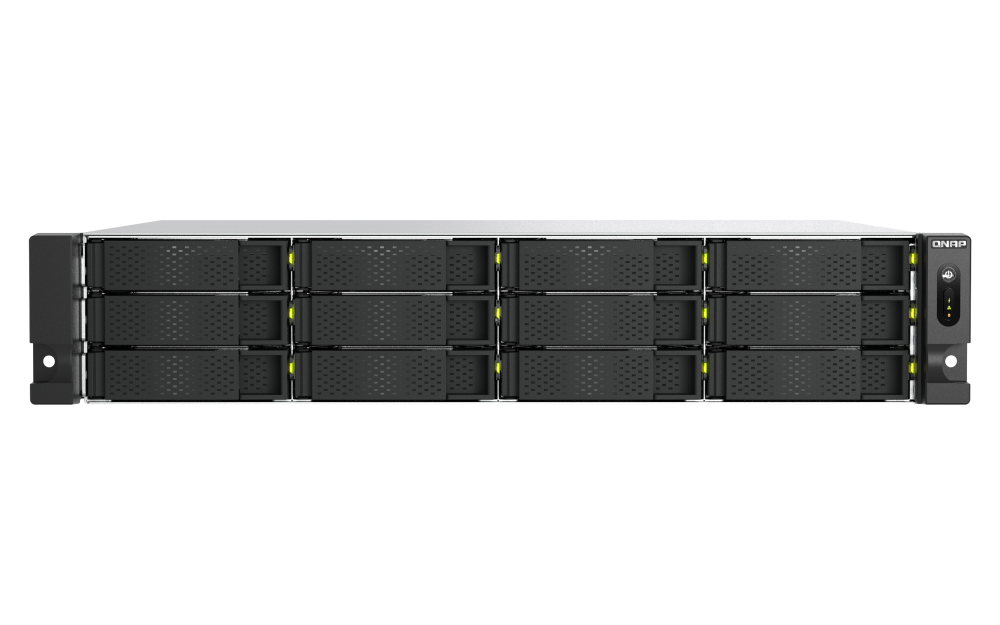
The important count is twelve native front bays. QNAP’s hardware selector lists twelve 3.5-inch SATA positions, accepts 3.5-inch SATA hard drives and 2.5-inch SATA SSDs in those bays, and separately shows two rear E1.S/M.2 NVMe Gen3 x1 positions. QNAP says M.2 NVMe use requires its preinstalled QDA-E1SM3 adapter. Those rear NVMe slots are not extra SATA trays; neither they nor an optional JBOD should be treated as a thirteenth or fourteenth internal bay. The captured compatibility response did not provide an exact drive/firmware row, so a specific HDD, SSD or NVMe model is not endorsed here. Use the full model code and current compatibility list before ordering media. QNAP’s U.S. hardware specifications.
QNAP’s product page lists up to one TL-R1200C-RP expansion enclosure, adding up to twelve external HDD positions. That is a separate purchase, enclosure, cable and power plan—not storage included with this NAS and not a change to its internal-bay count. Expansion introduces its own compatibility and management questions; compare the full expansion path rather than adding the external bays to a built-in-bay finder result.
2.5GbE is the native link ceiling
The current U.S. selector lists two built-in 2.5GbE ports. For a requirement stated as the speed of one built-in port, this system is a 2.5GbE match—not a built-in 5GbE or 10GbE match. QNAP describes port trunking and optional higher-speed adapters, but link aggregation is not a promise that one client flow will run at the sum of two ports. A 10GbE adapter is a separate card, host, switch, cable and compatibility decision; the one PCIe Gen3 x2 slot is also a resource shared with any other expansion plan. Router/switch capability, client NIC, cabling, drives, RAID layout and workload can all bottleneck transfers. Do not use the 2.5GbE label as a throughput estimate.
This port distinction is particularly useful when comparing the TS-h1465U-RP with QNAP’s reviewed TS-h1655XeU-RP-8G-US. Both are twelve-bay rack profiles with separate NVMe storage, but QNAP documents a built-in 10GBASE-T port on the h1655XeU-RP while the h1465U-RP starts with dual 2.5GbE and needs optional expansion for 10GbE. The h1465U-RP’s 2U chassis may be attractive where rack height matters; the h1655XeU-RP is the more direct comparison if a native 10GbE port is essential. Their different chassis and installation needs still need to fit the actual rack.
One memory slot makes the 8G package a real constraint
QNAP’s exact selector identifies an Intel four-core processor without naming the precise CPU model, and lists 8 GB of DDR5 SODIMM memory, one slot and a 16 GB maximum. Do not transfer a CPU name or larger memory ceiling from a similarly numbered QNAP model. The memory ceiling also matters for virtualization, multiple services and QuTS hero plans. On the product page QNAP lists an 8 GB hardware minimum for QuTS hero, at least 16 GB for inline data deduplication and 32 GB recommended for optimal performance. The exact U.S. selector caps this unit at 16 GB, so an owner could at most reach the stated minimum for that deduplication feature, not QNAP’s 32 GB recommendation. That does not establish how any particular application will perform; it is a reason to confirm the workload and memory requirement before choosing this configuration. Check the current hardware selector.
RAID is owner-configured, not ready on arrival
The exact-model software selector presents QTS and QuTS hero as separate profiles and lists RAID 1 in both of their 8-bay-and-larger tables. QNAP describes QuTS hero as preinstalled on the product page, so verify the software state and setup route for the exact delivered revision if QTS is the intended environment. The two operating systems use different filesystems—EXT4 for QTS and ZFS for QuTS hero—and are alternatives, not simultaneous modes. In either plan the buyer must select two compatible SATA drives and create the storage pool. QNAP’s standard package list names the chassis, an Ethernet cable, two power cords and drive screws, not data drives or a prebuilt array. QNAP U.S. software specifications and the QTS RAID reference explain the supported options and mirror model.
RAID 1 mirrors two disks, leaving usable capacity around that of one member before formatting and system overhead. It can keep the volume available after one member-disk failure while the other is healthy, but it does not protect against accidental deletion, malware, theft, fire, controller damage or loss of the entire NAS. Keep a separate, recoverable backup and test restoration. The two drive positions used by a mirror are drawn from the twelve native bays; it is not a twelve-drive mirror by default.
Rack and package checks before buying
QNAP gives chassis dimensions of 3.49 by 17.01 by 14.6 inches (height, width, depth) and calls this a 2U rackmount model. The inspected U.S. selector does not state net weight, and chassis depth alone cannot establish rail fit, post spacing, overhang, rear cable clearance or loaded rack capacity. The package list does not name a rail kit. Confirm the rail SKU, rack geometry, airflow and loaded weight with the rack and NAS manufacturers rather than ordering by the enclosure’s depth alone. QNAP lists two 300 W power supplies; they only provide the intended supply-failure benefit when the installation uses suitable independent upstream power paths, not two cords plugged into one shared circuit.
Overall, the TS-h1465U-RP-8G-US is a documented candidate for a 12-bay rack design where dual 2.5GbE is sufficient, the 2U body fits, and the buyer is willing to select compatible drives and build the storage layout. Its rear E1.S/M.2 options, optional faster NIC, external JBOD and redundant power are useful planning paths, but none is a substitute for checking exact compatibility, package contents, memory needs and installation. The official image shows the twelve-front-tray family chassis, not the installed media or seller’s bill of materials. No independent measurements, benchmark results, noise results, installation experience or customer feedback are claimed.
Key specifications
Key details at a glance
| Internal drive bays | 12 bays |
|---|---|
| Documented internal drive media | 3.5-inch SATA HDD / 2.5-inch SATA SSD / E1.S NVMe SSD / M.2 NVMe SSD with the preinstalled QDA-E1SM3 adapter |
| Built-in Ethernet ports | 2 x built-in 2.5GbE RJ45 |
| Fastest individual Ethernet port | 2.5 Gbps |
| Installed system memory | 8 GB |
| Maximum listed memory | 16 GB |
| Listed storage arrangements | QTS: RAID 1 listed in the 8-bay-and-larger selector profile / QuTS hero: RAID 1 listed in the 8-bay-and-larger selector profile |
| Internal file systems | QuTS hero: ZFS / QTS: EXT4 |
| Hardware warranty | 3 years |
| M.2 NVMe slots | 2 |
| Maximum total drive bays with listed expansion | 24 bays |
| Expansion-unit note | QNAP's U.S. product page says the NAS can connect up to one TL-R1200C-RP, adding up to twelve external HDDs. Those positions belong to a separate expansion enclosure and do not increase the twelve internal bays or make the NAS disk-populated. Check current expansion compatibility, cabling, unit placement and power separately. |
| Listed expansion unit | QNAP TL-R1200C-RP 12-bay JBOD (up to one unit, per QNAP product page) |
| Processor | Intel 4-core processor (QNAP does not name a specific CPU model in the inspected U.S. selector) |
| CPU cores | 4 |
| Installed memory type | 8 GB DDR5 SODIMM; the selector lists one memory slot and a 16 GB (1 x 16 GB) maximum |
Use the exact model’s instructions for operating limits, supplied equipment and version differences.
Sources for this review
Sources for this assessment
- QNAP U.S. Tower / SMB product grid — TS-h1465U-RP family card
- TS-h1465U-RP — QNAP U.S. product page
- TS-h1465U-RP U.S. rendered hardware selector — QNAP
- TS-h1465U-RP U.S. rendered software selector — QNAP
- TS-h1465U-RP U.S. rendered package selector — QNAP
- TS-h1465U-RP-8G-US — QNAP U.S. Official Store identity page
- QTS 5.2.x User Guide — RAID types
- QuTS hero h5.2.x User Guide — RAID reference
- TS-h1465U-RP official front image — QNAP U.S.

Check your setup before choosing a NAS
Use the finder to narrow documented desk/shelf or rack formats, internal-bay minimums, a single Ethernet-port rating and optional redundancy requirements.