
Your needs, this model
Does it fit your priorities?
How many native SATA bays does the AS6510T have, and do its M.2 connectors count toward that number?
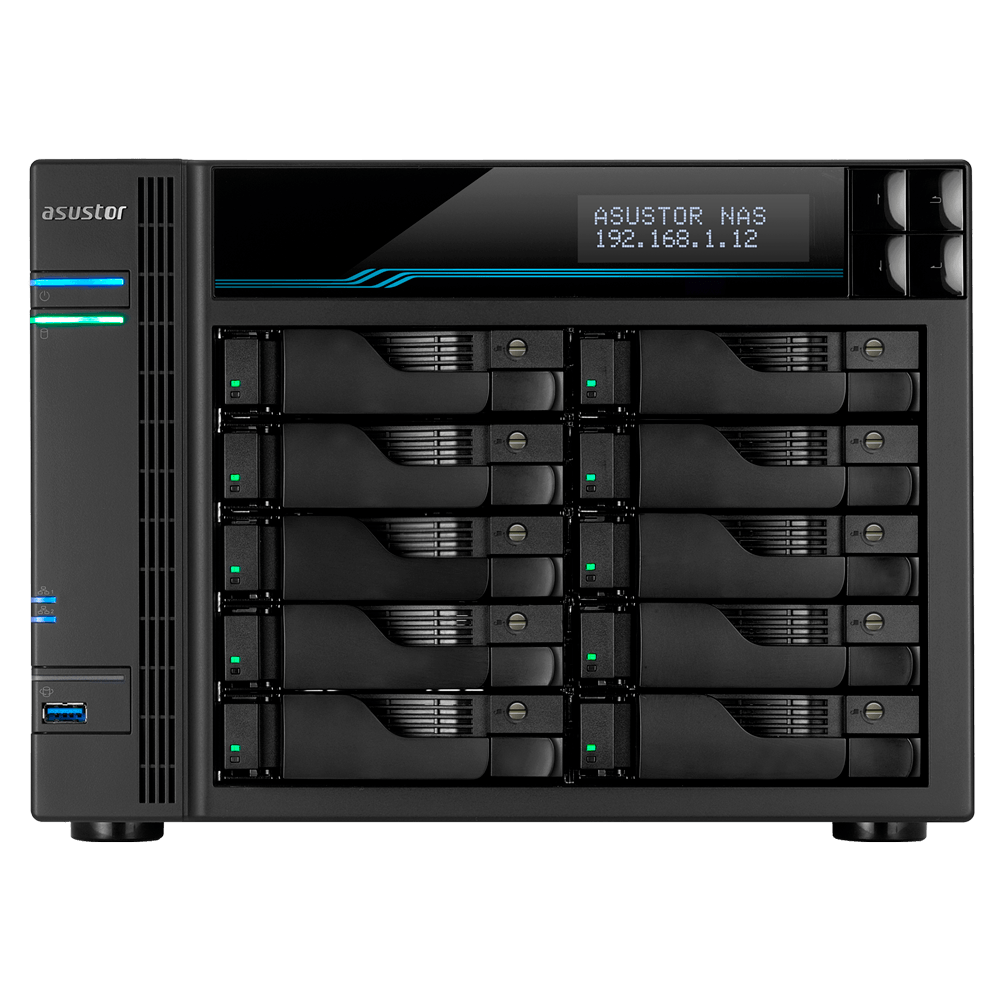
ASUSTOR's exact hardware selector lists ten native SATA positions for 3.5-inch HDDs, 2.5-inch HDDs or 2.5-inch SSDs. Its two M.2 connectors are separate, so the AS6510T meets a ten-bay minimum but not an eleven-bay minimum. The listed 180-TB figure is raw arithmetic for ten 18-TB drives, not usable space or drives in the box.
Explore this need in the finder →What is the fastest individual built-in Ethernet port on the AS6510T?
The exact hardware selector lists two individual 10-GbE ports and two individual 2.5-GbE ports. One built-in port meets a 10-Gbps minimum but not 10.5 Gbps. Aggregating multiple ports does not create one faster port or establish actual file-transfer speed.
Explore this need in the finder →Can the current-reference AS6510T meet a ten-bay, 10-GbE and two-drive-redundancy screen together?
Yes, through a possible owner-created plan: ten native SATA bays, a RAID 1 option using two separately selected compatible drives, and one built-in individual 10-GbE port coexist in the same model. The pair uses two trays and leaves eight open. The package lists no data drives or initialized array; verify exact drive firmware and the whole network path, and keep an independent backup because RAID 1 is not one.
Explore this need in the finder →Read the model number carefully
“LOCKERSTOR 10” is not a complete identity. ASUSTOR lists both the LOCKERSTOR 10 (AS6510T) and the newer-named LOCKERSTOR 10 Gen3 (AS6810T) as separate products. The AS6510T page identifies an Intel Atom C3538 four-core processor at 2.1 GHz, 8 GB of DDR4 memory, ten SATA bays, two M.2 positions, two 10-GbE ports and two 2.5-GbE ports. That is a particular older hardware profile, not a shorthand for every ten-bay LOCKERSTOR. Before ordering or planning a replacement, compare the exact chassis label and seller’s written model suffix with ASUSTOR’s AS6510T product page and its separate product-list entries.
ASUSTOR’s support-status table presently marks AS6510T “Generally Available,” with software and technical support shown as “Supported” and a three-year warranty entry. That supports our current-reference classification; it does not prove that a retailer has stock, that a particular offer is genuine, or that the manufacturer’s warranty transfers through every seller.
Ten native SATA trays, plus separate M.2 positions
The hardware selector lists ten drive bays for 3.5-inch SATA hard drives, 2.5-inch SATA hard drives and 2.5-inch SATA SSDs. Its two M.2 positions are separate connectors, not two extra SATA trays. The selector names 2280 NVMe and 2280, 2260 and 2242 SATA M.2 media, and reports a PCIe 3.0 x2 interface. In the software section it also lists M.2 Volume and supported M.2-volume RAID choices. That is more specific than the marketing page’s emphasis on caching, but it still is not approval for a particular SSD model or firmware. Use ASUSTOR’s current drive-compatibility route for the exact device you intend to install; the evidence captured for this review does not verify a drive-and-firmware pair.
The headline 180-TB internal figure is the manufacturer’s raw arithmetic for ten 18-TB drives, and ASUSTOR itself says capacity varies with RAID. It is not usable volume space, a forecast for a particular redundancy layout, or storage included with the NAS. The hardware table separately gives an expansion-unit figure; attached expansion does not change the AS6510T’s ten native positions. The official package list names the enclosure and installation accessories, not data disks, an initialized volume or a prepared array.
A mirror is a setup choice, not an included configuration
ASUSTOR lists RAID 1 for the AS6510T and includes it among the model choices in its RAID calculator. A reasonable example is an owner-created mirror with two separately selected, compatible SATA drives: that plan uses two of ten bays and leaves eight trays open. It does not mean the package arrives with two drives or a finished array. The model-specific package page lists the AS6510T unit, AC cord, network cables and screws but no data drives. Check drive capacity, model and firmware against the current compatibility information before installation, and preserve an independent backup: a mirror can help with a drive failure but cannot restore files deleted, encrypted or damaged in both copies.
The platform supports larger RAID layouts too, but those need their own chosen drives and tradeoffs; a bay count by itself does not say how much space remains after protection. M.2 volume support is also a separate storage path and should not be conflated with SATA-bay capacity or with an M.2 cache configuration. The exact SSDs, volume plan and application workload still need to be checked against current software and compatibility information.
Network sockets are not a 20-Gbps client link
The two 10-GbE ports and two 2.5-GbE ports are individual interfaces. The product page describes link aggregation and quotes a combined figure for multiple clients, but that does not turn a single NAS socket into a faster port or guarantee one client’s file-transfer rate. Switch or router, client NIC, cable, protocol, storage layout and workload all have to support the intended route. The package page lists two Cat 6a and two Cat 5e cables; confirm which cable and switch port fit your actual 10-GbE path. If you only have ordinary 1-GbE clients, paying for a 10-GbE enclosure will not by itself change their link rating.
Space, power and intended buyer
This is a desktop tower rather than a shallow rack appliance. ASUSTOR lists dimensions of 215.5 × 293 × 230 mm (H × W × D), a 6.4-kg unit weight and a 250-W internal supply. Leave room for the enclosure, cabling and unobstructed ventilation; the installation guide specifies a flat, stable location and an operating ambient range of 0–40°C. The hardware selector’s 76.8-W operation and 41.1-W disk-hibernation entries are manufacturer figures, not readings from our own test or a promise for every set of drives and workload.
The AS6510T is worth investigating when ten internal SATA positions and one built-in 10-GbE connection solve a real capacity or network constraint, and when its processor, memory, software profile and tower footprint suit the job. It is a poor fit if you need a rack chassis, expect drives or a prebuilt mirror in the box, need a verified drive list today, or are treating four network sockets as one combined connection. Buyers comparing ten-bay ASUSTOR models should also review the distinct LOCKERSTOR 10 Gen3 (AS6810T) assessment; the model name overlap does not establish interchangeable specifications or packages.
Checks to make before choosing
Ask the seller to confirm the precise AS6510T model and complete box contents in writing, including whether it is new or refurbished and which return and warranty terms apply. Identify the exact SATA or M.2 drives, verify their model and firmware against ASUSTOR’s current list, and choose the storage layout before converting raw capacity into usable capacity. For a 10-GbE goal, map the whole path to a client and switch rather than assuming ports aggregate for one user. No measured performance, seller offer, price, stock, bundled drive set or U.S. retail suffix is established by this assessment.
Key specifications
Key details at a glance
| Internal drive bays | 10 bays |
|---|---|
| Documented internal drive media | 3.5-inch SATA HDD / 2.5-inch SATA HDD / 2.5-inch SATA SSD |
| Built-in Ethernet ports | 2 x built-in individual 10-Gigabit Ethernet (10G/1G each) / 2 x built-in individual 2.5-Gigabit Ethernet (2.5G/1G/100M each) |
| Fastest individual Ethernet port | 10 Gbps |
| Installed system memory | 8 GB |
| Maximum listed memory | 64 GB |
| Listed storage arrangements | Single / JBOD / RAID 0 / RAID 1 / RAID 5 / RAID 6 / RAID 10 |
| USB 3.2 Gen 1 ports | 2 |
| Dimensions (H × W × D) | 215.5 x 293 x 230 mm (H x W x D) |
| Weight | 6.4 kg |
| Hardware warranty | 3 years |
| Data drives included in listed package | No |
| M.2 NVMe slots | 2 |
| M.2 SSD storage-pool support | Yes |
| Processor | Intel Atom C3538 |
| CPU cores | 4 |
| Installed memory type | 8 GB SO-DIMM DDR4-2133, one 8-GB module pre-installed |
Use the exact model’s instructions for operating limits, supplied equipment and version differences.
Sources for this review
Sources for this assessment
- Preserved ASUSTOR Home/SOHO observation for LOCKERSTOR 10 (AS6510T)
- ASUSTOR product-list entry distinguishing AS6510T and AS6810T
- ASUSTOR LOCKERSTOR 10 (AS6510T), exact product ID 64
- ASUSTOR AS6510T exact hardware and software specification
- ASUSTOR AS6510T manufacturer package contents
- ASUSTOR AS6510T product datasheet page; linked PDF retrieval returned HTTP 400
- ASUSTOR AS65XXT English Quick Installation Guide, applicable to AS6510T
- ASUSTOR product support-status table, exact AS6510T row
- ASUSTOR RAID calculator; AS6510T appears in the two-drive RAID 1 recommendations
- ASUSTOR NAS drive compatibility route
- Exact ASUSTOR AS6510T front-view product image

Check your setup before choosing a NAS
Use the finder to check bay count, the network link you need, and whether a documented two-drive redundant arrangement is essential.