
Your needs, this model
Does it fit your priorities?
Can the NASync iDX6011 Pro 64GB meet a six-bay, individual 10GbE and two-drive redundancy screen?
Yes, as a possible owner-created plan: UGREEN lists six SATA bays, two individual 10GbE ports and RAID 1. Two compatible buyer-supplied SATA drives would use two of six trays, leaving four open; the diskless NAS includes no configured pool. One individual port is rated 10GbE, not a tested transfer speed, and the second port does not create a 20GbE client link. Keep a separate backup.
Explore this need in the finder →Does the NASync iDX6011 Pro 64GB support 208TB of included usable storage?
No. UGREEN’s U.S. page advertises 208TB raw (six 32TB SATA drives plus two 8TB M.2 drives), but the NAS is diskless and a UGREEN Knowledge Center specification lists a lower 196TB configuration (six 30TB SATA plus two 8TB M.2). Neither figure is a guaranteed usable volume; verify the exact U.S. compatibility list and planned RAID layout.
Explore this need in the finder →Are the NASync iDX6011 Pro 64GB memory configuration and all published dimensions/ratings confirmed by one consistent U.S. page?
No. The selected U.S. variant identifies 64GB LPDDR5/x and the product table lists no RAM expansion, but UGREEN’s visible SKU, clock, capacity and/or physical-dimension fields conflict with the selected variant JSON or support article. Use the exact variant title, variant ID and UPC for identity; confirm the complete SKU, chassis clearance, exact drive support and software release with UGREEN before buying or migrating data. No clock or benchmark conclusion is inferred.
Explore this need in the finder →What does the iDX6011 Pro add over the non-Pro 64GB iDX6011?
UGREEN lists a Core Ultra 7 255H (16 cores/16 threads) for Pro versus Core Ultra 5 125H (14/18) for the non-Pro models, while the Pro retains 64GB fixed memory, six SATA bays, two M.2 positions and dual 10GbE. The Pro product page advertises a 3.7-inch display; an alternate UGREEN support specification lists an OCuLink port that the U.S. table omits. Verify those exact-region details and do not assume greater real-world speed without a workload test.
Explore this need in the finder →The UGREEN NASync iDX6011 Pro 64GB is the distinct Pro six-bay configuration, not simply a larger-memory version of the regular iDX6011. UGREEN’s selected U.S. product JSON maps it to variant 48727393009858, SKU 75785 and UPC 6941876277858. The visible specifications table shows SKU 75787, so confirm the exact product title and Pro 64GB option in any order record. This is a review of published manufacturer specifications and configuration questions, not a hands-on test; no local-AI workload, storage pool, power draw or file-transfer speed was measured.
The Pro distinction is the compute platform, not extra bays
UGREEN lists an Intel Core Ultra 7 255H with 16 cores and 16 threads for Pro, compared with the Core Ultra 5 125H (14 cores, 18 threads) used in both non-Pro iDX6011 memory configurations. The Pro has 64GB LPDDR5/x, with no expandable-memory maximum listed. UGREEN’s U.S. page and support table give a 5.1GHz maximum for the 255H; that is a specification, not a benchmark or guarantee of a particular inference result. The practical question is whether the software and compute workloads you intend to use benefit from this specific processor configuration. A headline about AI does not prove that a chosen model, container or virtual machine will run at a desired speed.
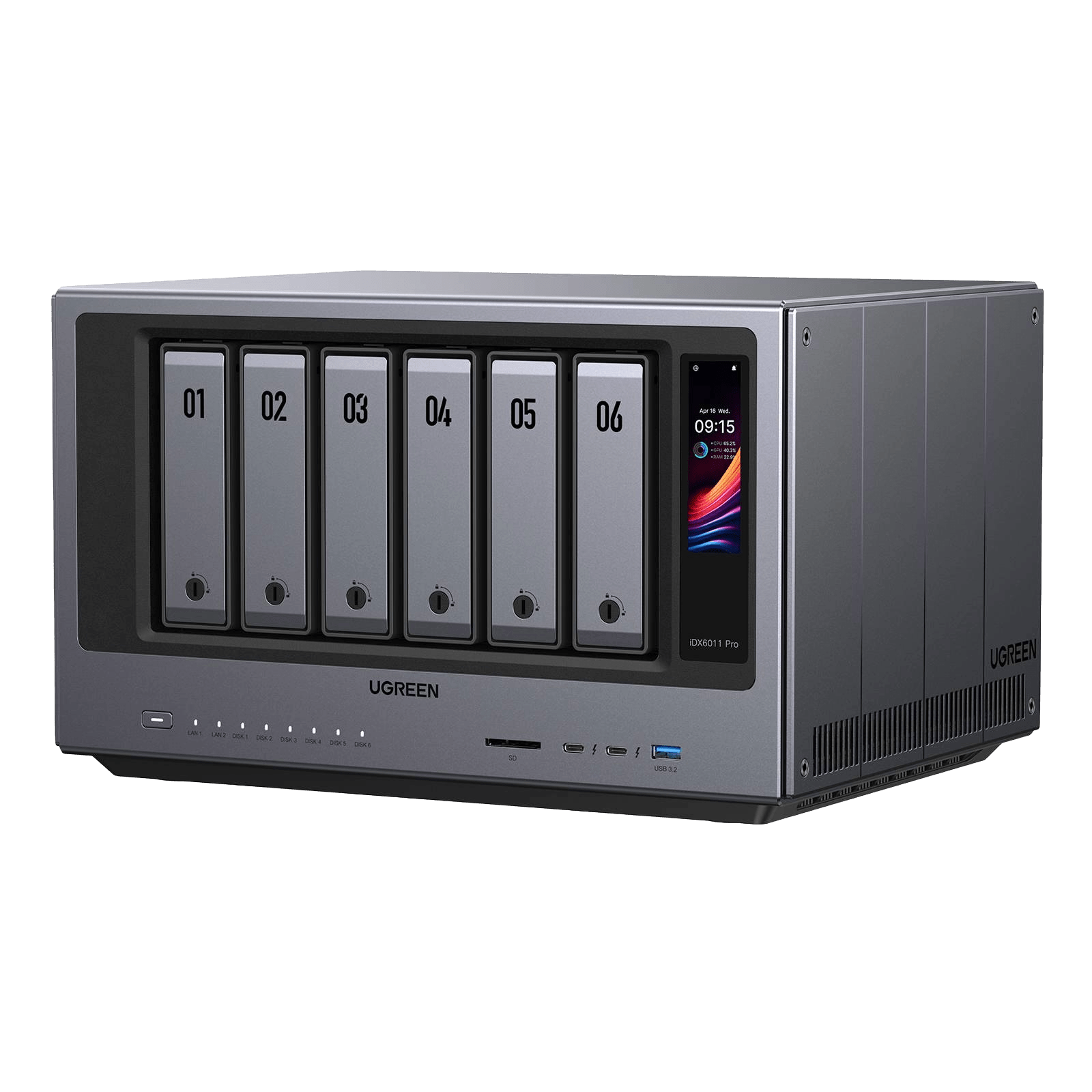
The core storage/network outline remains six SATA bays, two M.2 SSD positions, a 128GB system SSD, dual 10GbE and Thunderbolt 4. Pro does not increase the six SATA tray count or make its two Ethernet ports a single 20GbE connection. Its official U.S. page also advertises a 3.7-inch touch LCD, which is visibly present in UGREEN’s exact Pro exterior image; the non-Pro page does not list this screen. Do not transfer Pro-specific exterior or display details to the standard iDX6011.
Capacity is a raw-storage headline, not a finished pool
The Pro page advertises 208TB as six 32TB SATA drives plus two 8TB M.2 drives. UGREEN’s iDX Knowledge Center instead lists 30TB × 6 plus 8TB × 2, or 196TB. Those are different manufacturer capacity ceilings, both expressed as raw media arithmetic. The standalone Pro is diskless, so the capacity is not included, and RAID choice, system use, formatting and the M.2 role affect usable space. Select exact drives from the current model compatibility list and get written confirmation if the 32TB-per-SATA-drive boundary matters to the purchase.
A buyer-created two-drive SATA RAID 1 plan is possible according to UGREEN’s RAID list. It uses two of the six SATA positions and leaves four open, but it needs compatible buyer-supplied drives and pool setup; it is neither a prepared array nor a separate backup. If you need a backup, plan a second copy and test a restore rather than relying on the mirror alone.
Two 10GbE ports and workstation connections
The two individual 10GbE RJ45 ports meet a 10Gbps single-port rating screen. UGREEN describes an aggregated configuration, but this does not create a single 20GbE port or predict a 20Gbps copy. The client, switching or direct-link setup, cable, drives, RAID layout and workload all affect real transfers. Thunderbolt 4 can make a local workstation connection interesting for creators handling large media, while SD 4.0, 8K HDMI, USB-A and a PCIe Gen4 x8 slot give the chassis several additional routes for work. Those connector labels do not establish compatibility with every device or a measured result, so verify the exact card, enclosure, client and software before building a workflow around them.
There is a model-specific port question: UGREEN’s Spanish-locale iDX Knowledge Center also lists one OCuLink port for the Pro, but the current U.S. product-table field list does not. The U.S. page does document a PCIe Gen4 x8 slot. Because that difference could determine an external-GPU or storage-expansion plan, verify the exact U.S. chassis and accessory support with UGREEN rather than assuming the OCuLink connector is present.
Local-AI positioning still needs a software check
UGREEN markets the Pro around local chat and search, AI file and photo organization, and its own assistant. “Local” is a manufacturer description, not a privacy audit; confirm what features work without an account or network service, which file types and models are supported, and what is transmitted or indexed before exposing sensitive material. Check the current model-specific firmware, application support and security release notes. UGREEN’s support schedule lists software security updates through June 29, 2030 for the iDX6011 Pro; this does not extend the hardware warranty or guarantee that every app will be maintained for that period. Product material also uses both “UGOS” and “UGOS Pro” labels, so verify the actual installed software build.
Fit and identity are worth checking before a purchase
UGREEN’s U.S. page and iDX Knowledge Center both list 348.8 × 260 × 212mm for Pro, unlike their conflicting dimensions for the non-Pro chassis. Allow for ventilation, rear cabling and tray access rather than fitting the NAS exactly to the product photo. The selected Pro variant JSON gives SKU 75785 and UPC 6941876277858, while the page’s visible SKU field says 75787; use the model title, Pro designation and 64GB configuration as well as the selected variant ID when confirming the item.
The Pro is a plausible fit when you need six native SATA trays, two separate M.2 positions, an individual 10GbE path, a fixed 64GB memory configuration and the Pro processor—not simply a six-bay NAS with the highest headline. It is less compelling if the non-Pro Ultra 5 platform already covers your storage and application needs. UGREEN’s published AI and connectivity claims may be useful prompts for a compatibility check, but they are not evidence of the performance or privacy behavior of your exact workload. If the Pro processor, OCuLink, exact maximum drive size, chassis clearance or software behavior is essential, get the exact U.S. answer before moving data or fitting it into a cabinet.
Key specifications
Key details at a glance
| Internal drive bays | 6 bays |
|---|---|
| Documented internal drive media | SATA / M.2 NVMe |
| Built-in Ethernet ports | 2 × 10GbE RJ45 |
| Fastest individual Ethernet port | 10 Gbps |
| Installed system memory | 64 GB |
| Maximum listed memory | 64 GB |
| Listed storage arrangements | JBOD / Basic / RAID 0 / RAID 1 / RAID 5 / RAID 6 / RAID 10 |
| Data drives included in listed package | No |
| M.2 NVMe slots | 2 |
| Processor | Intel Core Ultra 7 255H |
| CPU cores | 16 |
| CPU threads | 16 |
| Installed memory type | Fixed 64GB LPDDR5/x per selected U.S. variant; the manufacturer table lists no expandable RAM. Choose this capacity at purchase; no upgrade module is asserted. |
Use the exact model’s instructions for operating limits, supplied equipment and version differences.
Sources for this review
Sources for this assessment
- UGREEN U.S. iDX6011 pro product page, selected configuration and current specifications
- UGREEN Shopify product JSON mapping the exact iDX6011 pro variant, SKU, UPC and featured image
- UGREEN U.S. iDX Series collection showing all three observed models
- UGREEN Knowledge Center iDX specification table (Spanish locale); browser-rendered content inspected; the downloaded body is only a dynamic shell
- UGREEN UGOS Pro software security support statement; browser-rendered content inspected; downloaded body is only a dynamic shell
- UGREEN NAS compatibility reference list and exact-part-number verification guidance
- UGREEN RAID calculator and disk-count guidance
Check your setup before choosing a NAS
Use the finder to narrow documented desk/shelf or rack formats, internal-bay minimums, a single Ethernet-port rating and optional redundancy requirements.