
Your needs, this model
Does it fit your priorities?
Can the DXP8800 Plus meet an eight-bay, one-port 10GbE and two-drive-redundancy screen?
It can fit that screen as a possible buyer-created setup: the exact model table lists eight SATA bays, RAID 1 and two individual 10GbE ports. Two compatible SATA drives could use two bays for a mirror, leaving six trays physically open. The standalone unit is diskless, drive compatibility must be checked, and the mirror is not a separate backup.
Explore this need in the finder →Does the DXP8800 Plus's 272TB maximum mean that much included usable storage?
No. UGREEN calculates 272TB from eight 32TB SATA drives and two 8TB M.2 SSDs, while the exact standalone product page identifies the NAS as diskless. Drives are separate purchases, and RAID layout, M.2 role, system use and formatting prevent that raw sum from being a guaranteed usable volume.
Explore this need in the finder →Will dual 10GbE or Thunderbolt 4 give one client a 20Gbps Ethernet connection?
No. Each built-in Ethernet port is individually rated 10GbE; aggregation is conditional and does not make one 20GbE connector. Thunderbolt 4 is a different interface. A client's end-to-end transfer also depends on the network path, storage, cabling and workload, and no measured speed is claimed here.
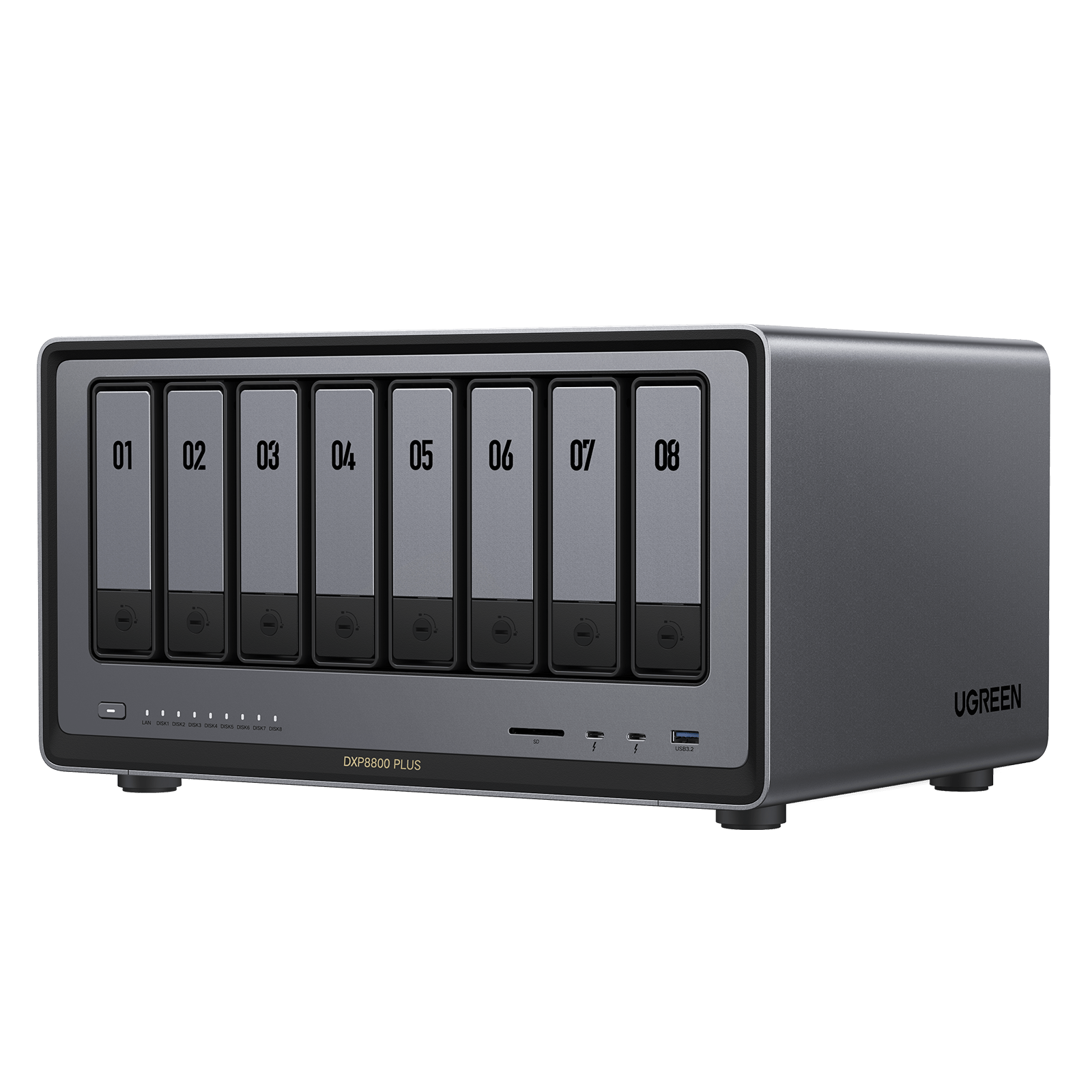
Explore this need in the finder →The NASync DXP8800 Plus is an eight-tray desktop NAS for a buyer who has a real use for eight internal SATA positions, rather than just a large headline capacity. UGREEN’s U.S. product page identifies this exact Plus model as diskless and lists eight SATA bays, two M.2 NVMe positions, a 128GB system SSD, 8GB of DDR5 memory, dual 10GbE Ethernet and two Thunderbolt 4 ports. This assessment is based on the model documentation, not a hands-on test.
Eight SATA trays are the decision point
The useful distinction is between eight front SATA trays and the separate storage figures around them. UGREEN lists two M.2 NVMe positions in addition to the eight SATA bays, and a 128GB SSD as the system disk. Neither the two M.2 positions nor the system disk is an extra SATA tray. The listed 272TB maximum is arithmetic across eight 32TB SATA drives and two 8TB M.2 SSDs; those data drives are not included with the standalone diskless NAS, and the raw total is not a promise of a single usable volume after a storage layout and formatting.
This is a meaningfully larger bay tier than the six-SATA-bay DXP6800 Pro. If six trays already cover the plan, the DXP8800 Plus adds hardware positions without automatically adding useful capacity. If the build genuinely needs more than six native SATA positions, the Plus reaches eight; its similarly named DXP8800 Ultra is a separate product, not an interchangeable configuration. Before choosing either, count only the kind of internal positions your intended drives can use.
Two 10GbE jacks do not make one 20GbE port
The manufacturer lists two separate 10GbE RJ45 ports. For this guide’s network selector, the relevant ceiling is 10Gbps for one built-in Ethernet port. UGREEN describes aggregation for up to 20Gbps of combined network bandwidth in a supported setup, but that depends on the network environment and does not turn either jack into a single 20GbE workstation connection. The product page also lists Thunderbolt 4 separately; it is not Ethernet, and its connector rate is not a file-copy result.
Plan the whole wired path before paying for a 10GbE-capable system: the client interface, switch or direct link, cabling, configured NAS port, storage layout and workload can all limit a transfer. The manufacturer’s port rating and aggregation description are not independent speed tests. The official manual recommends a 10-Gigabit-capable router or switch for the intended high-speed connection and identifies the device’s individual network ports.
Redundancy is a setup choice, not a ready-made array
UGREEN lists RAID 1 among the supported storage modes. With two compatible SATA drives that a buyer supplies and installs, a two-drive RAID 1 plan is plausible; it would occupy two of the eight SATA trays, leaving six physically open. The DXP8800 Plus does not arrive with that pair or an initialized mirror. A mirror can help keep data available after one member drive fails, but it does not protect against deletion, malware, theft or loss of the whole NAS. Keep a separate backup and verify that you can restore it.
The manual describes M.2 SSD installation as optional and lists an M.2 NVMe 2280 drive as a supported position; it discusses using an M.2 drive as storage or cache. These are separate choices from the eight SATA trays. Check the current compatibility information against the complete model and exact drive identifier before buying. The captured compatibility page did not provide an auditable DXP8800 Plus drive-and-firmware pairing, so this review does not certify any particular disk or M.2 part.
Read the display and memory claims narrowly
The product specification lists a 12th-generation Intel Core i5-1235U, 8GB DDR5 memory and a 64GB maximum. The model-specific manual shows two memory slots with one module pre-installed, but it does not make every DDR5 module a verified upgrade. Match an exact module to current support information before opening the chassis. The product page advertises 8K HDMI; the manual qualifies smooth playback of 8K video as requiring an additional memory module. Treat that as a configuration condition, not a guarantee about every workload or display chain.
UGREEN lists the chassis at 14.4 × 10.2 × 7.4 inches (L × W × H). Leave room for ventilation, cabling and opening the trays. The product page’s 70.39W drive-access and 28.99W drive-hibernation figures are manufacturer scenario ratings, not measurements of a particular set of drives or an installed system. Actual draw will depend on the hardware and workload.
What to confirm before ordering
Check the exact NASync DXP8800 Plus name and eight-bay diskless package rather than a DXP8800 Ultra or a seller-created drive bundle. Confirm the seller’s current box contents and warranty terms, then verify every intended drive and memory part against UGREEN’s current compatibility guidance. Budget for the drives, decide whether the two-drive mirror is the right layout, and identify an independent backup target. The manufacturer’s DXP8800 Plus specification, compatibility list and model-specific download center are the right places to recheck documentation before purchase or installation. This review does not report ownership, testing, live seller availability or current pricing.
Key specifications
Key details at a glance
| Internal drive bays | 8 bays |
|---|---|
| Documented internal drive media | 3.5-inch SATA HDD / 2.5-inch SATA HDD / 2.5-inch SATA SSD |
| Built-in Ethernet ports | 2 × 10GbE RJ45 |
| Fastest individual Ethernet port | 10 Gbps |
| Installed system memory | 8 GB |
| Maximum listed memory | 64 GB |
| Listed storage arrangements | JBOD / Basic / RAID 0 / RAID 1 / RAID 5 / RAID 6 / RAID 10 |
| Data drives included in listed package | No |
| System drives included (not data-bay drives) | 128GB SSD listed as system storage; it is not an additional SATA data bay |
| M.2 NVMe slots | 2 |
| Processor | Intel Core i5-1235U (12th generation) |
| CPU cores | 10 |
| CPU threads | 12 |
| Installed memory type | UGREEN lists 8GB DDR5 and a 64GB maximum; the exact model manual identifies SODIMM DDR5 and shows two memory positions with one pre-installed module. The saved evidence does not identify a verified upgrade part or confirm the installed module's ECC behavior; check the exact module against current compatibility data. |
Use the exact model’s instructions for operating limits, supplied equipment and version differences.
Sources for this review
Sources for this assessment
- UGREEN NASync DXP8800 Plus U.S. product page and exact model table
- UGREEN DXP8800 Plus product JSON: SKU, selected U.S. variant, UPC and official image association
- UGREEN U.S.-facing NAS collection and DXP8800 Plus listing bridge
- UGREEN DXP series collection and Plus-model family context
- UGREEN official DXP8800 Plus Product Documentation PDF (English / German / Chinese; model-specific manual)
- UGREEN RAID calculator and general RAID guidance
- UGREEN drive, SSD, memory and UPS compatibility reference captured before model-specific selection
- UGREEN model-specific download center selector and document-category guidance
Check your setup before choosing a NAS
Use the finder to check bay count, the network link you need, and whether a documented two-drive redundant arrangement is essential.