
Your needs, this model
Does it fit your priorities?
Can the NAS component support a four-bay, 10GbE, buyer-created two-drive mirror plan?
Yes as a possible owner-created NAS layout: UGREEN lists four native SATA bays, an individual 10GbE port and RAID 1 for the DXP4800 Pro. A two-drive mirror would occupy two trays, with two unused, after the buyer obtains and configures compatible drives. No drives or initialized mirror are stated as included. Keep a separate backup.
Explore this need in the finder →Does “with SSD enclosure” mean an SSD is already installed or supplied?
No. The bundle page names a docking station with an SSD enclosure, but its package list does not name an SSD. Treat the enclosure and any storage drive as separate things until the actual offer states otherwise, and do not count it as one of the NAS’s four native SATA bays.
Explore this need in the finder →Is this the same accessory as every other UGREEN 10-in-1 Revodok listing?
That identity bridge is not established. The bundle page describes an SSD-enclosure version; a separate U.S. accessory page prints SKU 45366 but does not link that number to this bundle option. Confirm the bundled dock’s own item number and host requirements before assuming its port layout or charging behavior.
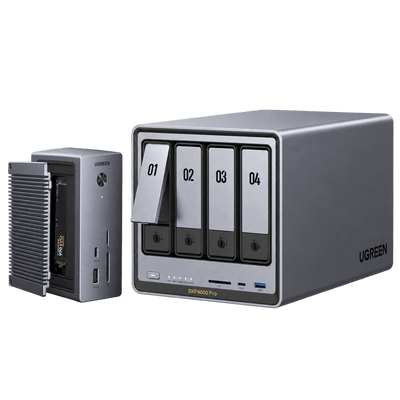
Explore this need in the finder →The U.S. DXP4800 Pro bundle page lists a distinct “DXP4800 Pro + Revodok Pro (10-in-1)” option. It says the package includes the NASync DXP4800 Pro and a Revodok Pro 10-in-1 docking station with SSD enclosure, 4K HDMI, and 100W PD. The same page lists different 12-in-1 and 17-in-1 packages; this review covers only the 10-in-1 choice. The selected option is named, but the page does not give it a printed bundle SKU, a selector identifier, or a complete part-numbered bill of materials.
Judge the NAS before the dock
The NAS component is a diskless four-bay DXP4800 Pro. UGREEN's separate U.S. product and comparison materials list an Intel Core i3-1315U, 8 GB of DDR5, two M.2 NVMe positions separate from the four SATA trays, and one 10GbE port alongside one 2.5GbE port. The NAS listing supports RAID 1 among its software layouts, but the bundle does not arrive with a pre-built mirror or drives. A buyer can plan a two-drive mirror and retain two free SATA bays, provided the chosen drives are supported and the storage pool is configured after setup. Redundancy is not a backup; keep another copy away from the NAS. The 144-TB headline is a maximum raw-media calculation across SATA and M.2 positions. It is not the package's included storage, an assurance of a single usable volume, or a forecast of mirrored capacity. Ask which drives are included in the exact offer; the NAS portion is described as diskless.The listed 10-in-1 difference
Unlike the 12-in-1 option, the exact bundle listing describes this dock as having an SSD enclosure and 4K HDMI, with 100W PD. That gives the package a different accessory purpose and a lower port-count label, but the NAS's four internal SATA bays and built-in network ports do not change. An SSD enclosure is not an installed SSD, and the bundle page does not say that a drive is included in it or that it creates a NAS storage pool. Do not count the external dock or an unlisted SSD as one of the NAS's native bays. There is an important identification limit: UGREEN also lists a separate Revodok Pro 10-in-1 USB-C dock under another U.S. accessory page. That page prints SKU 45366 but does not establish that SKU as the 10-in-1 enclosure described in this NAS bundle. The package image and bundle text identify the bundled option at the model-name level; they do not bridge it to that other SKU. I therefore do not transfer the standalone dock's port layout, host compatibility or charging details into this bundle assessment. The package's exact dock SKU and full port-by-port specification remain unconfirmed.A workable four-bay plan, with ordinary limits
The NAS hardware may suit a small home or studio that wants four native SATA bays and a single faster-than-gigabit path to a compatible network. A possible two-drive RAID 1 plan uses two trays, leaving two for later expansion. It requires the buyer to select and install compatible drives and initialize the pool; the page does not promise the exact usable capacity or any measured transfer rate. A 10GbE port does not make an entire network 10GbE. The client interface, switch, cabling, drive behavior, RAID activity and file workload each matter. One piece of the bundle page's marketing conflicts with the DXP4800 Pro's separately documented identity: a promotional passage refers to Intel N100 and 2.5GbE only, while the product heading and model-specific specifications identify a Core i3-1315U with 10GbE plus 2.5GbE. I use the latter exact-model evidence for the NAS assessment and leave the conflict visible. It would be misleading to claim a tested workload gain from either statement.Check the exact 10-in-1 package
Before ordering, verify that the seller is supplying the DXP4800 Pro plus the 10-in-1 dock with SSD enclosure, not a standalone NAS, the 12-in-1 dock, or the 17-in-1 Thunderbolt 5 dock. Request the bundled dock's item number, actual ports, host-display limits, charger and cables, and whether an SSD is included. Check the drive compatibility list for NAS disks, budget for them separately if not supplied, and decide how the NAS will be backed up. If the SSD enclosure is the reason this option stands out, confirm that it matches the intended SSD and host before relying on the short name. This package makes sense only if the DXP4800 Pro's NAS capabilities fit independently of the accessory. Its 10-in-1 label should be a prompt to inspect the exact box contents, not a shortcut for assuming the bundle contains a particular retail dock SKU or delivers a particular computer setup.Key specifications
Key details at a glance
| Internal drive bays | 4 bays |
|---|---|
| Documented internal drive media | 3.5-inch SATA HDD / 2.5-inch SATA HDD / 2.5-inch SATA SSD |
| Built-in Ethernet ports | 1 × 10GbE RJ45 / 1 × 2.5GbE RJ45 |
| Fastest individual Ethernet port | 10 Gbps |
| Installed system memory | 8 GB |
| Maximum listed memory | 96 GB |
| Listed storage arrangements | Basic / JBOD / RAID 0 / RAID 1 / RAID 5 / RAID 6 / RAID 10 |
| Hardware warranty | 2 years |
| Data drives included in listed package | No |
| M.2 NVMe slots | 2 |
| M.2 SSD storage-pool support | Yes |
| Processor | Intel Core i3-1315U |
| CPU cores | 6 |
| CPU threads | 8 |
| Installed memory type | UGREEN lists 8 GB DDR5 across two SODIMM slots with a stated 96-GB maximum. It says module support is model-specific; no upgrade is included or endorsed. |
Use the exact model’s instructions for operating limits, supplied equipment and version differences.
Sources for this review
Sources for this assessment
- UGREEN DXP4800 Pro 4-Bay NAS + Docking Station Bundle, current U.S. option selector
- UGREEN NAS Docking Ecosystem, U.S. English page
- UGREEN NASync DXP4800 Pro U.S. standalone product page
- UGREEN NAS model specification comparison
- UGREEN model-specific drive and component compatibility list
- UGREEN RAID and capacity guidance
- Official UGREEN DXP4800 Pro + Revodok Pro (10-in-1) bundle option image
- UGREEN U.S. Revodok Pro 10-in-1 Docking Station listing (SKU 45366; bundle bridge not established)
Check your setup before choosing a NAS
Use the finder to narrow documented desk/shelf or rack formats, internal-bay minimums, a single Ethernet-port rating and optional redundancy requirements.