
Your needs, this model
Does it fit your priorities?
Does the standard F4-425 have four native SATA positions?
Yes. TerraMaster's exact specification lists four SATA positions for 3.5-inch SATA HDDs, 2.5-inch SATA HDDs and 2.5-inch SATA SSDs. Its 120-TB (4 x 30-TB) figure is raw capacity, not an estimate of usable RAID space. The captured table does not list an M.2 position, so do not count one or assume the Plus/Pro models' M.2 layout applies.
Explore this need in the finder →Does its 2.5GbE label meet a 3-Gbps single-port requirement?
No. The F4-425 specification lists one built-in RJ45 port rated at 2.5GbE. It meets a 2.5-Gbps nominal single-port floor but not 3 Gbps. A port label is not an expected transfer rate; the client, switch or direct peer, cabling, drives and workload shape actual file traffic.
Explore this need in the finder →Can I create a two-drive mirror and retain open bays?
The product page lists RAID 1 and four SATA positions, so a possible owner-created two-drive mirror would use two trays and leave two open. Check both exact drives against the current F4-425 compatibility information and confirm the present setup sequence; one drive row does not certify a RAID pair. The seller package and an initialized array are not established here, and a mirror does not replace an independent backup.
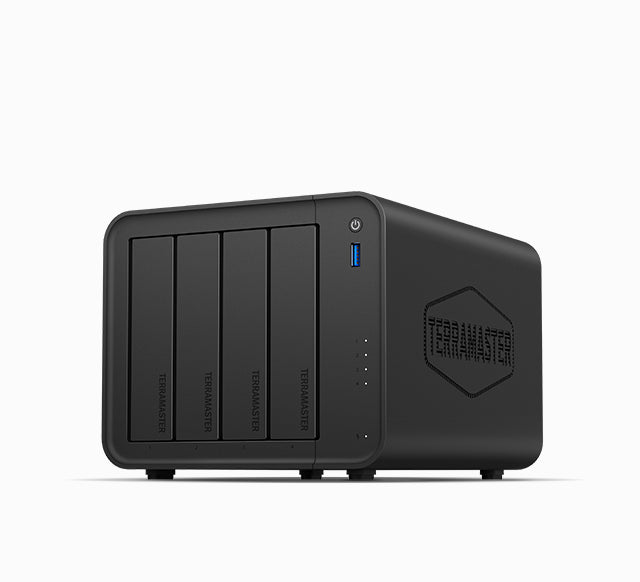
Explore this need in the finder →The TerraMaster F4-425 is the standard four-SATA-bay desktop model, not the F4-425 Plus or F4-425 Pro. Its exact table lists an Intel Celeron N5095, 4 GB DDR4 memory and one 2.5GbE Ethernet port. This is a source-based assessment of those manufacturer records, not a hands-on test or ownership report.
Four SATA trays are the central reason to compare it
The model table identifies four internal SATA positions and supports 3.5-inch hard drives, 2.5-inch hard drives and 2.5-inch SATA SSDs. It also lists hot-swap support. TerraMaster advertises up to 120 TB as four 30-TB drives in raw capacity, while warning that RAID changes capacity and that maximum single-volume size is a separate limit. Treat 120 TB as manufacturer arithmetic, not usable mirrored space or proof that every 30-TB drive is currently on the compatible list.
The table does not list an M.2 drive position. I therefore do not count any NVMe slots or transfer the Plus and Pro models' M.2 claims to this standard enclosure. If NVMe cache or an M.2 storage pool is a hard requirement, compare the exact Plus, Pro or F4-424 review rather than assuming the shared “F4-425” name means shared internals.
RAID 1 can use two of the four trays
The F4-425 product page lists RAID 1 as a supported storage mode alongside TRAID and TRAID+. A possible buyer-created two-drive RAID 1 arrangement would consume two SATA positions and leave two trays available. That is a useful distinction from a two-bay NAS, where mirroring occupies the entire chassis, but it is not a ready-to-use array: select drives, check the exact models and firmware against TerraMaster's current drive-compatibility table, and confirm the setup instructions for the purchased unit.
The current table contains an F4-425 row for Seagate IronWolf ST20000NE000 (20 TB) marked Recommended. That is an individual drive listing, not a certification of four matching drives or a two-drive mirror pair. Do not turn a raw-capacity line or one compatibility row into a complete-array guarantee. RAID 1 helps with some single-drive failures; it is not another copy against accidental deletion, malware, theft or enclosure loss. Keep an independent backup and test restoration.
One 2.5GbE port, not a pair of links
The exact specification lists one built-in RJ45 2.5GbE port. That is the fastest individual Ethernet port documented for this configuration: it meets a 2.5-Gbps nominal link threshold but falls short of a 3-Gbps single-port requirement. Do not import the dual 2.5GbE ports of the F4-424 or the two 5GbE links of the F4-425 Plus and Pro. Even the one-port rating describes a link negotiation ceiling, not a promised file-copy speed. The computer adapter, switch or direct peer, cable, disk layout, protocol and workload all matter.
The spec table also lists two USB host ports rated at 10 Gbps, a third USB host port at 5 Gbps and one HDMI port. Those are separate interfaces; none raises Ethernet link speed. Check that the actual network path supports the port you plan to use.
Memory and hardware are the standard model's own configuration
TerraMaster lists 4 GB of non-ECC DDR4 SODIMM memory in one slot and a 16-GB maximum. That maximum is a total-capacity figure, not an extra 16 GB beyond the installed module, and this review does not certify a particular replacement DIMM. The exact table names an Intel Celeron N5095; no benchmark or application-performance result is inferred from the processor label.
The listed enclosure measures 222 x 179 x 154 mm (height, width, depth), so check clearance for the chassis, cabling and tray access rather than the case dimensions alone. The manufacturer gives a 90-W supply rating. Its 21.0-dB(A) noise figure is conditional on two SATA drives in standby, a stated 17.3-dB(A) test-room floor and a one-metre distance. It is not an independent measurement, a full-load result or a guarantee that the unit will be inaudible in a particular room.
Check the exact model, package and software version
The official product handle has one “Default Title” option and leaves both SKU and barcode blank; the exact manufacturer configuration record does not provide a usable retail SKU. Confirm that an offer is the standard F4-425 rather than the F4-425 Plus, F4-425 Pro or another similarly named chassis. The retrieved product-page copy does not settle a reseller's included drives or accessories, so use the seller's written package, return and warranty terms rather than inferring them from a model photograph or storefront availability field.
There is a documentation wrinkle: one section of the live product page refers to TOS 7 while another describes TOS 6. The official quick-install selector includes F4-425, but the retrieved portal exposed a model selector rather than the selected manual's procedure. I do not claim which software version ships with a seller's unit or give a model-specific setup sequence; check the current guide and interface before creating a pool, especially if disks contain data.
Who should keep the F4-425 on the shortlist?
It is a plausible fit when four internal SATA positions, one 2.5GbE connection and the option to create a mirror while keeping two trays free match the plan. It is not the choice to make solely from the 120-TB headline, or if a faster single Ethernet port or documented M.2 expansion is essential. The standard model has distinct published capabilities from the N150/N95 F4-425 Plus and the N305/N350 F4-425 Pro; these are separate product/configuration identities, not memory options inside this handle.
Before committing, check the exact intended drive pair, current compatibility and firmware, local network equipment, chassis clearance, software version, seller package and an independent backup. No hands-on testing, performance measurements, customer experience, current price, stock or exact Amazon listing is claimed here.
Key specifications
Key details at a glance
| Internal drive bays | 4 bays |
|---|---|
| Documented internal drive media | 3.5-inch SATA HDD / 2.5-inch SATA HDD / 2.5-inch SATA SSD |
| Built-in Ethernet ports | 1 x built-in individual RJ45 2.5GbE port |
| Fastest individual Ethernet port | 2.5 Gbps |
| Installed system memory | 4 GB |
| Maximum listed memory | 16 GB |
| Listed storage arrangements | Single / RAID 0 / RAID 1 / TRAID / TRAID+ |
| Internal file systems | Btrfs / EXT4 |
| Processor | Intel Celeron N5095 |
| Installed memory type | DDR4 non-ECC SODIMM |
Use the exact model’s instructions for operating limits, supplied equipment and version differences.
Sources for this review
Sources for this assessment
- TerraMaster official F4-425 product page and embedded specification table
- TerraMaster official F4-425 product-handle JSON
- TerraMaster Home/SOHO catalogue recheck for the previously observed F4-425 card
- TerraMaster official drive-compatibility table
- TerraMaster official Quick Installation Guide selector
- Exact-model image linked by the F4-425 product handle

Check your setup before choosing a NAS
Use the finder to check bay count, the network link you need, and whether a documented two-drive redundant arrangement is essential.