
Your needs, this model
Does it fit your priorities?
Does the N150 configuration meet a four-bay and 5-Gbps single-port screen?
Yes on the exact model page: this selector has four SATA positions and two individual 5GbE ports. The three M.2 slots are a separate layer, and two ports are not one 10-Gbps port.
Explore this need in the finder →Can I make a two-drive redundant setup and still use a 5GbE port?
The product page lists RAID 1 and two individual 5GbE ports. A buyer can select two compatible SATA drives and create a mirror using two of four trays while using one port; this is not a preconfigured package or a separate backup.
Explore this need in the finder →Does its individual Ethernet port meet a 5.5-Gbps minimum?
No. Each listed port is 5GbE, so this profile is below a 5.5-Gbps one-port floor. Two connectors do not combine into one faster port.
Explore this need in the finder →The TerraMaster F4-425 Plus is a four-SATA-bay desktop NAS with a separate group of three M.2 2280 NVMe positions and two individual 5GbE ports. This review is specifically about the manufacturer-listed N150 configuration: four-core Intel N150 and 16 GB of DDR5 memory. It is not a performance test or a claim about any reseller's bundle. The same product page also offers an N95 option with different processor and memory details, so check the selected option rather than treating “F4-425 Plus” as one fixed hardware profile.
What the N150 selection actually specifies
The exact F4-425 Plus product page and its selector identify an N150 configuration, and TerraMaster's English specification table lists an Intel N150 quad-core processor, up to 3.6 GHz burst, 16 GB DDR5 non-ECC memory, one installed 16-GB SODIMM in one slot, and a 32-GB maximum. Moving from 16 to 32 GB therefore means replacing the single existing module; the specification does not describe adding a second stick. Treat that as a manufacturer configuration limit, not a promise that every third-party module will work. The processor and memory are the main reasons to pick this version over the separately offered N95 configuration, whose listed memory is 8 GB DDR4. The model name alone does not distinguish them.
The physical storage layout is easier to count than the product's “3+4 bay” shorthand: the specification lists four native SATA positions for 3.5-inch HDDs or 2.5-inch HDDs/SSDs, plus three M.2 2280 NVMe slots. The M.2 positions do not turn the chassis into a seven-tray SATA NAS. TerraMaster's product page also talks about caching and a combined HDD-plus-M.2 capacity example. That is a useful expansion concept, but it is not proof that a particular drive set, RAID level, cache mode or firmware combination is supported. Review the live compatibility tables and the exact TOS setup path before ordering drives.
Network fit: two 5GbE ports, not one 10GbE port
The N150 table lists two built-in RJ45 5GbE ports. A single port meets a requirement for one 5-Gbps link, but the two ratings must not be added to claim a single 10-Gbps connection. A 5GbE path only helps when the client adapter, switch or direct connection, cabling, protocol, storage and workload can use it. The port rating is not a file-transfer benchmark. If a home router or client is only 1GbE or 2.5GbE, that part of the path will constrain the connection regardless of the NAS's port labels.
Before buying, decide whether one fast client link is the goal or whether you need several clients to connect at once. The product page's high aggregate-speed language does not substitute for checking each endpoint and does not establish how a particular switch configuration will behave. If the essential requirement is one built-in port faster than 5 Gbps, this profile does not meet it; if your network uses 5GbE, confirm the port negotiation and cabling on both ends.
Four bays, three M.2 positions, and an unclosed capacity question
For a conventional multi-drive home library or small-office file share, four native SATA positions allow room for more than a two-drive starting layout. TerraMaster's exact model page lists RAID 1 and other storage modes, so one possible owner-created redundant setup is two separately chosen, compatible SATA drives in a RAID 1 mirror. That arrangement uses two of four trays and leaves two unoccupied; the included package or a seller's shipment is not established by the specification pages. TerraMaster's TOS 7 guide describes storage-pool operations, but a new pool is a configuration task, not an included prebuilt volume. Keep a separate backup: a mirror does not protect against deletion, ransomware, theft, controller failure or loss of the whole enclosure.
Capacity figures need restraint. The product page advertises a 144-TB total example combining four HDDs with three M.2 SSDs. Its detailed N150 specification separately lists 120 TB raw as four 30-TB HDDs and notes that drive capacity may change. The live compatibility table is model-specific and shows different outcomes for exact drives—for example, a 24-TB Toshiba NAS model is marked Recommended while some 24-TB Seagate Exos models are only marked Applicable, not recommended. These statements do not settle one maximum usable capacity, certify a simultaneous seven-drive array, or tell you what any seller supplies. Check each exact drive model and firmware against the current list, then account for the chosen storage layout and redundancy overhead.
Who should shortlist this configuration?
The N150 F4-425 Plus is a plausible candidate if your plan calls for four internal SATA bays, a separate three-slot NVMe layer, one built-in 5GbE connection and the listed 16-GB DDR5 starting configuration. It is worth comparing with the N95 F4-425 Plus if you do not need the N150/16-GB profile; compare the N95 facts directly because its installed memory is listed differently. A larger NAS with six or more native SATA trays is a more direct starting point for a firm bay-count requirement above four. Likewise, a workstation or storage network needing a single 10GbE port should start with a model whose individual port is rated for that link.
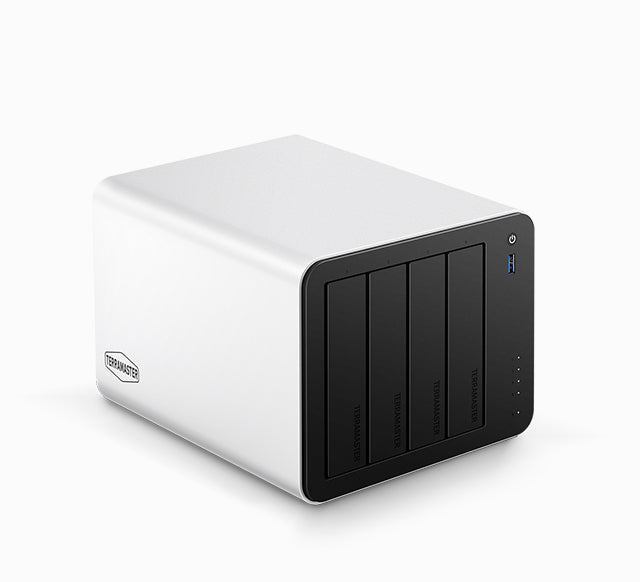
The chassis image is an official exterior view; it does not show the CPU selector, memory module, rear ports, installed drives or package contents. The manufacturer page currently lists the N150 option as a selector choice, but its displayed store availability is not a statement about another retailer's stock. Before ordering, confirm the N150 SKU, whether the shipment is new or bundled, exactly which drives and memory are included, seller/warranty terms, and the live compatibility status of every drive you intend to install. This is a source-based assessment of published specifications, not hands-on testing.
Primary references: TerraMaster's F4-425 Plus product page, English specification sheet, HDD compatibility table, drive compatibility page and TOS 7 Storage Pool guide.
Key specifications
Key details at a glance
| Internal drive bays | 4 bays |
|---|---|
| Documented internal drive media | 3.5-inch SATA HDD / 2.5-inch SATA HDD / 2.5-inch SATA SSD |
| Built-in Ethernet ports | 2 x individual built-in RJ45 5GbE ports |
| Fastest individual Ethernet port | 5 Gbps |
| Installed system memory | 16 GB |
| Maximum listed memory | 32 GB |
| Listed storage arrangements | RAID 0 / RAID 1 / RAID 5 / RAID 6 / RAID 10 / TRAID / TRAID+ |
| Internal file systems | Btrfs / EXT4 |
| Dimensions (H × W × D) | {'height': 150, 'width': 181, 'depth': 219} |
| Weight | 2.9 kg |
| M.2 NVMe slots | 3 |
| Processor | Intel N150 |
| CPU cores | 4 |
| Installed memory type | 16GB DDR5 non-ECC SODIMM, one 16GB module pre-installed |
Use the exact model’s instructions for operating limits, supplied equipment and version differences.
Sources for this review
Sources for this assessment
- TerraMaster U.S.-facing F4-425 Plus product page
- TerraMaster official F4-425 Plus product-handle JSON
- TerraMaster English F4-425 Plus specification sheet
- TerraMaster official NAS HDD compatibility table
- TerraMaster official drive compatibility page
- TerraMaster TOS 7 Storage Pool guide
- TerraMaster Home/SOHO NAS catalogue page
- Official F4-425 Plus exterior image linked by the exact model handle

Check your setup before choosing a NAS
Use the finder to narrow documented desk/shelf or rack formats, internal-bay minimums, a single Ethernet-port rating and optional redundancy requirements.