
Your needs, this model
Does it fit your priorities?
Does the F4-424 Max meet a four-bay floor and a 10-Gbps single-port requirement?
Yes on the documented base hardware: the exact F4-424 Max specification lists four native SATA positions and two separate built-in RJ45 10GbE ports. The finder compares one port rating, not a combined 20-Gbps pipe or a guaranteed file-copy rate. Your switch, client NIC, cabling, storage and workload still need to support the path.
Explore this need in the finder →Can a two-drive mirror coexist with the four-bay and 10-GbE arrangement?
The exact model page lists RAID 1. One possible owner-created plan uses two buyer-selected compatible SATA drives in two of four trays while one individual 10GbE port serves the network requirement, leaving two native bays open. The manufacturer's package reference lists no data drives or prepared volume. Check the current exact drive/firmware list, back up before initializing a pool and retain a separate backup because RAID 1 is not one.
Explore this need in the finder →What thresholds rule out the F4-424 Max?
A five-native-bay minimum exceeds its four SATA trays; the two M.2 cache sockets are separate. A 10.5-Gbps minimum for one built-in port exceeds its 10-GbE rating even though it has two such ports. A four-bay floor and a 10-Gbps one-port floor are the inclusive documented boundary, not a throughput guarantee.
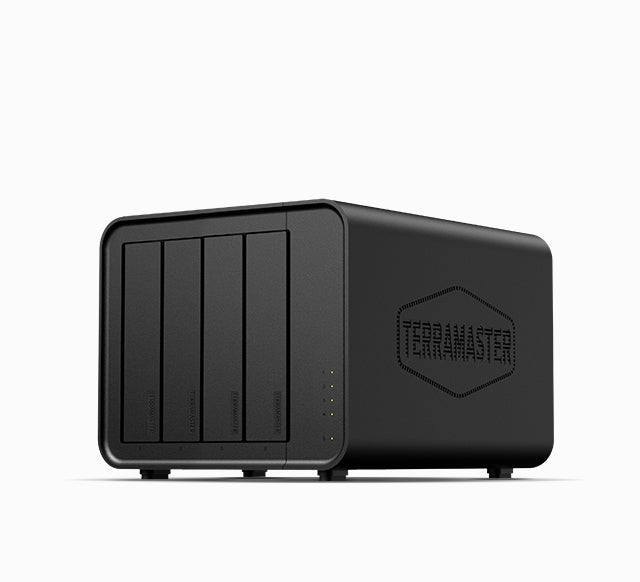
Explore this need in the finder →The F4-424 Max is an unusually network-forward four-bay NAS: TerraMaster lists four internal SATA positions, two separate M.2 NVMe cache sockets and two individual 10GbE RJ45 jacks. That mix suits a small studio or home lab with a real multi-gigabit path and a deliberate four-tray storage plan. It is not automatically a better fit than a slower four-bay unit if the client and switch remain at 1GbE or 2.5GbE. This is a documentation-based assessment, not a hands-on test.
Four SATA trays and two separate cache sockets
The exact specification accepts 3.5-inch SATA HDDs and 2.5-inch SATA HDDs or SSDs in its four drive positions. It separately lists two M.2 2280 NVMe slots at PCIe 4.0 x4 and describes them as SSD-cache positions. That distinction matters when planning growth: the M.2 sockets do not make this a six-bay SATA chassis, and the finder counts only the four native SATA positions. TerraMaster also lists hot-swap support for the drive bays, but the installation manual and selected disk firmware still govern safe removal and replacement.
Capacity needs a particularly careful reading. The product specification states 88 TB as four 22-TB drives. The current TerraMaster HDD compatibility table, however, lists selected 24-, 26-, 30- and 32-TB drive models for the F4-424 Max. Those are conflicting manufacturer references, not a basis for silently replacing the published figure with a new maximum. I therefore do not assign a maximum raw or usable capacity. Verify the exact HDD model and firmware in the live compatibility table before ordering; usable space will also depend on the chosen RAID layout, formatting and filesystem overhead.
Two 10GbE connectors are not one 20GbE port
The model page specifies two individual 10GbE RJ45 ports. A one-port minimum of 10 Gbps matches either individual connector, but the two jacks should not be counted as one 20-Gbps path. TerraMaster discusses link aggregation and SMB Multichannel, which can be useful in particular multi-link setups, but both ends and the network configuration must support the selected method. A link rating is not a file-copy result: client NIC, switch, cable, storage, protocol and workload all influence transfers.
TerraMaster advertises high sequential and random-I/O figures and pairs this chassis with a ten-core Intel Core i5-1235U. Those claims and component details can help identify the intended class of work, but they do not tell us how your workloads, drives or application configuration will behave. This assessment has not measured the unit, run a benchmark or tested video editing, virtual machines or database workloads.
A possible RAID 1 mirror must be built by the buyer
RAID 1 appears in the exact model's supported-mode list. One possible arrangement is to choose two compatible SATA drives, create a RAID 1 volume yourself and connect through one built-in 10GbE port. That uses two of the four native trays and leaves two open; it does not use the separate cache sockets as extra drive bays. The manufacturer's package reference lists the host, an adapter, a power cord, one RJ45 cable, a Quick Installation Guide, a warranty note and screws. It does not list data drives or an initialized storage pool. Check a retailer's actual package rather than assuming those reference contents describe a seller's shipment.
Creating or reinitializing a pool can erase data. RAID 1 can preserve access after certain single-drive failures, but it does not recover a mistakenly deleted file or protect the NAS from malware, theft, fire or a failed controller. Keep a separate backup copy and test that you can restore it before trusting important files to the new system.
Resolve the memory label before treating it as a configuration
The exact product specification lists one 8-GB DDR5 non-ECC SODIMM, two memory slots and a 64-GB supported ceiling. The Home/SOHO catalogue card labels the F4-424 Max as a 16GB model. The official product JSON shows one Default Title variant with SKU 6939236145565, not an identified 16-GB alternative. That does not prove what a reseller will ship, so confirm the exact model, SKU, module count and seller package on the listing or invoice before paying. Memory is not used to make a finder match here.
Other published specifications include a 154 × 179 × 222 mm chassis (height × width × depth), a listed net weight of 2.2 kg and a 120-W adapter. These figures help with a shelf or cabinet check, but the cabinet needs space for ventilation, cables and servicing beyond the chassis dimensions. The package reference does not establish what a particular seller includes, and the product page displayed the item as sold out when checked. That observation is not a promise about later stock or any retailer's availability, price, condition, warranty or return terms.
Who should shortlist the F4-424 Max?
Consider this model if four native SATA positions are enough, one 10GbE connection is useful across the actual network path and you are comfortable selecting compatible drives and creating the storage layout yourself. A four-bay floor and a 10-Gbps single-port floor are supported by the documented base hardware; one possible two-drive mirror can coexist with that port plan while leaving two trays open. Those facts do not mean drives or a RAID volume are included.
Look elsewhere if the growth plan requires five or more native trays or if one built-in Ethernet port must exceed 10 Gbps. Do not count the M.2 cache sockets or add the two Ethernet ports together to clear those boundaries. Before ordering, reconcile the 8GB-versus-16GB descriptions, consult the current exact drive/firmware table, confirm seller-supplied parts, and choose an independent backup plan. This review makes no claim of present stock, personal ownership, lab testing, measured noise, real-world throughput or customer experience.
Key specifications
Key details at a glance
| Internal drive bays | 4 bays |
|---|---|
| Documented internal drive media | 3.5-inch SATA HDD / 2.5-inch SATA HDD / 2.5-inch SATA SSD |
| Built-in Ethernet ports | 2 x built-in individual RJ45 10GbE ports |
| Fastest individual Ethernet port | 10 Gbps |
| Installed system memory | 8 GB |
| Maximum listed memory | 64 GB |
| Listed storage arrangements | TRAID / TRAID+ / Single / JBOD / RAID 0 / RAID 1 / RAID 5 / RAID 6 / RAID 10 |
| Dimensions (H × W × D) | 154 x 179 x 222 mm (H x W x D) |
| Weight | 2.2 kg |
| Data drives included in listed package | No |
| M.2 NVMe slots | 2 |
| Processor | Intel Core i5-1235U |
| CPU cores | 10 |
| Installed memory type | 8 GB DDR5 non-ECC SODIMM listed on the exact product page as one pre-installed 8-GB module |
Use the exact model’s instructions for operating limits, supplied equipment and version differences.
Sources for this review
Sources for this assessment
- TerraMaster official U.S.-facing F4-424 Max product page and specification
- TerraMaster official Home/SOHO NAS collection
- TerraMaster official NAS HDD compatibility table
- TerraMaster official F4-424 Max product documentation index
- TerraMaster official F4-424 Max product JSON
- TerraMaster official F4-424 Max product image

Check your setup before choosing a NAS
Use the finder to check bay count, the network link you need, and whether a documented two-drive redundant arrangement is essential.