
Your needs, this model
Does it fit your priorities?
How many internal drive positions does the standard TerraMaster F2-425 have, and do the model names imply M.2 storage?
The exact F2-425 table lists two native SATA positions for 3.5-inch HDDs, 2.5-inch HDDs or 2.5-inch SATA SSDs. Its comparison table says the standard F2-425 has no M.2 SSD slot. That is different from the separately named F2-425 Plus, which has three M.2 positions, and from the F2-424's distinct M.2 cache sockets. The two-bay model's 60-TB figure is a raw two-by-30-TB example, not usable RAID 1 capacity or a drive package promise.
Explore this need in the finder →Can I use both F2-425 bays for a mirror, and what does the 60-TB figure mean?
TerraMaster lists RAID 1 and two native SATA positions, so a buyer could select two compatible SATA drives and create an owner-managed mirror. That would occupy both trays; the page does not prove the exact pair, included disks or an initialized pool. The listed 60 TB is two 30-TB drives' raw capacity and varies by RAID type, so it is not 60 TB of usable mirror space. Check both drive identifiers and the current software procedure, then maintain a separate backup.
Explore this need in the finder →Does the F2-425 meet a 3-Gbps requirement for one Ethernet port?
No. The exact F2-425 specification lists one individual built-in RJ45 port rated 2.5GbE. It meets a 2.5-Gbps nominal single-port floor but not 3 Gbps; it is not two links that can be added together. A port's link rating does not guarantee file-transfer speed across the client, switch or direct peer, cabling, drives and workload. The same page's title metadata says N95 while the detailed specification says N5095, and its TOS copy conflicts between versions 6 and 7, so verify those exact-unit details if they matter to your choice.
Explore this need in the finder →The standard TerraMaster F2-425 is a two-bay desktop NAS with one individual 2.5GbE port, 4 GB of DDR4 and no M.2 SSD slots in its exact comparison table. This source-based review is not a hands-on test. The official page has a CPU-label conflict: title metadata says “N95,” while its feature text and detailed specifications name Intel Celeron N5095; do not silently equate them.
Two SATA trays make the storage decision concrete
The detailed table specifies two internal SATA positions for 3.5-inch hard drives, 2.5-inch hard drives or 2.5-inch SATA SSDs. The comparison panel says the standard F2-425 has no M.2 SSD slot. That distinction matters beside TerraMaster’s similarly named F2-425 Plus, whose own product record lists three M.2 positions, and the F2-424, which has separate M.2 cache sockets. Neither sibling’s storage layout belongs to this model.
TerraMaster gives a maximum internal raw-capacity example of 60 TB, expressed as two 30-TB drives, while cautioning that capacity varies by RAID mode. It is not 60 TB of available mirrored space. A two-drive RAID 1 mirror would use both bays, and usable space is constrained by the smaller member and the array/filesystem overhead. The page does not make every 30-TB drive or every pair compatible by implication, so treat the raw sum as a vendor example rather than a promise.
A mirror is a possible setup, not a ready-made safety net
The model’s storage comparison lists RAID 1, along with Single, RAID 0, JBOD and TRAID. That supports a possible owner-created two-drive mirror: choose the exact drives, verify each identifier against current support information and create the array on the purchased unit. This record does not establish that data drives or an initialized pool are included. TerraMaster’s compatibility table lists individual drives for the F2-425—including both recommended and “applicable, not recommended” entries—but an individual model row does not approve a particular pair, firmware revision or pool layout.
A mirror can help after a single drive failure, but it is not a separate copy against deletion, malware, theft, fire or enclosure failure. Keep a backup and test recovery. Hot-swap support is not a reason to pull a drive before checking the current replacement procedure and array state.
One 2.5GbE port sets a clear ceiling
The hardware table lists one RJ45 port rated at 2.5GbE. It meets a 2.5-Gbps minimum for one built-in port and falls short of a 3-Gbps single-port floor. Unlike the F2-424’s two individual 2.5GbE jacks, there is no second built-in Ethernet connection to plan around. And neither a port rating nor a combined-link feature elsewhere in the range would equal a file-copy benchmark: the client, router or switch, cable, storage layout, protocol and workload all influence the path.
The spec separately lists two 10-Gbps USB host ports, one 5-Gbps USB host port and HDMI. None raises Ethernet speed; check the client adapter and network equipment too.
Memory and software details need exact-version checks
TerraMaster’s table specifies 4 GB of non-ECC DDR4 SODIMM memory in one slot, with a 16-GB supported total. That maximum is not an additional 16 GB on top of the installed module, and this review does not certify a particular replacement DIMM. A separate product-copy mismatch also remains: one section calls the included system TOS 6 while another promotes TOS 7. The captured quick-install portal is a general selector shell rather than a retrieved F2-425 procedure, so the operating-system version shipped with a seller’s unit and its setup sequence remain unconfirmed.
The product page lists an 80-mm fan, 48-W supply and 19.0-dB(A) noise figure, conditioned on two SATA drives in standby, a 17.3-dB(A) room noise floor and a one-metre distance. This is not an independent or full-load test. Listed chassis dimensions are 222 × 119 × 154 mm; leave room for cables, ventilation and tray access.
Identity, compatibility and package checks
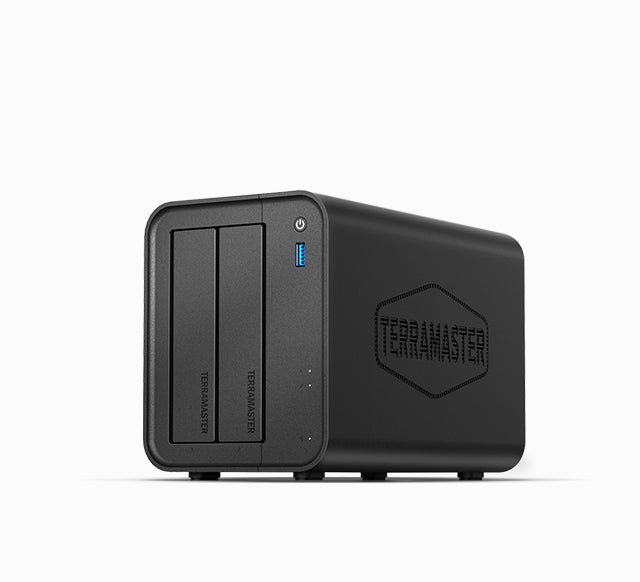
The exact product-handle JSON shows one “Default Title” variant and leaves the maker SKU and barcode blank. The U.S.-currency manufacturer page and Home/SOHO card establish a U.S.-facing F2-425 model reference, but not a reseller’s exact SKU, included disks, seller-added configuration, present stock or Amazon listing identity. The official image is associated with this exact model; it shows the exterior and two front tray faces, not a selected CPU, installed drives, rear ports or package contents.
Before choosing an offer, confirm that its title is the standard F2-425 rather than F2-425 Plus, F2-424 or another TerraMaster family member; resolve the N95/N5095 label if processor identity is material; check both intended drive models against current compatibility information; and verify package, warranty, return and software-version terms in writing. Do not infer an included array, a guaranteed 60-TB usable volume or current availability from the manufacturer page.
Who should keep the standard F2-425 on the shortlist?
It is worth comparing when two native SATA positions, a single 2.5GbE link and the option of a buyer-created two-drive mirror align with the actual plan. It is a poor match if the requirement is more than two internal positions, an M.2 SSD slot, dual Ethernet jacks or a single port faster than 2.5GbE. The F2-425 Plus and F2-424 are separate alternatives with different port and M.2 layouts; the four-bay F4-425 is another route when more native SATA growth matters. These are hardware distinctions, not performance rankings.
This review makes no claim of ownership, measured performance, customer experience, included drives, independent noise testing, current price, stock or verified Amazon destination. Check the exact model, intended drive pair, network path, software details and seller package before purchase, and keep a separate, recoverable backup whatever RAID choice is made.
Key specifications
Key details at a glance
| Internal drive bays | 2 bays |
|---|---|
| Documented internal drive media | 3.5-inch SATA HDD / 2.5-inch SATA HDD / 2.5-inch SATA SSD |
| Built-in Ethernet ports | 1 x built-in individual RJ45 2.5GbE port |
| Fastest individual Ethernet port | 2.5 Gbps |
| Installed system memory | 4 GB |
| Maximum listed memory | 16 GB |
| Processor | Intel Celeron N5095 |
| Installed memory type | DDR4 non-ECC SODIMM |
Use the exact model’s instructions for operating limits, supplied equipment and version differences.
Sources for this review
Sources for this assessment
- TerraMaster official F2-425 U.S.-currency product page and embedded specification/comparison tables
- TerraMaster official F2-425 product-handle JSON
- TerraMaster Home/SOHO catalogue row recheck for the previously observed F2-425
- TerraMaster English drive-compatibility table
- TerraMaster Quick Installation Guide portal shell
- Exact-model official F2-425 exterior photograph linked by its product-handle JSON

Check your setup before choosing a NAS
Use the finder to check bay count, the network link you need, and whether a documented two-drive redundant arrangement is essential.