
Your needs, this model
Does it fit your priorities?
Do its three M.2 slots make this a five-SATA-bay NAS?
No. The N150 specification lists two native SATA positions and three separate M.2 2280 NVMe sockets. The finder counts two internal bays; the M.2 layer is not extra SATA trays.
Explore this need in the finder →Can I plan two-drive redundancy and still use a 5GbE connection?
A possible buyer-created TRAID pool uses two compatible SATA HDDs; TerraMaster says at least two disks are needed for one-disk failure protection. One of the two individual 5GbE ports can serve the plan. Drives, pool setup and a separate backup are not included assumptions.
Explore this need in the finder →What is actually known about memory upgrades on the N150 option?
The N150-specific specification lists one pre-installed 8GB DDR5 non-ECC SODIMM in one slot and a 32GB supported maximum. Reaching that figure requires replacing the installed module; confirm the replacement model and do not transfer this limit to N95.
Explore this need in the finder →The TerraMaster F2-425 Plus N150 is a compact NAS with two native SATA positions, three separate M.2 SSD positions and two individual 5GbE ports. It is not a five-tray SATA chassis, and the two network connectors do not become one 10GbE port. The N150 selector is listed with 8GB DDR5; its detailed sheet specifies one memory slot and a 32GB maximum. This is an assessment of published material, not a hands-on test or a particular seller's shipment.
Two SATA positions, with a separate M.2 layer
The N150 sheet lists two SATA positions for 3.5-inch HDDs, 2.5-inch HDDs, or 2.5-inch SATA SSDs, plus three M.2 2280 NVMe sockets rated PCIe 3.0 x1 each. The product's “3+2” phrase refers to those two different storage layers; M.2 does not raise the native SATA count. That matters when a minimum refers to internal HDD trays rather than storage devices overall.
TerraMaster describes M.2 caching, RAID 5, and separate storage pools, but those are different configurations. A three-slot layout does not certify every SSD, firmware or mixed HDD/M.2 combination. Check exact drive models in the current compatibility lists rather than reading a capacity example as validation of a full set.
What is specifically documented for the N150
The N150 is an Intel quad-core processor listed up to 3.6GHz. Its detailed sheet specifies one installed 8GB DDR5 non-ECC SODIMM in one slot and a 32GB supported maximum. Reaching that limit means replacing the module, not adding a second stick. Confirm the selector and replacement compatibility before buying; N95 memory evidence is not a substitute for this N150 detail.
The sheet lists Btrfs and EXT4 and gives an N150-specific physical/noise profile. It specifies one 80 × 80 × 25mm fan and 20.0dB(A) with two SATA drives in standby, 17.3dB(A) background noise and a one-metre distance. The product page elsewhere says fanless/19dB. That wording is unresolved, not an independent noise result; ask TerraMaster to clarify if acoustics are decisive.
Two 5GbE ports are two separate links
Either of the two built-in 5GbE ports meets a 5Gbps single-port requirement; the connectors cannot be added into one 10GbE link. Link aggregation or SMB Multichannel is not a single faster port or a throughput guarantee. Client NIC, switch/direct link, cable, protocol, storage and workload all matter. A 1GbE or 2.5GbE endpoint still limits its own path.
A possible redundant plan is still a setup task
TerraMaster names TRAID for this model and says its one-disk failure tolerance requires at least two drives. A possible buyer-created pool uses two separately selected compatible SATA HDDs, one in each position; pool creation is an owner task, not an included initialized array. Both SATA bays are then occupied. Redundancy does not protect against deletion, malware, theft or enclosure loss, so keep a separate backup and test recovery.
Capacity figures need their labels
The page's 84TB headline adds two 30TB HDD examples and three 8TB M.2 examples. The N150 sheet separately gives 60TB raw for two 30TB SATA drives and notes that raw capacity and volume size differ. These are different scopes, not a proven usable total or a guaranteed seven-device configuration. Redundancy also affects usable space. Verify each drive and do not shop by the headline alone.
Check the installation path before using M.2 slot 3 as a system disk
TerraMaster Support's notice applies to F2-425 Plus and F4-425 Plus. It describes a Slot 3 NVMe boot-priority defect on BIOS MTWL0101.V03–V06; V07 and BJFX-TWLX-108 are listed as needing no extra adjustment. Check the delivered BIOS before a TOS 7 installation or update that boots from Slot 3. This is version-specific, not a fault claim about every unit.
Who should compare this profile
Compare this selector if two SATA positions, separate M.2 storage, one individual 5GbE link and the documented 8GB-to-32GB memory path fit your plan. If you need three or more internal SATA bays, choose a larger chassis; M.2 does not meet that floor. A redundant plan also needs compatible drives, pool setup and another backup.
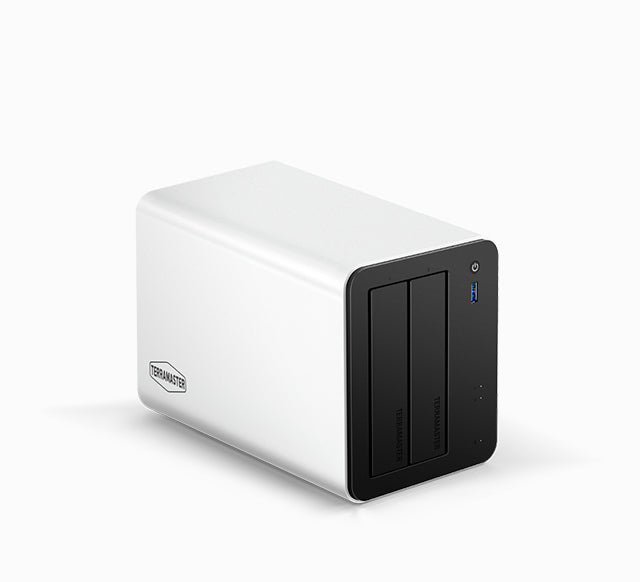
The official image shows the chassis, not the N150 option, memory, rear ports, installed drives or seller package. Before ordering, confirm the N150 selector, seller contents and warranty terms, plus compatibility of each planned drive. This is documentation-based analysis; no ownership, measurement or performance test is claimed.
Primary references: TerraMaster's F2-425 Plus product page, English specification sheet, HDD compatibility list, NVMe compatibility list, TRAID overview, TOS 7 Storage Pool guide, and 425 Plus TOS 7 installation notice.
Key specifications
Key details at a glance
| Internal drive bays | 2 bays |
|---|---|
| Documented internal drive media | 3.5-inch SATA HDD / 2.5-inch SATA HDD / 2.5-inch SATA SSD |
| Built-in Ethernet ports | 2 x individual built-in RJ45 5GbE ports |
| Fastest individual Ethernet port | 5 Gbps |
| Installed system memory | 8 GB |
| Maximum listed memory | 32 GB |
| Listed storage arrangements | TRAID |
| Internal file systems | Btrfs / EXT4 |
| Dimensions (H × W × D) | {'height': 150, 'width': 122, 'depth': 219} |
| Weight | 2.2 kg |
| M.2 NVMe slots | 3 |
| M.2 SSD storage-pool support | Yes |
| Processor | Intel N150 |
| CPU cores | 4 |
| Installed memory type | 8GB DDR5 non-ECC SODIMM, one 8GB module pre-installed |
Use the exact model’s instructions for operating limits, supplied equipment and version differences.
Sources for this review
Sources for this assessment
- TerraMaster U.S.-facing F2-425 Plus product page
- TerraMaster official F2-425 Plus product-handle JSON
- TerraMaster English F2-425 Plus specification sheet, N150 profile
- TerraMaster current NAS HDD compatibility table
- TerraMaster current M.2 NVMe compatibility table
- TerraMaster TOS 7 Storage Pool guide
- TerraMaster Support 425 Plus TOS 7 installation notice
- TerraMaster TRAID overview
- TerraMaster Home/SOHO NAS directory
- Exact F2-425 Plus page-associated exterior image

Check your setup before choosing a NAS
Use the finder to narrow documented desk/shelf or rack formats, internal-bay minimums, a single Ethernet-port rating and optional redundancy requirements.