
Your needs, this model
Does it fit your priorities?
Are 28 drives inside the RS2825RP+ chassis?
No. The RS2825RP+ has sixteen native SATA bays. Reaching 28 total requires a separately purchased RX1225RP shelf; confirm its compatibility, separate power and rack placement before treating the expanded total as part of the plan.
Explore this need in the finder →Does the RS2825RP+ have redundant power, and what does that protect against?
Synology documents dual hot-swappable power supplies and two AC cords. Redundancy only helps when both supplies and the facility power path are planned appropriately; two cords on the same failed outlet do not make an independent power source.
Explore this need in the finder →Does sixteen-bay capacity remove the need for a backup?
No. RAID 1 and other redundant layouts can reduce some drive-failure risk, but they do not preserve an independent copy after deletion, malware, theft, fire or system loss. Choose and test a separate backup target.
Explore this need in the finder →Sixteen drive positions in one 3U rack chassis
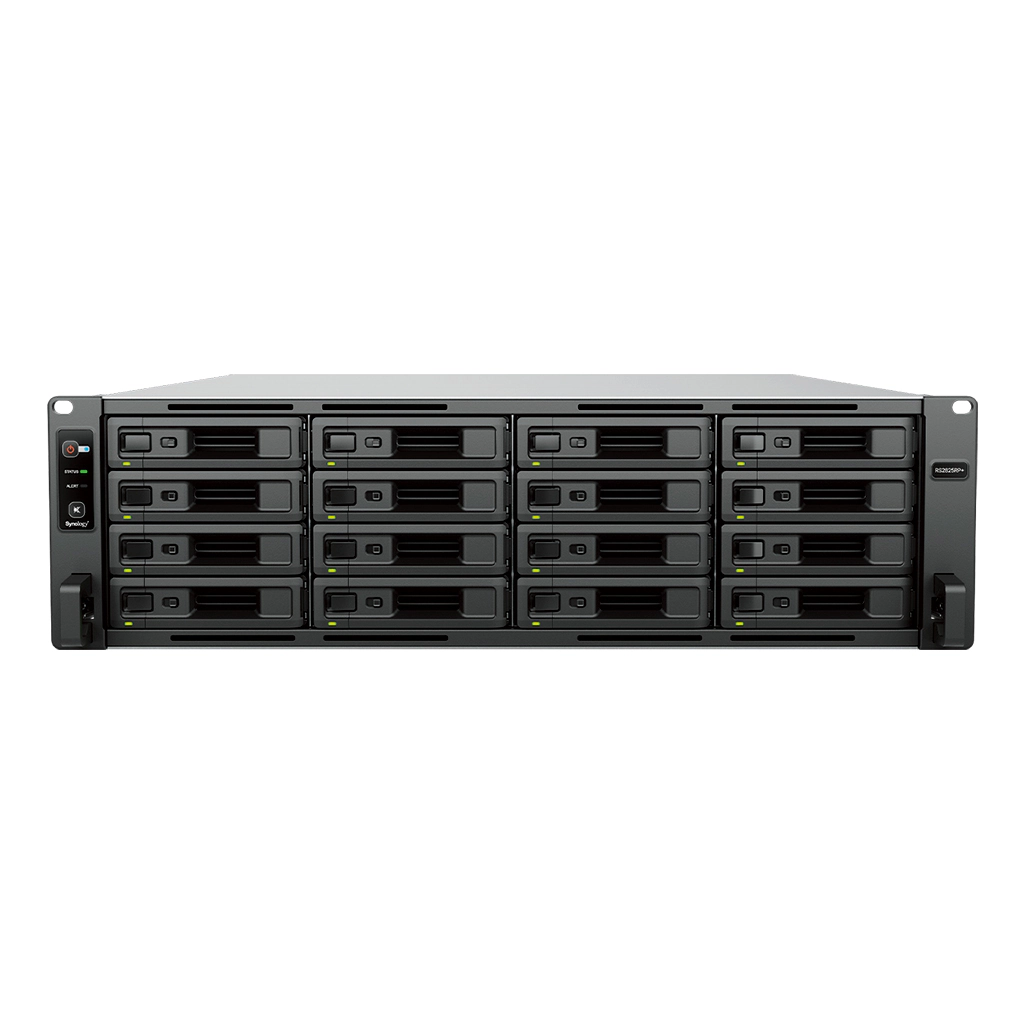
The RackStation RS2825RP+ is a 16-bay rackmount NAS designed for teams that want a larger native disk count and redundant power in one chassis. It is a 3U enclosure measuring 132.3 × 482 × 656.5 mm and weighing 17.3 kg before the drives are installed. Those dimensions and mass are practical parts of the decision: check usable rack depth, rail fit, service clearance and the rack’s load plan before treating a 16-bay system as a simple shelf upgrade.
Synology documents expansion to 28 total positions with one RX1225RP. That is sixteen bays in the RS2825RP+ plus twelve in a compatible, separately purchased shelf. The main chassis does not contain 28 trays. A shelf changes cabinet space, power, cabling and maintenance needs, so a plan to fill all 28 positions should account for the whole installation rather than relying on a headline maximum.
Redundant power, a single built-in 10GbE data port
The model has dual hot-swappable power supplies and the hardware guide lists two AC cords. Redundant supplies can reduce the effect of one supply failing, but they do not create power independence by themselves. For resilience, connect them to the intended separate feeds or UPS outputs and verify how the facility’s distribution is protected. One power event that removes both feeds can still interrupt the system.
Its built-in data networking is one 10GbE RJ-45 port plus two 1GbE RJ-45 ports. Unlike several xs+ models, the hardware overview does not document a dedicated out-of-band management jack; the listed console port is for manufacturing. Do not assume remote administration will remain available through a separate management LAN when the system is otherwise offline. The single 10GbE link is also not a promise of 10Gbps file throughput: switches, clients, storage layout, cabling and concurrent workloads remain limiting factors.
The RS2825RP+ has one PCIe Gen3 x8 slot with an x4 link. Synology lists compatible network cards and M.2 adapter cards as optional accessories, so a future NIC or cache design may be possible. The datasheet does not list built-in M.2 slots. Any added card and SSD must be checked for exact model compatibility and package contents before purchasing.
Storage layout and memory are more modest than the bay count suggests
The chassis supports 3.5-inch SATA HDDs and 2.5-inch SATA SSDs. It ships with 8 GB DDR4 ECC UDIMM memory in one of two slots and lists a 32 GB maximum. The processor is a four-core, eight-thread AMD Ryzen V1780B. These specifications describe the starting platform, not a guarantee that every application will fit comfortably; workloads such as large VM collections or high concurrency may make memory and network planning important. Synology’s standard memory caution applies when considering third-party modules.
Supported storage arrangements include Synology Hybrid RAID, RAID 1, RAID 5, RAID 6 and RAID 10, among others; Btrfs is listed for the internal file system. That provides choices from a two-drive mirror to larger multi-drive layouts, but redundancy is not a separate backup. A 16-drive NAS can still lose files through accidental deletion, a compromised account, malware, fire or a failed maintenance plan. Keep an independent backup, protect its credentials and practice restoring representative data.
The vendor lists 108 TB as a maximum single-volume tier and 200 TB with at least 32 GB of memory. These are conditional volume limits, not a forecast of formatted usable space. Drive size, RAID choice, filesystem overhead and the way storage pools are divided all matter. A system with the 8 GB baseline does not qualify for the larger listed limit without an appropriate memory configuration.
Fit, support and package checks
The 10GbE port and 16 internal bays make the RS2825RP+ a plausible candidate for a rack-based shared-storage or backup target where the team already has the network and operational capacity to administer it. It is less suitable when the buyer needs several built-in 10GbE links, an out-of-band management port, or a smaller 1U chassis. Compare it with the four-bay RS1626xs+: the larger RS2825RP+ provides four times the native bays and redundant power, but one built-in 10GbE port rather than two, an 8 GB rather than 16 GB memory baseline, and a three-year rather than five-year standard warranty in the support table.
The standard hardware guide lists the main unit, two AC power cords, and drive screws; data drives and the RX1225RP shelf are not listed in that package. Synology specifies a four-post 19-inch rack and the RKS-02 sliding rail kit sold separately. The U.S. support-status row observed October 29, 2026 marks the model Generally Available, with Full DSM updates, Full Technical Support and a three-year warranty. Those are manufacturer fields, not a confirmation of seller inventory, offer package or a particular purchase’s warranty terms. Check the exact suffix, drives, cords, rails, compatible expansion unit and return terms in the actual offer.
Assessment
The RS2825RP+ earns consideration when sixteen native SATA positions and dual power supplies are requirements, not when the buyer merely wants “a NAS.” Its mix of 3U footprint, 10GbE and a separate-shelf growth path can suit a managed small-business rack, but it calls for compatible drives, rack planning, backup discipline and a realistic understanding of its single built-in 10GbE data port. A larger bay count is useful only if the storage architecture, network and operations can support it. This is a documentation-based assessment of Synology’s exact model materials, not a personal installation or performance test.
Primary references: Synology U.S. RS2825RP+ specifications, the English datasheet, the hardware installation guide and the U.S. Product Support Status row.
Key specifications
Key details at a glance
| Internal drive bays | 16 bays |
|---|---|
| Documented internal drive media | 3.5-inch SATA HDD / 2.5-inch SATA SSD |
| Built-in Ethernet ports | 1 × 10GbE RJ-45 data port / 2 × 1GbE RJ-45 data ports |
| Fastest individual Ethernet port | 10 Gbps |
| Installed system memory | 8 GB |
| Maximum listed memory | 32 GB |
| Listed storage arrangements | Synology Hybrid RAID / Basic / JBOD / RAID 0 / RAID 1 / RAID 5 / RAID 6 / RAID 10 |
| Internal file systems | Btrfs |
| Maximum listed single-volume size | 200 TB |
| Dimensions (H × W × D) | 132.3 × 482 × 656.5 mm (H × W × D); 3U |
| Weight | 17.3 kg |
| Hardware warranty | 3 years |
| Data drives included in listed package | No |
| Maximum total drive bays with listed expansion | 28 bays |
| Expansion-unit note | Sixteen native bays plus one separate 12-bay RX1225RP; 28 is not the base chassis count. |
| Listed expansion unit | RX1225RP × 1 (sold separately) |
| Processor | AMD Ryzen V1780B |
| CPU cores | 4 |
| CPU threads | 8 |
| Installed memory type | DDR4 ECC UDIMM |
| Single-volume limit condition | 200 TB maximum single volume requires at least 32 GB RAM; 108 TB is the listed tier otherwise. Usable capacity is lower and configuration-dependent. |
Use the exact model’s instructions for operating limits, supplied equipment and version differences.
Sources for this review
Sources for this assessment
Check your setup before choosing a NAS
Use the finder to narrow documented desk/shelf or rack formats, internal-bay minimums, a single Ethernet-port rating and optional redundancy requirements.