
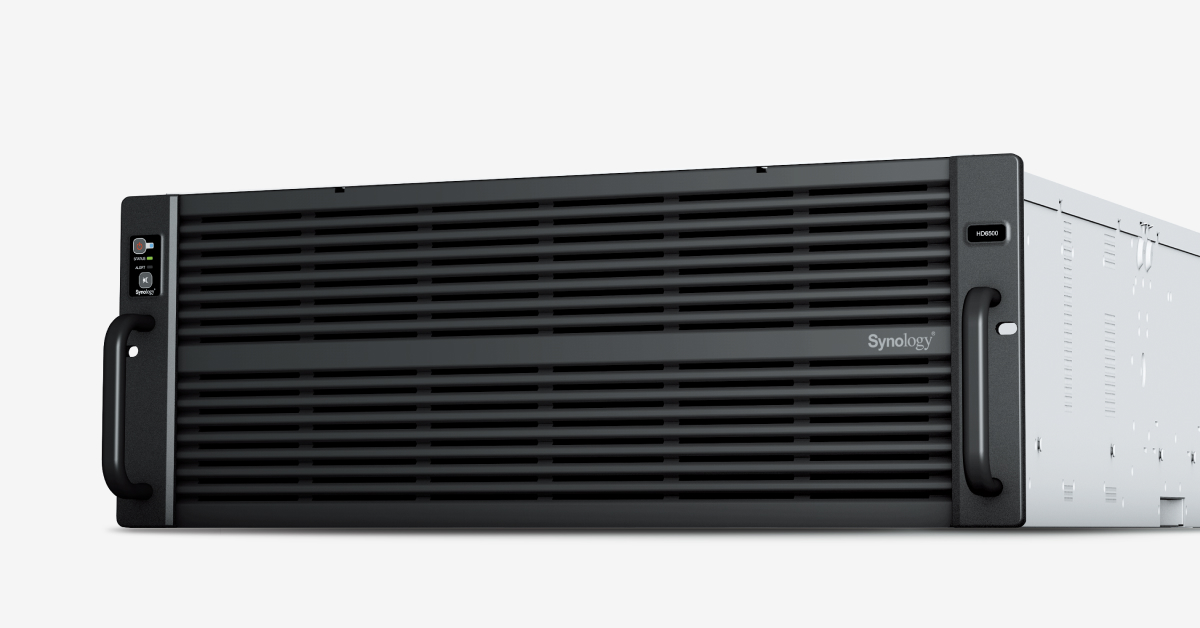
Your needs, this model
Does it fit your priorities?
Do the HD6500’s included SSDs fill its 60 data bays?
No. Synology lists two SATA SSDs for system use in the package, separate from the 60 storage positions. Storage bays are specified for 3.5-inch SAS HDDs or 2.5-inch SATA SSDs; 2.5-inch SSD installation needs optional R5 trays.
Explore this need in the finder →Which expansion shelves are compatible with HD6500?
The current product specification lists four RX6025sas units for up to 300 total bays. Synology’s compatibility reference also lists HD6500 with RX6022sas, and the HD6500 manual describes that earlier unit’s multipath topology. Check exact DSM, unit, cabling and drive requirements.
Explore this need in the finder →Can the HD6500’s 1 PB limit replace a backup plan?
No. The manufacturer lists a conditional 1 PB single-volume limit for RAID 6, but a large RAID volume is not a separate backup copy. Plan off-system protection and test restoration.
Explore this need in the finder →The HD6500 is a high-density 4U NAS for large warm- or cold-storage deployments, including centralized backups, video production archives and substantial surveillance storage. Its 60 native drive bays and four expansion-unit ceiling place it far beyond a typical home NAS. The central buying question is not whether a household can fill the chassis; it is whether an organization has the rack, power, cooling, compatible disks, operational staffing and restore plan required to use this class of storage.
Separate the data pool from the included system drives
Synology specifies 60 positions for 3.5-inch SAS hard drives or 2.5-inch SATA SSDs. The product documentation says two Synology SATA SSDs are included for system use; those are not a bundle of sixty data disks. Synology also says optional R5 trays are required to install 2.5-inch SATA SSDs in the storage bays. Its package contents list the chassis, two system SSDs, two AC power cords, an accessory pack and an RKS-03 sliding rail kit. Check the exact seller package, and distinguish those included system drives from the compatible storage media you still need to plan.
The model supports Btrfs and lists RAID 1, RAID 5, RAID 6 and RAID 10, among other configurations. RAID 1 can form a two-drive mirror, but it does not substitute for an independent backup. Synology lists a 1 PB single-volume option for RAID 6 groups, plus a 200 TB limit; the 1 PB number has conditions and is not raw or guaranteed usable capacity. Drive count, chosen HDD/SSD models, RAID layout, filesystem and metadata affect the result. Large archive capacity still needs off-system replication or backup, access controls and periodic restore testing.
Expansion is substantial, but must be matched precisely
The current HD6500 product page and product-specification document list up to 300 total bays with four RX6025sas expansion units. Synology’s compatibility material also lists the HD6500 with RX6022sas. The older HD6500 hardware guide documents RX6022sas connection topology and SAS multipathing, while the newer product specification names RX6025sas. Treat these as distinct compatible expansion models, not interchangeable names: confirm the exact unit, DSM requirement, cable path, drive support and topology in current manufacturer documentation for the system being purchased.
An expansion shelf is another powered, rack-mounted appliance with its own space, drive trays, compatible disks and failure modes. The system supports multipath I/O for expansion, but that benefit depends on correct cabling and configuration. The 300-bay ceiling means a coordinated HD6500-plus-shelf deployment, not 300 bays inside the base enclosure.
Network, processing and facility requirements
Built-in networking includes two 10GbE and two 1GbE RJ-45 data ports, plus a separate 1GbE out-of-band management port. That OOB connection is for administration, not a third Gigabit file path. Four PCIe slots accept supported add-in cards; Synology lists options for faster Ethernet and Fibre Channel, but they are not part of the standard built-in port count. A 10GbE line rating does not predict full-array throughput for a real mix of clients and data.
The HD6500 contains two Intel Xeon Silver 4210R processors, each with 10 cores and 20 threads, and 64 GB of DDR4 ECC RDIMM memory expandable to a listed 512 GB across sixteen slots. The 4U chassis measures 176 × 482 × 1,020 mm and weighs 37.9 kg. Its 60.8 dB(A) noise figure and 1,025.2-watt access consumption are manufacturer test values; they underscore the need to plan for an equipment room, power distribution, heat removal and service access. The included RKS-03 rail kit is a separate consideration from rack compatibility itself; verify the rack depth, mounting clearances and load rating.
Who should evaluate the HD6500?
A business with many terabytes or petabytes of warm/cold data, an established four-post rack environment and staff who can manage SAS storage may have a reason to compare it with other high-density systems. A home user looking for an easy first NAS will find the 4U size, mass, power, acoustics, drive trays and expansion planning disproportionate. The vendor’s five-year warranty and generally-available/full-support status describe the manufacturer program, not any seller’s current stock or service terms.
Before purchase, confirm whether the data bays will use compatible 3.5-inch SAS HDDs or 2.5-inch SATA SSDs, whether the system SSDs and RKS-03 are actually present in the offer, and whether optional R5 trays or RX-series shelves are needed. Then validate rack fit, power, cooling, 10GbE switching, retention policy and an independent backup copy. The HD6500 is a specialized storage platform; its headline capacity only becomes useful when those surrounding systems are ready.
Key specifications
Key details at a glance
| Internal drive bays | 60 bays |
|---|---|
| Documented internal drive media | 3.5-inch SAS HDD / 2.5-inch SATA SSD |
| Built-in Ethernet ports | 2 × 10GbE RJ-45 data ports / 2 × 1GbE RJ-45 data ports |
| Fastest individual Ethernet port | 10 Gbps |
| Installed system memory | 64 GB |
| Maximum listed memory | 512 GB |
| Listed storage arrangements | Basic / JBOD / RAID 0 / RAID 1 / RAID 5 / RAID 6 / RAID 10 |
| Internal file systems | Btrfs |
| USB 3.2 Gen 1 ports | 2 |
| Maximum listed single-volume size | 1000 TB |
| Dimensions (H × W × D) | 176 × 482 × 1,020 (H × W × D) |
| Weight | 37.9 kg |
| Manufacturer's idle noise figure | 60.8 dB(A) |
| Hardware warranty | 5 years |
| Data drives included in listed package | No |
| System drives included (not data-bay drives) | 2 × Synology SATA SSD for system use |
| Maximum total drive bays with listed expansion | 300 bays |
| Expansion-unit note | Up to 300 total bays with four compatible expansion units. Current Product Specifications name RX6025sas; official compatibility materials also list RX6022sas. Confirm exact expansion model, DSM requirements, cabling and drive compatibility. |
| Listed expansion unit | RX6025sas × 4 (current product specifications); RX6022sas also listed as compatible in Synology expansion reference |
| Processor | 2 × Intel Xeon Silver 4210R |
| CPU cores | 20 |
| CPU threads | 40 |
| Installed memory type | DDR4 ECC RDIMM |
| Single-volume limit condition | Synology lists 1 PB for RAID 6 groups and a 200 TB option; conditions, memory, RAID and system version apply. This is not raw or usable-capacity guidance. |
Use the exact model’s instructions for operating limits, supplied equipment and version differences.
Sources for this review
Sources for this assessment
- Synology US FlashStation product directory, cycle 10 capture
- Synology HD6500 US product page
- Synology HD6500 Product Manual, package and hardware overview
- Synology HD6500 Product Manual, hardware components and expansion topology
- Synology HD6500 English datasheet, 2025 revision
- Synology HD6500 Product Specifications, last updated 2026-05-12
- Synology US Product Support Status, FS and HD rows
- Synology Knowledge Center expansion-unit compatibility list
Check your setup before choosing a NAS
Use the finder to check bay count, the network link you need, and whether a documented two-drive redundant arrangement is essential.