
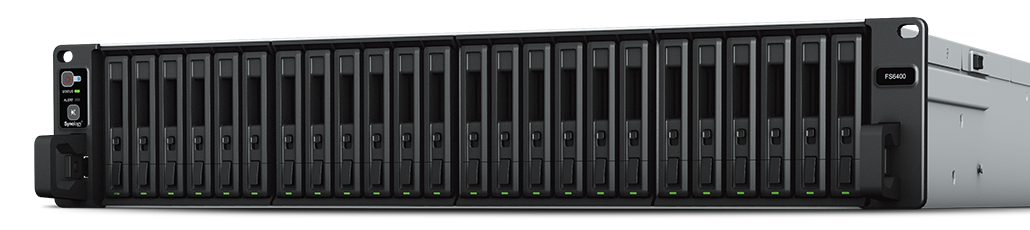
Your needs, this model
Does it fit your priorities?
Which drive types does the FS6400 support?
Synology lists 24 positions for 2.5-inch SAS hard drives or SSDs and SATA SSDs. Drives are sold separately, and Synology says to check the compatibility list. Verify the full drive model and firmware for this exact FS6400 rather than assuming every SAS or SATA device works.
Explore this need in the finder →Can the FS6400 grow beyond its 24 internal bays?
Yes, with compatible optional Synology shelves: Synology lists two RX1222sas units for up to 48 total bays or two FX2421 units for up to 72. Those are separate rack, drive, power and compatibility decisions; the expansion units are not part of the standard FS6400 package.
Explore this need in the finder →Does its 1 PB volume specification apply with the installed memory?
Not without a configuration change: Synology lists the 1 PB single-volume option for RAID 6 groups with 64 GB of memory, while the FS6400 page lists 32 GB installed. Confirm the full supported memory configuration and DSM requirements before building a plan around that limit; it is not a forecast of usable space.
Explore this need in the finder →The Synology FlashStation FS6400 is an older-generation 2U rackmount NAS whose distinction is 24 positions for 2.5-inch SAS hard drives/SSDs and SATA SSDs, plus separate Synology expansion shelves. Synology still lists it as generally available with full DSM updates and technical support. For a team already designed around those media and expansion options, that may matter more than a newer processor generation.
Built for shared file and block storage
The FS6400's 24 hot-swappable 2.5-inch bays support SAS HDDs, SAS SSDs and SATA SSDs, unlike the SATA-SSD-only FS6420. Still check each disk against the current FS6400 compatibility list. SMB/NFS file services, iSCSI/Fibre Channel, Btrfs/ext4 and Virtual Machine Manager point to a business role such as shared project data, virtualization or databases, not a casual desktop appliance.
Synology lists two Intel Xeon Silver 4110 processors, eight cores each, and 32 GB of DDR4 ECC RDIMM. Its page advertises more than 240,000 iSCSI 4K random-write IOPS, an internal manufacturer benchmark rather than an expected file-transfer speed. The actual path and workload can change performance.
Networking and expansion are not the same thing
Built-in networking is two 10GbE RJ-45 plus two 1GbE ports. Its maximum single built-in link is 10GbE; the two faster ports do not automatically make one 20Gb/s client connection. Optional PCIe 3.0 x8 cards add network options. A separate Mini-SAS HD port connects compatible shelves: Synology lists two RX1222sas units for up to 48 total drives or two FX2421 for up to 72. Those separately purchased shelves are not native bays or included capacity.
This shelf path distinguishes FS6400 from FS6420, but requires checking the exact shelf, cables, drives and current topology. Budget rack space, power and cooling for added equipment too.
Redundancy is useful, not a backup
The FS6400 lists RAID 1, RAID 5, RAID 6, RAID 10 and Synology RAID F1, among other options. A two-drive RAID 1 set is therefore a documented way to keep a mirror against one drive failure. It does not protect against accidental deletion, malware, a failed enclosure, stolen equipment or damage to the site. Synology also lists Btrfs snapshots, Snapshot Replication and High Availability; those features can improve recovery and service continuity when they are configured and operated correctly. Pair them with an independent backup destination and a restore test rather than using RAID as a substitute for a second copy.
The 1 PB single-volume option is listed only for RAID 6 with 64 GB memory; the installed 32 GB is below that condition. A buyer relying on the headline needs a supported upgrade and DSM prerequisite check. Drive count, RAID and filesystem overhead mean raw and usable capacity differ.
Installation and package checks
The chassis is 2U, 88 × 482 × 724 mm and 17.26 kg before disks. It requires a four-post 19-inch rack; RKS-02 rails are sold separately. Synology lists 100–240 V AC and redundant power supplies. Its 53.7 dB(A) figure comes from the stated manufacturer test setup, not our measurement; plan a suitable server location rather than assuming home-office quiet.
The hardware guide lists two cords and 100 drive screws but no disks; Synology says drives are sold separately. Budget compatible disks, rails, cards, shelves, memory and installation separately, and verify the seller package rather than relying on a generic “24-bay NAS” listing.
How it compares with the newer FS6420
The FS6420 moves to one 16-core AMD EPYC 7303, 64 GB installed memory, 1 TB maximum memory and two PCIe 4.0 x16 slots, but its listed internal drive media are 2.5-inch SATA SSDs and no matching external shelf expansion is documented. The FS6400 instead has two older 8-core Xeon processors, 32 GB installed memory, 512 GB maximum memory, PCIe 3.0 x8 slots and the SAS/SATA plus shelf options described above. Both are 24-bay, 2U systems with 10GbE, Btrfs, RAID 1 and a five-year warranty listing. These differences matter more than the shared family name: choose around the drive inventory, interface, expansion design and support window, not a processor slogan alone.
Who should evaluate it?
Consider it for a rack-based business NAS needing 24 positions, SAS support, redundant networking or shelf expansion—with staff for DSM and storage administration. Synology lists current availability and full support, but confirm regional terms. A household or small office needing only shared folders will likely gain little from the chassis and deployment work. For a SATA-SSD-only system with no shelf plan, compare the newer FS6420.
Checks before ordering
Identify each proposed disk by its full model number and verify it in the FS6400 compatibility list. Check whether the plan depends on SAS, SATA, a 1 PB volume, 2U rack rails or a specific expansion shelf, then confirm those conditions against Synology's current documents. Verify switch and client support for the intended 10GbE path, rack depth and cooling, the loaded chassis weight and the seller's exact diskless or bundle contents. Prices, stock and a particular system's performance are not established by this documentation-based review.
Key specifications
Key details at a glance
| Internal drive bays | 24 bays |
|---|---|
| Documented internal drive media | 2.5-inch SAS HDD / 2.5-inch SAS SSD / 2.5-inch SATA SSD |
| Built-in Ethernet ports | 2 × 10GbE RJ-45 data ports / 2 × 1GbE RJ-45 network ports |
| Fastest individual Ethernet port | 10 Gbps |
| Installed system memory | 32 GB |
| Maximum listed memory | 512 GB |
| Listed storage arrangements | RAID F1 / Basic / JBOD / RAID 0 / RAID 1 / RAID 5 / RAID 6 / RAID 10 |
| Internal file systems | Btrfs / ext4 |
| USB 3.2 Gen 1 ports | 2 |
| Maximum listed single-volume size | 1000 TB |
| Dimensions (H × W × D) | 88 × 482 × 724 (H × W × D) |
| Weight | 17.26 kg |
| Manufacturer's idle noise figure | 53.7 dB(A) |
| Hardware warranty | 5 years |
| Data drives included in listed package | No |
| Maximum total drive bays with listed expansion | 72 bays |
| Expansion-unit note | 24 internal bays; Synology lists a total of up to 48 with two RX1222sas units or 72 with two FX2421 units. The expansion units are separate purchases. |
| Listed expansion unit | FX2421 or RX1222sas |
| Processor | 2 × Intel Xeon Silver 4110 |
| CPU cores | 16 |
| CPU threads | 32 |
| Installed memory type | DDR4 ECC RDIMM |
| Single-volume limit condition | The listed 1 PB single-volume limit requires 64 GB memory and RAID 6 groups; the installed 32 GB must be upgraded for this condition. Supported configuration, drive sizes, RAID and filesystem overhead affect usable capacity. |
Use the exact model’s instructions for operating limits, supplied equipment and version differences.
Sources for this review
Sources for this assessment
Check your setup before choosing a NAS
Use the finder to check bay count, the network link you need, and whether a documented two-drive redundant arrangement is essential.