
Your needs, this model
Does it fit your priorities?
What drive types fit the FS3600 bays?
Synology lists 24 hot-swappable 2.5-inch SAS HDD/SSD or SATA SSD bays. Storage drives are separate; check the exact drive model on the FS3600 compatibility list rather than relying on the connector or form factor.
Explore this need in the finder →Can the FS3600 grow beyond its internal 24 bays?
Synology lists up to 72 drives with two FX2421 expansion units. The product page also mentions RX1222sas, but the current pairing table does not list FS3600 with that unit; verify the precise compatible shelf and cabling before buying.
Explore this need in the finder →Does its dual 10GbE mean every transfer runs at 10Gbps?
No. Two built-in 10GbE RJ-45 ports establish the link rating, not application throughput. The switch, client, cable, drive arrangement and workload must also support the path.
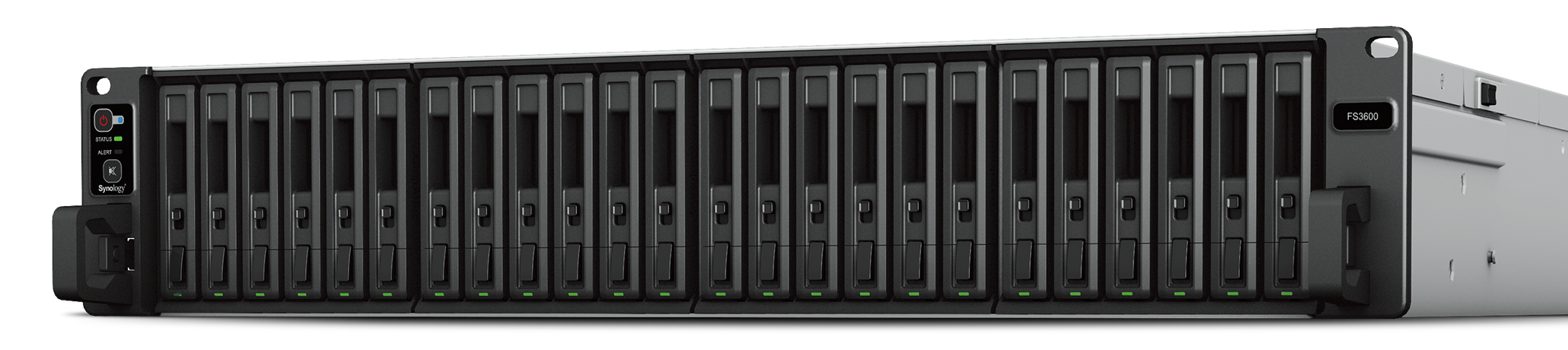
Explore this need in the finder →The FS3600 is a 2U, 24-bay FlashStation for businesses that need all-flash or mixed SAS/SATA storage in a rack, not a low-noise desktop file server. Its headline “all-flash” positioning describes the intended performance tier, but Synology’s current specification lists 2.5-inch SAS hard drives and SAS SSDs as well as SATA SSDs. That wider drive choice is a meaningful distinction from SATA-SSD-only FlashStations such as the FS3420 and FS3410.
A flexible 24-bay media choice, with a compatibility caveat
Each of the 24 hot-swappable positions accepts a documented 2.5-inch SAS HDD, 2.5-inch SAS SSD, or SATA SSD. The chassis is sold without storage drives in the manufacturer’s package list. A connector or form factor alone does not prove that a particular disk is supported: check the exact drive model against Synology’s FS3600 compatibility information before assembling a capacity plan. Do not treat the model’s all-flash marketing as evidence that a bundle of SSDs is included.
The same hardware can therefore serve different storage approaches, but not every one at once: a SAS spinning-disk arrangement, SAS SSD pool, and SATA SSD pool have different cost and performance tradeoffs. RAID 1 is one documented storage option and can provide a two-drive mirror arrangement. That is a drive-failure safeguard, not an independent backup. Snapshots, replication and a separate backup target address different failure events and require their own capacity and administration plans.
Rack, network and expansion are part of the system cost
Built-in data networking includes two 10GbE ports and four 1GbE ports. The single 10GbE port is a link-rate ceiling for the finder, not a promise of sustained file throughput; server workload, installed drives, switch, cabling and client all matter. Optional supported network cards can change the installed interface mix, but they are not standard built-in ports. The system is 2U and listed for a four-post 19-inch rack. Synology lists its sliding RKS-02 rail kit as a separate purchase, while the manufacturer package list includes two AC power cords and an accessory pack.
Capacity can grow beyond the 24 internal bays through compatible expansion units. Synology lists a 72-drive maximum with two FX2421 units, and its current compatibility table confirms FX2421 for FS3600. The product page also mentions RX1222sas, but that current pairing table does not list FS3600 with RX1222sas; verify the latter with Synology before relying on it. Treat an expansion shelf as a separate rack appliance with its own power, space, cooling and compatible drives, not as extra free internal bays.
Older platform, still a distinct supported model
The specification identifies one 12-core Intel Xeon D-1567 processor, 16 GB of installed DDR4 ECC RDIMM memory and a listed maximum of 128 GB. Synology’s present US support-status page shows FS3600 as generally available with full DSM updates, full technical support and a five-year warranty. This is manufacturer lifecycle information; it is not a promise that a particular seller has stock or a particular package. The 57 dB(A) noise figure is a manufacturer measurement in a specified fully populated idle test with hard drives. It is a useful warning to plan a rack room, not a measurement of every installation.
Synology also advertises more than 195,000 4K random-write iSCSI IOPS for the current product page. That is a company test claim, not an independently reproduced result or an estimate of a buyer’s file-copy speed. The practical question is whether your application, media type, RAID layout and network path can use an enterprise all-flash platform at all.
Who should shortlist the FS3600?
It belongs on a shortlist when a team needs a 24-bay rack NAS, has a deliberate compatible-drive plan, can use built-in 10GbE, and values a choice of supported SAS and SATA SSD media or listed SAS HDDs. It is less compelling for a home user who only needs shared files, wants quiet equipment near a desk, or expects drives and rails to come in a complete ready-to-use bundle.
Compare it with the FS3420 if SATA SSD-only bays are enough and the newer 32 GB memory baseline and PCIe Gen4 slots matter; compare it with the FS3410 if four built-in 1GbE data ports or a different network-card path are relevant. The FS3600’s differentiators are drive-interface flexibility and its documented expansion route, not an assumption that any nearby FlashStation is interchangeable. Confirm exact drives, shelf model, rack depth, noise tolerance and backup destination before choosing an offer.
Key specifications
Key details at a glance
| Internal drive bays | 24 bays |
|---|---|
| Documented internal drive media | 2.5-inch SAS HDD / 2.5-inch SAS SSD / 2.5-inch SATA SSD |
| Built-in Ethernet ports | 2 × 10GbE RJ-45 data ports / 4 × 1GbE RJ-45 data ports |
| Fastest individual Ethernet port | 10 Gbps |
| Installed system memory | 16 GB |
| Maximum listed memory | 128 GB |
| Listed storage arrangements | RAID F1 / Basic / JBOD / RAID 0 / RAID 1 / RAID 5 / RAID 6 / RAID 10 |
| Internal file systems | Btrfs / ext4 |
| USB 3.2 Gen 1 ports | 2 |
| Maximum listed single-volume size | 1000 TB |
| Dimensions (H × W × D) | 88 × 482 × 724 (H × W × D) |
| Weight | 14.9 kg |
| Manufacturer's idle noise figure | 57 dB(A) |
| Hardware warranty | 5 years |
| Data drives included in listed package | No |
| Maximum total drive bays with listed expansion | 72 bays |
| Expansion-unit note | Synology lists 72 total bays using two FX2421 units. The product page also references RX1222sas in an alternate expansion statement, but the current compatibility table does not list FS3600 for RX1222sas; verify current exact compatibility before relying on that pairing. |
| Listed expansion unit | FX2421 × 2 (72 total bays); RX1222sas also named by the product page but requires current compatibility verification |
| Processor | Intel Xeon D-1567 |
| CPU cores | 12 |
| CPU threads | 24 |
| Installed memory type | DDR4 ECC RDIMM |
| Single-volume limit condition | Synology lists 1 PB for RAID 6 groups with at least 64 GB memory; lower 200 TB (32 GB) and 108 TB limits also apply. These are conditional single-volume limits, not usable-capacity promises. |
Use the exact model’s instructions for operating limits, supplied equipment and version differences.
Sources for this review
Sources for this assessment
Check your setup before choosing a NAS
Use the finder to check bay count, the network link you need, and whether a documented two-drive redundant arrangement is essential.