
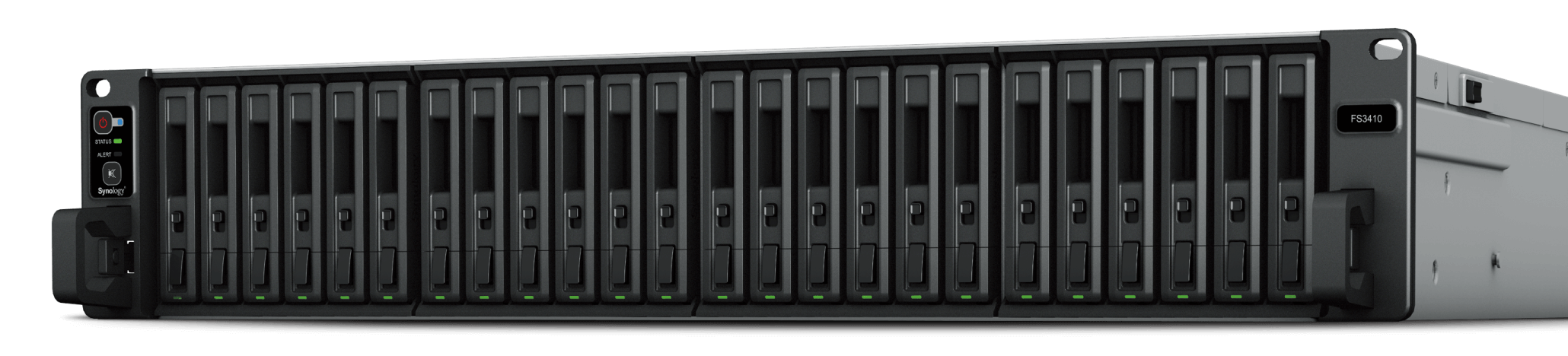
Your needs, this model
Does it fit your priorities?
Can FS3410 use SAS disks?
Synology specifies 24 × 2.5-inch SATA SSD bays. It does not list SAS hard drives or SAS SSDs for this chassis. SSDs are separate, and each exact model should be checked against the compatibility list.
Explore this need in the finder →How many built-in data-network ports are there?
The FS3410 lists two 10GbE RJ-45 data ports and four 1GbE data ports, plus a separate 1GbE out-of-band management interface. Only the six data ports carry the documented NAS/network role.
Explore this need in the finder →How does the FS3410 differ from FS3420?
FS3410 has 16 GB installed ECC RDIMM and a 128 GB listed maximum across four slots, while FS3420 lists 32 GB installed and 192 GB across six slots. FS3410 also uses PCIe Gen3 and has four built-in 1GbE data ports.
Explore this need in the finder →The FS3410 is a 2U, 24-bay FlashStation for business environments that want all-flash storage and DSM file, block and virtualization services. It is not a smaller sibling of every other 24-bay Synology model: its native positions are documented for 2.5-inch SATA SSDs, while its built-in network layout and older PCIe generation differ from the FS3420. The chassis is sold without the SSDs needed to create a storage pool.
All-flash capacity requires a separate drive plan
Synology specifies 24 hot-swappable SATA SSD bays and recommends checking the exact model compatibility list. Its manufacturer package list describes the main unit, accessories and power cords, not an installed SSD set. The FS3410 also lists Btrfs and RAID F1, Basic, JBOD, RAID 0, RAID 1, RAID 5, RAID 6 and RAID 10. RAID 1 can satisfy a two-drive mirror plan, but a mirror is not a second copy against deletion, ransomware, theft or loss of the whole rack. Size the usable storage after deciding on a RAID layout and reserve a separate backup target.
Synology reports a 1 PB single-volume option for RAID 6 with at least 64 GB of memory and a 200 TB option requiring 32 GB, alongside a 108 TB limit. The FS3410 ships with 16 GB, and its listed maximum is 128 GB; reaching a higher volume ceiling therefore involves a memory and configuration decision, not just filling bays. The data sheet’s performance claims are similarly conditional: over 129,000 4K random-write IOPS and over 356,500 read IOPS are manufacturer test results, not an independent benchmark or a forecast of file-transfer speed.
Network flexibility from the factory
There are two built-in 10GbE RJ-45 ports and four built-in 1GbE RJ-45 data ports. A separate 1GbE out-of-band management connection is shown in the hardware specifications and should not be mistaken for another file-service port. Optional network cards can add 10/25/40GbE interfaces through two PCIe 3.0 slots, but those are not built-in and must be selected from the current supported accessory list. A fast NIC cannot overcome a slower switch, client, cable, drive set or workload.
The 16 GB installed DDR4 ECC RDIMM memory can be expanded to a listed 128 GB with four slots. This differs from the FS3420’s 32 GB baseline, 192 GB listed ceiling and PCIe Gen4 slots. If the FS3410 is being considered because its four Gigabit ports are useful for segmentation or a particular network design, that real topology is a better reason to compare it than an old performance slogan.
Rack and room checks
At 88 × 482 × 724 mm and 15 kg, the FS3410 is a deep 2U chassis for a four-post 19-inch rack. The RKS-02 rail kit is a separate purchase. Synology lists dual redundant power supplies and hot-swappable fans, but those features still need an appropriate pair of power feeds, airflow, rack depth and maintenance process. The manufacturer’s 46.1 dB(A) idle-noise figure and 113.84-watt access figure are measurement results from its specified installed configuration; neither predicts every deployment’s sound or energy use. The current US support table lists the FS3410 as generally available with full DSM updates, full technical support and a five-year warranty.
Who it fits—and who should compare elsewhere
A small or midsize business may shortlist the FS3410 when 24 native SATA-SSD positions, 10GbE networking and a 2U rack format fit a defined service plan. Synology documents SMB/NFS file services as well as iSCSI and other business functions, so this is NAS-capable storage rather than a block-only device. It is less suitable for a desk-side home setup, a buyer who wants included disks, a design based on SAS HDDs, or a plan that assumes expansion shelves without a listed path for this model.
Compare the FS3420 if more installed and maximum memory or newer PCIe slots matter; compare the FS3600 if the documented 2.5-inch SAS HDD/SSD choices and listed external expansion options are important. In every case, verify the full SSD model, memory module recommendation, rack and rail kit, the end-to-end network, warranty terms from the seller and a separate backup/restore procedure. No single bay count or IOPS figure settles those checks.
Key specifications
Key details at a glance
| Internal drive bays | 24 bays |
|---|---|
| Documented internal drive media | 2.5-inch SATA SSD |
| Built-in Ethernet ports | 2 × 10GbE RJ-45 data ports / 4 × 1GbE RJ-45 data ports |
| Fastest individual Ethernet port | 10 Gbps |
| Installed system memory | 16 GB |
| Maximum listed memory | 128 GB |
| Listed storage arrangements | RAID F1 / Basic / JBOD / RAID 0 / RAID 1 / RAID 5 / RAID 6 / RAID 10 |
| Internal file systems | Btrfs / ext4 |
| USB 3.2 Gen 1 ports | 2 |
| Maximum listed single-volume size | 1000 TB |
| Dimensions (H × W × D) | 88 × 482 × 724 (H × W × D) |
| Weight | 15 kg |
| Manufacturer's idle noise figure | 46.1 dB(A) |
| Hardware warranty | 5 years |
| Data drives included in listed package | No |
| Expansion-unit note | No external drive-shelf expansion path is listed for FS3410; its PCIe slots support compatible cards, not extra drive bays. |
| Processor | Intel Xeon D-1541 |
| CPU cores | 8 |
| CPU threads | 16 |
| Installed memory type | DDR4 ECC RDIMM |
| Single-volume limit condition | Synology lists 1 PB for RAID 6 with 64 GB memory, 200 TB with at least 32 GB, and 108 TB. These are conditional limits; the installed FS3410 starts with 16 GB and usable capacity varies by configuration. |
Use the exact model’s instructions for operating limits, supplied equipment and version differences.
Sources for this review
Sources for this assessment
Check your setup before choosing a NAS
Use the finder to check bay count, the network link you need, and whether a documented two-drive redundant arrangement is essential.