
Your needs, this model
Does it fit your priorities?
Can DVA1622 share files as well as record video?
Synology's US product FAQ says DVA appliances support most features found on other Synology NAS and can access Package Center. Its technical page lists SMB, NFS, FTP and WebDAV file protocols and up to 512 shared folders. Confirm that your exact packages and backup workflow are supported; the FAQ says most features, not all features.
Explore this need in the finder →Does DVA1622 have a two-drive mirror option?
Yes. Its model-specific installation guide lists two-drive RAID 1 and Synology Hybrid RAID with one-disk fault tolerance. Both use the two internal drive positions, and a mirror protects only against a drive failure; it is not an independent backup against deletion, theft or a damaged device.
Explore this need in the finder →How many cameras and analytics tasks are ready to use out of the box?
Synology lists eight included Surveillance Device Licenses and support for up to 16 camera feeds with additional licenses. The model supports up to two simultaneous real-time analytics tasks or one face-recognition task. Confirm that exact cameras and settings are supported, and budget licenses separately for a growing deployment.
Explore this need in the finder →This documentation-based assessment evaluates Synology's model-specific specifications and installation guide; it is not a hands-on test. DVA1622 is a compact two-bay network video recorder with DSM-based storage features. Its niche is a small surveillance system that also needs network shares, not a fast general-purpose NAS for every household workload.
A small NVR with real NAS functions
The DVA1622 can record and manage camera feeds while providing common file-sharing protocols. Synology's US product FAQ says DVA appliances support most features found on its other NAS systems and can use Package Center. The same product page lists SMB, NFS, FTP and WebDAV. This is enough to make it relevant to a buyer who wants recordings and ordinary shared folders on one device, but “most features” is intentionally not the same as full compatibility. Before planning around a backup package, media service or third-party application, check the supported package list for this exact model.
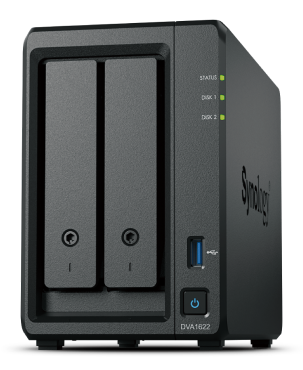
The hardware is modest and easy to distinguish from a large rack NVR. It has two internal SATA positions, 6 GB of DDR4 non-ECC memory in a 2 GB plus 4 GB configuration, and a four-core Intel Celeron J4125. One built-in 1GbE port is the only specified network data port. The chassis also provides HDMI output, two USB ports, and direct keyboard-and-mouse control for local surveillance management. That screen connection is useful for an operator's nearby monitor, not an Ethernet substitute or a way to connect the NAS to a television for general media features.
Two drives, one network link, and a documented mirror
Synology lists support for 3.5-inch SATA hard drives and 2.5-inch SATA SSDs, but the package includes no drives. The model-specific installation guide lists Basic, JBOD, RAID 0, RAID 1 and Synology Hybrid RAID with one-disk fault tolerance. With two compatible drives, RAID 1 or SHR-1 can provide a one-drive-failure-tolerant arrangement. That trades away some raw capacity and remains different from a backup: accidental deletion, malware, a failed enclosure or a stolen device can still take out the data.
The maximum single volume listed is 108 TB, not a prediction of usable space from a pair of disks; actual capacity depends on the drive set, array and filesystem metadata. Synology supports Btrfs and ext4 for internal storage. One gigabit is the port-level ceiling for a single wired path, and the switch or client can lower real speeds. HDMI and USB are not network upgrades.
Camera limits and included licenses
DVA1622 ships with eight Surveillance Device Licenses. Synology lists support for up to 16 IP camera streams, but the additional cameras require extra licenses. The hardware is specified for up to two simultaneous real-time analytics tasks, or one face-recognition task; the configuration of some features consumes more of that task budget. It can recognize license plates on stationary vehicles only, according to the specification. Treat the camera count, analytics ceiling and codec figures as manufacturer limits that depend on the selected camera resolution, frame rate, drives and other active services, not as a guarantee of performance in a particular installation.
The model's HDMI port and local input support matter if the recorder will sit beside a monitor in a small office, shop or home-security area. A remote-only camera installation may not need those ports, while a central monitoring desk may value them. The included licenses are a starting point, not a complete camera package; cameras, storage drives and any additional licenses are separate budget items.
Who should shortlist it
This is a reasonable candidate for a small site that wants local recording, a nearby monitor and shared storage. A home or small business could mirror the two drives and reserve a separate destination for backups. Synology lists a three-year hardware warranty; any extension is region-dependent, so verify local eligibility and seller terms.
It is less appealing when the priority is high-speed file transfer, substantial virtualization or memory-heavy workloads. The 1GbE interface is slower than multi-gigabit alternatives, memory is non-ECC, there are only two native drive positions, and the camera side adds compatibility and license work that a file-only NAS does not require. A four-bay or faster-port NAS may make more sense for a growing data library, while a dedicated NVR could be preferable if network storage is not needed. Compare the intended setup rather than choosing from bay count alone.
DVA1622 versus DVA7400
Both products combine surveillance management with most Synology NAS features, but their deployment profiles are far apart. DVA1622 is a 1.51 kg desktop enclosure with two bays, a single 1GbE port, local HDMI and eight included camera licenses. DVA7400 is a 2U, 12-bay rack model with dual 10GbE ports, ECC memory, two included camera licenses and a published ceiling of 100 feeds and 40 simultaneous analytics tasks. The larger unit is not simply a consumer NAS with more room; it involves rack, power, cooling, license and installation planning. For a small local setup, DVA1622's desktop form and HDMI may be more useful than the larger system's scale. For dense recording and higher-speed file access, DVA7400's hardware may justify its operational overhead.
What to verify before buying
Check the exact DVA1622 model and the seller's package, since the standard system is diskless. Confirm each disk and camera against Synology's current compatibility lists, count required camera licenses, and verify the exact features and packages needed for both video and file services. Plan the two-drive layout and a separate backup copy before loading important footage. If a direct monitor is part of the setup, confirm its resolution and placement; if multiple users will transfer files, check the whole network path and not just the gigabit label. Finally, verify warranty terms and local availability from the seller. These checks matter more than a generic “up to 16 cameras” headline.
Key specifications
Key details at a glance
| Internal drive bays | 2 bays |
|---|---|
| Documented internal drive media | 3.5-inch SATA HDD / 2.5-inch SATA SSD |
| Built-in Ethernet ports | 1 × 1GbE RJ-45 |
| Fastest individual Ethernet port | 1 Gbps |
| Installed system memory | 6 GB |
| Listed storage arrangements | Synology Hybrid RAID / Basic / JBOD / RAID 0 / RAID 1 |
| Internal file systems | Btrfs / ext4 |
| USB 3.2 Gen 1 ports | 2 |
| Maximum listed single-volume size | 108 TB |
| Dimensions (H × W × D) | 166 × 106 × 223 |
| Weight | 1.51 kg |
| Manufacturer's idle noise figure | 18.4 dB(A) |
| Hardware warranty | 3 years |
| Data drives included in listed package | No |
| Processor | Intel Celeron J4125 |
| CPU cores | 4 |
| CPU threads | 4 |
| Installed memory type | DDR4 non-ECC (2 GB + 4 GB) |
Use the exact model’s instructions for operating limits, supplied equipment and version differences.
Sources for this review
Sources for this assessment
Check your setup before choosing a NAS
Use the finder to check bay count, the network link you need, and whether a documented two-drive redundant arrangement is essential.