
Your needs, this model
Does it fit your priorities?
Does DS925neo+ include four internal SATA drive positions?
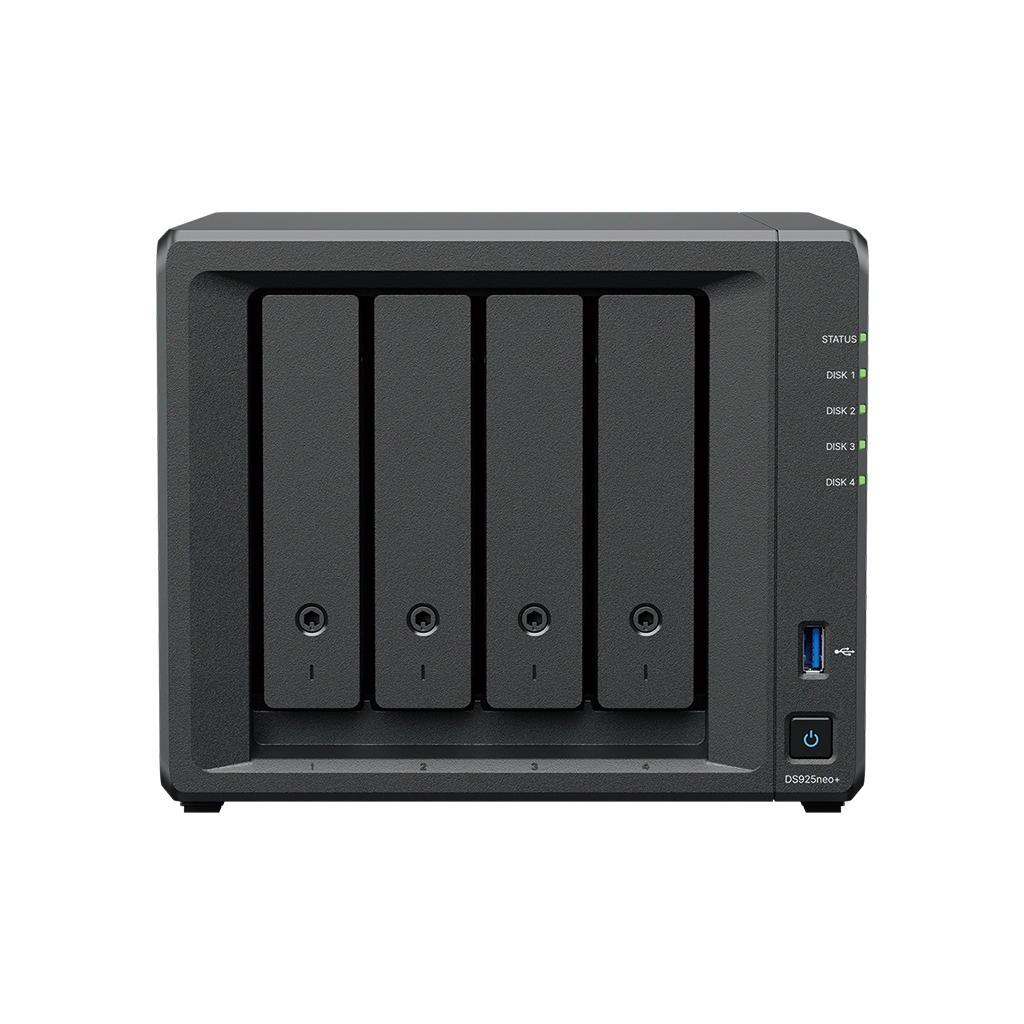
Yes. Synology lists four internal positions for 3.5-inch SATA HDDs or 2.5-inch SATA SSDs, plus two M.2 NVMe slots. The product lists up to nine total drives with one separate DX525; that shelf is not included in the base chassis and the finder counts four internal bays.
Explore this need in the finder →Are both network ports 2.5GbE?
The specification and manual list two 2.5GbE RJ-45 ports. Those are two separate wired ports: their rates do not add into a 5Gb/s connection for one client. The switch, cable, client adapter, configuration, drives and workload govern the path you actually get.
Explore this need in the finder →How is DS925neo+ different from DS925+?
Synology presents them as distinct models. Both are listed with the Ryzen V1500B, four SATA bays, two 2.5GbE ports, two M.2 slots and a nine-drive expansion route. The neo+ is listed with 4 GB DDR4 non-ECC SODIMM by default; the DS925+ has 4 GB DDR4 ECC SODIMM. Check the suffix and the exact compatible memory path before ordering or upgrading.
Explore this need in the finder →This assessment covers the exact DS925neo+ configuration described by Synology's U.S. materials. No installation, benchmark, noise measurement or hands-on ownership is claimed.
Four internal bays, with a separate five-bay shelf route
The Synology DiskStation DS925neo+ is a four-bay desktop NAS with two M.2 2280 NVMe positions, two USB 3.2 Gen 1 ports and two built-in 2.5GbE RJ-45 ports. Synology lists one DX525 expansion unit and a maximum of nine total drives. That maximum is a system-plus-shelf configuration, not nine trays in the base chassis: the DS925neo+ itself has four internal SATA positions for 3.5-inch hard drives or 2.5-inch SATA SSDs.
The neo+ suffix matters for memory. Synology presents the DS925neo+ alongside the DS925+ as a separate model, with the same listed Ryzen V1500B processor, four SATA bays, port count and DX525 route. The default configuration differs: DS925neo+ has 4 GB DDR4 non-ECC SODIMM memory; DS925+ has 4 GB DDR4 ECC SODIMM. The non-ECC configuration is not a typo or a drive-bundle choice. It is an exact hardware edition, so a listing that omits the full model name should be clarified before you rely on the memory details here.
Memory is upgradeable, but verify the module plan
The comparison page lists two memory slots and up to 32 GB for both DS925+ and DS925neo+. Synology's U.S. neo+ announcement says the models ship with non-ECC memory, allow ECC upgrades and do not officially support mixing ECC and non-ECC modules. The vendor also cautions that non-Synology memory may affect warranty or technical support. Confirm the recommended part number and permitted configuration against the exact manual before expanding memory.
Four SATA bays can support a wider range of starting arrays than a two-bay NAS. Synology lists Basic, JBOD, RAID 0, RAID 1, RAID 5, RAID 6, RAID 10 and SHR for this model. A two-drive SHR-1 or RAID 1 setup can tolerate one drive failure, but uses about one drive's capacity from an equal pair before formatting overhead. With more bays, the choice of array still affects redundancy and usable space; bay count alone does not select a layout. Deleted files, malware, fire, theft or a failure affecting the whole device can still reach the array, so a second copy and recovery test remain essential.
M.2 pools are a supported use, with a maintenance caveat
The DS925neo+ has two M.2 2280 NVMe slots. Synology's current model-support article explicitly includes DS925neo+ among NAS systems that support M.2 SSD storage pools, and says to use compatible Synology M.2 SSDs. Its comparative specification also marks pool support. The product datasheet emphasizes SSD caching, so do not turn the presence of two slots into a claim that any consumer NVMe module is an approved pool device. Check the current model-and-capacity compatibility list before ordering. M.2 modules are not hot-pluggable, require the NAS to be powered down for insertion or removal, and cannot by themselves host DSM; the setup still needs at least one non-M.2 drive for system installation.
The expansion unit is also separate. Synology describes up to nine total drives with one DX525, which adds five positions. The shelf needs its own location and installation plan and is not in the DS925neo+ manual's base package list. The standard hardware package identifies the NAS, accessory items, AC power supply and cable, two Ethernet cables, a tray key and screws for 2.5-inch drives. It does not list SATA hard drives, NVMe SSDs or the DX525. Retailers sometimes advertise configurations beyond the manufacturer's baseline; read the exact seller's package description rather than assuming it includes these pieces.
Two multigigabit ports are not a single 5GbE port
The dual 2.5GbE layout offers more than one built-in multigig link, which can matter when separate clients or supported network configurations are part of the plan. Synology describes Link Aggregation options for failover and load balancing. But two 2.5GbE ports do not guarantee that one client can transfer at 5Gb/s. The workstation's interface, switch, cabling, network configuration, drive layout, protocol and workload all contribute. If one computer is the priority, trace that one route end to end and verify that each component supports the intended rate.
Synology lists 108 TB as a single-volume maximum and 200 TB with 32 GB memory, while warning usable capacity is lower and varies with disks, filesystem and storage layout. The enclosure measures 166 × 199 × 223 mm (H × W × D), weighs 2.26 kg and carries a listed three-year limited hardware warranty. No published benchmark predicts a particular installation's throughput.
When this four-bay edition makes sense
The DS925neo+ is a plausible candidate when four internal drives give the right starting capacity, a future DX525 route is genuinely valuable and two 2.5GbE ports fit the existing or planned network. It also offers a distinct non-ECC default-memory choice in a chassis whose core processor, bays and network layout overlap with DS925+. That is useful to know, not a universal advantage: buyers who require ECC at purchase should compare the exact DS925+ instead, while buyers who do not need four bays or dual 2.5GbE may be carrying more system than necessary.
Before ordering, confirm DS925neo+ rather than DS925+, check the exact SATA and NVMe model numbers against Synology's compatibility lists, and determine whether the offer is diskless or includes a clearly specified drive bundle. If using M.2 as a pool, account for compatible modules and powered-off maintenance. If nine drives are the goal, confirm the DX525 separately. Plan a backup outside the NAS and an end-to-end network route; the number of ports or trays is not itself a recovery plan or an actual transfer result. No present-day price, stock status, customer rating or seller offer is represented here.
Key specifications
Key details at a glance
| Internal drive bays | 4 bays |
|---|---|
| Documented internal drive media | 3.5-inch SATA HDD / 2.5-inch SATA SSD |
| Built-in Ethernet ports | 2 × 2.5GbE RJ-45 |
| Fastest individual Ethernet port | 2.5 Gbps |
| Installed system memory | 4 GB |
| Maximum listed memory | 32 GB |
| Listed storage arrangements | Synology Hybrid RAID / Basic / JBOD / RAID 0 / RAID 1 / RAID 5 / RAID 6 / RAID 10 |
| Internal file systems | Btrfs / ext4 |
| USB 3.2 Gen 1 ports | 2 |
| Maximum listed single-volume size | 200 TB |
| Dimensions (H × W × D) | 166 × 199 × 223 |
| Weight | 2.26 kg |
| Hardware warranty | 3 years |
| Data drives included in listed package | No |
| M.2 NVMe slots | 2 |
| M.2 SSD storage-pool support | Yes |
| Maximum total drive bays with listed expansion | 9 bays |
| Listed expansion unit | DX525 |
| Processor | AMD Ryzen V1500B |
| CPU cores | 4 |
| CPU threads | 8 |
| Installed memory type | DDR4 non-ECC SODIMM |
| Single-volume limit condition | The 200 TB single-volume maximum requires 32 GB of memory; 108 TB is the other listed limit. These are not usable-capacity promises. |
Use the exact model’s instructions for operating limits, supplied equipment and version differences.
Sources for this review
Sources for this assessment
- Synology DS925+ and DS925neo+ product specifications
- DS925neo+ Product Manual: package contents and hardware overview
- DS925neo+ Product Manual: hardware installation
- Synology DS925neo+ datasheet
- Synology America introduces DiskStation neo+ Series
- Synology US product list
- Synology Knowledge Center: NAS models that support M.2 SSD storage pools
- Choose a RAID Type: Synology Knowledge Center
Check your setup before choosing a NAS
Use the finder to check bay count, the network link you need, and whether a documented two-drive redundant arrangement is essential.