
Your needs, this model
Does it fit your priorities?
Can I grow this NAS beyond four internal drives?
The DS425+ has four internal SATA positions. Its official hardware overview lists USB but no expansion port, and its product specification does not list an expansion unit. Treat it as a four-bay appliance rather than assuming you can attach Synology's DX525 later; the two M.2 NVMe slots are separate from the SATA bays.
Explore this need in the finder →Can I use M.2 drives as a storage pool, not only as cache?
Synology's specifications mark M.2 SSD storage-pool support and list two M.2 2280 NVMe slots. The same page says that creating M.2 storage pools requires Synology-verified SSDs. Check the current DS425+ compatibility list for the complete SSD model and capacity instead of assuming any NVMe drive qualifies.
Explore this need in the finder →Does four bays mean a four-drive mirror or four times the capacity?
No. The listed modes include SHR, RAID 1 and RAID 5, but their usable capacity and fault tolerance depend on the exact number and sizes of drives. For a two-drive SHR-1 or RAID 1 setup, plan on one drive's capacity before overhead and one-drive fault tolerance. RAID is not an independent backup; choose another destination and test a restore.
Explore this need in the finder →This is a document-based assessment, not a hands-on review. The observations below come from Synology's model page, manual, datasheet and support records; they do not establish how this NAS performs in a particular room or network.
A fixed four-bay model with a multigigabit port
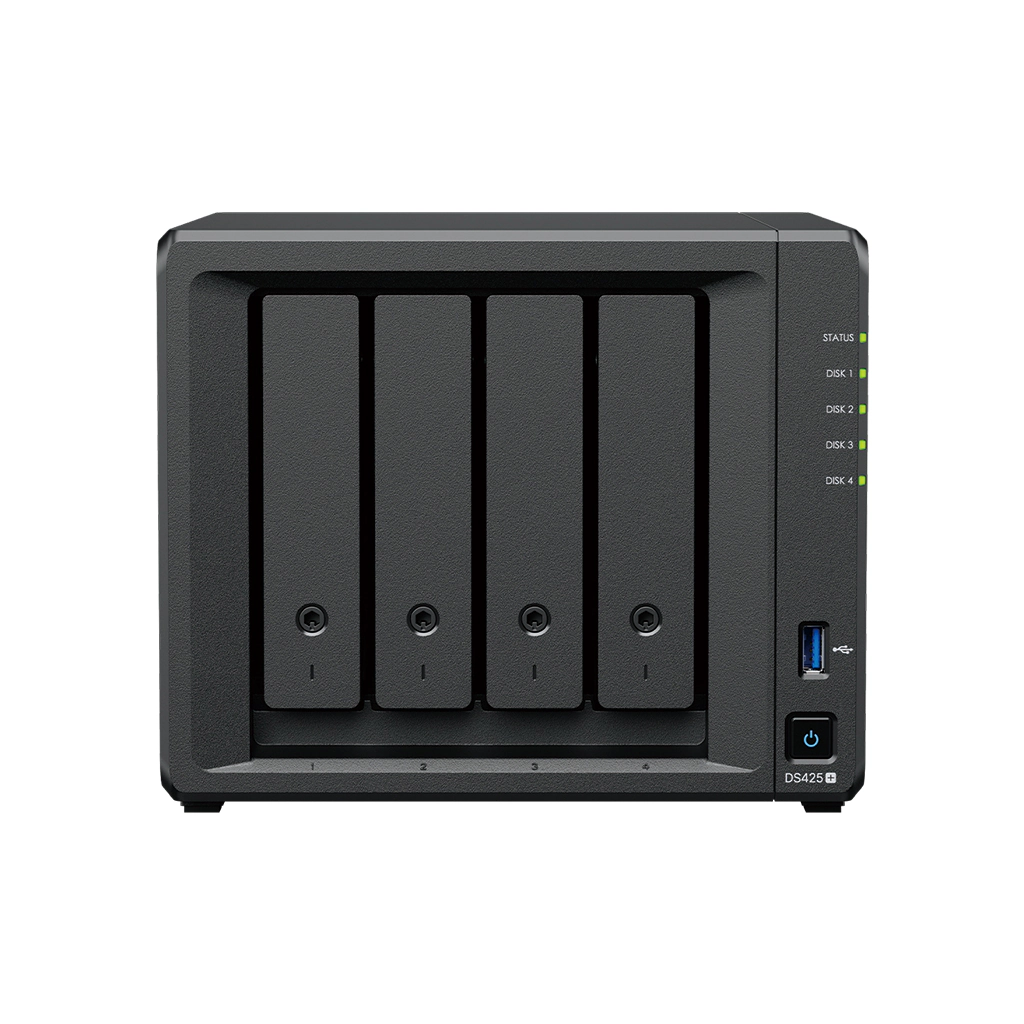
The Synology DiskStation DS425+ gives a small office or a home archive four internal SATA drive positions, two M.2 2280 NVMe slots, one 2.5GbE port and one 1GbE port. Its hardware identity matters: this is the Intel Celeron J4125 configuration with 2 GB of non-ECC memory, not the Ryzen/ECC hardware in Synology's DS725+ or DS925+. The US support page lists the DS425+ as Generally Available with full DSM updates and technical support when checked; that is a lifecycle status, not a promise that a retailer has it in stock.
Four bays give more layout choices than a two-bay chassis. Synology lists SHR, Basic, JBOD, RAID 0, RAID 1, RAID 5, RAID 6 and RAID 10. A one-drive Basic volume has no redundancy. Two compatible drives can be arranged as SHR-1 or RAID 1 for protection against one drive failing; larger RAID layouts have their own minimum-drive counts and capacity tradeoffs. Choose based on the usable capacity and failure tolerance you actually need, rather than multiplying the drive labels together.
Four bays do not mean room to add a shelf later
The DS425+ is the four-bay choice in this group without a listed expansion unit. Its hardware overview lists two USB ports, a network pair and the power connector, but no expansion port; its specifications do not name a maximum drive count with an expansion unit. That makes the chassis straightforward if four internal positions are enough, but a buyer expecting a supported step up to seven or nine SATA drives should compare the DS725+ or DS925+ before choosing.
Those alternatives have materially different roles. The DS725+ starts with two SATA bays and supports a separate DX525 to reach seven drives; it uses a two-core Ryzen R1600 and 4 GB ECC memory. The DS925+ starts with four bays, uses four-core Ryzen V1500B with 4 GB ECC memory, has two 2.5GbE ports and can reach nine drives with the DX525. The DS425+ instead shares the DS225+'s J4125, 2 GB non-ECC memory and 1GbE-plus-2.5GbE layout, while adding two SATA bays and M.2 positions. These are function differences, not interchangeable suffixes.
M.2 capability needs an exact SSD check
The specifications list two M.2 NVMe positions and mark M.2 SSD storage-pool support. Synology's introductory copy emphasizes caching, while its technical note explains that an M.2 storage pool requires Synology-verified SSDs. The practical conclusion is not “any NVMe stick will work”: check the current DS425+ compatibility list for the exact model and capacity, then decide whether the SSD is intended for cache or a separate pool. M.2 slots are not extra SATA bays, and a storage pool on flash does not provide a second copy of data by itself.
For the main four bays, the page lists 3.5-inch SATA hard drives and 2.5-inch SATA SSDs. Synology specifies Btrfs or ext4 for internal drives and a maximum single volume of 108 TB. That maximum is not the usable size of every configuration; usable space depends on the chosen disks, RAID layout, filesystem and metadata. A two-drive mirror, for example, uses roughly one drive's capacity before overhead, even though two drives are installed.
Network and performance: read the fine print
The wired ports are one 2.5GbE and one 1GbE. Synology advertises up to 278 MB/s sequential read and 281 MB/s write. These are its own test figures, not independent results or a promise for an ordinary file copy. The NAS, client, switch or router, cable, disks, file size and software workload all affect throughput. A multigigabit port helps only when the whole route can use it; two ports should not be added together as a single client's rate.
Other specification lines can inform planning but do not replace a listening or workload test. The listed enclosure is 166 × 199 × 223 mm (height × width × depth), weighs 2.18 kg and has a 21.6 dB(A) manufacturer noise figure. Synology's product page also lists a three-year hardware warranty. A noise figure is not the sound of a specific set of mechanical drives in your room, and warranty extensions have separate terms.
Where it fits—and where it stops
Consider the DS425+ when you have a concrete four-drive plan, want a 2.5GbE link, and are content to keep the supported SATA chassis at four bays. The two M.2 positions can add cache or, with verified SSDs, an M.2 pool. Its manufacturer-listed DSM features can support shared files, photo libraries and scheduled backup jobs, provided you plan the drives, users and independent backup destination around the workload.
Look at an expansion-capable model if future attached SATA bays are essential, and look at the exact workload requirements if you need more installed memory, ECC or more than one 2.5GbE link. Synology's manual lists the appliance, adapter, cord and cables, but does not list hard drives; a seller may offer a separately assembled bundle. Confirm the exact DS425+ suffix, drive identifiers and capacities, M.2 compatibility, package contents, seller warranty and return terms before ordering. No current price, stock level or retail bundle is asserted in this assessment.
Key specifications
Key details at a glance
| Internal drive bays | 4 bays |
|---|---|
| Documented internal drive media | 3.5-inch SATA HDD / 2.5-inch SATA SSD |
| Built-in Ethernet ports | 1 × 2.5GbE RJ-45 / 1 × 1GbE RJ-45 |
| Fastest individual Ethernet port | 2.5 Gbps |
| Installed system memory | 2 GB |
| Maximum listed memory | 6 GB |
| Listed storage arrangements | Synology Hybrid RAID / Basic / JBOD / RAID 0 / RAID 1 / RAID 5 / RAID 6 / RAID 10 |
| Internal file systems | Btrfs / ext4 |
| USB 3.2 Gen 1 ports | 2 |
| Maximum listed single-volume size | 108 TB |
| Dimensions (H × W × D) | 166 × 199 × 223 |
| Weight | 2.18 kg |
| Manufacturer's idle noise figure | 21.6 dB(A) |
| Hardware warranty | 3 years |
| Data drives included in listed package | No |
| M.2 NVMe slots | 2 |
| M.2 SSD storage-pool support | Yes |
| Maximum total drive bays with listed expansion | 4 bays |
| Expansion-unit note | No expansion-unit port or unit is listed; four bays is the supported manufacturer-documented total. |
| Processor | Intel Celeron J4125 |
| CPU cores | 4 |
| CPU threads | 4 |
| Installed memory type | DDR4 non-ECC |
Use the exact model’s instructions for operating limits, supplied equipment and version differences.
Sources for this review
Sources for this assessment
Check your setup before choosing a NAS
Use the finder to check bay count, the network link you need, and whether a documented two-drive redundant arrangement is essential.