
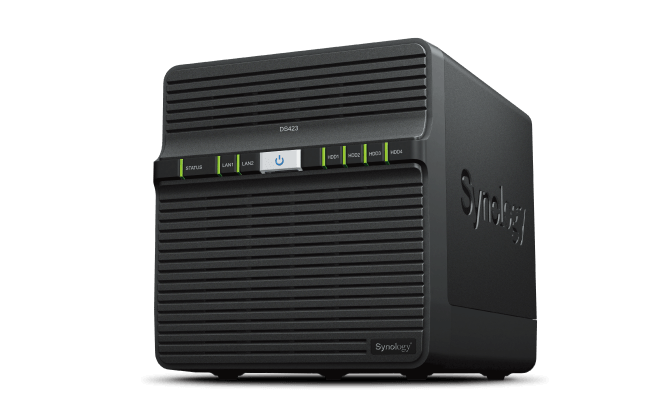
Your needs, this model
Does it fit your priorities?
Does DS423 have four internal bays and faster-than-gigabit Ethernet?
It has four internal SATA bays and two built-in 1GbE RJ-45 ports. The top individual port rate is 1GbE, not 2.5GbE; two ports do not add into a guaranteed single-client rate. Check the client and full wired path before expecting faster transfers.
Explore this need in the finder →What does the DS423 add over the two-bay DS223?
Both list the Realtek RTD1619B, 2 GB non-ECC memory, and gigabit Ethernet, but DS423 has four drive bays rather than two and lists additional RAID 5, RAID 6, and RAID 10 modes. A four-drive layout creates choices that the two-bay chassis cannot provide; it does not make usable capacity or backup automatic.
Explore this need in the finder →Are hard drives included in the ordinary DS423 package?
Synology's US product packaging and Product Manual list the main unit, adapter, cables and accessory pack, not hard drives. Treat it as diskless unless the exact seller package explicitly identifies included drives, their full model codes and capacities.
Explore this need in the finder →This assessment interprets Synology's US product page, manual and datasheet. I did not install drives, measure noise or benchmark the NAS; the specifications and manufacturer workload claims should not be read as independent test results.
The short version: four bays, but still gigabit networking
The DiskStation DS423 is a four-bay desktop NAS with a Realtek RTD1619B processor, 2 GB of DDR4 non-ECC memory and two built-in 1GbE RJ-45 ports. Its important distinction in this group is storage choice: Synology lists SHR and two-drive RAID 1 as well as four-drive RAID 5, RAID 6 and RAID 10 options. That makes the chassis more flexible than a two-bay model if the buyer's plan genuinely calls for more positions. It does not make the DS423 a faster network NAS than its smaller siblings; its fastest individual Ethernet port is still 1GbE.
Synology's US product-status table lists the model with full DSM updates and full support on the date checked. That is manufacturer lifecycle evidence, not a retail availability or price claim. The direct product page supports a documentation-based assessment, not a guarantee that every workload or drive arrangement will perform the way a buyer expects.
Four positions help only when the drive plan uses them
The DS423 accepts four internal 3.5-inch SATA hard drives or compatible 2.5-inch SATA SSDs. A two-drive mirror is one possible starting arrangement; the other two bays can remain unfilled while a buyer learns the capacity and maintenance needs. A four-drive SHR-1 or RAID 5 layout can provide a one-drive-failure-tolerant arrangement, while RAID 6 is listed as a four-drive option with a different capacity and failure-tolerance tradeoff. These are not interchangeable promises: check the supported drive counts and the exact layout in Synology's storage documentation before filling the unit.
A four-bay chassis does not mean four times a two-bay model's usable space. Usable storage depends on drive sizes, layout, filesystem and system metadata. The unit's listed maximum single-volume size is a platform limit, not an estimate for a particular set of disks. The standard package contents list the enclosure, cables, adapter and accessory pack but no hard drives. Verify every full drive model code and capacity against the DS423 compatibility list.
Redundancy also has limits. RAID 1, SHR or parity can help a pool remain available after a covered drive failure, but they are not a second independent backup. Deletion, ransomware, a damaged controller or a stolen NAS can affect the data even when every internal disk was healthy. Set up another destination and verify that a restore works.
Do not mistake two ports for a multigig link
Both built-in Ethernet jacks are rated at 1GbE. The product page's two ports can be useful for documented networking features, but this review does not assume port aggregation or a faster single-client transfer. The slowest link in the NAS-to-switch-to-client path, plus disks and workload, can constrain file copies. Buyers seeking a built-in 2.5GbE or 10GbE port should compare another exact model rather than add two gigabit labels together.
The DS423's specified dimensions are 184 × 168 × 230 mm (height × width × depth), and it weighs 2.21 kg before the drives. Its product page lists 20.6 dB(A) in a defined idle noise test with installed drives and microphones set one meter away. That is manufacturer context, not a promise that a populated unit will be inaudible at a desk or in a bedroom. Drive seek sounds, room acoustics, airflow and workload remain relevant.
More bays than DS223, not a different network tier
Synology's comparison shows the DS223 and DS423 using the same Realtek RTD1619B, 2 GB non-ECC memory and 1GbE network family. The DS223 has two bays and lists SHR, Basic, JBOD, RAID 0 and RAID 1; the DS423 adds two bays and the model-specific RAID 5, RAID 6 and RAID 10 options. It also has two gigabit ports instead of the DS223's one, but that does not change the fastest individual link. A four-bay chassis is most useful when the additional positions or listed layouts are part of the planned capacity or redundancy strategy.
The DS423 has no M.2 slots or expansion-unit bay count listed, so the four native SATA positions are the grounded storage plan. It also does not match the DS425+ on networking: DS425+ lists 2.5GbE and M.2 positions, while DS423 remains a more basic four-bay gigabit system. Compare the exact configurations rather than expecting “four bay” to mean a common feature set.
DSM features and the practical workload
Synology describes DSM file sharing, photo and file synchronization, backup packages, snapshots and Surveillance Station on the DS423. The manufacturer lists two default Surveillance Station licenses and additional camera licenses as paid, so a surveillance plan should include the camera and licensing requirements, not just a bay count. The model has 2 GB of non-ECC memory; no maximum memory expansion is recorded in the cited current specifications, so don't assume a memory upgrade path from a neighboring model.
For a home library, a four-bay backup target or a small office with multiple storage layouts to consider, those packages can make sense if someone will configure accounts, updates, backup schedules and alerts. A NAS is a small server with ongoing maintenance, not a plug-in substitute for every external disk.
Who should shortlist the DS423?
Consider it if four internal SATA positions and the option to use a documented multi-drive layout matter more than a faster port, and if you will supply compatible disks and an independent backup destination. Look elsewhere if 2.5GbE or M.2 storage is essential, if a two-bay unit already covers the plan, or if the owner does not want to maintain a network appliance. Read the exact manual, check drive compatibility, confirm the seller's diskless or bundled package, and verify warranty and return terms. No purchase price, stock status, user-review summary or personal test result is claimed here.
Key specifications
Key details at a glance
| Internal drive bays | 4 bays |
|---|---|
| Documented internal drive media | 3.5-inch SATA HDD / 2.5-inch SATA SSD |
| Built-in Ethernet ports | 2 × 1GbE RJ-45 |
| Fastest individual Ethernet port | 1 Gbps |
| Installed system memory | 2 GB |
| Listed storage arrangements | Synology Hybrid RAID / Basic / JBOD / RAID 0 / RAID 1 / RAID 5 / RAID 6 / RAID 10 |
| Internal file systems | Btrfs / ext4 |
| USB 3.2 Gen 1 ports | 2 |
| Maximum listed single-volume size | 108 TB |
| Dimensions (H × W × D) | 184 × 168 × 230 |
| Weight | 2.21 kg |
| Manufacturer's idle noise figure | 20.6 dB(A) |
| Hardware warranty | 2 years |
| Data drives included in listed package | No |
| M.2 NVMe slots | 0 |
| M.2 SSD storage-pool support | No |
| Processor | Realtek RTD1619B |
| CPU cores | 4 |
| CPU threads | 4 |
| Installed memory type | DDR4 non-ECC |
Use the exact model’s instructions for operating limits, supplied equipment and version differences.
Sources for this review
Sources for this assessment
- DiskStation DS423 US product specifications
- DS423 Product Manual: package contents and setup overview
- DS423 Product Manual: hardware setup
- Synology DS423 datasheet
- Synology DS223j, DS223, DS224+ and DS423 comparison
- Synology DS223 and DS423 comparison
- Synology US product support status
- Choose a RAID Type: Synology Knowledge Center
Check your setup before choosing a NAS
Use the finder to check bay count, the network link you need, and whether a documented two-drive redundant arrangement is essential.