
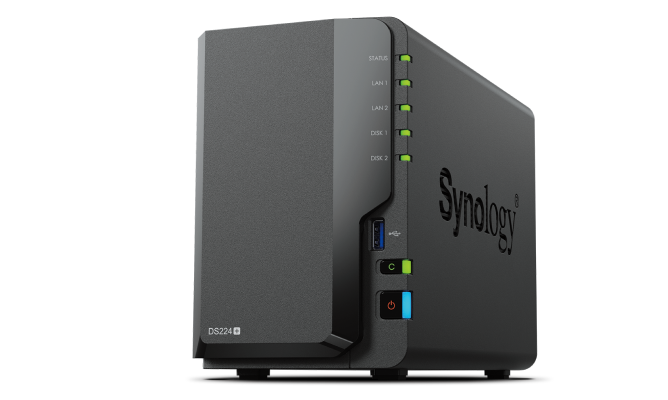
Your needs, this model
Does it fit your priorities?
Do the two 1GbE ports make one 2GbE connection?
No single 2GbE client link is documented by the specification. It lists two 1GbE RJ-45 ports and network failover support; do not add those ratings into one promised client transfer rate. The switch, client, cabling, storage and workload determine the usable path.
Explore this need in the finder →Can a two-drive DS224+ protect a volume from one failed drive?
Synology lists SHR and RAID 1 for this model. A supported two-drive SHR-1 or RAID 1 arrangement can tolerate one drive failure, but a mirror uses roughly one member drive's capacity before formatting overhead. It is not a separate backup against deletion, malware or loss of the NAS.
Explore this need in the finder →What should I check before adding memory or choosing drives?
The specification lists 2 GB of DDR4 non-ECC memory, one memory slot and a 6 GB maximum using a listed 4 GB module. The exact package is shown without drives. Check the DS224+ compatibility list for each drive and memory part number and read current warranty/support terms before ordering non-Synology components.
Explore this need in the finder →This is a documentation-based assessment, not a hands-on test. The manufacturer's product page, manual, datasheet and support record describe the DS224+ configuration; they do not establish real-world speed, acoustics or workload comfort in a particular home.
The short version: a two-bay Plus model with two gigabit ports
The Synology DiskStation DS224+ is a compact two-drive NAS built around an Intel Celeron J4125, 2 GB of DDR4 non-ECC memory and two 1GbE RJ-45 ports. Its appeal is less about a single headline number than about the familiar DSM ecosystem in a chassis that can hold a pair of compatible SATA drives. Synology lists the DS224+ in its US product-support status table with full DSM updates and full technical support on the date checked, so it remains a current US reference here; that status is not a promise about a particular seller's stock.
The central fit question is whether two bays and ordinary gigabit networking are enough. If you need four native bays, a 2.5GbE port, or M.2 storage, the DS224+ is not a substitute for those options in another model. Its published specifications are a useful checklist, not an independent performance test.
Two SATA bays create a clear capacity tradeoff
Synology lists two 3.5-inch SATA hard-drive positions and support for 2.5-inch SATA media. The model's storage modes include Synology Hybrid RAID (SHR), Basic, JBOD, RAID 0 and RAID 1. A buyer can begin with one drive in Basic storage, or plan a two-drive SHR-1 or RAID 1 arrangement for tolerance of one drive failure. A two-drive mirror generally offers capacity based on one member drive before formatting and filesystem overhead—not the combined raw capacity printed on both labels.
The protection is narrow by design. If a user deletes a folder, malware changes files, or the whole NAS is stolen, a mirror does not create a recoverable second system. Synology's RAID guide explains those failure boundaries; budget for an additional backup destination and test restoring a file. Drives are not listed in the standard package contents, and the exact drive code and capacity should be checked against the current DS224+ compatibility list before ordering.
No M.2 slots or external expansion bay count is listed for the DS224+. Treat the two internal SATA positions as the capacity plan, not as a starting point for an undocumented upgrade. If the expected library is growing quickly, compare larger native-bay models before selecting drives.
Two 1GbE ports are not one 2GbE client link
The two RJ-45 ports give the DS224+ two wired connections, but each is rated at 1GbE. The datasheet describes network failover; that does not mean one computer automatically receives the sum of both link ratings. A client, switch or router, cabling, drive workload and file sizes can all constrain a transfer. For a buyer specifically needing one 2.5GbE port, this model does not meet that requirement even though it has two ports.
Synology's published testing and use-case claims are not results from this review. Before paying for network equipment, trace the path from NAS to switch to client. If every device is gigabit and the job is routine file sharing or scheduled backups, the network may be sufficient. If several users or large-file workloads make networking a deciding factor, compare the exact built-in port rate rather than counting ports.
CPU, memory and software are part of the decision
The J4125 is a four-core Intel processor. Synology lists 2 GB of non-ECC memory, one memory slot and a 6 GB maximum configuration using a 4 GB module. That ceiling is more flexibility than the listed fixed 1 GB memory on several entry-level siblings, but it is still a modest amount by workstation standards. Do not infer that it will suit any number of virtual machines, containers or simultaneous services: the buyer's package choices and workload matter, and this is not a benchmark of those tasks.
DSM provides file sharing, synchronization, photo management and backup packages documented for the model. The product page also describes snapshot and surveillance features. Features such as snapshots can help roll back some unwanted changes, but they remain within the same NAS unless replicated elsewhere. Use a separate destination for a copy that should survive loss of the chassis.
Where it sits among nearby Synology choices
The direct comparison with DS223, DS223j and DS423 clarifies the naming. DS223 is also two-bay, but uses a Realtek processor, has 2 GB of memory and one 1GbE port; DS223j keeps two bays and one gigabit port with 1 GB of memory and fewer USB ports. The DS224+ instead brings its J4125 processor and two 1GbE ports, while still lacking a 2.5GbE port. The four-bay DS423 uses the same Realtek family and 2 GB non-ECC memory as DS223 but provides four bays and more RAID modes. If a faster network port is the priority, the separate DS225+ comparison is more relevant: DS225+ lists one 2.5GbE and one 1GbE port, whereas DS224+ lists two 1GbE ports.
Who should keep it on the shortlist?
The DS224+ is worth comparing for a small home or office that wants DSM, two SATA positions, a two-drive protection option, and a small enclosure whose gigabit links fit the network. It is less compelling when one needs more native bays, a built-in 2.5GbE link, M.2 drives, or more memory than the documented ceiling. The package lists the enclosure and accessories, not disks, and Synology specifies a two-year hardware warranty in the US status record. Check the complete model suffix, seller's exact package, drive compatibility, return conditions and current warranty before purchase. No price, stock, user rating or hands-on reliability conclusion is asserted here.
Key specifications
Key details at a glance
| Internal drive bays | 2 bays |
|---|---|
| Documented internal drive media | 3.5-inch SATA HDD / 2.5-inch SATA HDD or SSD |
| Built-in Ethernet ports | 2 × 1GbE RJ-45 |
| Fastest individual Ethernet port | 1 Gbps |
| Installed system memory | 2 GB |
| Maximum listed memory | 6 GB |
| Listed storage arrangements | Synology Hybrid RAID / Basic / JBOD / RAID 0 / RAID 1 |
| Internal file systems | Btrfs / ext4 |
| USB 3.2 Gen 1 ports | 2 |
| Maximum listed single-volume size | 108 TB |
| Dimensions (H × W × D) | 165 × 108 × 232.2 |
| Weight | 1.3 kg |
| Manufacturer's idle noise figure | 22 dB(A) |
| Hardware warranty | 2 years |
| Data drives included in listed package | No |
| M.2 NVMe slots | 0 |
| M.2 SSD storage-pool support | No |
| Processor | Intel Celeron J4125 |
| CPU cores | 4 |
| CPU threads | 4 |
| Installed memory type | DDR4 non-ECC |
Use the exact model’s instructions for operating limits, supplied equipment and version differences.
Sources for this review
Sources for this assessment
Check your setup before choosing a NAS
Use the finder to check bay count, the network link you need, and whether a documented two-drive redundant arrangement is essential.