
Your needs, this model
Does it fit your priorities?
Is DS223j the same two-bay system as DS223?
They share the Realtek RTD1619B, two bays, one 1GbE port and the listed SHR, Basic, JBOD, RAID 0 and RAID 1 modes. The DS223j is listed with 1 GB non-ECC memory and two USB ports; the DS223 has 2 GB and three USB ports. The DS223j also needs an optional Type C holder for 2.5-inch drives.
Explore this need in the finder →Can the DS223j mirror two drives?
Synology lists SHR and RAID 1 on this two-bay model. Two compatible drives in SHR-1 or RAID 1 can tolerate one drive failure, but the second disk does not replace an independent backup. A mirror normally gives capacity based on one member drive before formatting overhead.
Explore this need in the finder →What extra part may be needed for 2.5-inch media?
Synology's exact DS223j specifications say that an optional Type C disk holder is required for 2.5-inch drives. Verify the exact HDD/SSD code against the DS223j compatibility list and confirm whether the seller includes this accessory; do not assume a generic adapter fits.
Explore this need in the finder →This is an assessment from Synology's official model page, comparison, manual and datasheet; it is not a hands-on review. I have not installed the optional drive holder, measured noise or tested DSM applications on this unit.
The short version: two bays with an entry-level memory ceiling
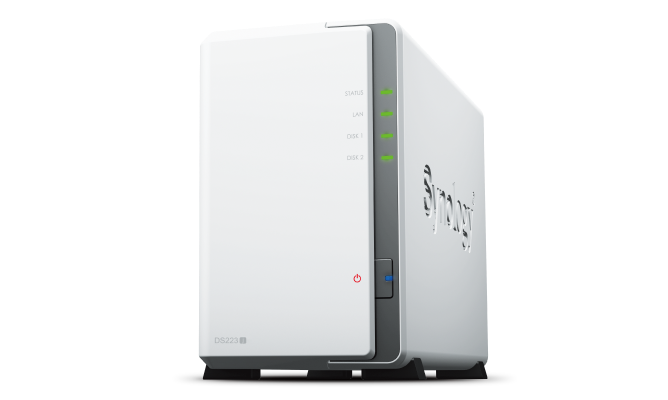
The white Synology DiskStation DS223j is a two-bay NAS based on the Realtek RTD1619B four-core processor, 1 GB of DDR4 non-ECC memory and one 1GbE RJ-45 port. It can use two compatible 3.5-inch SATA drives, and Synology lists SHR and RAID 1 along with Basic, JBOD and RAID 0. Those modes make it more flexible than the one-bay DS124, but the DS223j's 1 GB memory, single gigabit link and two-position limit are the important boundaries for a shopper.
Synology lists the DS223j as generally available with full DSM updates and technical support in its US support-status table on the checked date. That is a manufacturer status, not a claim about any seller's stock or price. This review evaluates the published arrangement; it does not claim that an owner will experience a particular throughput, noise level or reliability outcome.
Two bays allow redundancy with a clear capacity cost
The product page supports SHR, Basic, JBOD, RAID 0 and RAID 1. A single-drive Basic arrangement can be a starting point, while a two-drive SHR-1 or RAID 1 pool can tolerate one drive failure under the documented conditions. A mirror normally has usable capacity based on one drive, not the sum of both equal drives, before formatting overhead. Decide whether that trade is useful before buying disks; if the library needs both capacity and redundancy, compare a four-bay model and its drive-count requirements.
Redundancy does not replace backup. A deleted file, encrypted share, stolen appliance or mistake affecting the storage pool can still make both drives unusable as a recovery source. Synology lists backup software and Snapshot Replication for the DS223j, with the product page noting that some features require DSM 7.2 or later. A separate target and an occasional restore test remain necessary.
One model-specific detail matters for drive shopping: Synology says an optional Type C disk holder is required to install 2.5-inch SATA drives. Verify the exact drive against the DS223j compatibility list and check whether the seller's offer includes the holder. The standard package list does not include hard drives. Do not substitute a generic caddy without confirming the model-specific accessory.
Networking and peripheral ports
The DS223j has one 1GbE port and two USB 3.2 Gen 1 ports. The USB ports can connect supported external devices, but they do not raise the rating of its Ethernet interface. If a 2.5GbE NAS port is essential, this unit will not meet that minimum. The actual file path also includes the router or switch, client, cabling, drive performance and workload; a nominal gigabit port is not a guaranteed transfer rate.
Synology's published noise figure is 18.2 dB(A) under a stated test condition, not a claim that the machine will be silent in every room. Mechanical drives produce their own sound and the enclosure's placement affects vibration and airflow. It is 165 × 100 × 225.5 mm (height × width × depth), weighs 0.88 kg before drives and has one chassis fan. These details are useful for placement planning, not a substitute for an acoustic test in the intended space.
DS223j versus DS223: similar bay plan, different details
The DS223 and DS223j share a Realtek RTD1619B, two SATA bays, one 1GbE port and the listed two-drive SHR/RAID 1 options. The differences are functional. Synology lists 1 GB non-ECC memory and two USB 3.2 Gen 1 ports for the DS223j; the DS223 has 2 GB and three USB ports. Synology also marks Btrfs support for DS223j as available from DSM 7.2-64570 in the comparison, so check installed software requirements instead of assuming every older setup has the same feature. The DS223 is black, while the DS223j is white, but the color is less important than its memory and accessory requirements.
Against the one-bay DS124, DS223j offers a second internal position and a documented mirror option. Against the DS224+, it retains the Realtek processor and 1 GB memory, while the Plus unit uses the Intel J4125, two 1GbE ports and a listed 6 GB memory ceiling. None of these models supplies a built-in 2.5GbE connection. If faster Ethernet is the critical requirement, compare other model families rather than choosing based on “j” or “+” alone.
DSM features require a plan and some maintenance
Synology describes file access, synchronization, photo management, backup tools, snapshots and Surveillance Station for the DS223j. The product lists two included camera licenses and notes that additional cameras require more licenses. These features may suit a simple home library or private file share, but the owner is still responsible for software updates, strong access controls, drive-health alerts and recovery planning. One gigabyte of memory is a reason to keep the planned services in view, not proof that any mix of apps will feel responsive.
Who should keep it on the shortlist?
The DS223j may fit a budget-aware two-drive plan when 1 GB memory is acceptable, a gigabit network is sufficient and the 2.5-inch drive holder requirement is accounted for. It is a poor match for one-drive redundancy, four internal bays, faster Ethernet or a setup whose workload needs more memory. Check the exact DS223j suffix, package, drive codes, required holder, two-year warranty and seller return terms before ordering. No seller-specific bundle, current price, inventory or personal test is claimed in this assessment.
Key specifications
Key details at a glance
| Internal drive bays | 2 bays |
|---|---|
| Documented internal drive media | 3.5-inch SATA HDD / 2.5-inch SATA SSD |
| Built-in Ethernet ports | 1 × 1GbE RJ-45 |
| Fastest individual Ethernet port | 1 Gbps |
| Installed system memory | 1 GB |
| Listed storage arrangements | Synology Hybrid RAID / Basic / JBOD / RAID 0 / RAID 1 |
| Internal file systems | Btrfs / ext4 |
| USB 3.2 Gen 1 ports | 2 |
| Maximum listed single-volume size | 108 TB |
| Dimensions (H × W × D) | 165 × 100 × 225.5 |
| Weight | 0.88 kg |
| Manufacturer's idle noise figure | 18.2 dB(A) |
| Hardware warranty | 2 years |
| Data drives included in listed package | No |
| M.2 NVMe slots | 0 |
| M.2 SSD storage-pool support | No |
| Processor | Realtek RTD1619B |
| CPU cores | 4 |
| CPU threads | 4 |
| Installed memory type | DDR4 non-ECC |
Use the exact model’s instructions for operating limits, supplied equipment and version differences.
Sources for this review
Sources for this assessment
- DiskStation DS223j US product specifications
- DS223j Product Manual: package contents and setup overview
- DS223j Product Manual: hardware setup
- Synology DS223j datasheet
- Synology DS223j, DS223, DS224+ and DS423 comparison
- Synology DS124, DS223 and DS223j comparison
- Synology US product support status
- Choose a RAID Type: Synology Knowledge Center
Check your setup before choosing a NAS
Use the finder to check bay count, the network link you need, and whether a documented two-drive redundant arrangement is essential.