
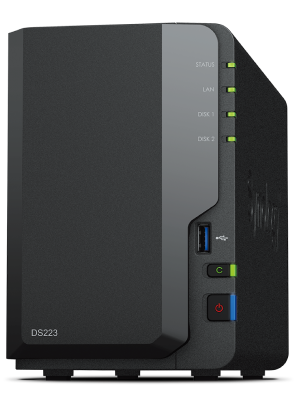
Your needs, this model
Does it fit your priorities?
Can the DS223 use two drives for one-drive fault tolerance?
Yes. Synology lists SHR and RAID 1 for the two-bay DS223. A two-drive SHR-1 or RAID 1 setup can tolerate one drive failure; it does not protect against deletion, malware, theft or a failure affecting the whole NAS. Keep a separate backup copy.
Explore this need in the finder →Will the DS223 be faster than gigabit on a wired client?
No faster built-in Ethernet port is listed: it has one 1GbE RJ-45 port. A client, switch, cable and workload can reduce transfer speed further. The model's three USB 3.2 Gen 1 ports are separate peripheral connections, not extra Ethernet bandwidth.
Explore this need in the finder →How is DS223 different from DS223j?
The official comparison lists the DS223 with 2 GB DDR4 non-ECC and three USB 3.2 Gen 1 ports; DS223j has 1 GB and two USB ports. Both are two-bay, Realtek RTD1619B, single-1GbE systems with the listed SHR, Basic, JBOD, RAID 0 and RAID 1 choices. The exact 2.5-inch drive mounting requirements also differ, so verify the model-specific accessory list.
Explore this need in the finder →This is a documentation-based assessment. I have not used the DS223 or tested transfer speed, noise, reliability or software workloads. Synology's official documents establish the configuration; actual results depend on drives, services and the surrounding network.
The short version: two bays and a single gigabit port
The Synology DiskStation DS223 is a two-bay NAS for home and small-office shared storage. Synology lists a Realtek RTD1619B four-core processor, 2 GB of DDR4 non-ECC memory, one 1GbE RJ-45 port and three USB 3.2 Gen 1 ports. Its simple network configuration is easy to understand: it does not have a built-in 2.5GbE port, and the three USB ports do not substitute for a faster wired link. The official US support-status record listed the DS223 as generally available with full DSM updates and technical support on the date checked.
The strongest reason to compare it is the combination of two SATA positions and DSM software in a relatively compact enclosure. The strongest reason to pause is also clear: two positions limit both raw drive count and growth, and the network link is ordinary gigabit.
Two bays support a mirror, but do not turn into a backup
The specifications list SHR, Basic, JBOD, RAID 0 and RAID 1. A buyer can start with one compatible drive in Basic storage, or use two supported drives in SHR-1 or RAID 1 to tolerate one member failure. Equal-size mirrored drives generally yield a volume based on one drive's capacity before formatting overhead. This may be a sensible trade if a drive failure should not immediately take the volume offline, but it spends a bay and reduces usable capacity relative to a simple two-disk sum.
Neither SHR nor RAID 1 is an independent second copy. Deletions, malicious encryption, a damaged NAS or theft can affect both drives. Synology documents software for separate backup destinations, but buyers still need to choose a destination, schedule copies and test recovery. The listed maximum volume size of 108 TB is a system limit, not a recommended or guaranteed usable-capacity total.
Synology lists 3.5-inch SATA HDDs and 2.5-inch SATA SSDs as supported media. The standard package list includes the NAS, AC components, a LAN cable and accessories but no hard drives. Verify each intended drive's full product code and capacity in the current DS223 compatibility list; do not infer that another Synology model's drive policy applies.
The network is deliberately straightforward
The one RJ-45 port is rated at 1GbE. That is enough for a conventional wired home network when the switch, client and workload also fit, but it will not satisfy an essential minimum of one 2.5GbE NAS port. Nor should a buyer expect the USB connections or a Wi-Fi access point to change that port rating. A real file copy may be slower than the nominal link because the client, switch, cable, disk activity, file size and enabled services all matter.
Synology describes the DS223 as a shared-file and backup hub and lists photo, sync and surveillance applications. It also lists two default camera licenses in Surveillance Station; adding cameras may require paid licenses. Those software options are useful only when they match the owner's capacity and maintenance plan. A network appliance needs updates, access controls, alerts and a separate backup strategy.
How it differs from DS223j and DS224+
The similar DS223 and DS223j model names hide a real configuration difference. Synology's comparison lists the DS223 with 2 GB non-ECC memory and three USB 3.2 Gen 1 ports; the DS223j has 1 GB memory and two USB ports. Both share a two-bay layout, a Realtek RTD1619B, a single 1GbE port and SHR/RAID 1 options. The DS223j also calls for a separate Type C disk holder when using 2.5-inch drives. The DS223 is not an expansion of the DS223j, and their details should not be mixed in a purchase listing.
The DS224+ is a different two-bay alternative: it uses an Intel Celeron J4125 and two 1GbE ports, with 2 GB memory listed expandable to 6 GB. That does not give it a 2.5GbE link either, but the processor and memory specification differ. For buyers who need one 2.5GbE port, Synology's DS225+ is the closer comparison. Choose based on the documented port, processor, memory and exact package—not the year number alone.
Physical fit and ownership checks
The stated dimensions are 165 × 108 × 232.7 mm (height × width × depth), and Synology lists 1.28 kg before drives. Its 14.6 dB(A) figure comes from manufacturer testing; it is not a measured room-noise promise for a particular hard drive. There is one chassis fan, so allow airflow and think about where mechanical disks may be heard. Synology lists a two-year hardware warranty in the current US support information.
Before setup, decide the two drive identifiers, whether the volume should be mirrored, and what copy would survive failure or theft of the NAS. Check the exact seller offer for included drives, warranty coverage and return conditions. The source package is diskless; a seller bundle should be treated as a separate configuration to verify.
Who should keep DS223 on the shortlist?
The DS223 fits a home or small office that wants two bays, one gigabit network path, 2 GB of non-ECC memory and familiar DSM file and backup tools. It is less suitable when the buyer needs more than two native positions, a 2.5GbE port, M.2 storage, or a supported high-memory workload. It is not a ranking against the DS223j or Plus models; the intended job and actual network path determine which compromises matter. No hands-on result, price, live stock, seller bundle or customer experience is claimed here.
Key specifications
Key details at a glance
| Internal drive bays | 2 bays |
|---|---|
| Documented internal drive media | 3.5-inch SATA HDD / 2.5-inch SATA SSD |
| Built-in Ethernet ports | 1 × 1GbE RJ-45 |
| Fastest individual Ethernet port | 1 Gbps |
| Installed system memory | 2 GB |
| Listed storage arrangements | Synology Hybrid RAID / Basic / JBOD / RAID 0 / RAID 1 |
| Internal file systems | Btrfs / ext4 |
| USB 3.2 Gen 1 ports | 3 |
| Maximum listed single-volume size | 108 TB |
| Dimensions (H × W × D) | 165 × 108 × 232.7 |
| Weight | 1.28 kg |
| Manufacturer's idle noise figure | 14.6 dB(A) |
| Hardware warranty | 2 years |
| Data drives included in listed package | No |
| M.2 NVMe slots | 0 |
| M.2 SSD storage-pool support | No |
| Processor | Realtek RTD1619B |
| CPU cores | 4 |
| CPU threads | 4 |
| Installed memory type | DDR4 non-ECC |
Use the exact model’s instructions for operating limits, supplied equipment and version differences.
Sources for this review
Sources for this assessment
- DiskStation DS223 US product specifications
- DS223 Product Manual: package contents and setup overview
- DS223 Product Manual: hardware setup
- Synology DS223 datasheet
- Synology DS223j, DS223, DS224+ and DS423 comparison
- Synology DS124, DS223 and DS223j comparison
- Synology US product support status
- Choose a RAID Type: Synology Knowledge Center
Check your setup before choosing a NAS
Use the finder to check bay count, the network link you need, and whether a documented two-drive redundant arrangement is essential.