
Your needs, this model
Does it fit your priorities?
How many internal SATA bays does the DS1825+ have?
Eight internal SATA positions. Its two M.2 slots are separate, and the total can reach 18 only when two separately purchased five-bay DX525 expansion units are added.
Explore this need in the finder →Can the DS1825+ support a two-drive mirror?
Synology lists SHR and RAID 1 for the DS1825+. Two compatible drives in SHR-1 or RAID 1 provide documented one-drive fault tolerance; plan a separate backup because a mirror does not cover deletion or loss of the full NAS.
Explore this need in the finder →Does the DS1825+ have 10GbE built in?
No. It has two built-in 2.5GbE ports. The PCIe slot supports optional compatible 10GbE or 10/25GbE network cards, so verify the exact card and complete network path before planning those rates.
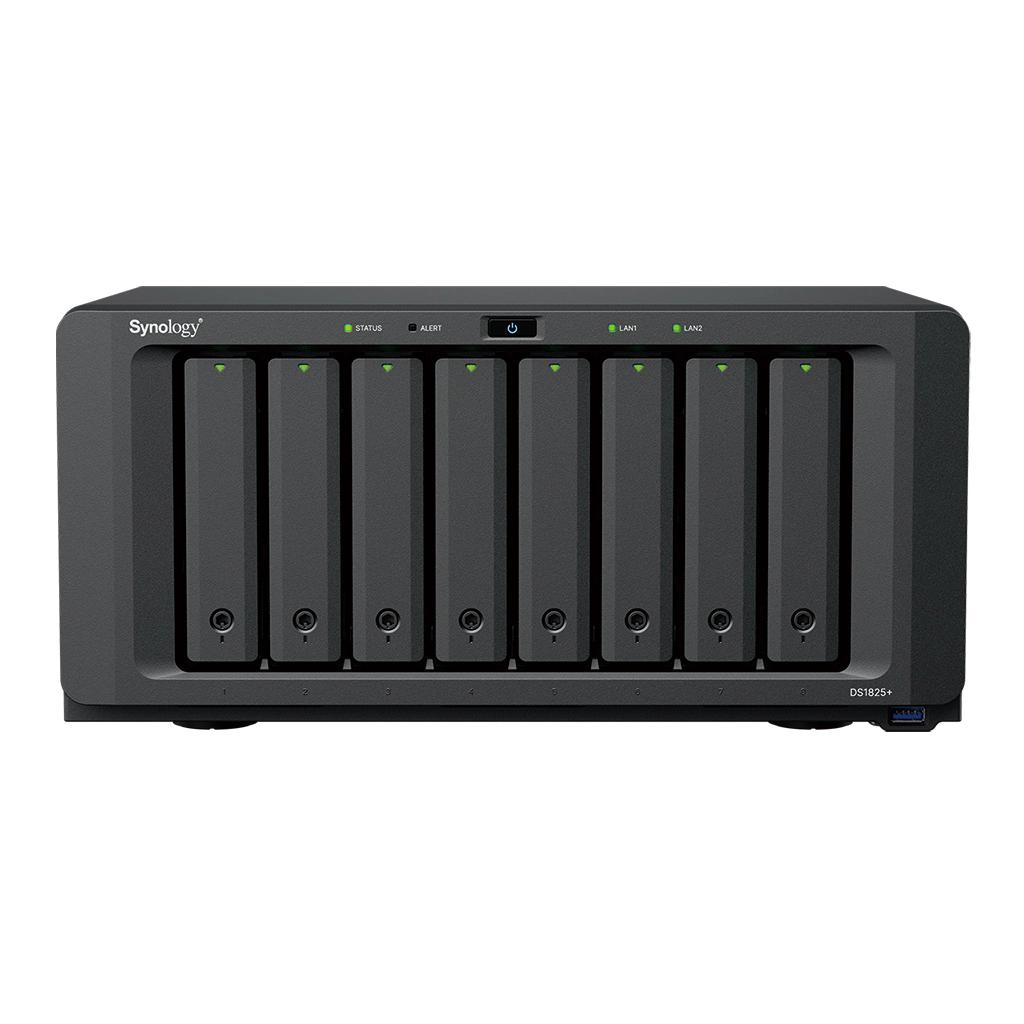
Explore this need in the finder →The Synology DiskStation DS1825+ is an eight-bay desktop NAS for a storage plan that needs more native drive positions than a four- or five-bay system can provide. Its current US product page and datasheet identify an AMD Ryzen V1500B processor, 8 GB of DDR4 ECC SODIMM memory, dual 2.5GbE networking, two M.2 NVMe slots, and a PCIe expansion slot. Those are manufacturer specifications, not a hands-on performance result; actual throughput depends on the drives, network path, software and workload.
Eight native drive bays—not eighteen in the box
The chassis accepts eight 3.5-inch SATA hard drives or 2.5-inch SATA solid-state drives. Two M.2 2280 NVMe positions are available separately for supported caching or storage-pool uses, but they are not additional SATA bays. Synology lists support for up to two DX525 five-bay expansion units, for 18 total drive positions across the main unit and expansion enclosures. The DX525 units and drives are separate purchases; the manual's package list does not describe a populated drive bundle.
Eight native bays leave more room to choose a multi-drive layout than a smaller enclosure. A user could start with two drives in SHR-1 or RAID 1 and add compatible drives later, or plan for a supported larger arrangement such as SHR, RAID 5 or RAID 6. The better choice depends on the drive sizes, capacity goal, tolerance for a drive failure and recovery plan. More bays do not directly translate into a fixed amount of usable space, and redundancy does not protect against accidental deletion, malware, theft or a failure that affects the whole unit. Keep an independent backup destination in the plan.
Network options without confusing the link speeds
Two 2.5GbE RJ-45 ports are built in. Unlike the DS1525+, whose network-upgrade slot is described for a particular 10GbE module, the DS1825+ has a PCIe 3.0 x8 physical slot operating at an x4 link. Synology says compatible add-in cards can provide 10GbE or 10/25GbE networking; the card itself is optional. Buyers should check the current product compatibility list for the exact network card and ensure that the switch, client adapters, cable and software path support the chosen rate.
The built-in ports are useful when a local network already supports 2.5GbE, but two ports do not equal one guaranteed 5Gb/s connection to one client. Link aggregation may serve failover or distribute activity across paths, while a single client flow and the storage workload can remain limited elsewhere. The manufacturer's published transfer figures are test claims under specific conditions, not a suitable substitute for checking the whole network path.
ECC memory and M.2 require exact compatibility checks
The regular DS1825+ starts with 8 GB of DDR4 ECC memory, installed as one module, with two memory slots and a listed ceiling of 32 GB. Synology also sells the distinct DS1825neo+ with 4 GB of non-ECC memory by default. The standard and neo+ versions share the eight-bay chassis class and several central features, but the memory configuration is not interchangeable shorthand. Verify the suffix on the seller's exact listing. Synology's manual recommends matching modules for upgrades and warns that non-Synology memory may limit warranty or technical support.
Two M.2 slots can be used for caching and supported storage pools when compatible, verified SSDs are selected. Those positions are not hot-swappable, and the manual calls for powering down before M.2 installation or removal. Synology's support notes also state that DSM cannot be installed on M.2 alone. Treat M.2 as a separately sourced feature, not as a reason to count more SATA bays or assume a particular SSD is supported.
Plan for the physical footprint and included package
Synology lists the DS1825+ at 166 × 343 × 243 mm and 6 kg. That is a substantially wider and heavier enclosure than the five-bay DS1525+, which the same product family lists at 166 × 230 × 223 mm and 2.67 kg. Check shelf depth, rear cable clearance, cooling space and the path for lifting the chassis before committing to a location. The larger model also lists three USB 3.2 Gen 1 ports, two expansion connections and two built-in 2.5GbE ports; the exact number and type of ports matter more than a generic claim of “connectivity.”
The manual package list includes the main unit, accessory pack, AC power cord and two RJ-45 LAN cables. It does not list hard drives, M.2 SSDs, DX525 expansion units or a PCIe network card. The datasheet lists a three-year hardware warranty, while extension options vary by region and terms. No retailer-specific SKU, stock, price or bundle was established for this assessment. Before ordering, verify the exact DS1825+ model suffix, drive compatibility, whether the seller's package is diskless, the card compatibility, and the return terms for any separately purchased drives or memory.
When the eight-bay platform makes sense
Shortlist the DS1825+ when eight internal positions are justified now or by a planned multi-drive growth path, the home lab or small office can make use of ECC memory and DSM software, and the physical footprint fits. Its optional PCIe path is a distinct advantage when a supported faster network card is part of a real plan, but it does not turn the built-in 2.5GbE ports into 10GbE. A smaller NAS may be simpler if fewer native bays and no add-in card meet the job. Compare the DS1825+ with the five-bay DS1525+ on bay count, expansion topology, PCIe flexibility and footprint, then decide what the drives and network will actually need. This review is based on Synology's published product specifications, manuals, release information and support notes rather than personal testing.
Key specifications
Key details at a glance
| Internal drive bays | 8 bays |
|---|---|
| Documented internal drive media | 3.5-inch SATA HDD / 2.5-inch SATA SSD |
| Built-in Ethernet ports | 2 × 2.5GbE RJ-45 |
| Fastest individual Ethernet port | 2.5 Gbps |
| Installed system memory | 8 GB |
| Maximum listed memory | 32 GB |
| Listed storage arrangements | Synology Hybrid RAID / Basic / JBOD / RAID 0 / RAID 1 / RAID 5 / RAID 6 / RAID 10 |
| Internal file systems | Btrfs / ext4 |
| USB 3.2 Gen 1 ports | 3 |
| Maximum listed single-volume size | 200 TB |
| Dimensions (H × W × D) | 166 × 343 × 243 mm |
| Weight | 6 kg |
| Hardware warranty | 3 years |
| Data drives included in listed package | No |
| M.2 NVMe slots | 2 |
| M.2 SSD storage-pool support | Yes |
| Maximum total drive bays with listed expansion | 18 bays |
| Expansion-unit note | Eight internal positions plus up to two separate five-bay DX525 expansion units; DX525 units are sold separately. |
| Listed expansion unit | DX525 (up to two) |
| Processor | AMD Ryzen V1500B |
| CPU cores | 4 |
| CPU threads | 8 |
| Installed memory type | DDR4 ECC SODIMM |
| Single-volume limit condition | The 200 TB single-volume maximum requires 32 GB of memory; 108 TB is the other listed limit. Neither figure is a usable-capacity promise. |
Use the exact model’s instructions for operating limits, supplied equipment and version differences.
Sources for this review
Sources for this assessment
- DiskStation DS1825+ | Synology US product page
- DS1825+ Product Manual: package contents and hardware overview
- DS1825+ Product Manual: hardware installation and operating instructions
- Synology DS1825+ datasheet
- Synology Introduces DiskStation DS1825+ and DS725+
- Synology Knowledge Center: NAS models that support M.2 SSD storage pools
- Choose a RAID Type: Synology Knowledge Center
- Synology US product list
Check your setup before choosing a NAS
Use the finder to check bay count, the network link you need, and whether a documented two-drive redundant arrangement is essential.