
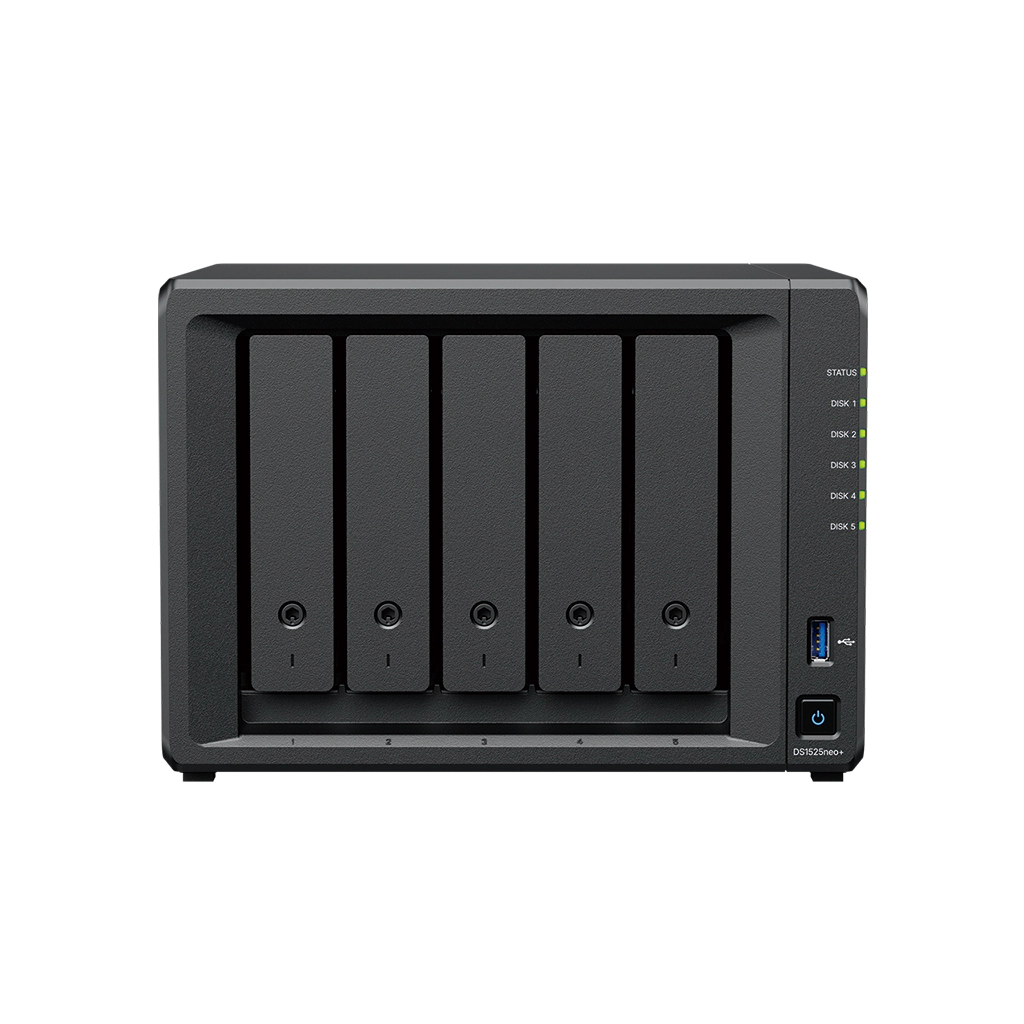
Your needs, this model
Does it fit your priorities?
How many internal SATA bays does the DS1525neo+ have?
Five internal positions for 3.5-inch SATA HDDs or 2.5-inch SATA SSDs. Synology lists up to 15 drives only when two separate five-bay DX525 expansion units are added; the M.2 slots and the optional expansion bays are not internal SATA positions in the main NAS.
Explore this need in the finder →Can the DS1525neo+ support a two-drive mirror?
Synology lists SHR and RAID 1 for this model. With two compatible drives, a documented SHR-1 or RAID 1 arrangement can tolerate one drive failure. The other three internal bays may remain unused or be planned separately. A mirror does not replace an independent backup copy.
Explore this need in the finder →Does the DS1525neo+ have 10GbE built in?
No. The main unit lists two 2.5GbE ports. Its manual identifies a network-upgrade slot for the optional E10G22-T1-Mini 10GbE RJ-45 module. Check Synology’s current compatibility data and the complete switch-to-client path before planning that extra connection.
Explore this need in the finder →The Synology DiskStation DS1525neo+ is a five-bay desktop NAS, not a drive bundle. This assessment is based on Synology’s US product comparison, model manual, datasheet and support material; it does not rely on hands-on use or independent performance testing. The model’s practical question is whether five internal SATA positions, dual 2.5GbE and a separately expandable platform fit the storage plan—and whether its neo+ memory configuration is acceptable.
Five internal bays, with expansion kept separate
The main chassis holds five 3.5-inch SATA hard drives or 2.5-inch SATA SSDs. Two M.2 2280 NVMe positions sit alongside those bays, but they are not two more SATA trays. Synology lists support for up to 15 total drives with two DX525 expansion units. That total means five positions in the NAS plus ten across two optional enclosures; the DX525 units are not part of the standard DS1525neo+ package.
This distinction affects both planning and matching. If the system must start with five drives inside one case, the DS1525neo+ has five internal positions. If a later expansion unit is part of the plan, budget for another powered enclosure, its cabling and compatible drives. “Up to 15” does not mean 15 drive bays are present in the box, and capacity depends on which drives and storage layout are selected.
What the neo+ suffix changes
Synology’s side-by-side comparison identifies the same AMD Ryzen V1500B processor, five SATA bays, two M.2 positions and dual 2.5GbE ports for the DS1525neo+ and DS1525+. The material distinction is the supplied memory: DS1525neo+ starts with 4 GB DDR4 non-ECC SODIMM, while DS1525+ is listed with 8 GB DDR4 ECC SODIMM. Synology lists a maximum of 32 GB for the neo+ and supports compatible ECC memory upgrades, but its launch notice says mixing ECC and non-ECC modules is not officially supported. Check the exact module and configuration before planning an upgrade; maximum capacity is not approval for arbitrary memory.
A smaller starting memory configuration may be relevant if you expect to run several services or memory-intensive packages. It does not, by itself, establish how a particular workload will perform. The two versions should stay separate in a buying shortlist: do not read the DS1525+ memory line, photo or seller bundle as proof of what comes with a DS1525neo+ offer.
Drive layout, M.2 and usable space
The listed storage choices include Synology Hybrid RAID (SHR), Basic, JBOD and RAID 0, 1, 5, 6 and 10. A two-drive SHR-1 or RAID 1 plan can tolerate one drive failure; a five-drive array can use one of the supported multi-drive layouts. Those arrangements solve different problems and trade usable space for protection. A mirror or parity layout is not a second backup: deletion, malware, theft or loss of the NAS still requires another recoverable copy.
Synology documents the two M.2 slots for caching and its current support article explicitly lists DS1525neo+ for M.2 storage pools. Use only M.2 SSDs shown as compatible with the exact NAS. The M.2 positions are not hot-swappable, DSM cannot be installed solely on M.2, and maintenance that involves removing an M.2 drive requires a full shutdown. The datasheet lists 108 TB and a 200 TB single-volume ceiling when 32 GB of memory is installed. These are software limits, not a promise of usable space from an unspecified drive set; formatting, RAID and system overhead reduce usable capacity.
Two 2.5GbE ports and an optional upgrade
The built-in network ports are two 2.5GbE RJ-45 connections. Synology describes link-aggregation options for failover and load balancing, but adding the port ratings does not create a 5Gb/s path for one ordinary client. The switch or router, client adapter, cabling, storage and workload each matter. If a computer reaches the NAS through gigabit equipment, the faster NAS port cannot make that entire path multigigabit.
The manual identifies a network-upgrade slot for Synology’s E10G22-T1-Mini module, which adds one 10GbE RJ-45 connection when the exact supported hardware is installed. That is an optional part, not a third built-in port or a guarantee of a particular transfer rate. Check its availability and compatibility, and map the full path before paying for faster networking.
What to verify before choosing it
The manual’s package list names the main unit, accessory pack, power adapter and cord, two LAN cables, tray keys and screws for 2.5-inch drives. It does not list SATA drives, M.2 SSDs or DX525 expansion units; a seller-created bundle needs its own exact contents check. The documented enclosure is 166 × 230 × 223 mm and 2.67 kg, with a three-year limited hardware warranty. Those are manufacturer specifications, not measurements made for this review.
Before ordering, compare the full DS1525neo+ suffix with the listing, verify every intended SATA and M.2 part against Synology’s current compatibility data, decide whether five internal bays are enough, and confirm whether any expansion unit or network module is actually included. Then write down the storage layout and a separate backup destination. The DS1525neo+ offers a clear five-bay, multigigabit plan with optional growth, but its standard package and non-ECC starting memory should be evaluated as they are—not inferred from a similarly named DS1525+.
Key specifications
Key details at a glance
| Internal drive bays | 5 bays |
|---|---|
| Documented internal drive media | 3.5-inch SATA HDD / 2.5-inch SATA SSD |
| Built-in Ethernet ports | 2 × 2.5GbE RJ-45 |
| Fastest individual Ethernet port | 2.5 Gbps |
| Installed system memory | 4 GB |
| Maximum listed memory | 32 GB |
| Listed storage arrangements | Synology Hybrid RAID / Basic / JBOD / RAID 0 / RAID 1 / RAID 5 / RAID 6 / RAID 10 |
| Internal file systems | Btrfs / ext4 |
| USB 3.2 Gen 1 ports | 2 |
| Maximum listed single-volume size | 200 TB |
| Dimensions (H × W × D) | 166 × 230 × 223 mm |
| Weight | 2.67 kg |
| Hardware warranty | 3 years |
| Data drives included in listed package | No |
| M.2 NVMe slots | 2 |
| M.2 SSD storage-pool support | Yes |
| Maximum total drive bays with listed expansion | 15 bays |
| Expansion-unit note | Five internal positions plus up to two separate five-bay DX525 expansion units; DX525 units are sold separately. |
| Listed expansion unit | DX525 (up to two) |
| Processor | AMD Ryzen V1500B |
| CPU cores | 4 |
| CPU threads | 8 |
| Installed memory type | DDR4 non-ECC SODIMM |
| Single-volume limit condition | The 200 TB single-volume maximum requires 32 GB of memory; 108 TB is the other listed limit. Neither figure is a usable-capacity promise. |
Use the exact model’s instructions for operating limits, supplied equipment and version differences.
Sources for this review
Sources for this assessment
- Synology DS1525+ and DS1525neo+ specifications comparison
- DS1525neo+ Product Manual: package contents and hardware overview
- DS1525neo+ Product Manual: installation and hardware instructions
- Synology DS1525neo+ datasheet
- Synology America introduces DiskStation neo+ Series
- Synology US product list
- Synology Knowledge Center: NAS models that support M.2 SSD storage pools
- Choose a RAID Type: Synology Knowledge Center
Check your setup before choosing a NAS
Use the finder to check bay count, the network link you need, and whether a documented two-drive redundant arrangement is essential.