
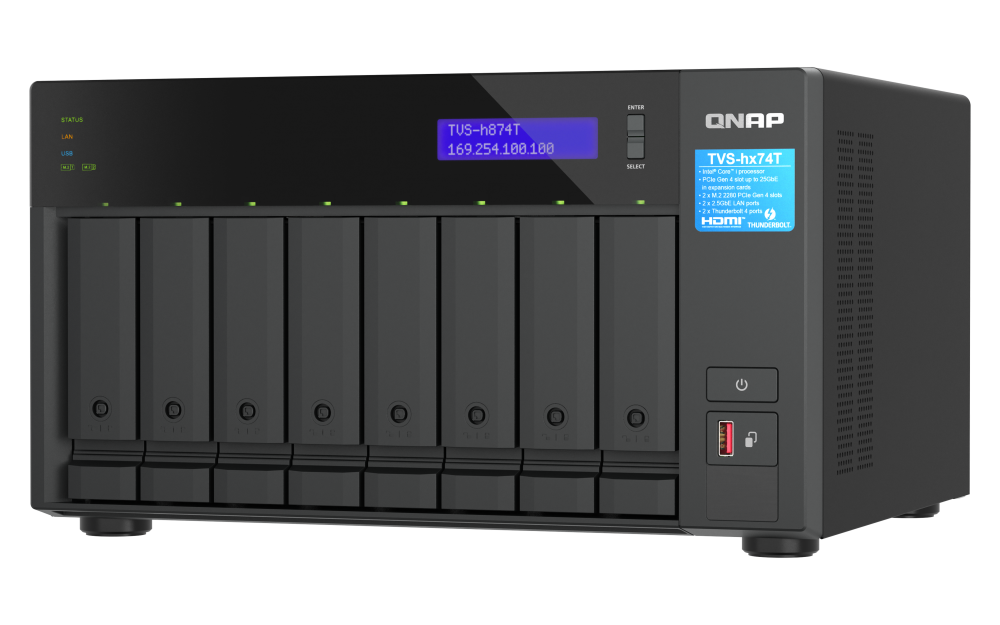
Your needs, this model
Does it fit your priorities?
How many internal drive bays does this exact i9 package have?
QNAP lists eight native 3.5-inch SATA positions for this i9 profile, compatible with 3.5-inch SATA HDDs or 2.5-inch SATA SSDs. The two M.2 2280 NVMe sockets are separate and are not extra hot-swappable SATA bays. QNAP's current TVS-h874T family list names exact HDD, SATA SSD and M.2 drive/firmware entries; match the chosen part and firmware before ordering. It does not say what a reseller ships.
Explore this need in the finder →Does the i9-64G profile clear a 2.5GbE single-port floor?
Yes. The exact U.S. hardware profile lists two built-in 2.5GbE ports, so one port meets a 2.5Gbps link-rating minimum. A 3Gbps floor is above the fastest built-in Ethernet port. Optional faster PCIe adapters are not base ports, and the rated link is not a file-transfer result.
Explore this need in the finder →Can the i9-64G profile support a two-drive mirror?
QNAP's eight-bay software tables list RAID 1 in both alternative QTS and QuTS hero profiles. The owner must choose one OS, select two compatible SATA drives and create a pool; the listed standard package has no data drives or preconfigured mirror. Match the chosen drive model and firmware against QNAP's current TVS-h874T family list, and keep an independent backup.
Explore this need in the finder →What does i9-64G change compared with i7-32G?
The i9-64G profile is listed with a 16-core/24-thread Intel Core i9 and 64 GB DDR4 SODIMM memory. The i7-32G profile has a 12-core/20-thread i7 and 32 GB. Both profiles share the eight SATA bays, dual 2.5GbE, two M.2 sockets, Thunderbolt 4 and the same 64 GB memory ceiling. No independent workload test quantifies the CPU difference.
Explore this need in the finder →The TVS-h874T-i9-64G-US is the higher processor-and-memory package in QNAP's eight-position Thunderbolt 4 tower family. The chassis has the same eight SATA positions, two separate M.2 sockets, two 2.5GbE ports and two Thunderbolt 4 connections as the i7-32G profile; its practical distinction is the i9/64 GB starting configuration, not a different bay count or faster base Ethernet. This assessment is based on QNAP's U.S. profile, its exact U.S. Store identity and the shared English user guide. It is not a hands-on test, and a Store product page does not prove present stock or the contents of a seller-added bundle.
What the i9-64G suffix changes
The hardware selector lists a 16-core, 24-thread Intel Core i9 for this configuration, comprising eight performance cores and eight efficiency cores; QNAP's English manual gives a maximum burst figure of 5.1 GHz. The exact Intel processor part number is not named in the selector. Installed memory is listed as 64 GB DDR4 SODIMM, two 32 GB modules, and the maximum is also 64 GB. Buyers comparing it with the i7-32G should therefore see the documented differences clearly: the i7 package is listed at 12 cores/20 threads and 32 GB, while this i9 package is listed at 16 cores/24 threads and 64 GB. Both share the same 64 GB memory ceiling, so the i9 version's supplied capacity is not evidence of a larger upgrade limit.
Those parts establish a configuration difference, not a quantified improvement for a video-editing, virtual-machine, AI or file-serving workload. QNAP's published model scenarios use specific operating systems, disks, RAID layouts and optional network cards. They do not isolate these two order packages under a controlled independent comparison. Choose the i9 profile when the extra documented CPU and installed-memory tier address a real workload or service plan; do not infer a percentage gain, a particular transcoding outcome or a transfer rate from the model name alone.
Separate the eight SATA positions from M.2
The eight native drive positions are listed for 3.5-inch SATA hard drives or 2.5-inch SATA solid-state drives. There are also two M.2 2280 PCIe Gen 4 x4 sockets for NVMe media; they are a separate layer, not two additional ordinary SATA trays. QNAP's guide says M.2 SSDs are not hot-swappable. That difference matters when planning an editing cache, scratch volume or future replacement routine: QNAP's current TVS-h874T compatibility list publishes exact model-and-firmware entries for 3.5-inch HDDs, SATA SSDs and M.2 SSDs. Check the selected model and firmware against the matching family entry, and plan installation and replacement around the non-hot-swappable M.2 sockets. The compatibility list is not evidence of what an individual reseller ships in its package.
The published internal count is eight bays even though the NAS has two M.2 sockets. This review does not add the sockets to the questionnaire's native-bay figure. Nor does the count say how much usable space the eventual volume will hold: that depends on the purchased disks, selected RAID layout, file-system overhead and future expansion decisions. QNAP's rendered U.S. package list contains the chassis and small installation accessories, not data drives; obtain the exact order contents from the seller rather than relying on configuration selectors or a chassis photo.
Plan the software and mirror as a setup task
QNAP lists QTS (EXT4) and QuTS hero (ZFS) as alternative operating systems for the family. Both corresponding eight-bay tables include RAID 1. The administrator still selects the compatible disks, chooses an operating system, creates a storage pool and configures the mirror. A two-drive RAID 1 arrangement uses two of the native SATA positions; it is not preinstalled or populated simply because the feature appears in a table. QTS and QuTS hero have separate setup instructions, and the hardware guide warns that changing the operating system can reset the NAS and erase data. Decide early, keep a backup independent of the NAS, and verify the drive-pool migration path before initialization.
Mirroring can maintain access through a qualifying single drive failure, but it does not protect against accidental deletion, software compromise, fire, theft or mistakes copied to every member. It also reserves capacity for redundancy. Buyers with valuable project files should plan a separate backup destination, versioning and restore check rather than treating RAID 1 as a backup strategy.
Base connectivity stays at 2.5GbE
The i9-64G profile retains two built-in 2.5GbE RJ45 ports. The maximum individual Ethernet link rating is 2.5 Gbps; two ports do not combine into one 5Gbps workstation connection, and a link rate is not expected file-transfer throughput. The two Thunderbolt 4 ports provide a different direct-connect route for supported hosts or devices. QNAP's compatibility note excludes third-party Thunderbolt external storage, so confirm supported equipment and software rather than assuming the port is a universal dock or storage bridge. Optional 10GbE or faster adapter paths are separate purchases that need exact card, PCIe slot, client, cable and switch checks.
A multi-gigabit workstation setup depends on both ends, network equipment, cabling, storage organization and the editing workload. A faster card would not make an unsuitable drive pool, source media or client pipeline fast by itself. This is a reasoned configuration assessment, not a benchmark of the i9 package.
Installation cautions apply to both packages
QNAP's current hardware selector lists the chassis at 7.09 × 12.96 × 11.01 inches, excluding variable foot-pad height. The English guide lists 7.41 × 12.96 × 11.06 inches; neither source explains the difference. Both list 16.18 lb net. If the tower has to fit into a tight shelf or built-in space, confirm actual dimensions and leave extra clearance for airflow, cables and tray access rather than treating either published set as a complete placement envelope. The specification also identifies one 350 W supply, which is not a measured consumption figure or redundant power design. Account for room heat and the planned drive load separately.
Shortlist this exact profile only if its distinction matters
The i9-64G-US package can be a stronger paper fit than its i7 sibling when the documented 16-core/24-thread processor and 64 GB supplied memory correspond to a known workload, and when the shared eight-SATA/dual-M.2, Thunderbolt and 2.5GbE layout suits the room and client network. The i7-32G-US retains the same eight positions and 64 GB maximum with a lower starting memory amount and different processor tier, so the choice is not a comparison of bay expansion or built-in Ethernet classes. Before purchase, verify the exact SKU and bundle, drive/firmware compatibility, OS choice, memory requirements, optional network-card layout, supported Thunderbolt host, and real room clearance. No seller price, stock statement, customer experience or unsupported performance comparison is made.
Key specifications
Key details at a glance
| Internal drive bays | 8 bays |
|---|---|
| Documented internal drive media | 3.5-inch SATA HDDs in eight native positions / 2.5-inch SATA SSDs in eight native positions |
| Built-in Ethernet ports | 2 x built-in 2.5GbE RJ45 |
| Fastest individual Ethernet port | 2.5 Gbps |
| Installed system memory | 64 GB |
| Maximum listed memory | 64 GB |
| Listed storage arrangements | QTS: 8-bay table lists RAID 1, RAID 5, RAID 6, RAID 10, RAID 50 and RAID 60 alongside other modes / QuTS hero: 8-bay table lists RAID 1, RAID 5, RAID 6, RAID 10, RAID 50, RAID 60, Triple Mirror and Triple Parity alongside other modes |
| Internal file systems | EXT4 (QTS alternative) / ZFS (QuTS hero alternative) |
| Hardware warranty | 3 years |
| Data drives included in listed package | No |
| M.2 NVMe slots | 2 |
| M.2 SSD storage-pool support | Yes |
| Processor | Intel Core i9 (QNAP does not identify the exact processor part number) |
| CPU cores | 16 |
| CPU threads | 24 |
| Installed memory type | 64 GB DDR4 SODIMM, 2 x 32 GB per the model guide |
Use the exact model’s instructions for operating limits, supplied equipment and version differences.
Sources for this review
Sources for this assessment
- TVS-h874T — QNAP U.S. product page
- TVS-h874T i7-32G and i9-64G rendered hardware selectors — QNAP U.S.
- QTS and QuTS hero rendered software selectors — QNAP U.S.
- TVS-h874T rendered package contents — QNAP U.S.
- TVS-hx74T User Guide, English U.S. — QNAP
- TVS-h874T-i9-64G-US — QNAP U.S. Official Store
- SMB Desktop category, page 2 — QNAP U.S. Official Store
- TVS-hx74T series — QNAP U.S. Official Store
- Storing data — QTS 5.2.x User Guide
- RAID types — QTS 5.2.x User Guide
- Creating a storage pool — QuTS hero h5.3.x User Guide
- QNAP Compatibility List entry point filtered to TVS-h874T
- TVS-h874T official image — QNAP U.S. product page
- QNAP official TVS-h874T family compatibility data

Check your setup before choosing a NAS
Use the finder to narrow documented desk/shelf or rack formats, internal-bay minimums, a single Ethernet-port rating and optional redundancy requirements.