
Your needs, this model
Does it fit your priorities?
How many native drive positions does this exact i5 package have?
QNAP lists eight native 3.5-inch SATA positions. Two separate M.2 2280 NVMe sockets do not make a ninth or tenth front bay. The current selector lists 3.5-inch SATA HDDs and 2.5-inch SATA SSDs; the series guide also mentions 2.5-inch SATA HDDs, so confirm the exact disk and firmware in QNAP’s live compatibility list.
Explore this need in the finder →Does the i5-32G profile meet a 2.5-Gbps single-port floor?
Yes. QNAP lists two built-in 2.5GbE ports, so one individual port meets a 2.5-Gbps link-rating minimum; a 3-Gbps floor exceeds the fastest built-in port. Optional 5/10GbE cards are separate from the base configuration, and the link rating is not measured file-transfer speed.
Explore this need in the finder →Can the owner configure a two-drive redundant arrangement?
QNAP’s eight-bay software tables include RAID 1 under both the QTS and QuTS hero alternatives. The owner selects two compatible SATA drives, chooses one OS and creates the pool; the listed standard contents do not include data drives or a prebuilt mirror. Keep a separate backup.
Explore this need in the finder →Does this i5 package include a 10GbE port?
No built-in 10GbE is listed for the i5-32G. QNAP identifies higher-rate networking as an optional PCIe-card route. The TVS-h874X-i9-64G is a separate profile that lists two built-in 10GBASE-T ports; verify its exact SKU and installation details separately.
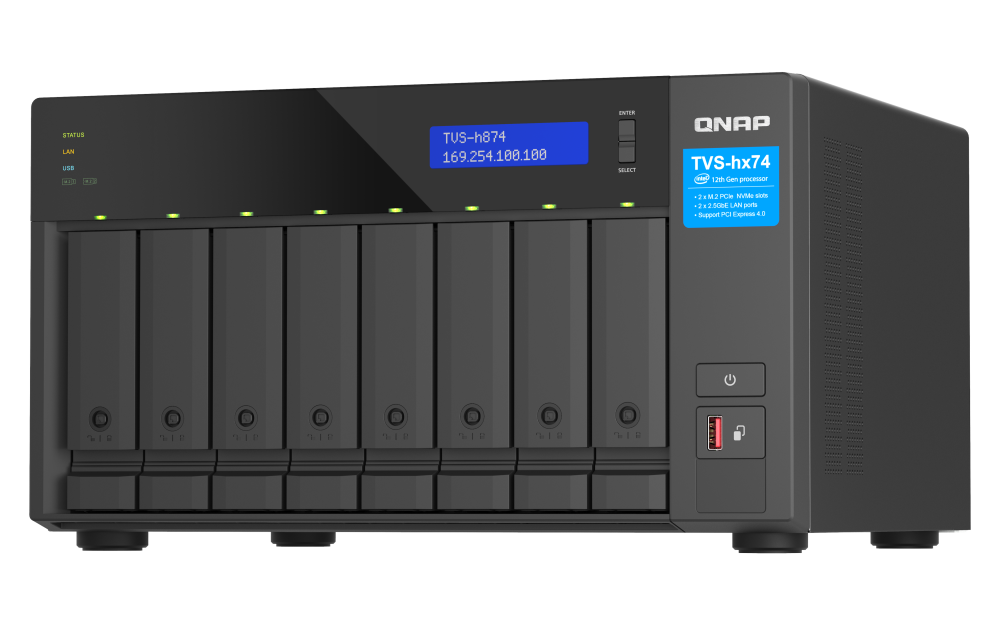
The TVS-h874-i5-32G-US is an eight-position tower NAS built around an Intel Core i5-12400 and a listed 32 GB of DDR4 memory. Its appeal is a relatively capable eight-bay platform without paying for a built-in 10GbE interface: QNAP lists two 2.5GbE ports, two M.2 NVMe sockets and two PCIe slots. This is a source-based assessment of the exact i5 package, not a hands-on test or an independent performance result.
What the i5-32G profile actually includes
QNAP's current U.S. hardware selector identifies this profile as a six-core, 12-thread Core i5-12400 with 32 GB of DDR4 SODIMM memory and a 64 GB maximum. The exact retail identity is the U.S. Store's TVS-h874-i5-32G-US title and SKU. The eight front positions are native 3.5-inch SATA bays; QNAP's current selector lists 3.5-inch SATA hard drives and 2.5-inch SATA solid-state drives for them. Two M.2 2280 PCIe Gen 4 x4 NVMe sockets sit outside that eight-bay count. QNAP says M.2 SSDs are not hot-swappable and asks owners to check its compatibility list for supported drives.
That distinction matters when planning capacity. An M.2 cache or tiering device is not a ninth or tenth hot-swap tray, and an external expansion enclosure does not change the number of bays in the tower itself. The manual's broader media table also mentions 2.5-inch SATA hard drives; because the current selector does not repeat that item and exact drive/firmware pairs have not been verified here, check the complete model number against QNAP's live compatibility information before treating a particular drive as supported.
Eight bays suit a deliberate storage plan
Eight positions offer more room to divide capacity, redundancy and future growth than a two- or four-bay box, but they do not decide the layout for you. QNAP's software tables list RAID 1 among the eight-bay options under both QTS and QuTS hero. An owner can therefore choose two compatible SATA drives and create a mirror in either supported operating-system path. The standard guide package lists the NAS, power cord, one network cable, drive screws, M.2 heatsinks, tray keys and a quick-installation guide; it does not list data drives or an already-built array. The actual Store offer and any seller additions still need their own written check.
A mirror can preserve availability after one member-drive failure while the other remains healthy; it does not protect against accidental deletion, ransomware, a failing NAS, theft or a building problem. Plan a separate backup that can be recovered independently. Before initialization, compare the intended drive sizes, firmware, noise and heat characteristics against the use location and confirm what the chosen OS does with those drives.
Built-in networking stops at 2.5GbE
The fastest individual built-in Ethernet port is rated at 2.5Gbps. Two jacks do not become one 5Gbps client connection merely because both are present, and the link rating is not a promise of file-transfer speed. A 2.5GbE switch, client port and suitable cabling must all be part of the path before that link rate is even possible; drive behavior and workload also matter. If one built-in port rated at 10Gbps is essential, compare the separate TVS-h874X-i9-64G-US instead of assuming that the non-X i5 contains its network card.
QNAP describes 5GbE and 10GbE as optional PCIe-card routes for this i5 profile. A card is a separate purchase and compatibility decision, not part of its built-in-port specification. The chassis has two PCIe positions, but a larger NIC or storage card can compete for physical space, airflow and future expansion. The same page lists two PCIe Gen 4 slots, one HDMI 1.4b output, two Type-A USB 3.2 Gen 2 ports and one Type-C USB 3.2 Gen 2 port. These are useful connections to assess against an actual local workflow, not evidence of measured application speed.
Pick the storage operating system before loading data
QNAP documents both QTS, which uses EXT4, and QuTS hero, which uses ZFS, as alternative choices. The series guide warns that changing between them resets the NAS and deletes data. Decide which storage behavior and software environment suit the job before initialization, and keep a separate copy before any migration or system change. The 32 GB starting memory is a fact about this package, not proof that every optional service or virtual machine workload will feel responsive; QNAP's software notes attach different memory requirements to some functions.
Fit, wattage and purchase checks
QNAP lists one 250W supply, which is a rated supply capacity rather than measured operating draw or redundant power. The current selector gives HWD dimensions of 7.41 × 12.96 × 11.06 inches and says the values exclude a foot pad that can add up to 1.18 inches in height. The English-U.S. guide gives the same height and width but a 11.01-inch depth; the reason for this small discrepancy is not established. Leave service and airflow room, and do not use either figure as a fit guarantee for a close cabinet. The published three-year standard warranty is also subject to the exact U.S. SKU and seller's delivered terms.
The selector reports 16.09 lb net, while the guide's shared h874 profile row prints 7.06 kg (20.79 lb); those published values conflict, and the guide's paired units are internally inconsistent. If a shelf load limit is close, confirm the exact revision and weight with QNAP rather than relying on either figure.
Verdict
The i5-32G is the straightforward base-profile choice when eight SATA positions, 32 GB RAM and a built-in 2.5GbE link meet the documented job. Its two NVMe sockets and optional PCIe expansion add flexibility, not extra native bays or a faster base Ethernet port. The i7 sibling changes the advertised processor tier and power-supply rating while keeping the same starting memory, bay count and built-in network ceiling; the X-marked i9 profile is the distinct option with built-in dual 10GbE. Verify exact media, OS, physical clearance and the written package before deciding. No price, seller stock or independent throughput claim is used in this assessment.
Key specifications
Key details at a glance
| Internal drive bays | 8 bays |
|---|---|
| Documented internal drive media | 3.5-inch SATA HDDs in eight native positions / 2.5-inch SATA SSDs in eight native positions |
| Built-in Ethernet ports | 2 x built-in 2.5GbE RJ45 |
| Fastest individual Ethernet port | 2.5 Gbps |
| Installed system memory | 32 GB |
| Maximum listed memory | 64 GB |
| Listed storage arrangements | QTS eight-bay class: RAID 1 is listed among supported layouts / QuTS hero eight-bay class: RAID 1 is listed among supported layouts |
| Internal file systems | EXT4 (QTS alternative) / ZFS (QuTS hero alternative) |
| Hardware warranty | 3 years |
| Data drives included in listed package | No |
| M.2 NVMe slots | 2 |
| Processor | Intel Core i5-12400 |
| CPU cores | 6 |
| CPU threads | 12 |
| Installed memory type | 32 GB DDR4 SODIMM; the U.S. guide lists 2 x 16 GB |
Use the exact model’s instructions for operating limits, supplied equipment and version differences.
Sources for this review
Sources for this assessment
- TVS-h874 — QNAP U.S. product page
- TVS-h874 i5/i7/i9-64G rendered hardware selector — QNAP U.S.
- QTS and QuTS hero rendered software selectors — QNAP U.S.
- TVS-hx74 User Guide, English U.S. — QNAP
- TVS-h874-i5-32G-US — QNAP U.S. Official Store
- SMB Desktop category, page 2 — QNAP U.S. Official Store
- TVS-h874 family chassis image — QNAP U.S. product page

Check your setup before choosing a NAS
Use the finder to narrow documented desk/shelf or rack formats, internal-bay minimums, a single Ethernet-port rating and optional redundancy requirements.