
Your needs, this model
Does it fit your priorities?
How many native drive bays does this exact TVS-h674T profile provide?
QNAP lists six native 3.5-inch SATA positions. Two separate M.2 NVMe sockets do not increase the SATA-bay count. The English manual names 3.5-inch SATA HDDs and 2.5-inch SATA SSDs; the current selector also mentions 2.5-inch SATA HDDs, so verify that exact drive class and each drive/firmware against the current compatibility list before purchase.
Explore this need in the finder →Does the built-in network clear a 2.5-Gbps single-port floor?
Yes. QNAP lists two built-in 2.5GbE ports, so one port meets a 2.5-Gbps link-rating floor; a 3-Gbps minimum is above the fastest built-in Ethernet port. Do not add the two ports or count Thunderbolt 4 as Ethernet. Optional 10/25GbE needs a separately selected, supported adapter and the available PCIe layout; line rate is not a file-transfer guarantee.
Explore this need in the finder →Can this six-bay configuration support a two-drive mirror?
The exact QNAP software selector lists RAID 1 under both alternative QTS and QuTS hero profiles. The owner selects one system, two compatible SATA drives and initializes the mirror; the standard package list has no data drives or factory-created array. Check each drive and firmware. A mirror is limited to a drive-failure case and is not a separate backup.
Explore this need in the finder →Does earlier-model filtering change the h674T's eligibility?
The TVS-h674T-i5-32G-US is treated as a current-reference U.S. profile because it appears on QNAP's current U.S. product selector and exact Official Store page. It therefore remains eligible with earlier models either excluded or included; that status does not guarantee live stock, package contents or a seller's warranty.
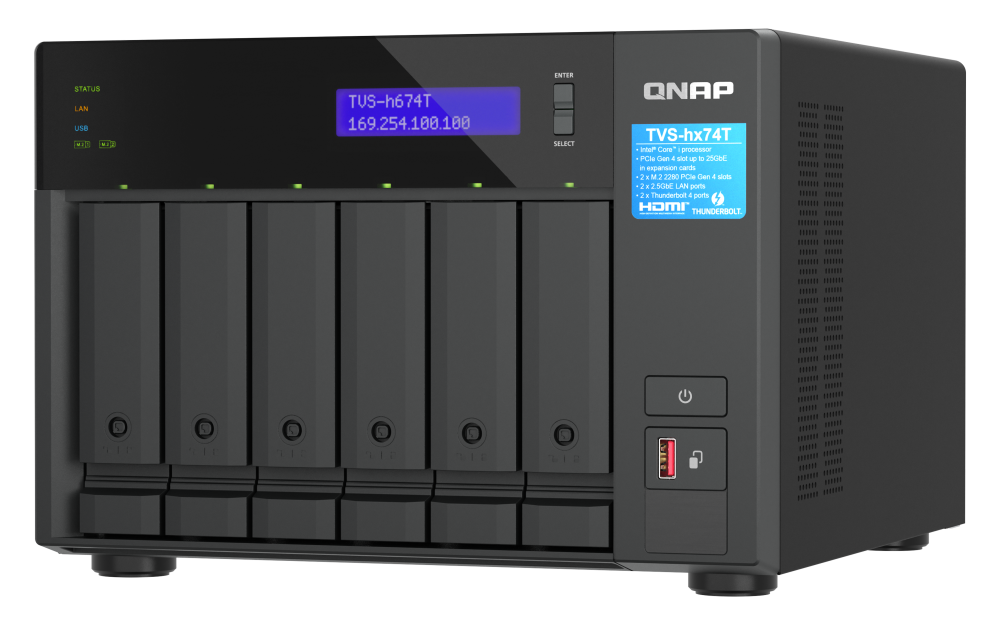
Explore this need in the finder →The TVS-h674T-i5-32G-US is QNAP’s six-bay Thunderbolt tower NAS, not a bare Thunderbolt dock with a few disks attached. The U.S. selector shows one i5-32G hardware profile for the TVS-h674T family, and the U.S. Store’s exact suffix bridges that profile to this retail identity. The evidence here is manufacturer documentation and a visually inspected manufacturer rendering; this is not a hands-on test, benchmark or claim about an available offer. Start with QNAP’s U.S. TVS-h674T overview and the English TVS-hx74T user guide.
Six SATA trays are the main capacity decision
QNAP documents six native 3.5-inch SATA positions. The model guide lists 3.5-inch SATA hard drives and 2.5-inch SATA solid-state drives as compatible tray media, while the current hardware selector also mentions 2.5-inch SATA hard drives. QNAP’s TVS-h674T compatibility list, checked November 5, 2026, names model-and-firmware entries in its 3.5 HDD, SSD and M.2 SSD categories. Check the exact drive and firmware in QNAP’s TVS-h674T compatibility data before purchase. It has no separately labeled 2.5-inch HDD category, which does not settle the selector/manual conflict; do not assume a particular 2.5-inch hard drive is supported, and no specific drive is recommended here.
There are two additional M.2 2280 PCIe Gen 4 x4 NVMe sockets, but these are a separate layer, not bays seven and eight. QNAP describes M.2 SSD-cache support, and its guide says M.2 SSDs are not hot-swappable. The current compatibility data also lists M.2 SSD model-and-firmware pairs, so verify the exact part and firmware against the latest QNAP list rather than treating all NVMe drives as interchangeable. The system therefore has a different drive workflow for its six front SATA trays and internal M.2 sockets. Decide on the storage media and service routine before treating the chassis as an eight-drive system; the M.2 sockets do not change the native SATA bay count.
The i5-12400 and supplied memory are specific to this package
This exact configuration is listed with an Intel Core i5-12400, six cores and twelve threads, a 4.4 GHz maximum burst figure and UHD Graphics 730. The guide identifies 32 GB of DDR4 SODIMM memory as two 16 GB modules, with two slots and a 64 GB maximum using two 32 GB modules. Those are documented specifications, not a workload assessment. QNAP advises using supported memory modules of identical specifications; I cannot turn that into an endorsement of an unverified upgrade kit.
When comparing it with other TVS-hx74T packages, read the suffix rather than carrying over the larger chassis’ specifications. The h674T/i5-32G is the six-bay i5 configuration. QNAP lists the h874T with i7 or i9 profiles and eight bays; that separate comparison does not make the h674T faster, slower or less reliable in any workload without a task-specific test. The useful distinction here is the six-position chassis, i5/32 GB configuration, ports and operating setup that QNAP actually documents.
Thunderbolt 4 and Ethernet solve different connection problems
QNAP lists two Thunderbolt 4 ports, two built-in 2.5GbE RJ45 ports and one HDMI 1.4b output. The direct-attach Thunderbolt path may be relevant to a supported Mac or Windows workstation workflow, but it is not an Ethernet port; the user guide also excludes third-party Thunderbolt external storage. If the NAS will serve several network clients through a switch, the useful built-in network figure is 2.5GbE per port. Two ports do not make a single 5GbE link, and a link rating does not predict file-copy speed through the full client, switch, cable, storage and workload path.
The current hardware layout lists a PCIe Gen 4 x16 slot and a Gen 4 x4 slot, with the x4 location occupied by the Thunderbolt add-in card. Optional higher-rate networking is therefore not equivalent to an extra included port: check adapter compatibility, physical clearance, power requirements and whether the installed Thunderbolt card must be moved before planning a 10 or 25GbE upgrade. I would not treat an adapter listing on a separate accessory page as proof that the card fits this exact slot arrangement.
RAID 1 is a setup plan, not a prepared array
The exact software selector lists both QTS 6.1.0 with EXT4 and QuTS hero h6.1.0 with ZFS, with RAID 1 available in each six-bay profile. These are alternatives, not two filesystems running together. The English guide calls QuTS hero the default installation path, allows QTS as another installation choice, and warns that switching operating systems resets the NAS and deletes data. Choose deliberately before initialization, and protect any existing data before changing systems.
With either selected system, RAID 1 means the owner selects two compatible data drives and creates the mirror. It does not mean QNAP ships a two-drive pool ready to use: the current standard package list does not include data drives. QNAP’s RAID table describes a two-disk RAID 1 arrangement and the one-member-drive failure case it can tolerate while healthy. That is not an independent backup; deletion, a damaging event affecting the whole chassis, or other data loss still calls for another protected copy. Use QNAP’s RAID reference as general OS guidance and confirm the exact drive list before creating a pool.
Resolve the conflicting installation details before ordering
The dimensions are not consistent across QNAP’s current selector and English guide. The selector lists 7.09 × 10.41 × 11.01 inches HWD and says the height excludes foot pads; the guide prints 7.41 × 10.41 × 11.06 inches. The guide gives a 14.02 lb net weight. That discrepancy matters if the NAS must slide into a shelf or a tightly fitted workstation bay, so measure the available space and verify dimensions with QNAP rather than treating either published outline as the final clearance envelope.
There is a similar power-supply detail to clarify: the current selector gives a 250 W minimum PSU specification, while the manual lists one 350 W supply. That does not establish measured power draw, redundancy or the exact supply installed in a shipped unit. Ask for confirmation where that rating affects a power plan. QNAP’s current standard package page lists a Cat5e cable, cord, screws, M.2 heatsinks and a quick-start guide, but not drives; its screw counts differ from the manual’s counts. The final seller package and any additions are not established by manufacturer standard contents, so request an exact written bill of materials and confirm the three-year warranty for the exact U.S. suffix.
Who should shortlist it?
The TVS-h674T-i5-32G-US is worth considering when six conventional SATA bays, separate M.2 cache positions, direct Thunderbolt 4 connectivity and dual 2.5GbE make sense together. It is less straightforward if the requirement is built-in 10GbE, a guaranteed single-link transfer rate, unambiguous compatibility for a specific 2.5-inch hard drive, or a precise clearance/power figure that must be known before installation. The buyer still has to select drives, settle the operating system, create the chosen RAID layout, maintain an independent backup and check the exact seller’s shipment. QNAP’s source pages establish the configuration; they do not replace those compatibility and installation checks.
Key specifications
Key details at a glance
| Internal drive bays | 6 bays |
|---|---|
| Documented internal drive media | 3.5-inch SATA HDDs / 2.5-inch SATA SSDs |
| Built-in Ethernet ports | 2 × built-in 2.5GbE RJ45 data ports |
| Fastest individual Ethernet port | 2.5 Gbps |
| Installed system memory | 32 GB |
| Maximum listed memory | 64 GB |
| Listed storage arrangements | QTS: RAID 1 listed for six-bay profile / QuTS hero: RAID 1 listed for six-bay profile |
| Internal file systems | EXT4 (QTS alternative) / ZFS (QuTS hero alternative) |
| Hardware warranty | 3 years |
| Data drives included in listed package | No |
| M.2 NVMe slots | 2 |
| Processor | Intel Core i5-12400 |
| CPU cores | 6 |
| CPU threads | 12 |
| Installed memory type | DDR4 SODIMM, 2 × 16 GB |
Use the exact model’s instructions for operating limits, supplied equipment and version differences.
Sources for this review
Sources for this assessment
- TVS-h674T — QNAP U.S. product page
- TVS-h674T-i5-32G rendered hardware selector — QNAP U.S.
- QTS and QuTS hero rendered software selectors — QNAP U.S.
- TVS-h674T rendered package contents — QNAP U.S.
- TVS-hx74T User Guide, English U.S. — QNAP
- TVS-h674T-i5-32G-US — QNAP U.S. Official Store
- SMB Desktop category, page 2 — QNAP U.S. Official Store
- TVS-hx74T series — QNAP U.S. Official Store
- QNAP Compatibility List route filtered to TVS-h674T
- TVS-h674T official image — QNAP U.S. product page
- RAID types — QTS 5.2.x User Guide
- Creating a storage pool — QuTS hero h5.3.x User Guide
- TVS-h674T exact-family compatibility data — QNAP Official Compatibility List

Check your setup before choosing a NAS
Use the finder to narrow documented desk/shelf or rack formats, internal-bay minimums, a single Ethernet-port rating and optional redundancy requirements.