
Your needs, this model
Does it fit your priorities?
How many native drive positions does the TS-h966TX-8G-US have, and are they alike?
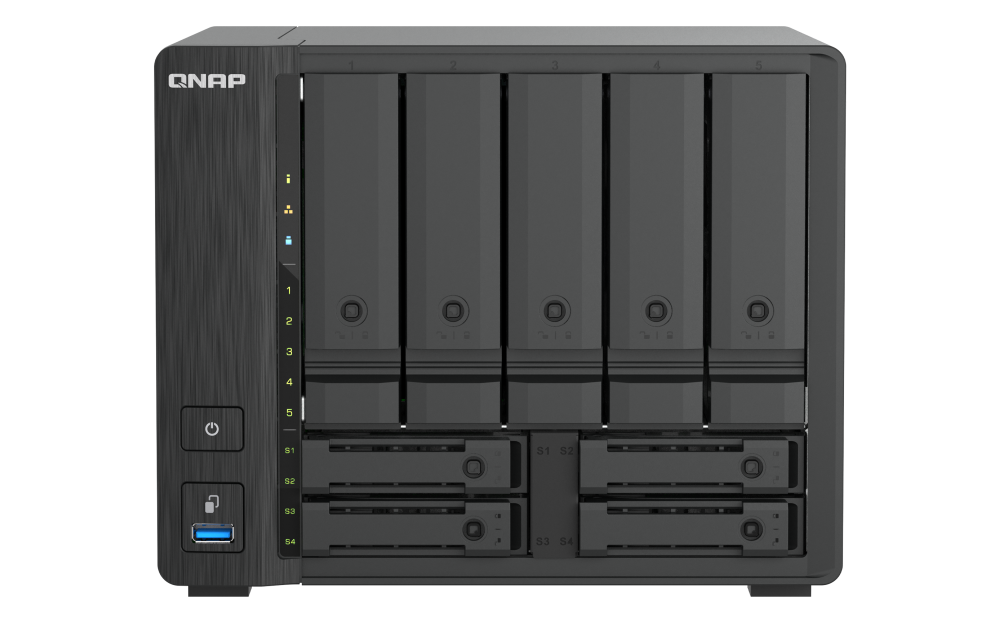
The selector lists nine native positions: five large 3.5-inch SATA bays, which it says accept 3.5-inch SATA HDDs or 2.5-inch SATA SSDs, plus four small 2.5-inch U.2 PCIe NVMe positions. The five bays are not nine interchangeable SATA slots, and the U.2 positions are a different interface. Check each complete drive part number and firmware in QNAP's current model-filtered compatibility list; the inspected interface did not show a readable exact drive row.
Explore this need in the finder →Does it meet a 10Gbps minimum for one built-in Ethernet port?
Yes, by the selector's rating of one 10GBASE-T multi-gig RJ45 port; it also has one separate 2.5GbE RJ45 port and two Thunderbolt 4 ports. A link rating is not measured file-transfer speed, and separate ports do not add into one faster Ethernet connection.
Explore this need in the finder →Can it support a two-drive redundant arrangement?
The current QTS and QuTS hero selector tables list RAID 1. An owner can choose two compatible drives and create a mirror, but the NAS is listed without data drives or a prepared pool. Keep an independent backup; RAID does not protect against every loss.
Explore this need in the finder →Does including earlier models change this profile's status?
The rendered current U.S. selector lists the TS-h966TX-8G profile, and the official U.S. Store search result identifies the exact TS-h966TX-8G-US item. It remains in the hardware comparison whether earlier models are included or not; that source identity is not a promise of live stock or support status.
Explore this need in the finder →QNAP · nine-position hybrid tower NAS · source-based assessment
The TS-h966TX-8G-US is the U.S. 8GB profile of QNAP’s TS-h966TX hybrid tower. Its distinguishing feature is not simply a nine-bay count: the machine divides those positions between five 3.5-inch SATA HDD bays and four 2.5-inch U.2 PCIe NVMe bays. That split, one 10GBASE-T connection, one separate 2.5GbE port and two Thunderbolt 4 ports give it a more specialized role than a conventional all-SATA desktop NAS. This is a document-based review, not a hands-on test. I did not install drives, measure performance, own or test the appliance, and do not claim a current price, offer, inventory status or customer experience.
First check what “nine bays” means here
QNAP’s current U.S. hardware selector lists five large 3.5-inch SATA positions and four small positions for 2.5-inch U.2 PCIe NVMe solid-state drives. It also explicitly lists 2.5-inch SATA SSD support in the five large-bay positions; those SSDs do not create extra bays, and the four U.2 slots remain a different interface. So the nine positions are not nine interchangeable SATA slots: a buyer who wants nine large-capacity SATA HDDs would be looking at the wrong layout, while a plan using U.2 storage needs the matching drive type and must still be checked for exact fit. QNAP’s model-filtered compatibility interface loaded, but the inspected response did not expose a readable exact drive-and-firmware entry. I therefore cannot certify a named HDD or SSD from the general specification: verify the complete part number, capacity and firmware in QNAP’s current TS-h966TX compatibility list before purchasing.
The product page’s own description and front image reinforce the five-plus-four arrangement. The official image shows five tall upper tray faces and four lower, narrow positions. It is a chassis view, not evidence that drives are installed or included. QNAP’s selector lists a 10GBASE-T cable, adapter, power cord, quick installation guide, screws and tray keys as standard components, but that manufacturer list does not confirm the contents of any mutable seller offer. QNAP’s rendered current selector identifies one U.S. profile, TS-h966TX-8G; the Store search result and previously observed U.S. Store card bridge the exact suffix TS-h966TX-8G-US. The exact item-page request failed certificate validation, so its present offer conditions remain outside this review.
Network options: one 10GbE link, a second Ethernet port and Thunderbolt
The published network hardware is one 10GBASE-T RJ45 multi-gig port and one separate 2.5GbE RJ45 port. QNAP lists the 10G port as negotiating at 10, 5, 2.5, 1 or 0.1Gbps. There are also two Thunderbolt 4 connections, a pair of USB 3.2 Gen 2 ports, one USB 2.0 port and HDMI output up to 4K/60Hz. Those are distinct interfaces, not a single summed transfer rate. The 10GbE label is a port rating, not a measured file-copy result; an end-to-end path also depends on the client, switch, cable, storage pool and workload. The product page includes an example lab environment, but its named test NAS is TS-h966TX-16G with a specified set of U.2 SSDs and software. That configuration is not the exact U.S. 8G profile being assessed, so I do not reuse its results as evidence of 8G performance or present them as my own test.
For a strict finder screen, nine native positions and one individual 10GbE port are supported by the listed hardware, and the 8G selector shows RAID 1 in both software tables. A ten-bay minimum or a requirement above 10Gbps on a single port rules this profile out on the corresponding field. These boundaries only say whether listed specifications meet a threshold; they do not estimate the performance of a completed system. Apply the same nine-bay and 10Gbps-per-port floors in the finder. Check the other network endpoints and intended Thunderbolt workflow separately.
Memory is the main feature-planning question
The current rendered selector gives the TS-h966TX-8G profile 8GB DDR5 SODIMM memory and lists two slots with a maximum of 64GB. QNAP warns users to use supported QNAP memory modules; the published ceiling is not proof that an arbitrary pair of modules or a particular revision will work. Eight gigabytes meets QNAP’s stated general minimum for QuTS hero. It does not meet the separate 16GB minimum QNAP specifies for inline data deduplication, and QNAP recommends 32GB or more for best performance of that feature. If deduplication is central to the proposed storage workflow, budget and verify a supported memory configuration rather than treating the base 8GB profile as sufficient. A maximum-memory field is not a workload guarantee, and I did not find an exact upgrade kit or module compatibility row during this research.
Choose QTS or QuTS hero; create a mirror yourself
The rendered selector identifies two software alternatives: QTS 5.2.11 with EXT4, or QuTS hero h5.2.11 with ZFS. They are separate operating-system choices, not two filesystems running together. The current selector’s relevant RAID tables list RAID 1 for both. That means a buyer can plan a two-drive mirror, but it does not mean a pool arrives initialized. The package list does not include data drives, and the owner must select currently compatible disks, create the storage pool and maintain it. A mirror can help tolerate one drive failure in a configured array; it does not protect against deletion, malware, damage to the whole appliance or the loss of a separate backup. Keep an independent copy and a tested recovery plan. A full model-specific user guide was not surfaced in the official download search I inspected; QNAP’s hardware selector lists a quick installation guide. I do not infer undocumented migration or recovery behavior from that absence.
Under the same nine-bay, single-port 10GbE screen, either software choice can be considered with an owner-created RAID 1 plan, provided the selected drives fit the right bay type and the pool is configured by the owner. Use the finder with nine bays, a 10Gbps individual-port floor and required two-drive redundancy. “Required” refers to a documented arrangement available to configure, not an included mirror or a guarantee about data safety.
Physical fit and purchase checks
QNAP lists the tower at 182.7 × 224.6 × 223.6mm and 3.57kg, with a 150W AC adapter and a three-year standard warranty. These are manufacturer specifications, not measurements I made. Confirm the unit’s exact revision, desk or shelf footprint, cooling clearance and electrical arrangement before installation. Also confirm the complete model suffix and written seller contents, because a configuration label or product photo does not establish what a particular offer includes.
The TS-h966TX-8G-US is most compelling on paper for someone who deliberately wants both conventional SATA HDD capacity and a separate bank of U.2 NVMe positions, plus a built-in 10GbE path and Thunderbolt 4 connectivity. It is a poor fit for anyone who expects nine ordinary SATA HDD bays, assumes all U.2 drives are compatible, needs a proven workload result, or plans to use QuTS hero deduplication without first resolving the 8GB memory limitation. Verify exact drives, RAM support, operating-system choice, network equipment and seller BOM before buying. The reviewed evidence is QNAP’s U.S. product page, its rendered hardware selector, and its QuTS hero memory FAQ. The product page’s TS-h966TX-16G test setup remains a lab configuration observation, not a verified separate U.S. retail package or a substitute for the exact 8G SKU.
Key specifications
Key details at a glance
| Internal drive bays | 9 bays |
|---|---|
| Documented internal drive media | 3.5-inch SATA HDD in five large native positions / 2.5-inch SATA SSD in five large 3.5-inch SATA positions / 2.5-inch U.2 PCIe NVMe SSD in four small native positions |
| Built-in Ethernet ports | 1 x built-in 10GBASE-T RJ45 Multi-Gig port (10/5/2.5/1/0.1 Gbps) / 1 x built-in 2.5GbE RJ45 port |
| Fastest individual Ethernet port | 10 Gbps |
| Installed system memory | 8 GB |
| Listed storage arrangements | QTS: RAID 1 (two drives, owner-created) / QuTS hero: RAID 1 (two drives, owner-created) |
| Internal file systems | QTS: EXT4 / QuTS hero: ZFS |
| Data drives included in listed package | No |
| System drives included (not data-bay drives) | |
| Processor | 12th-generation Intel Core i3, six cores |
| CPU cores | 6 |
| Installed memory type | 8GB DDR5 SODIMM |
Use the exact model’s instructions for operating limits, supplied equipment and version differences.
Sources for this review
Sources for this assessment
Check your setup before choosing a NAS
Use the finder to narrow documented desk/shelf or rack formats, internal-bay minimums, a single Ethernet-port rating and optional redundancy requirements.