
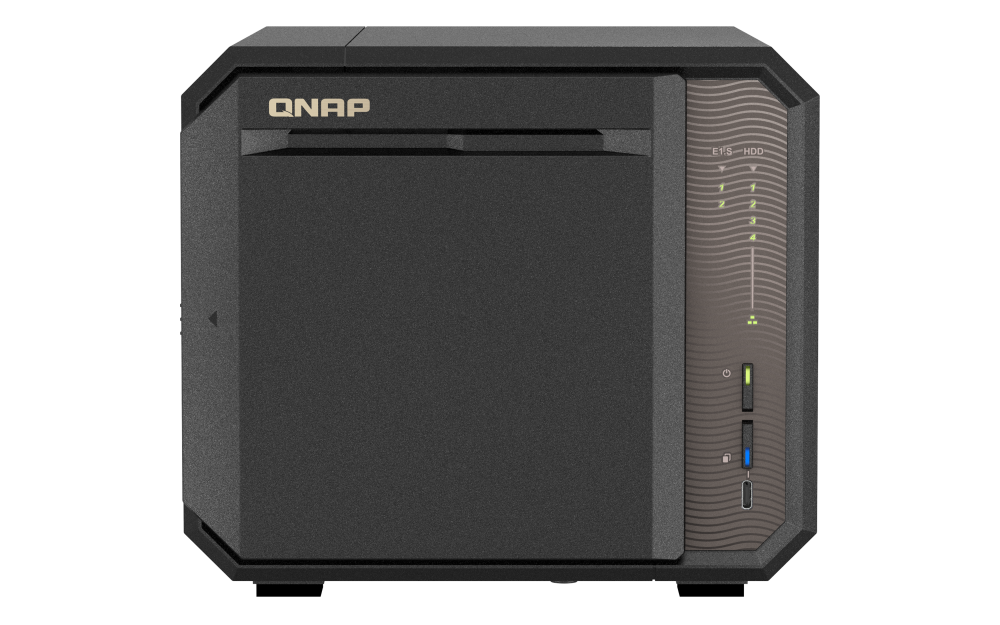
Your needs, this model
Does it fit your priorities?
Should the buyer count all six positions as HDD bays?
No. QNAP separates four 3.5-inch SATA HDD positions from two E1.S/NVMe positions. The latter add a separate fast-media option, not two more large SATA-drive trays; check exact NVMe/adapter support before planning them as storage.
Explore this need in the finder →Can the four SATA bays support a two-drive mirror?
Yes, the QTS and QuTS hero software selections list RAID 1 with two members. The buyer can plan two compatible SATA drives among the four bays, then configure the pool; it is not factory initialized and it is not a separate backup.
Explore this need in the finder →Can the built-in ports run a single 10GbE link?
No. The built-in ports are 2.5GbE. QNAP lists an optional compatible dual-port 10GBASE-T card, but that uses the only PCIe slot; confirm exact card support and the full network path before treating it as a planned upgrade.
Explore this need in the finder →Assessment basis: this is a source-based assessment of QNAP's TS-h665 product and specification pages, its U.S. Store model identifier and available software information. It is not a hands-on review. The exact Store configuration is TS-h665-8G-US; QNAP's ordinary product page describes the TS-h665 family and the 8G selector but does not make every seller's package identical.
Four large-drive positions, not six interchangeable HDD bays
The TS-h665's main storage count is four 3.5-inch SATA bays. QNAP also lists two E1.S PCIe Gen 3 x1 positions, with M.2 2280 NVMe compatibility through a tray adapter. That is a useful hybrid arrangement, but it is important not to add the two NVMe positions to the large-HDD capacity plan. A buyer comparing the h665 with the larger TS-h865 should see the actual trade: the h665 has four SATA bays and two separate E1.S positions; the h865 has six SATA bays and the same general two-position NVMe idea. Choose by the disks and pool design, not the marketing shorthand.
The listed profile has an Intel N150 four-core processor and 8 GB DDR5 SODIMM, with QNAP listing one slot and a 16 GB maximum. QNAP says the E1.S positions can support cache or a high-speed storage pool, while its hardware table lists the SATA and E1.S drive types separately. These facts are more useful than a generic claim that the NAS is “fast”: the right workload, compatible SSDs, cache policy and network path determine whether those positions matter. Confirm each intended SATA and NVMe model in the current compatibility material before committing data.
Two system paths and a practical mirror option
QNAP describes QuTS hero as preinstalled and says the model can be switched to QTS. The system selection changes the storage environment: QNAP identifies ZFS for QuTS hero and EXT4 for QTS. Its current software specification lists RAID 1 for a two-member group in either choice. An owner could put two compatible SATA drives into RAID 1 and keep the remaining SATA bays open; the included configuration is not a ready-made mirror, and the owner must plan initialization, capacity and a restore strategy.
RAID 1 can help if one member drive fails, but it is not a copy on another device and does not undo deletion, ransomware, theft or a controller problem. QuTS hero's integrity-oriented features and QTS's separate tool set also require administration, updates and supported apps. Make sure the chosen operating system suits the intended services before placing the only copy of files on it. The two NVMe positions are not a substitute for an offsite or offline backup.
2.5GbE built in, 10GbE is an expansion choice
The TS-h665 has two built-in 2.5GbE RJ45 ports. QNAP describes an optional dual-port 10GBASE-T card, but the hardware table lists only one PCIe Gen 3 x2 slot. That card therefore competes with any other planned PCIe expansion. It also does not make the rest of a network 10GbE: router or switch, client NIC, cabling and the actual storage workload must support the same route. Port trunking is not a promise that one client will see a particular transfer rate.
QNAP also describes direct HDMI display use, USB 3.2 Gen 2 and a One Touch Copy workflow for a supported external device. This may be convenient in a local office or surveillance setup, but check exact QTS applications and output requirements rather than assuming every client or display behaves as expected. The model page's multimedia and performance material is manufacturer information, not independent validation in this assessment.
What to check before buying
QNAP's Store identifier bridges the U.S. configuration to TS-h665-8G-US, while the manufacturer's spec page describes the 8-GB DDR5 profile. The hardware table states that data HDDs are not supplied. Check the item title and the seller's actual package list for the exact chassis, power adapter, NVMe adapters and any drive bundle; a product-family photo does not confirm those contents. Don't confuse the desktop h665 with TS-h665U rack models: the additional “U” denotes a different chassis family, and no rack rail or rack fit should be inferred here.
This model makes the most sense when four large SATA positions are enough and the owner has a real reason for two NVMe slots, 2.5GbE and QNAP's two-OS environment. Buyers who need six large HDD bays should compare the h865 instead. Buyers who require 10GbE from the start should account for the expansion card and its single-slot tradeoff. This research does not report measured throughput, acoustic behavior, power consumption or reliability; those aren't established by the maker's feature page. Verify the exact drive firmware, supported NVMe media, memory module, OS feature and network equipment, then retain a separate backup with a tested restore process.
Primary references: QNAP TS-h665 product page, hardware specifications, software specifications and the QNAP U.S. Store model page.
Key specifications
Key details at a glance
| Internal drive bays | 4 bays |
|---|---|
| Documented internal drive media | 3.5-inch SATA hard disk drives / 2.5-inch SATA solid-state drives in SATA bays / E1.S / M.2 2280 NVMe SSDs through the documented adapter |
| Built-in Ethernet ports | 2 x built-in 2.5GbE RJ45 |
| Fastest individual Ethernet port | 2.5 Gbps |
| Installed system memory | 8 GB |
| Maximum listed memory | 16 GB |
| Listed storage arrangements | RAID 1 / RAID 5 / RAID 6 / RAID 10 / RAID 50 |
| Internal file systems | EXT4 (QTS) / ZFS (QuTS hero) |
| Hardware warranty | 3 years |
| Data drives included in listed package | No |
| M.2 NVMe slots | 2 |
| M.2 SSD storage-pool support | Yes |
| Processor | Intel N150 |
| CPU cores | 4 |
| CPU threads | 4 |
| Installed memory type | DDR5 SODIMM |
Use the exact model’s instructions for operating limits, supplied equipment and version differences.
Sources for this review
Sources for this assessment

Check your setup before choosing a NAS
Use the finder to narrow documented desk/shelf or rack formats, internal-bay minimums, a single Ethernet-port rating and optional redundancy requirements.