
Your needs, this model
Does it fit your priorities?
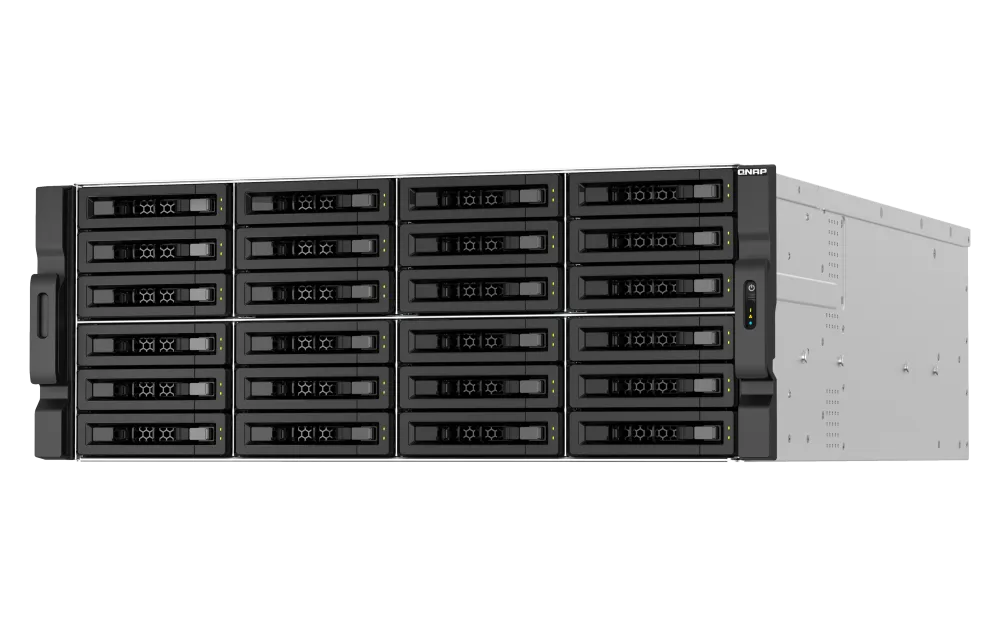
Does the TS-h3087XU-RP have thirty ordinary 3.5-inch HDD bays?
No. QNAP documents twenty-four 3.5-inch SATA bays plus six 2.5-inch SATA SSD bays. The 3.5-inch trays also accept documented 2.5-inch SATA SSDs, but the six smaller positions are not described as HDD slots. Confirm exact drive model, capacity and firmware in QNAP's current compatibility list before building a capacity or redundancy plan.
Explore this need in the finder →Can this exact 30-bay configuration meet a one-built-in-port 10GbE minimum?
The exact model guide lists two built-in 10GBASE-T RJ45 ports and two separate 2.5GbE RJ45 ports, so its fastest built-in individual port meets a 10-Gbps threshold but not 10.5 Gbps. Optional PCIe networking is not part of the base port count, and a 10GbE line rating is not a measured file-transfer speed.
Explore this need in the finder →Can I configure a two-drive redundant arrangement, and does it arrive prebuilt?
QNAP's exact model software selector lists RAID 1 in both its QTS and QuTS hero eight-bay-and-larger profiles, while the user guide specifies two disks and one failed-member tolerance. This is a buyer-configured option in either chosen OS; the system is listed without data drives. Select supported drives, configure and monitor the mirror, and keep a separate backup because RAID 1 does not protect against deletion, malware or loss of the NAS.
Explore this need in the finder →Is the exact E2378-64G-US package ready for a rack as shipped?
QNAP's guide lists a 4U chassis, dual power supplies, two power cords, a 10GbE Cat6A cable, screws and a quick-install guide, but it does not list data drives or a rail kit; RAIL-A02-90 is compatible and sold separately. Current hardware-selector and 2024-guide dimensions, net weight and memory module population disagree, and the current five-year warranty wording conflicts with the guide's three-year line. Confirm the exact physical specification, delivered modules, rails and current warranty terms with the seller before installation.
This document-based assessment is for the exact U.S. configuration TS-h3087XU-RP-E2378-64G-US, not a claim that every TS-h3087XU-RP offer has the same installed components or bundle. QNAP's U.S. product page describes a 30-position hybrid rack NAS; the exact Store SKU identifies the E2378/64G package. I have not handled, installed, owned or tested this system. No independent speed, noise, power, thermal or reliability measurements are available here.
Start by confirming the exact 64G package
The reviewed SKU pairs an Intel Xeon E-2378 with 64 GB of ECC DDR4 memory. QNAP's model guide identifies an eight-core/16-thread processor with 2.6 GHz base and up to 4.8 GHz turbo frequency; the current product information lists expansion to 128 GB. That makes this a server-class platform on paper, but a CPU or memory number does not establish what a particular virtual machine, backup job or media workload will deliver. Match the seller's complete part number to the E2378-64G configuration and request written confirmation of the delivered CPU and installed memory.
There is a useful specification conflict to settle before planning a memory upgrade. The current exact-SKU hardware selector shows a 64 GB layout of two 32 GB modules, while QNAP's 2024 English user guide lists four 16 GB ECC UDIMMs for the same E2378-64G order code. Both sources agree on the 64 GB total, ECC DDR4 class and four memory slots, but the occupied-slot count is consequential if you expect to reuse or add modules. QNAP advises using supported memory modules and matching specifications. Do not order memory on the assumption that one source's module layout is the delivered unit's layout; ask QNAP or the seller to verify the current revision.
Thirty positions, but only twenty-four are 3.5-inch trays
The headline count combines two different physical groups: twenty-four 3.5-inch SATA bays and six 2.5-inch SATA SSD slots. QNAP's guide says the 3.5-inch trays accept 3.5-inch SATA hard drives or 2.5-inch SATA SSDs, while the smaller 2.5-inch positions are for 2.5-inch SATA SSDs. In other words, this is not a 30-drive system where every position should be budgeted as an interchangeable large hard-drive tray. The six rear SSD positions can suit a hybrid plan, but they do not turn a drive-count claim into an estimate of usable capacity or performance.
The exact manufacturer package is listed without data drives. Before committing to capacity, check each drive's complete model number, size and firmware in QNAP's current compatibility list for this enclosure. A drive that fits physically or uses SATA is not automatically certified for a specific model, operating system, firmware or intended workload. The exact drive set also determines usable space, redundancy choices, power draw and the rebuild plan. No individual drive SKU or tested pool is selected in this assessment.
Pick one operating system before creating storage
QNAP positions QuTS hero, its ZFS-based operating system, as the normal installation, and also supports QTS, which uses EXT4. The model-specific software selector has separate RAID tables for each system; both list RAID 1 in the eight-bay-and-larger tier. These are alternatives, not two layers that run together. The exact user guide warns that changing between QTS and QuTS hero resets the NAS and deletes data. Decide which system fits the deployment before initializing the populated enclosure, and verify current migration instructions before attempting a change.
For a simple local redundancy screen, either system can support a buyer-configured two-disk RAID 1 arrangement. QNAP's model guide specifies two member disks and tolerance of one failed member. That is a conditional capability, not a preinstalled pool: the buyer still needs two compatible drives, an appropriate bay choice and deliberate setup. A mirror uses the second drive to maintain a copy, so it does not create twice the usable capacity. It also does not protect against deleted files, malware, electrical damage, theft or loss of the complete rack. Keep an independent backup on a separate system or location and verify that a restore works.
10GbE is built in; 25GbE would be an add-on
The exact model guide lists two 10GBASE-T RJ45 ports and two 2.5GbE RJ45 ports. The fastest single built-in port is therefore rated at 10 Gbps. An optional PCIe adapter can add different networking, but it should not be included in a base-configuration comparison. The 10-Gbps marking describes a port link rate, not the throughput one client will see; switch capability, the other endpoint, cabling, protocol, storage arrangement and concurrent workload all shape the result. A 10.5-Gbps minimum is above the documented built-in ceiling.
The two 10GbE sockets also should not be described as one automatic 20GbE workstation link. QNAP lists port trunking and failover features, but their use depends on the network topology and the peer configuration. Ask what the switch, client NIC and cabling can negotiate, and budget for compatible network components. This chassis is aimed at a planned rack environment; if the surrounding network remains gigabit or 2.5GbE, the faster NAS interfaces will not upgrade that path by themselves.
Rack, power and package checks matter as much as the front bays
QNAP lists this as a 4U rackmount enclosure with two 800 W power-supply units and four 80 mm fans. Those are component specifications, not a measurement of typical energy use, noise or heat in a particular room. The current hardware selector and 2024 guide disagree on physical dimensions and net weight. Confirm the up-to-date drawing, cabinet depth and clearance, loaded-weight allowance and service access against the rack before ordering; do not size a cabinet from an unverified number copied from one revision.
The guide's package inventory names the enclosure and trays, drive screws, two power cords, one 10GbE Cat6A cable and a Quick Installation Guide. It does not list data drives or a rail kit. QNAP lists RAIL-A02-90 as compatible but says rails are purchased separately. Seller-specific bundles may differ, so ask for the exact contents in writing rather than treating a standard manufacturer list as proof of a particular shipment. The current product and Store pages advertise a standard five-year warranty; the 2024 model guide still states three years. Confirm the current written warranty terms and their applicability to the unit offered.
Do not transfer the lab benchmark to this SKU
QNAP publishes performance figures for the model family, but the test details matter. The product page identifies its lab system as TS-h3087XU-RP-E2738-64G with QuTS hero h5.0.0, thirty Samsung 860 EVO 1 TB SSDs in RAID 50, an additional QXG-25G2SF-CX6 25GbE adapter and six client PCs. That is not the E2378-64G-US configuration reviewed here, and it is not a one-client default network. It is a manufacturer lab setup, not an independent test or a typical result. I do not use its claimed throughput as a prediction for a buyer's workload.
Who should shortlist it—and who should not
The TS-h3087XU-RP-E2378-64G-US makes sense to investigate when an organization genuinely needs a four-unit rack enclosure with many native SATA positions, separate large HDD and small SSD areas, dual built-in 10GbE and ECC memory. It is also a credible match for a buyer planning either QTS or QuTS hero and willing to select drives, check compatibility, configure the RAID group, choose the network path and maintain an independent backup.
It is a poor shortcut for someone who wants a quiet desktop NAS, expects thirty identical 3.5-inch HDD bays, assumes drives and rails are in the box, or needs a published benchmark to guarantee an individual transfer rate. Its specification record also contains revision conflicts in module layout, dimensions, weight and warranty duration that should be cleared up before installation. The decision is not merely whether the chassis has enough bays: the drive mix, rack fit, current package, network peers, operating-system choice and support terms all have to align.
Bottom line: this exact E2378-64G-US configuration clears a 30-native-bay floor, a built-in single-port 10GbE floor and a documented two-drive RAID 1 capability screen. Those are separate documented conditions, not a complete system design. Confirm the SKU and revision, verify every drive, settle the OS before setup, confirm rack and rail parts, validate current warranty terms and plan a separate backup. None of these findings imply current price, stock, seller delivery, independent testing or hands-on experience.
Primary references: QNAP U.S. TS-h3087XU-RP product page; TS-h3087XU-RP User Guide, English (U.S.); QNAP model software specifications; QNAP compatibility lookup; QTS RAID documentation; and QuTS hero RAID documentation. Manufacturer marketing is not independent testing.
Key specifications
Key details at a glance
| Internal drive bays | 30 bays |
|---|---|
| Documented internal drive media | 3.5-inch SATA HDD / 2.5-inch SATA SSD in a 3.5-inch bay / 2.5-inch SATA SSD in a 2.5-inch bay |
| Built-in Ethernet ports | 2 x built-in 10GBASE-T RJ45 / 2 x built-in 2.5GbE RJ45 |
| Fastest individual Ethernet port | 10 Gbps |
| Installed system memory | 64 GB |
| Maximum listed memory | 128 GB |
| Listed storage arrangements | QTS 8-bay-and-larger profile: RAID 1, RAID 5, RAID 6, RAID 10, RAID 50, RAID 60 / QuTS hero 8-bay-and-larger profile: RAID 1, RAID 5, RAID 6, RAID 10, RAID 50, RAID 60, Triple Mirror, Triple Parity |
| Hardware warranty | 5 years |
| Data drives included in listed package | No |
| Processor | Intel Xeon E-2378 |
| CPU cores | 8 |
| CPU threads | 16 |
| Installed memory type | 64 GB DDR4 ECC UDIMM; the exact current selector and 2024 guide disagree on module population (2 x 32 GB versus 4 x 16 GB). Verify modules in the delivered unit. |
Use the exact model’s instructions for operating limits, supplied equipment and version differences.
Sources for this review
Sources for this assessment
- QNAP U.S. TS-h3087XU-RP product page
- QNAP exact E2378-64G hardware selector PDF
- QNAP TS-h3087XU-RP User Guide, English (U.S.), version 4
- QNAP U.S. TS-h3087XU-RP rendered software specification profiles
- QNAP U.S. TS-h3087XU-RP rendered package contents
- QNAP U.S. Official Store exact E2378-64G-US offer page
- QNAP QTS 5.2 RAID types
- QNAP QuTS hero 5.2 RAID types
- QNAP U.S. Official Store Enterprise 4U category
- QNAP exact SKU Store gallery image

Check your setup before choosing a NAS
Use the finder to narrow documented desk/shelf or rack formats, internal-bay minimums, a single Ethernet-port rating and optional redundancy requirements.