
Your needs, this model
Does it fit your priorities?
Does 24 bays mean that the TS-h2477AXU-RP includes 24 drives or 600 TB of usable storage?
No. QNAP lists 24 native 3.5-inch SATA positions and a 24 x 30 TB capacity example, but its exact package contents do not list data drives. The headline total is not a usable-capacity promise. Two M.2 NVMe slots are separate from those bays; verify exact SATA and NVMe part numbers, capacity and firmware in QNAP's compatibility list.
Explore this need in the finder →Does the base system have a built-in port rated at 10 Gbps, and will that guarantee 10-Gbps file copies?
The exact selector lists two 10GBASE-T ports and two 2.5GbE ports, so a single-port minimum of 10 Gbps is documented. That line rate does not predict a file transfer. The switch, client NIC, cable, storage layout, protocol and workload must all support the path, and a 10.5-Gbps floor exceeds the documented fastest built-in port.
Explore this need in the finder →Can I configure RAID 1 on the TS-h2477AXU-RP without buying drives?
QTS and QuTS hero model profiles each list RAID 1, and the exact user guide describes a two-disk mirror that can tolerate one failed member. The package list does not include data drives or a preconfigured array. Select two compatible SATA drives, choose the OS before initialization, create and monitor the mirror, and keep an independent backup.
Explore this need in the finder →Are its rail kit and fan configuration settled for a 4U installation?
No. The manual names RAIL-A03 as not included, while the current online accessory list describes RAIL-A03-57 for 2U/3U models; the exact 4U rail must be confirmed. The current selector lists three 60 mm fans but the exact version 5 guide lists four 80 mm fans. Confirm the current revision and cabinet drawing; do not infer noise or clearance from either conflict.
This document-based assessment covers the exact U.S. configuration TS-h2477AXU-RP-R7-32G-US, not every possible TS-h2477AXU-RP offer or seller bundle. QNAP's U.S. hardware selector identifies an eight-core/16-thread Ryzen 7 PRO 7000-series configuration with 32 GB of DDR5 memory, 24 SATA drive positions, dual 10GbE and dual 2.5GbE. I have not owned, installed, handled or tested this system. The findings below interpret manufacturer documentation; they are not hands-on impressions or measured performance results.
Start with the exact rack package
The model-family page is not a complete purchase specification. QNAP's exact hardware selector labels the profile TS-h2477AXU-RP-R7-32G, while the observed U.S. Store offer adds the -US suffix: TS-h2477AXU-RP-R7-32G-US. The reviewed configuration starts with 32 GB DDR5 UDIMM memory and a Ryzen 7 PRO 7000-series CPU. The manufacturer describes support for up to 192 GB using four 48 GB modules and optional ECC memory. Do not assume the base 32 GB package is ECC or that any DDR5 module will work; confirm the delivered memory configuration and supported parts with the seller before budgeting an upgrade.
The eight-core/16-thread CPU and large memory ceiling are relevant to a rack system considered for multiple services or virtual machines, but component counts do not establish what a particular workload will achieve. QNAP's own model page includes a laboratory benchmark with a different memory and networking setup; that is not a buyer result for this exact package. I do not translate it into a transfer-rate promise.
Twenty-four native SATA bays, plus separate M.2 slots
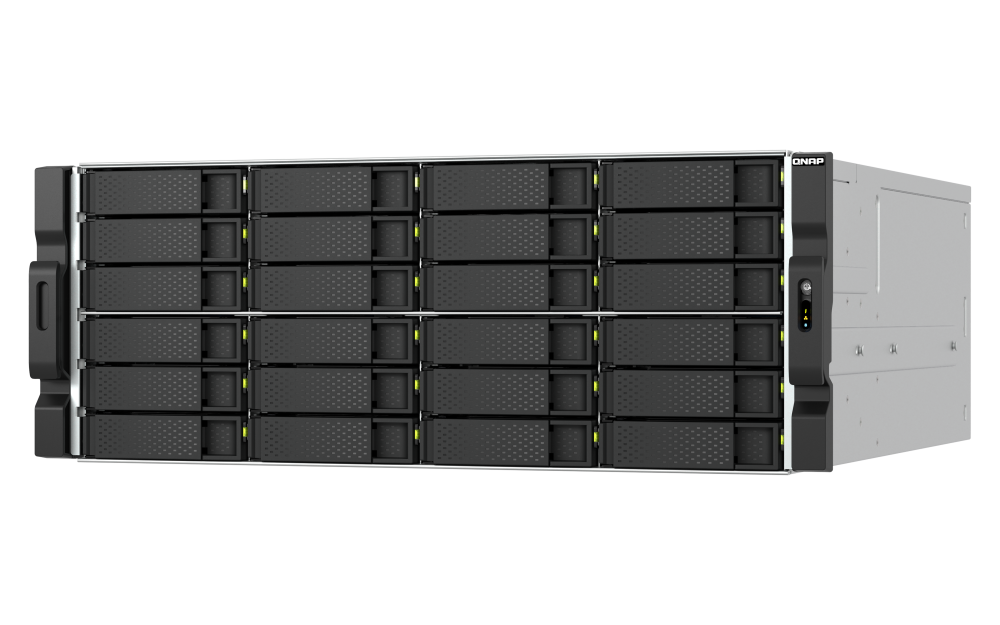
The 24 internal positions are 3.5-inch SATA bays, and QNAP also lists compatibility with 2.5-inch SATA SSDs in those trays. That is different from the TS-h3087XU-RP's mixed 24/6 layout: the h2477 is the more uniform 24-position design, but it still should not be treated as a supplied 24-drive bundle. QNAP's product page pairs an “up to 600 TB” headline with a 24 × 30 TB drive example, but does not establish an exact usable layout or a buyer-ready capacity figure. Confirm the actual drive compatibility and intended RAID/storage layout rather than treating that marketing capacity as a guarantee.
The chassis adds two M.2 2280 PCIe Gen 5 x2 NVMe slots. These are separate from the 24 SATA bays and do not raise the questionnaire's internal bay count to 26. The M.2 drives are sold separately and are not hot-swappable. QNAP warns about clearance for oversize third-party heatsinks and recommends its own heatsink. Verify an exact NVMe model on the current compatibility list and confirm cooling and installation details before treating M.2 as a planned storage pool or cache.
For a conventional RAID 1 mirror, either operating-system profile can use two selected compatible SATA drives in two of the 24 positions. The other positions remain separate; the mirror does not force a particular layout for them. Drives are not listed in the standard package, and no individual drive part number is verified here. Check the full model, capacity and firmware in QNAP's live compatibility tool. Capacity depends on chosen disks and the storage layout, not the headline bay count.
Pick the operating system and array before initialization
QNAP presents QuTS hero, based on ZFS, as the expected software profile, and its exact model specification also lists QTS. Their RAID tables are separate: both include RAID 1 in the eight-bay-and-larger tier. They are alternative installations, not two concurrent operating systems. The user guide describes a two-disk RAID 1 group that can tolerate one failed member while healthy. That only establishes a configurable capability. The purchaser must provide the two compatible drives, choose the operating system, create the array and monitor it.
A mirror uses the second disk for a redundant copy, so do not count both drive capacities as usable space. It cannot protect against deletion, malware, theft, a damaged chassis or a mistaken change that affects the whole volume. Maintain a separate backup and test a restore. QNAP's guide also warns that switching operating systems resets the NAS and deletes data, so decide the software plan before putting important files on it.
10GbE is a port rating, not a transfer guarantee
The U.S. hardware profile lists two 10GBASE-T Ethernet ports and two 2.5GbE ports. For a requirement phrased as the speed of one built-in port, 10 Gbps is the fastest documented choice. This exact base profile does not have a built-in 25GbE port; QNAP describes 25GbE as an optional adapter. The two 10GbE jacks do not automatically act as a single 20GbE client connection. A 10-Gbps link rate is not the same as file-transfer throughput: the peer, switch, cabling, protocol, disk array, CPU and workload all matter. If the rest of the deployment is gigabit or 2.5GbE, the higher port rating does not upgrade those parts.
Three PCIe Gen 4 slots offer expansion, but the slot widths are not identical. QNAP says slot 2 runs at x8 when slot 1 is unused and x4 when slot 1 is occupied; slot 1 and slot 3 are each x4. Consider adapter length, neighboring slot clearance, power and bandwidth before planning a high-speed NIC, GPU or storage card. An expansion card is an additional configuration decision, not a reason to count the base system as already having its capability.
Four rack units, and two specification conflicts to resolve
This is a 4U rackmount chassis with two 800 W power supplies, so cabinet space, power delivery and service access belong in the purchase decision. QNAP's current online hardware selector states 3 × 60 mm system fans, but the exact-model English U.S. user guide states 4 × 80 mm fans. The published pages therefore conflict; I do not choose one specification or claim a noise level. Ask for the current revision-specific service documentation if fan layout affects maintenance or acoustic planning.
There is a similar rail-kit uncertainty. The exact model guide names RAIL-A03 and says rails are not included, while the current accessory list describes RAIL-A03-57 for 2U/3U models. That is not enough evidence to recommend a rail SKU for this 4U enclosure. Confirm compatible rails directly against the current 4U rack drawing and cabinet before ordering. The online page's dimensions exclude the ear hook and protruding power-supply portion; verify overall installation depth, clearances and loaded weight instead of relying on a partial chassis measurement.
Check the box contents and current written terms
The manufacturer's package list for the R7-32G profile includes 24 drive trays, fastening screws, two power cords, a Cat6A cable and a quick-install guide. It does not list data drives or a rail kit. A reseller may add items, but that is a seller-specific bundle to confirm in writing. The current QNAP U.S. hardware listing states a five-year standard warranty; verify the applicable written terms for the exact delivered unit and seller. No price, stock, delivery date, rating or customer experience is represented here.
Who should shortlist it?
The TS-h2477AXU-RP-R7-32G-US is worth comparing when an organization needs a 4U rack NAS with 24 internal SATA positions, a clear growth path for memory and PCIe expansion, and 10GbE connectivity built into the base system. It is also a documented candidate for a two-drive RAID 1 plan, provided the buyer selects compatible media and configures the chosen operating system. The substantial decision work is in drive qualification, rack fit, the supported rail, power and cooling, OS choice, and the complete network path.
It is not a finished storage solution out of the box: the standard list is diskless, the mirror is not preconfigured, the rails are separate, and a two-drive mirror is not a backup. The unresolved fan-count discrepancy matters for anyone planning service or sound levels. A 10GbE label does not promise a 10Gb/s file copy, and the product-page capacity headline does not mean 600 TB usable. This system is a poor match for a casual desktop placement or a buyer who needs a validated delivered bill of materials before asking the seller about configuration.
Bottom line: this exact U.S. package meets a 24-native-bay floor, a 10-Gbps single-port floor and a documented two-drive RAID 1 capability screen. Those are separate specification matches, not compatibility, rack, throughput or backup guarantees. Confirm current drives, memory, fan revision, rail kit, cabinet dimensions and warranty before committing. This review is based on manufacturer documentation only, with no claim of ownership, testing or firsthand use.
Primary references: QNAP U.S. TS-h2477AXU-RP product page; QNAP exact model hardware specifications; QNAP model software specifications; TS-h2477AXU-RP User Guide, English (U.S.), version 5; QNAP compatibility lookup. Manufacturer marketing is not independent testing.
Key specifications
Key details at a glance
| Internal drive bays | 24 bays |
|---|---|
| Documented internal drive media | 3.5-inch SATA hard disk drives / 2.5-inch SATA solid state drives in supported 3.5-inch trays |
| Built-in Ethernet ports | 2 x built-in 10GBASE-T RJ45 / 2 x built-in 2.5GbE RJ45 |
| Fastest individual Ethernet port | 10 Gbps |
| Installed system memory | 32 GB |
| Maximum listed memory | 192 GB |
| Listed storage arrangements | QTS eight-bay-and-larger profile: includes RAID 1 / QuTS hero eight-bay-and-larger profile: includes RAID 1 |
| Hardware warranty | 5 years |
| Data drives included in listed package | No |
| M.2 NVMe slots | 2 |
| Processor | AMD Ryzen 7 PRO 7745 (Ryzen 7 PRO 7000 series) |
| CPU cores | 8 |
| CPU threads | 16 |
| Installed memory type | 32 GB DDR5 UDIMM in the exact R7-32G profile; optional ECC support is listed but not asserted for the base module |
Use the exact model’s instructions for operating limits, supplied equipment and version differences.
Sources for this review
Sources for this assessment
- QNAP U.S. TS-h2477AXU-RP product page
- QNAP U.S. exact-model TS-h2477AXU-RP-R7-32G hardware selector
- QNAP TS-h2477AXU-RP User Guide, English (U.S.), version 5
- QNAP U.S. TS-h2477AXU-RP QTS and QuTS hero software profiles
- QNAP U.S. exact-model R7-32G package contents profile
- QNAP U.S. Official Store exact R7-32G-US offer page
- QNAP U.S. Official Store Enterprise page 2 observed SKU card
- QNAP U.S. Official Store Enterprise 4U category observation
- QNAP TS-h2477AXU-RP official product image

Check your setup before choosing a NAS
Use the finder to narrow documented desk/shelf or rack formats, internal-bay minimums, a single Ethernet-port rating and optional redundancy requirements.