
Your needs, this model
Does it fit your priorities?
How many internal drive positions does the TS-h1886XU-RP-R2-D1622-32G-US profile provide, and are they interchangeable?
QNAP documents 18 total internal positions: 12 x 3.5-inch SATA positions; 6 x 2.5-inch SATA SSD positions. Their drive formats differ as described in the exact media compatibility note. This count is not a usable-capacity or all-HDD claim. Check exact disk/firmware compatibility before purchasing.
Explore this need in the finder →What is the fastest individual built-in network port on this profile?
QNAP documents a single built-in Ethernet port rated up to 10 Gbps: 4 x 2.5GbE RJ45, 2 x 10GbE SFP+. Port count does not make a single connection faster; the switch, cable, client and workload must also support the desired path. This is a link rating, not a throughput test.
Explore this need in the finder →Can this exact profile support two-drive redundancy, and are the drives included?
The current QNAP software selector lists RAID 1 for this profile/family. A buyer may choose two compatible drives in the suitable native positions, install one selected OS and create the mirror; no data drives or prebuilt pool are listed. A mirror can help if one drive fails but is not an independent backup.
Explore this need in the finder →What changes between the selected hardware configuration and its closest selector sibling?
Intel Xeon D-1622; 4 cores/8 threads; 32GB installed memory. Published CPU and memory specifications do not prove a workload-speed advantage. This exact U.S. SKU is documented by the official Store; compare its complete suffix before buying.
Assessment basis: This document-based review covers the QNAP TS-h1886XU-RP-R2-D1622-32G-US package listed by QNAP's U.S. Store. Its English U.S. guide, product page and current software selector were compared. It is not a hands-on review or a guarantee of any third-party seller's box contents, price or stock.
Eighteen native positions, with six SSD-only slots
The English guide divides the chassis into twelve 3.5-inch SATA bays and six 2.5-inch SATA positions. The larger trays support 3.5-inch HDDs, 2.5-inch SATA HDDs or SATA SSDs; the smaller six positions are listed for SATA SSDs. Calling this an 18-drive NAS is fair, but calling it an 18-HDD chassis is not. A buyer who needs a substantial conventional disk pool can start with twelve large trays and use the smaller positions for a separate supported SSD role. Confirm each drive model and firmware with QNAP before choosing the storage layout.
Networking combines four 2.5GbE RJ45 ports with a preinstalled dual-port 10GbE SFP+ SmartNIC. The guide's hardware summary row calls the RJ45 group “4 x GbE RJ45,” while its detailed component diagram labels the four individual jacks 2.5GbE; QNAP's current U.S. page also calls them 2.5GbE. That source inconsistency should be confirmed against the exact delivered revision. The fastest individual port is still documented as 10GbE SFP+. SFP+ needs compatible optics or DAC, a suitable switch and a client adapter; two ports do not promise one 20Gbps connection or a transfer rate.
What the D1622-32G package changes
This exact U.S. suffix names a four-core/eight-thread Intel Xeon D-1622 and 32GB ECC DDR4, installed as 2 × 16GB according to the guide. Four DIMM slots and a 128GB family ceiling are documented. The preinstalled dual-port 10GbE card occupies a PCIe slot; the guide describes three slots with different generations and lane arrangements, including shared constraints when cards are installed. Treat an added NIC, HBA or graphics card as a fit-and-slot planning exercise rather than assuming all three positions are freely available.
QNAP lists both QuTS hero and QTS as operating alternatives and RAID 1 in the current selector. The family guide documents QuTS hero, and the current product page warns that changing from QuTS hero to QTS requires removing all drives. A buyer-created RAID 1 plan can use two compatible 3.5-inch SATA drives in the large trays; those drives are not part of the standard package. A mirror can tolerate one member-drive failure under the documented arrangement, but it will not protect against deletion, ransomware, fire, theft or loss of the NAS. Keep an independent backup and test restores.
Rack and package diligence
This is a 2U chassis with dual 550W supplies. The English guide lists RAIL-B02 as compatible but explicitly says rails are not included. Its package table lists two power cords, one 1GbE Cat5e cable, drive screws and a quick-start guide, with no data disks. Confirm rack depth, post spacing, airflow, rear cable bend, loading and independent upstream feeds before procurement. The current U.S. product page says a three-year standard warranty with an extension option up to five years, while guide warranty wording is different; verify the written coverage for the precise unit.
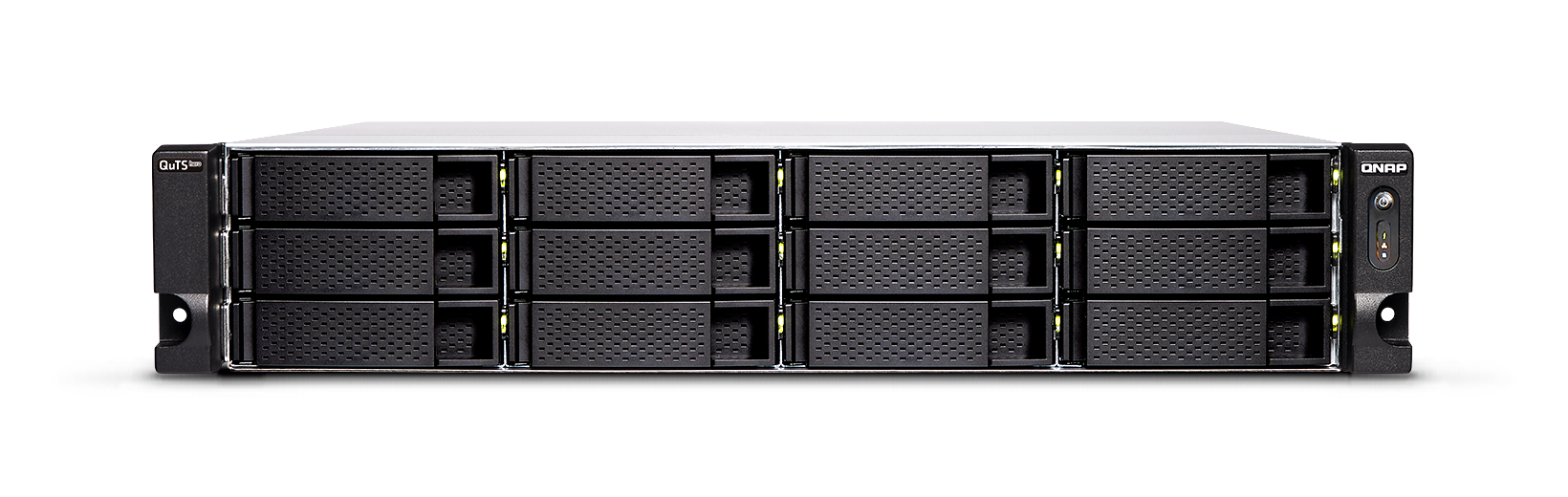
The D1622/32G variant is a plausible fit when a rack deployment needs a hybrid 12+6 layout, a preinstalled 10GbE SFP+ card and enterprise-style expansion. It is a poor match if the requirement is a quiet desktop NAS, all-large HDD trays, included rails or an assumed single 20Gbps link. The official image shows the 12 large front trays; the six 2.5-inch positions, exact CPU/RAM and installed disks are not visible. No installation, acoustic or transfer test is claimed.
Key specifications
Key details at a glance
| Internal drive bays | 18 bays |
|---|---|
| Documented internal drive media | 3.5-inch SATA HDD / 2.5-inch SATA HDD in 3.5-inch bays / 2.5-inch SATA SSD / 2.5-inch SATA SSD in 2.5-inch bays |
| Built-in Ethernet ports | 4 x 2.5GbE RJ45 / 2 x 10GbE SFP+ |
| Fastest individual Ethernet port | 10 Gbps |
| Installed system memory | 32 GB |
| Maximum listed memory | 128 GB |
| Listed storage arrangements | RAID 1 |
| Data drives included in listed package | No |
| Processor | Intel Xeon D-1622 |
| CPU cores | 4 |
| CPU threads | 8 |
| Installed memory type | ECC DDR4 UDIMM |
Use the exact model’s instructions for operating limits, supplied equipment and version differences.
Sources for this review
Sources for this assessment

Check your setup before choosing a NAS
Use the finder to narrow documented desk/shelf or rack formats, internal-bay minimums, a single Ethernet-port rating and optional redundancy requirements.