
Your needs, this model
Does it fit your priorities?
Does the twelve-bay count include the M.2 sockets or twelve installed drives?
No. QNAP lists twelve native 3.5-inch SATA positions; the two M.2 2280 NVMe sockets are a separate, non-hot-swappable storage layer. The package guide does not list data drives, so usable capacity depends on separately selected compatible media and the chosen pool/RAID layout.
Explore this need in the finder →Will the R5-16G-US configuration meet a 10-Gbps Ethernet-port floor, and is that guaranteed throughput?
The U.S. hardware profile lists two built-in 10GBASE-T ports, so one documented individual port meets a 10-Gbps link-rating floor but not the next 10.5-Gbps step. Actual transfers depend on the client, switch, cabling, storage, protocol, settings and workload; two jacks are not one 20-Gbps client link.
Explore this need in the finder →Can this package be configured as a two-drive mirror?
QNAP supports QTS and QuTS hero alternatives, and its documentation supports a two-drive RAID 1 arrangement. The package is diskless and does not contain a configured mirror: select a compatible pair, choose the OS/storage design and create the array yourself. Maintain a separate backup.
Explore this need in the finder →How does the R5 package differ from R7, and can the installed memory be assumed upgradeable to 192 GB?
QNAP identifies R5-16G as a 6-core/12-thread CPU with 16 GB DDR5, compared with R7-32G at 8 cores/16 threads and 32 GB. The current selector lists a 192-GB maximum, but User Guide v7 says 128 GB for these h1277 packages; verify the delivered revision and approved QNAP memory modules before relying on the ceiling.
Explore this need in the finder →QNAP · exact U.S. configuration assessment · checked 31 October 2026
The TS-h1277AXU-RP-R5-16G-US combines a twelve-position 2U rack chassis with QNAP's six-core Ryzen 5 7000-series configuration and 16 GB DDR5 UDIMM. The choice is not between a twelve-bay and a different-size machine: the R5 and R7 versions share the documented chassis and main storage/network layout, while their processor and starting memory differ. This is an evidence-based assessment of the listed configuration, not a hands-on test, measured comparison or statement about a currently purchasable offer.
Understand the R5/R7 split before comparing listings
QNAP's U.S. selector and English-U.S. User Guide v7 identify the R5-16G profile as a Ryzen 5 7000-series CPU with six cores, twelve threads and a burst ceiling of 5.1 GHz, paired with 16 GB DDR5 UDIMM. The sibling TS-h1277AXU-RP-R7-32G-US instead has a Ryzen 7 7000-series, eight cores, sixteen threads, a 5.3-GHz listed burst ceiling and 32 GB DDR5. Those are functional processor and memory differences, so do not treat the unsuffixed family name as a guarantee about the installed parts.
The current U.S. selector lists four memory slots and a 192-GB maximum for both configurations. The exact-family guide gives a conflicting 128-GB maximum for the h1277 series. The base 16-GB amount is corroborated for the R5 profile, but the upgrade ceiling is not consistent across those sources. Confirm the current approved memory parts and delivered board revision with QNAP before budgeting a memory expansion. The optional ECC-support note is not proof that the supplied R5 memory is ECC.
Storage layout is not included capacity
QNAP documents twelve native 3.5-inch SATA positions and compatibility for 2.5-inch SATA SSDs in the bays. The h1277's two M.2 2280 PCIe Gen 5 x2 sockets are separate from that count and are not hot-swappable. M.2 media may support a cache or a separate high-speed pool, but the right use depends on workload, endurance and operating-system plan. Check the exact SSD part and firmware against the compatibility list.
The English-U.S. package list names the appliance, twelve trays, screws, two power cords, a quick-install guide and one 10GbE Cat6A cable. It does not list data drives. The buyer chooses the complete drive models and storage layout, so the bay count alone says nothing about usable capacity. Check how many drives a mirror or parity group needs, whether you need a spare, and how you will keep an independent backup before filling the chassis.
Network choices without a throughput promise
The listed built-in ports are two 10GBASE-T and two 2.5GbE RJ45. The fastest individual built-in link meets a 10-Gbps question, but the 10.5-Gbps step exceeds the published rating. A port label is a link ceiling, not a file-copy result. Client NIC, switch, cabling, protocol and storage can all be slower, and one client's traffic is not made 20 Gbps by using two ports. Port trunking or redundancy only makes sense with a compatible switch and a planned network configuration.
Three PCIe Gen 4 positions provide room to consider compatible adapters, though the slot layout has constraints: slot 1 is x4; slot 2 is x8 only when slot 1 is unused, falling to x4 when that slot is occupied; slot 3 is x4. Confirm card fit, brackets, power, lane allocation and the current compatibility table. Add-in networking is optional and should not be counted as a base built-in port.
QTS, QuTS hero and a buyer-created mirror
QNAP's exact model page supports QTS and QuTS hero, which use different filesystems and are alternative operating-system configurations. The model page warns that changing from QuTS hero to QTS requires removing all drives. Choose the data-pool approach, applications and migration path before initializing storage, not after a full pool is established.
Both operating-system routes support a documented two-drive RAID 1 plan. QNAP describes the two-disk group as tolerating one failed member while healthy. It uses two selected compatible drives and the smaller member's capacity; it will not protect against accidental deletion, ransomware, a failed enclosure, fire or loss of access, and it does not replace an independent backup. This package has no preconfigured array or listed data drives. If QuTS hero is important, verify the exact model's current memory requirements and supported workload before assuming the base 16 GB is sufficient for every desired feature.
Fit and ownership checks for a rack install
The user guide identifies the chassis as 2U, lists two 550-W power supplies and three 60-mm fans, and gives a 13-kg net weight. The hardware selector and guide report different dimension conventions: the guide lists 88 × 432 × 511 mm; the current selector says 3.49 × 18.98 × 21.65 inches and notes its own exclusions. Obtain the current chassis drawing and verify the full width, depth, ears, rails, cable bend space, loaded weight, airflow and service access against your cabinet. Two power modules do not make upstream circuits or site availability redundant by themselves.
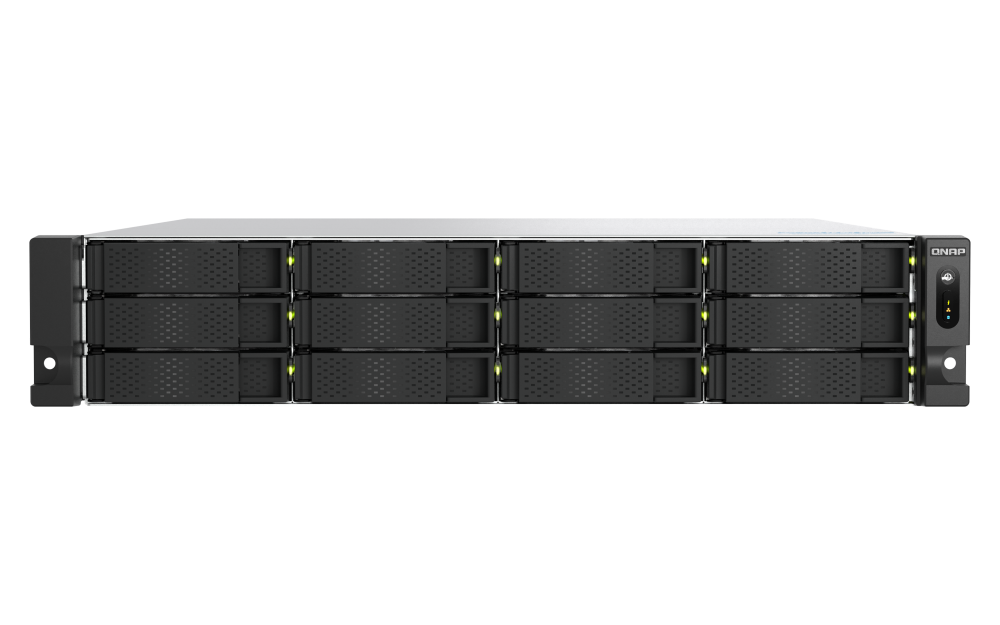
QNAP names RAIL-B02 as a compatible rail but says a rail kit is not included. Confirm the exact kit and mounting depth for the intended rack. The official image in this review shows the TS-h1277AXU-RP family front with twelve empty tray faces; it cannot identify the R5 processor or prove memory, drives, rails or a seller bundle. The product page states a five-year standard warranty, but confirm written terms and channel eligibility for the exact delivered SKU.
When the R5 version is the right one to investigate
Consider R5-16G-US if the twelve native SATA positions, built-in 10GbE path and six-core/16-GB starting profile meet your actual requirements. If your plan expects more CPU-heavy virtual machines or memory-intensive services, compare the R7-32G configuration's listed 8-core/32-GB baseline rather than assuming the shared model family makes the R5 equivalent. The higher listed specification still does not guarantee a workload outcome. Before a decision, verify the exact suffix, firmware and supported drives, memory plan, OS, array, rail, rack drawing, package and warranty. This review makes no claim about price, stock or a live store offer.
Key specifications
Key details at a glance
| Internal drive bays | 12 bays |
|---|---|
| Documented internal drive media | 3.5-inch SATA hard drives / 2.5-inch SATA SSDs in supported 3.5-inch trays |
| Built-in Ethernet ports | 2 x built-in 10GBASE-T RJ45 / 2 x built-in 2.5GbE RJ45 |
| Fastest individual Ethernet port | 10 Gbps |
| Installed system memory | 16 GB |
| Maximum listed memory | 192 GB |
| Listed storage arrangements | QTS RAID 1 option / QuTS hero RAID 1 option |
| Hardware warranty | 5 years |
| Data drives included in listed package | No |
| M.2 NVMe slots | 2 |
| Processor | AMD Ryzen 5 7000 series |
| CPU cores | 6 |
| CPU threads | 12 |
| Installed memory type | 16 GB DDR5 UDIMM in exact R5-16G profile; optional ECC support is listed but base-module ECC status is not asserted |
Use the exact model’s instructions for operating limits, supplied equipment and version differences.
Sources for this review
Sources for this assessment
- QNAP U.S. TS-h1277AXU-RP model page
- QNAP U.S. TS-h1277AXU-RP exact R5/R7 hardware selectors
- QNAP U.S. TS-h1277AXU-RP configuration comparison
- QNAP TS-hx77AXU-RP User Guide, English (U.S.), version 7
- QNAP QTS RAID type comparison
- QNAP Storage & Snapshots Quick Start Guide for QuTS hero
- QNAP U.S. Official Store exact TS-h1277AXU-RP-R5-16G-US listing
- QNAP U.S. TS-h1277AXU-RP family product image

Check your setup before choosing a NAS
Use the finder to narrow documented desk/shelf or rack formats, internal-bay minimums, a single Ethernet-port rating and optional redundancy requirements.