
Your needs, this model
Does it fit your priorities?
How many native drive positions does the TS-h1077AFU have, and which media fits?
The exact U.S. hardware selector lists ten native 2.5-inch SATA positions for compatible SSDs. It is not a 3.5-inch HDD array, M.2 adapter drives do not increase this native count, and no individual SSD compatibility row was verified. Check the precise drive and firmware in QNAP's compatibility list before planning capacity.
Explore this need in the finder →Does one built-in Ethernet port meet a 10-Gbps floor?
Yes: the profile lists two built-in 10GBASE-T ports, so one interface meets a 10-Gbps link-rating requirement. A 10.5-Gbps floor is above the fastest documented built-in port. Do not add ports together as one link or treat line rate as file throughput; verify the client, switch or direct link, cable and SSD workload.
Explore this need in the finder →Can this model be set up with a two-drive mirror?
The exact profile offers QTS and QuTS hero as alternatives, and QNAP's respective setup guidance permits a two-drive RAID 1 choice. The product is not listed with data SSDs or an installed pool: select two compatible 2.5-inch SATA SSDs, choose one OS and create the mirror. RAID 1 can tolerate a covered member-drive failure but does not replace a separate backup.
Explore this need in the finder →Is this the 30-bay h3077AFU or a tower unit?
No. The reviewed identifier is TS-h1077AFU-R7-32G-US: a 1U rackmount enclosure with ten 2.5-inch SATA SSD positions. QNAP's separate TS-h3077AFU family is a 30-bay model, and the TS-h1277AFX is a tower family; their media, dimensions and packages must not be substituted for this exact model.
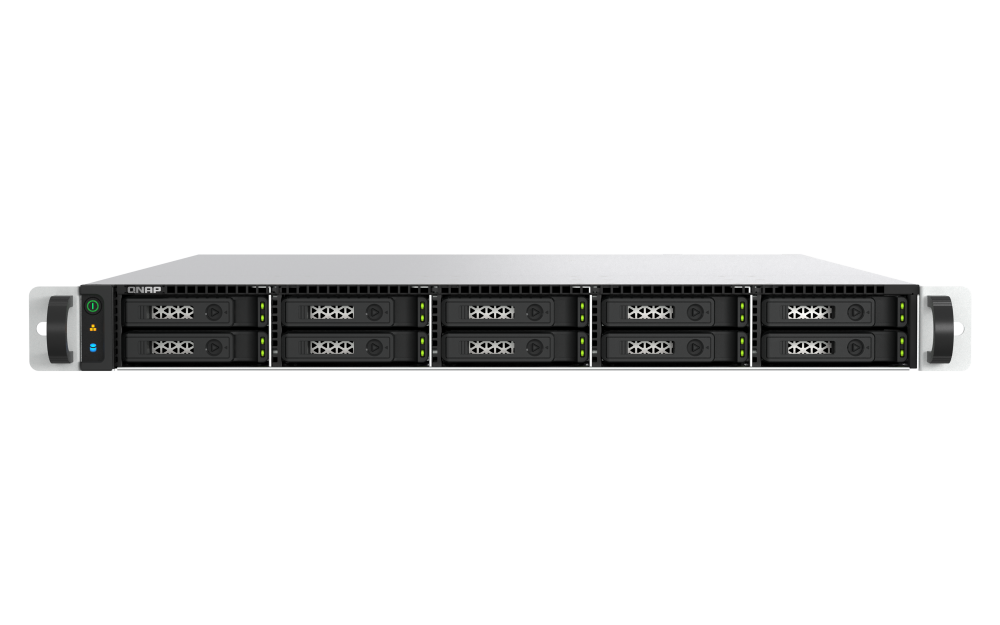
Explore this need in the finder →The QNAP TS-h1077AFU-R7-32G-US is a specialised 1U rack NAS for a buyer who has already decided on flash storage, a rack location and a fast wired network. Its ten internal positions are for 2.5-inch SATA SSDs, not 3.5-inch hard drives. The U.S. hardware selector shows a single R7-32G profile: 32 GB of ECC DDR5 memory, an eight-core Ryzen 7 7000-series CPU and two built-in 10GBASE-T ports alongside two 2.5GbE ports. QNAP’s product page calls the processor Ryzen PRO 7, while the hardware table omits “PRO,” so verify the exact CPU part number if that distinction matters. This review is based on QNAP’s published specifications and setup documentation, not hands-on testing.
Best suited to a planned rack and SSD workflow
The attraction is ten native SSD bays in one rack unit, with a built-in 10GbE link available without reserving a PCIe slot for a network card. That can make the model worth assessing for a small production team, virtualization host or branch-office storage plan that specifically needs low-latency flash and rack mounting. QNAP’s official model page also describes high-availability use with a paired NAS, but that is a separate two-system architecture; it should not be confused with this single enclosure’s storage redundancy.
Its form is a constraint as much as an advantage. A 1U chassis needs a suitable rack, verified rail kit and space for cable routing and airflow. QNAP’s U.S. table lists the chassis at 1.73 × 16.93 × 22.91 inches and 20.79 pounds net, but those dimensions do not establish cabinet depth, rail travel or loaded clearance. The package table lists two power cords and two 350-watt power supplies; confirm the actual rack, power and cooling plan rather than assuming that “1U” guarantees a drop-in fit.
Count the bays, then confirm the SSDs
QNAP lists ten 2.5-inch SATA positions and describes 2.5-inch SATA solid-state drive compatibility. It does not turn into a 3.5-inch HDD system just because some tray screws are described for 2.5-inch drives. M.2 storage is an optional expansion-card route, not another native bay. Optional QM2 cards can add M.2 support, and network cards can add up to 25GbE, but there are only two PCIe Gen 4 x8 slots. Check the exact card, SSD, firmware and slot combination on QNAP’s current compatibility list before building a parts plan; I did not verify a model-specific SSD row.
No data SSDs are listed in the exact profile’s package table. The table names a 10GBASE-T cable, screws, two power cords and a Quick Installation Guide, but that is not proof of a merchant’s complete bundle or of rail-kit inclusion. Capacity therefore starts with a separate drive decision, not the enclosure’s bay count. A small mirrored pair can use two positions while leaving the other eight free for a later plan, but it will not deliver the sum of both drives’ raw capacity.
Choose one operating system and build the pool
The selector offers QuTS hero, which uses ZFS, and QTS, which uses EXT4. These are alternatives, not simultaneous storage modes. QNAP’s QTS RAID comparison describes RAID 1 as a two-disk arrangement. Its QuTS hero pool guide likewise walks the administrator through selecting disks and choosing RAID 1 or another supported type. On this model, that makes a two-SSD mirror a reasonable setup scenario under either selected OS—but the owner must supply compatible drives, choose the OS and create the pool. The machine is not listed with a preconfigured mirror.
RAID 1 can help maintain access after a covered member-drive failure, but it does not protect against deletion, malware, fire, theft, a failed NAS or an administrator mistake. Keep an independently restorable copy and test a recovery. QuTS hero may appeal where its ZFS-based data-management options fit the deployment; a buyer already standardized on QTS may prefer that environment. The hardware list alone cannot decide which software workflow, maintenance model or backup target is right for a team.
What the network rating does—and does not—say
Two 10GBASE-T ports and two 2.5GbE ports give an installation several built-in link choices. The 10-Gbps value is the rating of one port, not a measured file-transfer result and not the total of two ports. Optional 25GbE needs a separate adapter and compatible equipment. Clients, switch or direct connection, cabling, storage layout, protocol, simultaneous workloads and configuration all affect the actual path. If the workstation has only gigabit Ethernet, or a switch cannot negotiate multigigabit links, paying for the NAS’s 10GbE does not make that other equipment faster.
Where it sits among other QNAP designs
The reviewed TS-h1277AFX is a twelve-position all-flash tower; the TS-h1077AFU gives up two native SSD positions for a 1U rack form. The reviewed TS-h3087XU-RP has thirty positions split between larger SATA bays and smaller SSD bays, which is a different capacity and media plan. These are not interchangeable names for the same box: compare the exact drive type, chassis, expansion needs and rack installation. QNAP advertises long-term availability through 2030 for the h1077AFU; that manufacturer statement does not establish current stock, service outcomes or a seller’s exact package.
Bottom line: assess this model when ten native 2.5-inch SATA SSD positions, a one-unit rack chassis and built-in 10GbE match a deliberate deployment. It is a poor default for someone seeking inexpensive 3.5-inch HDD capacity or an uncomplicated desktop NAS. Before ordering, verify the exact TS-h1077AFU-R7-32G-US identifier, processor wording, compatible SSD part numbers and firmware, rail/cabinet fit, power and cooling requirements, and written warranty/package terms. No price, offer status or independent performance result is claimed here.
Key specifications
Key details at a glance
| Internal drive bays | 10 bays |
|---|---|
| Documented internal drive media | 2.5-inch SATA SSD |
| Built-in Ethernet ports | 2 x built-in 10GBASE-T RJ45 / 2 x built-in 2.5GbE RJ45 |
| Fastest individual Ethernet port | 10 Gbps |
| Installed system memory | 32 GB |
| Maximum listed memory | 192 GB |
| Listed storage arrangements | QuTS hero: RAID 1 (two selected compatible SSDs) / QTS: RAID 1 (two selected compatible SSDs) |
| Internal file systems | ZFS (QuTS hero alternative) / EXT4 (QTS alternative) |
| Hardware warranty | 5 years |
| Data drives included in listed package | No |
| Processor | AMD Ryzen 7 7000 series / Ryzen PRO 7 7000 series profile |
| CPU cores | 8 |
| CPU threads | 16 |
| Installed memory type | 32 GB ECC UDIMM DDR5, R7-32G profile |
Use the exact model’s instructions for operating limits, supplied equipment and version differences.
Sources for this review
Sources for this assessment
- TS-h1077AFU — QNAP U.S. product page
- TS-h1077AFU hardware specification selector — QNAP U.S.
- TS-h1077AFU software specification selector — QNAP U.S.
- TS-h1077AFU-R7-32G-US — QNAP U.S. Official Store
- QTS RAID type comparison — QNAP
- Storage & Snapshots Quick Start Guide for QuTS hero — QNAP
- Compatibility List — QNAP
- TS-h1077AFU package contents — QNAP U.S.
- QNAP releases the TS-h1077AFU — QNAP U.S. newsroom
- TS-h1077AFU front image — QNAP U.S. product page

Check your setup before choosing a NAS
Use the finder to narrow documented desk/shelf or rack formats, internal-bay minimums, a single Ethernet-port rating and optional redundancy requirements.